Catching up on 15 years of Google Trends
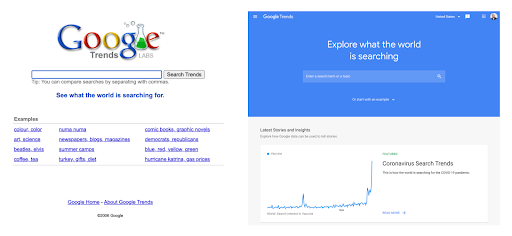
When we initially launched an experimental version of Trends 15 years ago, we pointed out ways people could use data to look at things like ice cream flavor popularity and singing competition contestants, or how much people searched for certain politicians. Since then, Google Trends has become an important resource for journalists, researchers, scholars, brands — and anyone else who wants to use it.
I’ve been working on Google Trends for almost five years as a Data Editor. I wanted to catch up with Yossi Matias, VP of Engineering and Research, who led the team that launched Trends. I took some time to talk about those early days with Yossi, as well as where we see Trends heading.
15 tips for getting the most out of Google Trends
To celebrate Google Trends’s 15th anniversary, we took a look at what questions about it have…well, trended. “How to use Google Trends?” and “how does Google Trends work?” were among the most-searched. So we decided to answer them with these 15 tips to help you get the most out of the tool and uncover interesting insights.
1. Data by date: Google Trends can tell you what people were searching for at any date from 2004 to a few minutes ago. It’s also based on two datasets: historic (2004-three days ago) and real-time (past week). Real-time is more granular, right down to minute-by-minute.
2. Trending versus top-searched:Trending (or rising) searches are those that are accelerating the fastest, while top-searched, or “most-searched,” are the most-searched queries in a specific time frame. Trending searches are useful for seeing how things have changed.
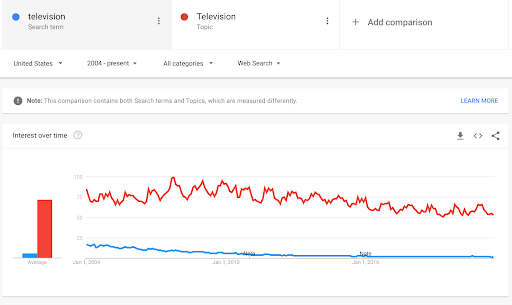
3. Choose topics when you can:When you start on Google Trends, you get the option to either search for a “term” or “topic.” We recommend choosing “topic” when possible. Topics are language agnostic and account for spelling variations (and mistakes!), as well as multiple names for the same thing.

Quale modello di Fire TV scegliere: la guida definitiva

Xiaomi è il più grande fornitore di smartphone al mondo

Google, nuove funzioni per la sicurezza di bambini e ragazzi

Visita guidata alla Starbase di SpaceX. La guida è Elon Musk. Idee e chicche a profusione
Tim Dodd, del canale YouTube Everyday Astronaut, ha passato parecchie ore a visitare Starbase, la fabbrica all’aperto di SpaceX dove si assemblano i razzi giganti Starship e Super Heavy. La visita è stata condotta da Elon Musk, che ha parlato decisamente a ruota libera, rivelando (o spiegando per bene) tantissimi dettagli di questi vettori e soprattutto dei concetti ingegneristici e di progettazione che stanno alla base del loro sviluppo incredibilmente rapido.
Se volete farvi un’idea non troppo filtrata di chi sia realmente Elon Musk e quali siano i suoi processi mentali, questa è una buona occasione.
Non so neanche da che parte cominciare a citare tutte le chicche tecniche che saltano fuori in questi video (disponibili purtroppo soltanto in inglese), ma credo che ci siano spunti per imparare non solo per chi progetta veicoli spaziali ma per chiunque abbia da gestire un progetto o almeno voglia capire quanta enorme complessità c’è dietro ogni realizzazione tecnica.
Meritano attenzione, in particolare, i cinque passi della filosofia di sviluppo proposti da Musk:
- Rendi meno stupide le specifiche tecniche e associale a una persona, non a un reparto (cita l’esempio di uno strato di materiale flessibile delle batterie delle Model 3 che ha causato forti rallentamenti alla produzione, per poi scoprire che il reparto insonorizzazione era convinto che servisse come protezione antincendio e il reparto sicurezza era convinto che servisse come insonorizzazione; lo strato è stato eliminato);
- Elimina un componente o un processo;
- Semplifica oppure ottimizza, ma soltanto dopo aver compiuto i passi precedenti (è inutile e costoso ottimizzare un componente o un processo che poi viene eliminato);
- Accelera il tempo di ciclo;
- Automatizza.
Le prime due puntate sono già state pubblicate: aggiungerò qui le altre man mano che verranno rese disponibili, insieme a qualche appunto sulle chicche che ho trovato più interessanti.
- Le grid fin del Super Heavy sono enormi e non sono ripiegabili come sul Falcon 9, perché si è capito che il peso supplementare del meccanismo di ripiegamento (che dovrebbe essere robustissimo, vista la massa a sbalzo e i carichi enormi che dovrebbe gestire e trasmettere) avrebbe comportato una penalità di consumo di propellente superiore al vantaggio aerodinamico offerto dal ripiegamento. Una conclusione davvero poco intuitiva. Quello che non c’è non pesa e non si può rompere.
- Il meccanismo di distacco della Starship dal vettore Super Heavy non sarà pirotecnico o basato su razzi dedicati o su meccanismi a molla come fatto finora (una sfida enorme, visto che Starship avrà a quel punto una massa di circa 1300 tonnellate che andrebbero spinte): non ci sarà proprio. Verrà invece sfruttata l’orientabilità (gimbaling) dei motori del Super Heavy per creare un impulso di rotazione che produrrà la separazione (in maniera simile al rilascio dei satelliti Starlink, che non hanno meccanismi di espulsione dal vettore ma si disperdono spontaneamente grazie alla rotazione impartita allo stadio).
- Tornando alle grid fin, il meccanismo di rotazione sull’asse (per dirigere il veicolo durante la discesa) è azionato da motori e batterie prese di peso dalle auto Tesla.
- E ancora sulle grid fin: mentre sul Falcon 9 sono disposte a croce (a intervalli di 90°), qui sono collocate a coppie (a croce di Sant’Andrea). Sembra un dettaglio banale, ma fa una grande differenza: si è capito che il rientro richiede maggiore authority (potenza di controllo) su due assi e meno sul terzo, per cui questa disposizione consente di concentrare l’efficacia delle grid fin sui due assi che servono.
Fonte aggiuntiva: Teslarati. Questo articolo vi arriva gratuitamente e senza pubblicità grazie alle donazioni dei lettori. Se vi è piaciuto, potete incoraggiarmi a scrivere ancora facendo una donazione anche voi, tramite Paypal (paypal.me/disinformatico) o altri metodi.

SpaceX acquisisce una startup per ampliare la flotta di Starlink

Xiaomi annuncia il Mix 4 con fotocamera sotto al display

Come funzionano i test COVID-19 in vendita su Amazon
How local news in Italy is using News Showcase
Editor’s note: This is part of our ongoing series featuring local publishers from around the world using Google News Showcase, our new product and licensing program for publishers, showing how we are supporting both their editorial and business goals. Read the first of our series, which comes from ADIRA in Argentina.
When the other founders and I looked to launch Citynews in Italy 11 years ago, there wasn’t a huge supply of local news online. We knew we wanted to have more local news available for citizens all over the country, to cover everything from local government to politics, schools, transportation and health. These are the stories that make an impact on people’s day-to-day lives. So after we tried a few different iterations and models, we launched Citynews in 2010.
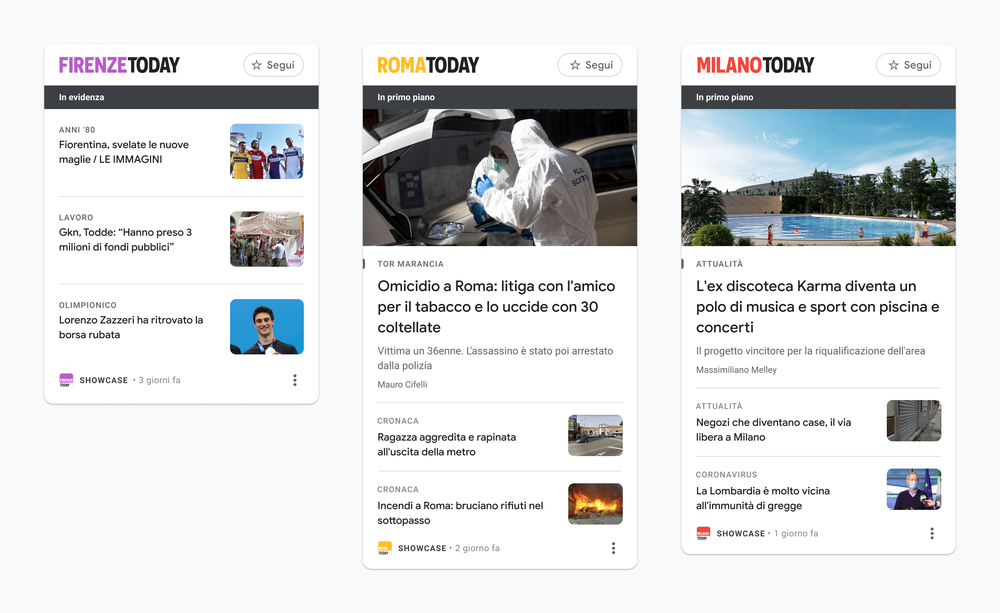
Now, after just over a decade, our company is a local news leader in Italy, publishing 50 metropolitan online newspapers everywhere, from Milan to Florence to Rome, plus the national newspaper Today.it. Our team of over 250 journalists produces news that reaches 32.6 million unique users monthly and theCitynews team produces more than 1,300 articles per day. That’s more than 50 stories an hour!
To fuel our growth we took a data-driven approach to journalism, building our news stories on data from Google Analytics to identify topics that are of real interest to our readers. The data differs from city to city and our news article content adapts to that. Now we’re using Google News Showcase to further this growth and better engage our readers on both Google News and Discover.
One example of a story that touched the hearts and minds of everyone in the country was the birth of Tommaso, the first baby to be born at the Martini hospital in Turin when the maternity ward finally reopened after closing for COVID-19. This was a wonderful example of the kind of local story that resonates with a larger national audience, all of whom have gone through the difficulties of the past 18 months of the pandemic. Our local paper Torino Today covered the story and our editors produced it for Google News Showcase.
What’s new with automated bidding in Display & Video 360
Automated bidding in Display & Video 360 helps advertisers improve performance by adjusting bids in real time to achieve the results they care about. Using Google’s advanced machine learning, it evaluates and tailors your bids for every auction to help predict the likelihood of a conversion.
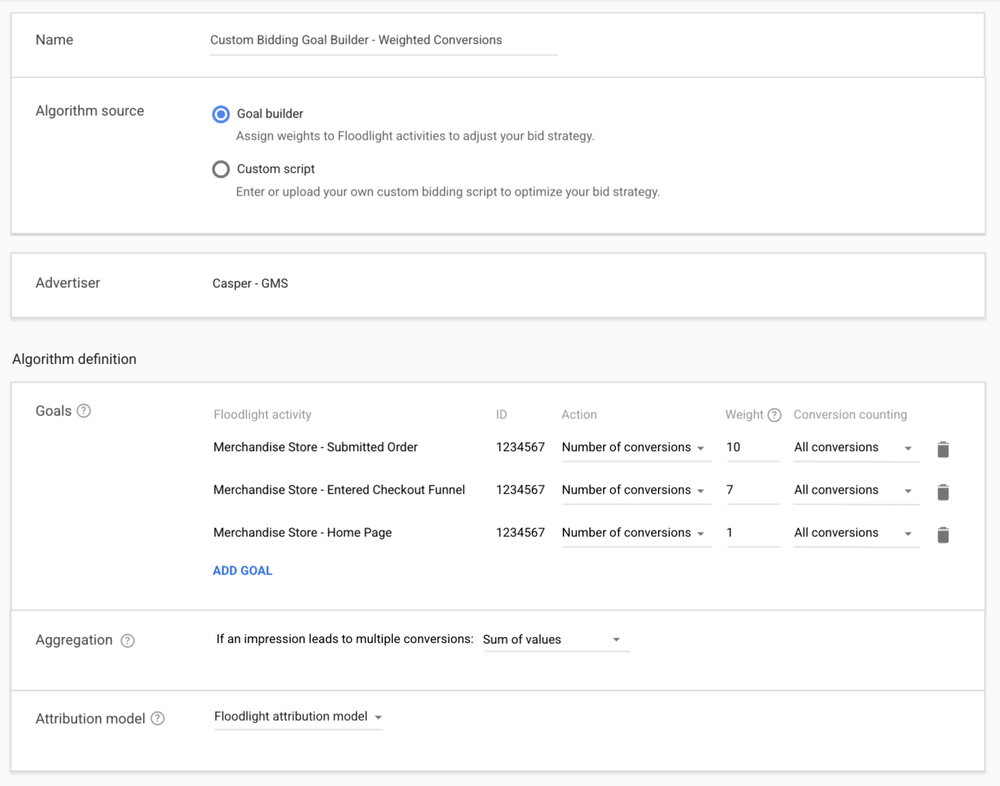
Today we’re introducing improvements to the automated bidding solutions in Display & Video 360. First, we’re introducing a new interface where you can set Custom Bidding multipliers without writing any code. Second, we’re adding support for pay for viewable impressions to outcome based buying. Lastly, we’re introducing a new report to give you more insights into how automated bidding places bids to hit your goals.
Simplified setup for Custom Bidding
Custom Bidding is an automated bidding strategy that allows you to assign values to different events, such as a conversion or a purchase. Marketers told us that Custom Bidding delivers great results because it helps tailor their bidding to their unique goals, but we also learned that they can’t always use it because they might lack the technical resources to build the required scripts. In addition to uploading a custom script, you now have the option to select Floodlight activities and assign them the value you want in an easy-to-use interface. For example, you can assign a higher value to high-value purchases, so that your ads are tuned to specifically increase revenue instead of driving more transactions. In the future, you will also be able to use Analytics 360 goals in the same way.

Dark Rock TF2, il dissipatore top-flow di be quiet! si rinnova

MSI RX 6600 XT Gaming X 8G alla prova, la nuova GPU AMD Radeon per il 1080p

Un’esperienza più sicura per i bambini e i ragazzi online
Costruire prodotti che siano sicuri e rispettosi della privacy è per noi un impegno costante, così come offrire alle persone strumenti semplici per il controllo dei propri dati. Come parte di questo impegno, e considerato che i minori di 13 anni non possono creare un Account Google, abbiamo realizzato funzionalità dedicate ai più giovani e alle loro famiglie. Attraverso i genitori possono impostare limiti di tempo e promemoria per i dispositivi dei loro figli. E sui dispositivi intelligenti con l’Assistente integrato, diamo ai genitori il controllo attraverso gli strumenti di Benessere Digitale disponibili nell’app Google Home. Nei prossimi mesi, lanceremo nuovi filtri di Benessere Digitale che permettono di bloccare le notizie, i podcast e l’accesso alle pagine web sui dispositivi smart con l’Assistente integrato.
Su YouTube, per chi ha meno di 18 anni attiveremo i promemoria per fare una pausa o riposarsi, e disattiveremo la riproduzione automatica. E su YouTube Kids aggiungeremo una opzione di riproduzione automatica che dovrà essere attivata dal genitore – sarà disabilitata come impostazione predefinita –, così da offrire maggiore scelta per le famiglie.
Un modo migliore per comunicare le nostre pratiche sui dati ai bambini e agli adolescenti
I dati giocano un ruolo importante nel rendere i nostri prodotti funzionali e utili. È nostro compito fare in modo che bambini e adolescenti capiscano più facilmente quali dati vengono raccolti, perché e come vengono utilizzati. Stiamo sviluppando materiali coinvolgenti e di facile comprensione per i più giovani e i loro genitori, per aiutarli a capire meglio le nostre pratiche relative all’uso dei dati. Queste risorse inizieranno a essere distribuite a livello globale nei prossimi mesi.
Un lavoro continuativo per sviluppare esperienze di prodotto sicure per i più giovani
Per realizzare prodotti migliori e sicuri per i più giovani, siamo coinvolti regolarmente insieme alle famiglie, ai governi, agli esperti e ai leader del settore in aree come la privacy, la sicurezza dei minori, il benessere digitale e l’educazione. Conoscere l’età precisa di un utente può essere un elemento importante per fornire esperienze su misura per le sue esigenze. Tuttavia, bilanciare questa informazione su più prodotti e piattaforme nel pieno rispetto della privacy, e continuando a garantire l’accesso ai nostri servizi, è una sfida complessa. Per affrontarla sarà necessario il contributo dei regolatori, dei legislatori, delle organizzazioni di settore, dei fornitori di tecnologia e di altri ancora. Insieme possiamo costruire un mondo digitale più sicuro per le nuove generazioni.
Scritto da: Mindy Brooks, General Manager, Kids and Families
Giving kids and teens a safer experience online
We’re committed to building products that are secure by default, private by design, and that put people in control. And while our policies don’t allow kids under 13 to create a standard Google account, we’ve worked hard to design enriching product experiences specifically for them, teens, and families. Through Family Link, we allow parents to set up supervised accounts for their children, set screen time limits, and more. Our Be Internet Awesome digital literacy program helps kids learn how to be safe and engaged digital citizens; and our dedicated YouTube Kids app, Kids Space andteacher approved apps in Play offer experiences that are customized for younger audiences.
Technology has helped kids and teens during the pandemic stay in school through lockdowns and maintain connections with family and friends. As kids and teens spend more time online, parents, educators, child safety and privacy experts, and policy makers are rightly concerned about how to keep them safe. We engage with these groups regularly, and share these concerns.
Some countries are implementing regulations in this area, and as we comply with these regulations, we’re looking at ways to develop consistent product experiences and user controls for kids and teens globally. Today, we’re announcing a variety of new policies and updates:
Giving minors more control over their digital footprint
While we already provide a range of removal options for people using Google Search, children are at particular risk when it comes to controlling their imagery on the internet. In the coming weeks, we’ll introduce a new policy that enables anyone under the age of 18, or their parent or guardian, to request the removal of their images from Google Image results. Of course, removing an image from Search doesn’t remove it from the web, but we believe this change will help give young people more control of their images online.
Tailoring product experiences for kids and teens
Some of our most popular products help kids and teens explore their interests, learn more about the world, and connect with friends. We’re committed to constantly making these experiences safer for them. That’s why in the coming weeks and months we’re going to make a number of changes to Google Accounts for people under 18:
- YouTube: We’re going to change the default upload setting to the most private option available for teens ages 13-17. In addition, we’ll more prominently surface digital wellbeing features, and provide safeguards and education about commercial content. Learn more about these changes here.
- Search:We have a range of systems, tools, and policies that are designed to help people discover content from across the web while not surprising them with mature content they haven’t searched for. One of the protections we offer is SafeSearch, which helps filter out explicit results when enabled and is already on by default for all signed-in users under 13 who have accounts managed by Family Link. In the coming months, we’ll turn SafeSearch on for existing users under 18 and make this the default setting for teens setting up new accounts.
- Assistant:We’re always working to prevent mature content from surfacing during a child’s experience with Google Assistant on shared devices, and in the coming months we’ll be introducing new default protections. For example, we will apply our SafeSearch technology to the web browser on smart displays.
- Location History: Location History is a Google account setting that helps make our products more useful. It’s already off by default for all accounts, and children with supervised accounts don’t have the option of turning Location History on. Taking this a step further, we’ll soon extend this to users under the age of 18 globally, meaning that Location History will remain off (without the option to turn it on).
- Play:Building on efforts like content ratings, and our “Teacher-approved apps” for quality kids content, we’re launching a new safety section that will let parents know which apps follow our Families policies. Apps will be required to disclose how they use the data they collect in greater detail, making it easier for parents to decide if the app is right for their child before they download it.
- Google Workspace for Education: As we recently announced, we’re making it much easier for administrators to tailor experiences for their users based on age (such as restricting student activity on YouTube). And to make web browsing safer, K-12 institutions will have SafeSearch technology enabled by default, while switching to Guest Mode and Incognito Mode for web browsing will be turned off by default.
New advertising changes
We’ll be expanding safeguards to prevent age-sensitive ad categories from being shown to teens, and we will block ad targeting based on the age, gender, or interests of people under 18. We’ll start rolling out these updates across our products globally over the coming months. Our goal is to ensure we’re providing additional protections and delivering age-appropriate experiences for ads on Google.
New digital wellbeing tools
In Family Link, parents can set screen time limits and reminders for their kids’ supervised devices. And, on Assistant-enabled smart devices, we give parents control through Digital Wellbeing tools available in the Google Home app. In the coming months, we’ll roll out new Digital Wellbeing filters that allow people to block news, podcasts, and access to webpages on Assistant-enabled smart devices.
On YouTube, we’ll turn on take a break and bedtime reminders and turn off autoplay for users under 18. And, on YouTube Kids we’ll add an autoplay option and turn it off by default to empower parents to make the right choice for their families.
Improving how we communicate our data practices to kids and teens
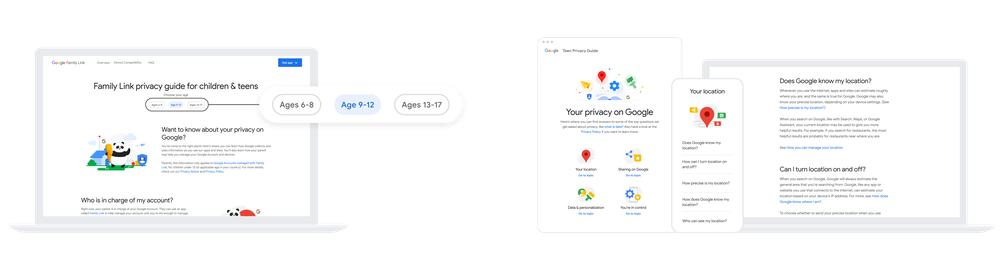
Data plays an important role in making our products functional and helpful. It’s our job to make it easy for kids and teens to understand what data is being collected, why, and how it is used. Based on research, we’re developing engaging, easy-to-understand materials for young people and their parents to help them better understand our data practices. These resources will begin to roll out globally in the coming months.