Rivoluzione blockchain anche nei casinò online?
Quando si tratta di giochi online, c’è poco che può superare i casinò in termini di dimensioni e frequenza. Il mercato infatti è davvero ampio ed è destinato a crescere fino…
L’articolo Rivoluzione blockchain anche nei casinò online? scritto da YOUR_DIGITAL_VOICE! proviene da Assodigitale.

Le mascherine FFP2 in sconto su Amazon scendono di prezzo coi coupon!

Piccola storia sui diversamente furbi che comprano i “green pass” falsi
Matteo Flora ha pubblicato poco fa su Twitter questo suo resoconto dedicato alla vicenda dei “green pass” falsi offerti in vendita online. Leggete l’originale e condividetelo, visto che potrebbe educare qualcuno: lo riassumo qui ripulendo alcuni refusi. Il link in fondo porta a uno dei gruppi Telegram citati.
I #GREENPASS FALSI? UNA DOPPIA FRODE!
Può una truffa essere talmente bella da configurarsi come Arte? La risposta è sì, e la migliore è quella ai danni dei #NoVax che ha visto la luce nelle scorse ore.
Come forse sapete i “#NoGreenPass” hanno acquistato, a caro prezzo (150€-350€) su gruppi #Telegram che avete visto su tutti i quotidiani, dei documenti falsi nonostante fosse palese che i pass NON POTEVANO essere contraffatti.
Ora si sono aggregati in gruppi di “utenti delusi” quando hanno scoperto che il FOTTUTO GENIO dietro ai gruppi non può e vuole (ovviamente) consegnarli. Scoperto l’inghippo vogliono indietro i soldi, altrimenti minacciano di denunciare chi glieli ha venduti.
Ma qui viene il bello: i truffatori ora hanno detto ai clienti che hanno pagato (con codice fiscale e carta d’identità) che O PAGANO un riscatto di 350€ in Bitcoin OPPURE diffonderanno i documenti online e faranno avere i nominativi dei clienti alla Polizia.
È tutto così bello da fare quasi piangere. E non so chi tu sia, impavido truffatore, ma passa che ti stendo di birre e pacche sulle spalle. #Darwin vince. Sempre. :D

A marsala la VI EDIZIONE DELLA H&P SUMMER SCHOOL “EUTopia. Istituzioni, democrazia, futuro”
A Marsala dal 23 al 28 agosto, si terrà “EUtopia. Istituzioni, democrazia, futuro“ (www.summerschoolmarsala.com), la VI edizione della History & Politics Summer School organizzata dal Dipartimento di Scienze Politiche e…
L’articolo A marsala la VI EDIZIONE DELLA H&P SUMMER SCHOOL “EUTopia. Istituzioni, democrazia, futuro” scritto da MercurPress proviene da Assodigitale.

Huawei, ricavi in calo in questa prima metà del 2021

Riconoscimento biometrico, master face e dictionary attack
How Olympians at Google handle hurdles at work
Clockwise, from top left: Kate Johnson, 2004 Olympics; Timothy Goebel, 2002 Olympics; Aleksandra Jarmolińska, 2020-2021 Olympics; Natalie Dell O’Brien, 2012 Olympics; Petri Kokko, 1994 Olympics; Matt Brittin, 1988 Olympics
Professional athletes are resilience experts. They’re constantly pushing their minds and bodies to new limits, all while staying motivated to reach their goals and tackle new challenges. If you don’t believe me, ask Matt Brittin. Matt is Google’s President of EMEA Business and Operations — as well as a former Olympian. Matt competed in the 1988 Olympics on the U.K. men’s rowing team, and he’s tapped into what got him to that stage in this last year. “We’re in a state of long term uncertainty and building resilience takes knowing yourself well and takes time,” he says. “It’s all about how you manage your energy and approach the unknown.”
As this year’s games come to a close, we asked Matt and several of other former Olympian Googlers to share how their experiences helped them in the workplace.
Petri Kokko – Country Sales Director of Brands, former Olympic figure skater
“Giving your maximum doesn’t help you achieve optimal results, but working optimally will help you achieve your maximum effort,” says Petri, who represented Finland in figure skating at the 1992 and 1994 Olympics. “And often people, especially motivated people, think that the more they work the more they achieve and that’s not the case. We’re not trying to achieve our best tomorrow, we’re trying to develop ourselves over the years.”
Petri falls back on his training to find a healthy work-life balance. He builds variation into his calendar, making sure some days and weeks are lighter, so he doesn’t burn out and can give his best over the long term. As an Olympic athlete, Petri learned the value of rest and recovery to avoid injuries and to deal with stress. At Google, mental health and wellbeing are highly valued, and these resources were expanded over the last year.
Aleksandra Jarmolińska – Cloud Software Engineer, former Olympic sports shooter
Calling Aleksandra a “former” Olympian is nearly a misnomer — she just competed in this year’s games in Tokyo, as well as back in 2016. “I interviewed for my role at Google during the same month that I qualified for the Tokyo Games,” she says. Fresh off her competition, she says an important lesson she’s learned in her athletic career that translates to work is to keep trying. “This may be a bit of a cliche, but I always appreciated Samuel Beckett’s philosophy of: ‘Try. Fail. Persist. Fail better.’”
In sports shooting, she explains, you can’t necessarily succeed with athleticism, you need to step back, clear your head and adapt. “This applies to lots of things — programming included,” Aleksandra says. “I cannot count the times I’ve started from scratch on some feature I worked on.”
Timothy Goebel – Marketing Mix Modeling Partner Manager, former Olympic figure skater
“It’s important to adapt instead of just giving up when things are challenging,” says Timothy, who won a bronze medal in figure skating for the U.S. in 2002. “It’s about finding small wins, like effectively communicating with stakeholders and finding the humanity in each other. At the end of the day, we’re all teammates!” A strong, supportive community is just as important as the training itself, he says.
Natalie Dell O’Brien – Head of Industry for U.S. Financial Services, former Olympic rower
“We see Olympians as individuals, but you might not realize there’s a village of people they put into their orbit to support them,” says Nataile, who won the bronze medal at the 2012 Summer Olympics in the quadruple rowing event for the United States.
Like Petri, Natalie recalls her Olympic training schedule when tackling business planning, breaking things down into “digestible training blocks” and communicating smaller milestones with her team. But Natalie says her support system was equally important to her professional athletic career and she continues to build a similar network at Google.
“Some of the smartest decisions and biggest leaps in performance I made in my rowing career were made possible because I leaned on others for help,” Natalie said. “ And any time I’m up against a challenge at work, I remember that even Olympic athletes have ‘phone a friend’ moments. Vulnerability can lead to better performance.”

Huawei MatePad 11, un tablet così a meno di 400 euro è un vero affare! La recensione

A Matter of Impact: July updates from Google.org
Unlike other forms of funding, philanthropy is in a position to take risky, long-term bets on solutions to society’s biggest challenges. Government funding generally needs to show taxpayers that money is going to proven solutions, and private investors tend to operate on short timelines and have to make financial returns. That’s why some call philanthropy “society’s risk capital’; it can put impact first and be patient about the results.
Google has a big appetite for risky bets, or, as we call them, “moonshots.” This approach has led to some of our biggest successes — from search to self-driving cars to translation. And, of course, some failures along the way. We’ve tried to take the same approach at Google.org, looking for places where we can direct risk capital toward big problems, often by helping organizations capture the potential of new technologies like artificial intelligence.
Through our Google.org Impact Challenges, for example, we invite social innovators of any size to give us their best ideas for transformative impact and we make sizable contributions of time and money to help them grow. Some of these bets have gone on to become the largest and fastest-growing nonprofit organizations in the world, like Give Directly, Khan Academy, and Equal Justice Initiative. And some have even failed. But through the success and failures, we’ve learned a lot:
-
There’s a place for risk and a place for sure bets: In our early days nearly everything we funded was in this category of risk capital, which made it tough to have steady, reliable impact or manage multi-year programs. We’ve shifted to a portfolio approach, carving out space for true risk capital and supporting immediate needs such as housing, food, and clean water.
-
Bet on the team and roll with the punches:Even good ideas fail, but a strong team will roll with the punches and continue iterating to find success. By establishing shared outcome goals in partnership with amazing people, we’ve been able to achieve great results — even when the initial idea foundered.
-
Invest in what you know:For us, that expertise often involves technology, which is why so many of our best examples have technology at their core.
-
Give adequate and flexible resources:Too often projects fail because they’re under-funded or funders too constrained in their use of money to make changes when a project takes an unexpected turn. Multi-year, general operating support is generally the right move with risky bets, and we aim to be generous in our support of both time and resources.
For a perspective from the other side, read on for how some of our Google Impact Challenge grantees were able to have outsized impact after we bet on them at ‘risky’ stages of their development.
In case you missed it
Speaking of Impact Challenges, we recently unveiled the 13 grantee organizations for the Google.org Impact Challenge Central and Eastern Europe. Funding recipients include a group working to create opportunities for people who are Deaf or hearing impaired, an organization running science, technology, engineering, the arts and mathematics (STEAM) courses for children in foster care, and a team creating coding courses for LGBTQ+ people in Lithuania.
Hear from one of our grantees: TalkingPoints
B2B Marketing News: LinkedIn Buys Jumprope, B2B Tech Buying Trends, YouTube SEO Study, Nielsen’s Cookie Alternative, & Google’s Record Ad Revenue
LinkedIn Acquires Tutorial Video App Jumprope as it Looks to Expand its Creator Tools
Microsoft-owned LinkedIn (client) has acquired video tutorial creation app firm Jumprope, with the array of creator tools from the acquisition set to help enhance LinkedIn Learning and other areas of the professional social media platform, the company recently announced. Social Media Today
Google parent Alphabet reaches record quarterly revenue, profit in ad boom
Google and its parent firm Alphabet saw an especially strong 70 percent increase in advertising revenue during the second quarter of 2021, the company recently disclosed. That equates to some $560 million is advertising revenue per day during the quarter, and a year-over-year increase of 62 percent, rebounding from the firm’s only revenue decline a year ago due to the global health crisis. Reuters
3 in 4 B2B Marketers Are Planning Hybrid Events — Here Are Their Perceived Challenges
Providing digital events as good as in-person ones is the leading hybrid event challenge faced by B2B marketers, followed by logistical obstacles and convincing attendees to come to physical events, according to newly-released survey data of interest to digital marketers. MarketingCharts
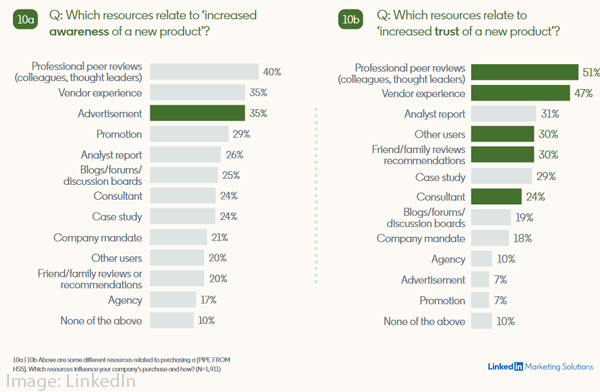
LinkedIn to B2B marketers: It’s time to build your brand
B2B firms can benefit from building greater brand awareness, according to recently-released report data from LinkedIn, which also revealed that some 4 out of 5 U.S. B2B buyers would reconsider purchasing from a brand that they had previously rejected. Campaign US
Nielsen unveils solution for cookieless media measurement
Nielsen has disclosed information about its forthcoming alternative to browser cookie media measurement, with a new solution that will combine machine-learning techniques with available first-party data, the firm recently annnounced. AdAge
Display & Video 360 gets new frequency and reach metrics
Google has recently added an array of new visual overview data to its Display & Video 360 enterprise advertising and analytics platform, in a change that is set to smooth the job of marketers using the product across various channels. The new views offer real-time glimpses of reach — gleaned partially from DV360’s log data — when it comes to a campaign’s performance, and is also set to make it easier to find the highest performing programmatic advertising campaigns.Search Engine Land
Amazon’s ads business posts 87% growth
Amazon saw year-over-year advertising and other revenue rise by 87 percent during the second quarter of 2021, topping the $7.9 billion mark, the firm recently announced — representing an increase surpassing the 77 percent grown it recorded during the first quarter of the year. CNBC
Twitter Adds New Spaces Sharing Options, New Search Tools to Improve Spaces Discovery
Twitter has given its Spaces live audio conversation feature an array of new engagement and search features intended to raise brand content awareness, the social media platform recently announced. Social Media Today
YouTube SEO Study: Insights & Data to Help You Rank Higher
As the world’s largest video platform, Google’s YouTube also represents an important search destination, and SEMrush recently examined how channel size and other data-driven factors play a role in search engine optimization (SEO) success, in the firm’s newly-released YouTube SEO study. SEMrush
LinkedIn Shares New Insights into Key Tech Buying Trends, and the Impacts of the Pandemic
42 percent of B2B technology buyers are likely to either increase or maintain overall technology spending compared to pre-pandemic levels — one of numerous findings of interest to digital marketers contained in recently-released study data from LinkedIn. Social Media Today
ON THE LIGHTER SIDE:
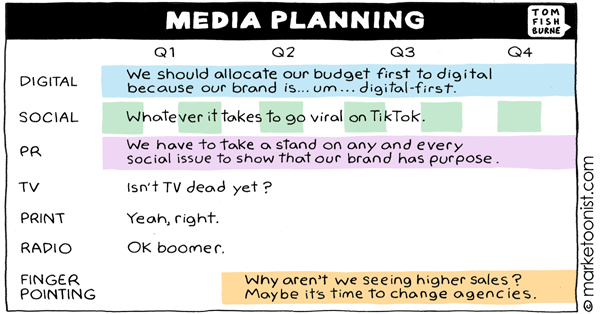
A lighthearted look at the “media planning” by Marketoonist Tom Fishburne — Marketoonist
Google’s ‘time crystals’ could be the greatest scientific achievement of our lifetimes — TNW
TOPRANK MARKETING & CLIENTS IN THE NEWS:
- TopRank Marketing — Analyzing the Analyst: A Guide to Holistic Analytics for Tracking the Right Metrics — MarketingProfs
- Joshua Nite — What’s Trending: Shake Things Up — LinkedIn (client)
Have you found your own B2B marketing news item from the past week of industry news? Please drop us a line in the comments below.
Thank you for taking the time to join us for this week’s TopRank Marketing B2B marketing news, and we hope you’ll come back next Friday for more of the week’s most relevant B2B and digital marketing industry news. In the meantime, you can follow us at @toprank on Twitter for even more timely daily news.
The post B2B Marketing News: LinkedIn Buys Jumprope, B2B Tech Buying Trends, YouTube SEO Study, Nielsen’s Cookie Alternative, & Google’s Record Ad Revenue appeared first on B2B Marketing Blog – TopRank®.

Podcast del Disinformatico RSI 2021/08/06: La madre di tutte le demo informatiche

È disponibile subito il podcast di oggi de Il Disinformatico della Rete Tre della Radiotelevisione Svizzera, condotto dal sottoscritto: lo trovate presso www.rsi.ch/ildisinformatico (link diretto). Questa è l’edizione estiva, dedicata all’approfondimento di un singolo argomento.
I podcast del Disinformatico di Rete Tre sono ascoltabili anche tramite feed RSS, iTunes, Google Podcasts e Spotify.
Buon ascolto, e se vi interessano il testo e i link alle fonti della storia di oggi, sono qui sotto!
Nota: la parola CLIP nel testo che segue non è un segnaposto in attesa che io inserisca dei contenuti. Indica semplicemente che in quel punto del podcast c’è uno spezzone audio. Se volete sentirlo, ascoltate il podcast oppure guardate il video che ho incluso nella trascrizione.
—
Sto guardando una presentazione di un prodotto informatico. Niente di speciale: un uomo, con voce piuttosto monotona, descrive come il suo prodotto consente di scrivere facilmente testi al computer, con il copia e incolla gestito tramite il mouse, e di creare link cliccabili fra un testo e un altro. Permette anche di mandare mail, di fare videoconferenze, tipo Zoom, e di collaborare a un documento a distanza, come Google Docs.
Roba da sbadiglio assoluto, se non ci fosse un piccolo particolare molto, molto speciale: la presentazione risale al 1968.
Questa è la storia di come un uomo, Douglas Engelbart, riuscì a presentare con più di cinquant’anni d’anticipo tutte le principali tecnologie informatiche che usiamo adesso tutti i giorni, e di come quella presentazione passò alla storia come “la madre di tutte le demo”.
—
Demo. Una parola semplice, di quattro lettere, che incute angoscia in chiunque debba andare di fronte a un pubblico e fare una dimostrazione pratica di un prodotto, sapendo che qualunque cosa possa andare storta lo farà, e lo farà nel peggior momento possibile, davanti al pubblico più ampio possibile, e finirà quasi sicuramente su YouTube per prolungare in eterno l’imbarazzo.
Come quella volta, ad aprile del 1998, che Chris Capossela di Microsoft stava presentando la novità, Windows 98, davanti al pubblico di addetti ai lavori della celeberrima fiera informatica Comdex, e sotto gli occhi del boss, Bill Gates in persona, gli comparve il mitico Schermo Blu della Morte che indicava il crash di Windows.
(CLIP: Capossela)
Sono cose che succedono, specialmente quando la dimostrazione viene fatta realisticamente, usando davvero i prodotti invece di fare spettacoli accuratamente coreografati, come per esempio la storica presentazione di un certo dispositivo tascabile da parte di Steve Jobs di Apple nel 2007.
(CLIP: Jobs-iPhone)
Pochi sanno che quella demo dell’iPhone fu fatta con un prototipo incompleto, a malapena funzionante, che riusciva a riprodurre uno spezzone di una canzone o di un video ma crashava se si provava a far sentire un brano intero. La demo fu confezionata in modo da eseguire una sequenza molto specifica di compiti che avrebbero ridotto, ma non eliminato, la possibilità che l’iPhone si piantasse davanti a tutto il mondo. Andò bene, ma per un soffio.
Sia come sia, le demo sono notoriamente un momento difficile per chi le conduce e per le aziende che le organizzano. Spesso una demo mal riuscita affossa anni di ricerca e milioni di budget pubblicitario, e quindi si procede con la massima cautela.
Ma allora con quale faccia tosta, con quale sprezzo del pericolo fu organizzata quella che oggi gli informatici chiamano “la madre di tutte le demo” e che presentò realisticamente non una, ma tutta una serie di nuove tecnologie?
Andiamo al 9 dicembre 1968. Siamo alla fine di un anno difficile in tutto il mondo, fra guerra in Vietnam, assassinio di Martin Luther King e di Robert Kennedy, Maggio francese, invasione sovietica della Cecoslovacchia, dirottamenti, scioperi, sommosse e manifestazioni ovunque.
Lontano da tutto questo c’è un ingegnere statunitense di 43 anni, Douglas Engelbart, che a San Francisco presenta appunto la sua demo davanti a un selezionatissimo pubblico di circa mille esperti informatici, molti dei quali lo considerano letteralmente “uno svitato”.
Però la demo, e le ricerche svolte per anni da Engelbart e dal suo gruppo di esperti allo Stanford Research Institute della Stanford University per arrivare a questa presentazione pubblica, sono finanziate e appoggiate da enti governativi di tutto rispetto, come l’agenzia di ricerca avanzata ARPA, la NASA e l’Aeronautica Militare statunitense.
Engelbart inizia subito con una scenografia decisamente inconsueta: è presente sul palco, seduto davanti al suo terminale, ma il suo volto viene inquadrato da una telecamera e proiettato su uno schermo televisivo gigante di sette metri per sei, un cosiddetto Eidophor, la cui tecnologia incredibile meriterebbe una storia a parte. Oggi schermi giganti del genere sono la norma, ma mezzo secolo fa erano una rarità.
E ancora oggi è raro quello che succede subito dopo: le informazioni presentate dall’ingegnere appaiono in sovrimpressione, in trasparenza, invece che in una finestra a parte. Il suo volto rimane sullo schermo, così il pubblico può vedere le sue espressioni senza spostare lo sguardo dal testo della presentazione. PowerPoint non lo fa neanche adesso, senza software e hardware speciali. Ricordatevi che siamo nel 1968, quando i computer sono grossi come armadi, pesanti come casseforti e sanno soltanto fare calcoli matematici.
Nel giro di un’oretta e mezza di dimostrazione, tutta dal vivo, Engelbart, assistito dietro le quinte da una squadra di tecnici, mostra il suo “oN-Line System”, o NLS, che trasforma questi pesanti tritatori di numeri in strumenti per “potenziare l’intelletto umano”. Dice proprio così: Engelbart era uno che pensava in grande.
L’ingegnere indossa quella che oggi chiameremmo una cuffietta ultrasottile da gamer e procede con calma e compostezza a dimostrare una tecnologia dirompente dopo l’altra. Muove un puntatore sullo schermo usando una scatoletta che tiene in mano e sposta sulla propria scrivania: è il prototipo del mouse, sviluppato insieme al collega Bill English, per il quale riceverà un brevetto. È proprio Engelbart a dargli il nome mouse, “topo”, per via del filo elettrico di collegamento che sporge dalla scatoletta e somiglia appunto alla coda di un topo.
Con quel mouse evidenzia e seleziona il testo, lo copia e incolla, e ridimensiona delle porzioni dello schermo: è la prima volta che qualcuno divide uno schermo di computer in finestre multiple, permettendo di spostare oggetti, parole e paragrafi da una finestra all’altra. Non ci sarà nulla del genere per altri vent’anni.
Engelbart presenta poi una tastiera che consente di premere più tasti contemporaneamente, creando combinazioni, come degli accordi su un pianoforte, che sono gli antenati del Control-C, Control-V e Control-Alt-Canc di oggi. È la prima volta nella storia dell’informatica che qualcuno mostra pubblicamente un sistema di elaborazione di testi tramite computer così potente.
(CLIP: Engelbart fa Zoom – 46.00 nel video)
Poi fa una videochiamata – nel 1968! – con i suoi colleghi che stanno a circa 50 chilometri di distanza, a Menlo Park, e la mostra sullo schermo gigante, spiegando come sia possibile non solo dialogare con le persone a distanza, come facciamo oggi con Teams, WhatsApp o Zoom, ma anche modificare collettivamente e contemporaneamente lo stesso documento intanto che ciascuna persona vede le altre.
Sì, non tutto funziona alla perfezione, le immagini sono in bianco e nero e c’è il trucco, nel senso che la videochiamata usa una connessione a microonde dedicata, di tipo televisivo professionale, invece delle comuni linee telefoniche, e ci sono due modem a 1200 baud (velocissimi per l’epoca) per lo scambio dei dati. Tecnologie non alla portata di tutti, allora, ma il concetto è chiaro: i computer non sono soltanto delle macchine per fare calcoli, ma consentono (o un giorno consentiranno) di comunicare e di lavorare in gruppo, condividendo dati, immagini e documenti, senza spostarsi fisicamente.
Come se tutto questo non bastasse, Engelbart clicca su una porzione di testo sottolineata e mostra che questo clic fa comparire un’altra pagina di informazioni: in altre parole, sta dimostrando l’ipertesto, quello che una ventina d’anni più tardi sarà la base concettuale di Internet e del Web.
Alla fine della demo, Engelbart ringrazia il suo gruppo di collaboratori e la moglie e le figlie, che sono in sala, per aver sopportato pazientemente “un marito che si è dedicato in maniera monomaniacale a qualcosa di folle”…
(CLIP: Engel ringrazia)
…e poi riceve una standing ovation.
(CLIP: Engel standing ovation)
In novanta minuti ha convertito gli scettici.
Ma le sue idee resteranno comunque troppo avanti anche per molti esperti di allora: la praticità del mouse, per esempio, verrà sottovalutata dallo Stanford Research Institute, che cederà una licenza per il suo brevetto per soli 40.000 dollari a una piccola, nascente azienda di personal computer di nome Apple, che la userà soltanto quindici anni più tardi, dapprima con il fallimentare computer Lisa, nel 1983, e poi con il popolarissimo Macintosh nel 1984.
Anche le finestre di Engelbart resteranno ancora più a lungo un’esclusiva del mondo Apple e di pochi, costosi computer di nicchia, fino all’arrivo di Microsoft Windows 3.0, la prima versione di grande successo, nel 1990. Il resto del mondo andrà avanti ancora parecchio con una schermata singola di solo testo.
Certo, non gli mancheranno i riconoscimenti, come il premio Turing, il premio MIT-Lemelson di 500.000 dollari e il premio von Neumann, conferitigli dalle associazioni internazionali degli esperti di settore. E un’altra azienda nascente, la svizzera Logitech, quella che con il mouse P4 realizzerà il primo mouse commercialmente disponibile nel 1981, gli assegnerà un ufficio nella propria sede principale fino al 2007 per consentirgli di proseguire le sue ricerche.
Ma il suo obiettivo molto anni Sessanta di usare l’informatica per potenziare l’intelletto umano gli sfuggirà. Vinton Cerf, uno dei padri fondatori di Internet, lo ricorderà così nel documentario del 2020 The Augmentation of Douglas Engelbart:
(CLIP: Cerf a 55.31)
“La storia di Doug” dice Cerf “è per certi versi una storia dolorosa su cui riflettere. È chiaro che aveva capito in modo straordinario quello che i computer avrebbero potuto fare e quanto sarebbero stati dei facilitatori. Ma allo stesso tempo, per far sì che qualcosa avvenga su vasta scala, deve esserci alla base un motore economico che la renda possibile”. E un idealista come Engelbart non era interessato ai motori economici, quelli grazie ai quali tutte le apparecchiature e i collegamenti necessari per quella costosa e complicatissima demo del 1968 risiedono ora a prezzi abbordabili nelle nostre tasche, dentro i nostri smartphone e computer.
Douglas Engelbart è morto il 2 luglio 2013, a 88 anni. Ha fatto in tempo a vedere realizzarsi tutte le profezie tecnologiche che aveva fatto in quella incredibile demo di oltre mezzo secolo fa. A noi non resta che goderne i frutti, ringraziando per la lungimiranza e tenendo vivo il ricordo di un informatico davvero visionario. E magari chiedendoci se ci sia, e chi sia, l’inascoltato Douglas Engelbart di oggi.
Ask a Techspert: How do you build a chatbot?
Chatbots have become a normal part of daily life, from that helpful customer service pop-up on a website to the voice-controlled system in your home. As a conversational AI engineer at Google, Lee Boonstra knows everything about chatbots. When the pandemic started, many of the conferences she spoke at were canceled, which gave Lee the time to put her knowledge into book form. She started writing while she was pregnant, and now, along with her daughter Rebel, she has this book: The Definitive Guide to Conversational AI With Dialogflow and Google Cloud.
Lee, who lives and works in Amsterdam, is donating the proceeds of her royalties to Stichting Meer dan Gewenst, a nonprofit organization that helps people in the LGBTQ+ community who want to have children. The charity is close to her heart; as an LGBTQ+ parent herself, she wants others like her to have a chance at the joy she feels with her daughter.
The book itself is for anyone interested in using chatbots, from developers to project managers and CEOs. Here she speaks to The Keyword about the art (and science) behind building a chatbot.
What exactly is a chatbot?
A chatbot is a piece of software designed to simulate online conversations with people. Many people know chatbots as a chat window that appears when you open a website, but there are more forms — for instance, there are chatbots that answer questions via social media, and the voice of the Google Assistant is a chatbot. Chatbots have been around since the early computing days, but computers, they’ve only recently become more mainstream. That has everything to do with machine learning and natural language understanding.
Old-school chatbots required you to formulate your sentences carefully. If you said things differently, the chatbot wouldn’t know how to answer. If you made a spelling mistake, the bot would run amok! But there are many different ways to say something. A chatbot built with natural language understanding can understand a specific piece of text and then retrieve a specific answer to your question. It doesn’t matter if you spell it wrong or say things differently.
What benefits can the use of chatbots offer companies?
A chatbot works quickly, knows (almost) everything and is available 24/7. That basically makes it the ideal customer service representative. The customer no longer has to wait, the company saves money and the employees experience less stress. As a customer, you get a chatbot on the phone that listens to your question and can answer like a human thanks to speech technology. This way, most customers already receive the answers they need. If the chatbot doesn’t know the answer, it can transfer them to an employee. The customer will not be prompted for information again, as the agent will see that the chat history and system fields are already filled.
Companies are finding more and more ways to use chatbots. For example, since the advent of artificial intelligence, KLM Royal Dutch Airlines has been handling twice as many questions from customers via social media. And technical developer Doop built a Google Assistant Action in the Netherlands in collaboration with AVROTROS, specifically for the Eurovision Song Contest. Anyone who asks for information about the Eurovision Song Contest will hear a chatbot with the voice of presenter Cornald Maas talk about the show.
How do you build a chatbot?
You can build a chatbot using the Dialogflow tool and other services on the Google Cloud platform. Dialogflow is a tool in your web browser that allows you to build chatbots by entering examples. For example, if you already have a FAQ section on your website, that’s a good start. With Dialogflow you can edit the content of that Q&A and then train the chatbot to find answers to questions that customers often ask. Dialogflow learns from all the conversation examples so that it can provide answers.
But just like building a website, you probably need more resources, such as a place to host your chatbot and a database to store your data. You may also want to use additional machine learning models so that your chatbot can do things like detect the content of a PDF or the sentiment of a text. Google Cloud has more than 200 products available for this. It’s just like playing with blocks: by stacking all these resources on top of each other, you build a product and you improve the experience, for yourself and for the customer.
Do you have any tips for getting started?
First things first: Start building the chatbot as soon as possible. Many people dread this, because they think it’s hugely complex, but it’s better to just get going. You will need to keep track of the conversations and keep an eye on the statistics; what do customers ask and what do they expect? Building a chatbot is an ongoing project. The longer a chatbot lasts, the more data is collected and the smarter and faster it becomes.
In addition, don’t build a chatbot just for one specific channel. What you don’t want is to have to build a chatbot for another channel next year and replicate the work. In a large company, teams often want to build a chatbot, but different chat channels are important to different departments. As a company you want to be present on all of those channels, whether that’s the website, on social media, via telephone or on Whatsapp. Build an integrated bot so there’s no duplication of work and maintenance is much easier.
How do chatbots make life easier for people?
Many of the frustrations that you experience with traditional customer services, such as limited opening hours for contact by phone, waiting times and incomprehensible menus, can be removed with chatbots. People do find it important to know whether they are interacting with a human being or a chatbot, but, interestingly, a chatbot is more likely to be forgiven for making a mistake than a human. People might also have a specific preference for human interaction or a chatbot when discussing more sensitive topics like medical or financial issues, either because they want to have personal, human contact or they would rather not discuss a topic with a human being because they don’t feel comfortable doing so. Chatbots are getting better and better at understanding and interacting, and can be very helpful for interactions about these topics as well.
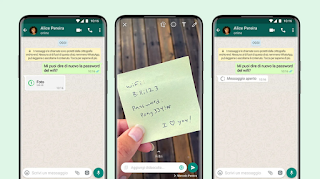
WhatsApp introduce le foto che si “cancellano” da sole

WhatsApp sta attivando una funzione che a suo dire permette agli utenti di condividere foto e video che si cancellano automaticamente dopo che sono state viste una sola volta.
Chi le riceve verrà avvisato da un’apposita icona che si tratta di contenuti temporanei, simili ai messaggi temporanei che già esistono da qualche mese in WhatsApp, come in altre app di messaggistica.
Queste foto e questi video non potranno essere inoltrati usando WhatsApp, non verranno salvati nella galleria di immagini e verranno eliminati automaticamente dopo 14 giorni se non sono stati visti.
Interessante, ma attenzione a non interpretare questa nuova funzione come una giustificazione per pensare di potere condividere disinvoltamente foto intime o personali contando sul fatto che una volta viste spariranno per sempre: come per tutte le foto “autocancellanti”, esistono modi banalissimi (dallo screenshot in su) per rendere quelle immagini assolutamente permanenti.
Ben venga, quindi, l’uso di questa funzione per eliminare automaticamente le foto che scattiamo per usi temporanei, come per esempio quelle fatte per mostrare a qualcuno un prodotto o un vestito visto in un negozio, ma niente di più. La funzione è utile per non occupare spazio inutilmente sul proprio smartphone riempiendolo di foto e video che non servono, ma prima di usare questo servizio di “cancellazione” automatica, chiedetevi che cosa succederebbe se la foto “temporanea” diventasse permanente e circolasse.
Windows 365, Microsoft stoppa le iscrizioni alla prova gratuita