
Samsung Galaxy Z Fold3 5G su Amazon con 450 euro di valutazione per l’usato
Galaxy Watch4: Samsung innova l’esperienza smartwatch
Xiaomi presenta CyberDog, il cane robot semi-autonomo

In person, virtual or hybrid: helpful tools for back to school
As a former director at the largest school district in the United States, I’ve witnessed the challenges of preparing for the back-to-school season. It can be daunting to equip your districts, educators, students and families with the educational resources they need to go back to school with confidence.
We recently sat down with a group of school administrators from around the world to get a sense of what they’re thinking about when using digital tools to overcome challenges for back to school in 2021. Although the term “going back to school” looks different across different schools, states and countries, here are a few of the top things administrators are thinking about to help guide you when going back to the classroom, regardless of whether you’ll be in-person, virtual or a hybrid of the two. To find more tips for how to use Google tools this upcoming school year, check out our Back to School Guide for school leaders.
Tools to enhance teaching and learning
Ruth Yeh, a teacher and technology advisor at Taipei First Girls High School, said she’s thinking a lot about how different it continues to be “to conduct classes the way we used to, and making sure all students are given the attention they need to learn and grow.” Ruth said that using Google tools, educators have been able to connect with students in real time using Google Meet, or do daily check-ins on mood with Google Forms or Google Classroom. Nothing can replace being in person – but tech tools can help bridge the gap in the meantime.
We’ve seen educators using Jamboard to have class brainstorms and discussions (all within a Google Meet!), where students can share ideas by writing and adding images in real time on a digital whiteboard. And for checking for understanding, Google Forms make conducting and grading quizzes easier – and can also be used for student check-ins. Educators are using Forms now to reach out to students with an emotional-health questionnaire and ask simple questions about how they are feeling… and then can set up time to talk to them afterwards.
Supporting students and families beyond the classroom
“Parents and guardians are trying to help their kids with their schoolwork, but sometimes don’t understand the tools and devices,” says Femi Aina, Executive Director of IT at Atlanta Public Schools. The biggest issue: They had trouble finding Meet links for their children’s virtual classes. Atlanta Public School teachers and principals resolved this problem by providing the support and resources guardians needed to understand how to use Google Classroom and other Google for Education tools, including the Tech Toolkit for Families and Guardians video series.
Providing students and families with supplemental resources beyond the classroom curriculum can help them understand how they can use Google for Education tools to support their education. Guardians can learn how to support their children’s education through Google resources like Google Families, Guardian’s Guides to Google for Education Tools and this information on setting up Classroom email summaries for guardians. For more support resources, check out our Help Center.
Google’s commitment to data privacy and security
Chin Song, Director of Technology at Milpitas Unified, told us that he’s planning on updating policies in Google Admin Console to ensure a safe learning environment, like the new age-based access setting, and making sure all of the district’s Chromebooks are updated to the latest operating system. And Ron Caroll, Manager of Instructional Technology at Chicago Public Schools, said in addition to customizing policies to protect students’ online learning experiences, it’s equally important to bring parents and guardians along during the process.
To inform guardians about their children’s use of Google Workspace for Education tools and how these tools protect their security online, Chicago Public Schools is planning on sharing information to help them learn more about Google’s privacy and security policies, like these frequently asked questions.
By customizing settings and updating policies, schools can support safer learning experiences for students through Google Admin console. Leverage resources to help inform families about security and privacy like the Safer Learning with Google for Education Guide, Google’s security commitments, our Be Internet Awesome Family Guide and our Guardian’s Guide to Privacy and Security.
Stay up-to-date with your Google for Education products
Mark Garrison, Chief Academic & Innovation Officer at Breck School, said his previous team typically spent summers focused on Chromebook deployment, helping schools set up and manage their devices. And Chin Song said his district has a secretary that logs every single Chromebook in a consolidated spreadsheet when deploying devices, to keep inventory management efficient. This year, they’re focusing on not only getting devices ready for in school learning, but also preparing them to go home, too.
Setting up and deploying Chromebooks ahead of the back-to-school season can help the return to the classroom be more seamless. For tips on how to set up new user accounts or pre-installing apps and extensions, check out the Chrome Device deployment guide for step-by-step instructions and this guide for sending Chromebooks home.
Regardless of how your school setup will look this year, our team is working to make digital tools easier and more helpful for everyone. For more best practices on heading back to school with Google for Education tools, check out Teaching Resources and our Google for Education Back-to-School Guide.
5 things to try with Wear OS on the Samsung Galaxy Watch4
For over a decade, Samsung and Google have worked together to push mobile technology forward across smartphones, tablets and foldables. We both want to bring users the best experiences possible, and as partners, we love a challenge. And now, we’re ready to take our collaboration to the next level with smartwatches.
Smartwatches are the next step in mobile computing and we’re truly excited about the future of wearables. Today at Unpacked, Samsung unveiled its new Galaxy Watch4 with Wear OS Powered by Samsung. It’s the first smartwatch running on our unified platform.
We’re taking what we’ve learned from Wear OS and Tizen to jointly build what smartwatch users need. Compared to previous Wear OS smartwatches, the Galaxy Watch4 features a 2.5x shorter set up experience, up to 40 hours of battery life, optimized performance with app launch times 30 percent faster than before and access to a huge ecosystem of apps and services.
And there are more ways to get more done from your wrist with Wear OS. We’re introducing more capabilities and a fresh new look based on Material You design language for Google Maps, Messages by Google and Google Pay apps as well as launching a YouTube Music app. There are also new apps and Tiles coming to Wear OS for quicker access to your favorites. Let’s get into the details:
1. Navigate with Google Maps on your wrist
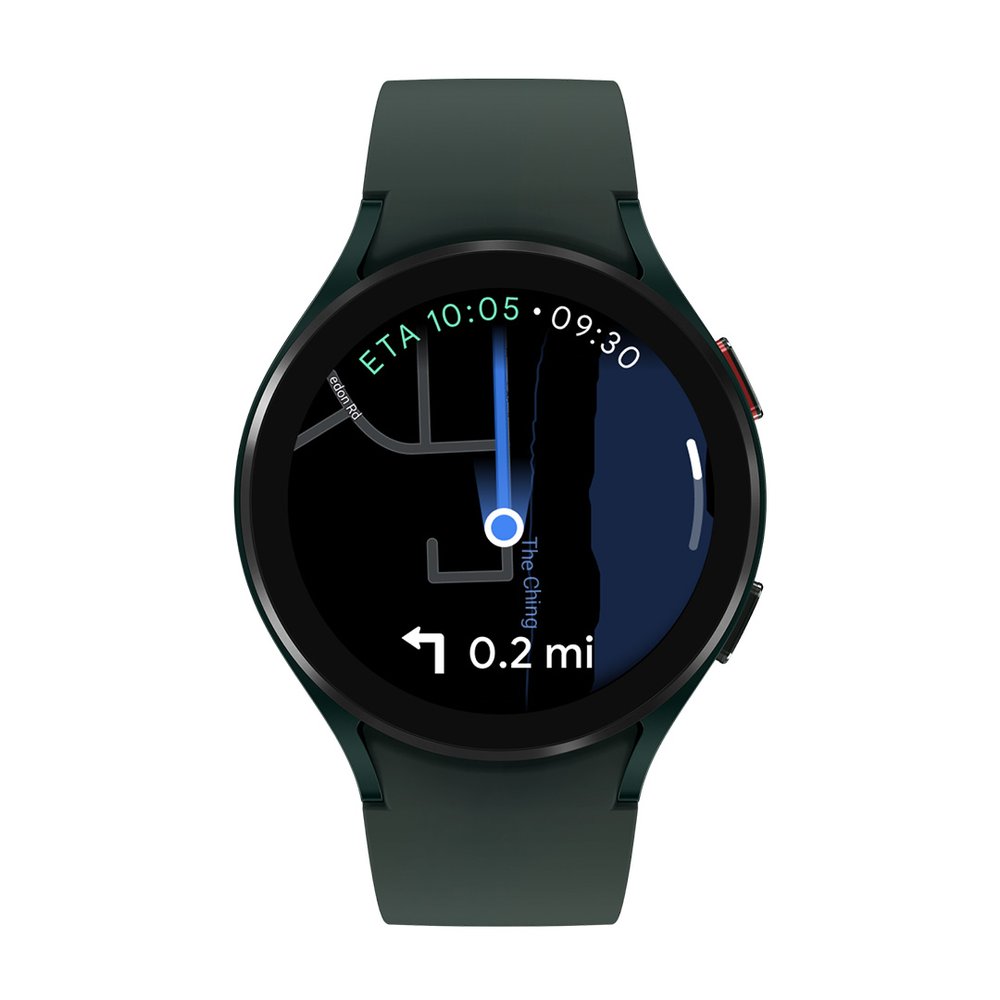
The Google Maps app on Wear OS will get you to your destination as efficiently as possible, whether you’re walking, cycling or driving. Turn-by-turn directions sent from phone to watch will help you to arrive on time. The watch app also syncs with Google Maps on your phone, and will show the home and work addresses you’ve added for easy access, as well as recent searches so you can start navigating where you want to go quickly.

Samsung Galaxy Z Fold 3 e Z Flip 3 ufficiali! Ecco l’anteprima video
Kick off the school year with Google Assistant and Search
Wherever your kids will be learning from this year, one thing is undeniable: The school year is fast-approaching. Over the past two years, my family’s adopted a few new routines — some that will stick, and others we’ll need to adjust. Here’s how I’m using Google Assistant and the latest educational Search features to help keep my family on track and connected — while still making time for some fun.
Make mornings more fun
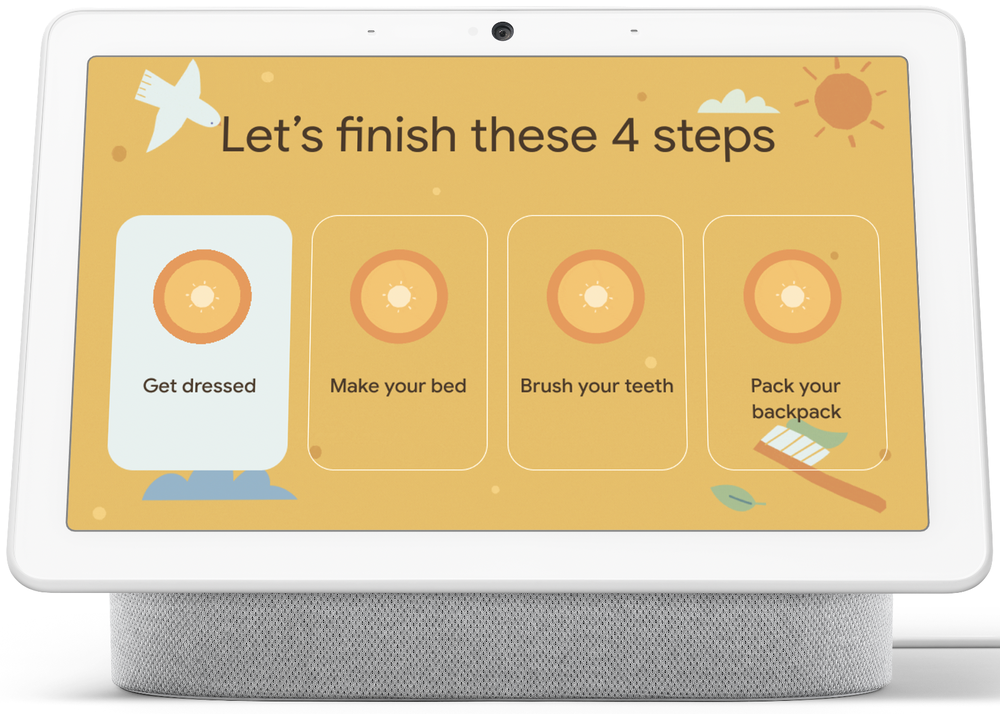
I already use Family Bell on my smart speakers and smart displays to help us stay on top of our routines throughout the day, with bells that remind me when it’s time for family dinner or to water the plants. In several weeks, Family Bell will be available to ring on mobile devices, making it even easier to set up and use throughout your day. Also coming soon, Family Bell will offer new, customizable bells that will initiate a checklist on your Nest Hub. I’ve been testing this feature and it’s been a great way to remind my kids what they need to do before heading out the door for school in a fun way— things like making their beds, getting dressed and brushing their teeth. When a task is completed, my kids enjoy the fun, on-screen celebratory animations and sounds that appear. I’m also planning to make a checklist for bedtime since it’s been working so well!
Stasera alle 20 una “live” in attesa di trovarsi a Spotorno per “Scienza Fantastica” il 29 agosto
Questa sera alle 20 (ora italiana) parteciperò a Aspettando Scienza Fantastica, una “live” organizzata come anteprima della manifestazione che da parecchi anni ormai riunisce scienza e fantascienza con eventi in presenza a Spotorno e in collegamento video.
Ho il piacere di essere uno degli ospiti ricorrenti di Scienza fantastica, che quest’anno giunge alla nona edizione e vede in programma ospiti come Gabriella Greison, Luca Perri, Adrian Fartade, l’astronauta Umberto Guidoni, Marco Ciardi, Silvano Fuso e appuntamenti di divulgazione scientifica a cura di Altec, Thales Alenia Space, ESA e CICAP, insieme a cosplayer di Star Wars.
Io porterò alla Sala Convegni Palace, alle 21.30 di domenica 29 agosto, una conferenza inedita, intitolata Non c’è diesel nello spazio: mobilità elettrica sulla Terra, Luna e Marte, dedicata alla storia e al futuro dei veicoli elettrici nell’esplorazione spaziale e anche sulla Terra, per ricordare il cinquantenario della prima auto elettrica usata sulla Luna, il Lunar Roving Vehicle, durante la missione Apollo 15.
Il link per seguire la live di stasera su Facebook, condotta da Stefano Culotta, è questo.
Maggiori informazioni su Scienza fantastica sono presso il sito della manifestazione, www.scienzafantastica.it.

Samsung, ufficiali Galaxy Z Fold3 e Galaxy Z Flip3: info e prezzi

Break Free B2B Marketing: Ramon Ray of Smart Hustle Media on Small Business Success & Thinking Big
How can small businesses work together with big clients and form powerful partnerships that make good things happen?
For our third season of Break Free B2B Marketing video interviews, we’re featuring conversations with leading B2B influencers, and examining the issues that each subject matter expert is influential about in their specialized industry.
2020 was a difficult year for business owners, and 2021 hasn’t quite been the return to normal many had envisioned. In 2020 profits were down, stress was up, and everyone was questioning how they were going to not only survive, but thrive, in the coming year.
These worries were more real for small business owners than anyone else. After all, when you own a small business, you’re not afforded the same protections or options that larger companies might have. You have to be smart, adaptable, and relentless in your pursuit of your goals.
Nobody understands this struggle better than Ramon Ray, founder of Smart Hustle Media. In fact, he’s built his personal success around his expert ability to predict and promote the needs of small businesses and help them elevate their brand to the next level.
He’s a keynote speaker, entrepreneur, best selling author, and the next guest on our Break Free B2B Marketing video interview series.
In the energetic and entertaining twelfth and final episode of our third season, Ramon sat down with our content marketing manager Nick Nelson to explore a fascinating array of topics surrounding how small and large businesses can think big together.
Ramon also shared how B2B influencers are bringing a face, a voice, credibility, and warmth to large brands, and why it’s key to be nimble, svelte, and creatively agile.
Check out the video below or listen to the podcast, to hear Ramon’s unique insight on thinking big, building trust, and small business achievement in 2021 and beyond.
Break Free B2B Interview with Ramon Ray
If you’re interested in checking out a particular portion of our discussion, you can find a quick general outline below, as well as a few excerpts that stood out to us.
- :40 – Introduction to Ramon Ray
- 2:08 – Where do things currently stand for small businesses after the challenges of 2020?
- 4:16 – Interesting ways small businesses are adapting
- 5:17 – “Threading a careful needle”
- 9:10 – What can larger businesses learn from the success of small ones?
- 10:47 – Running and attending virtual events
- 11:55 – Can large businesses reclaim the “scrappy start-up” energy SMBs possess?
- 13:50 – Small businesses shouldn’t pigeonhole themselves with small clients
- 16:51 – New technology innovations for small businesses?
- 18:08 – Ramon’s book, Celebrity CEO
- 20:30 – How to carve out your niche as an influencer
- 24:28 – How to get in touch with Ramon
Ramon: Where I see things are the future, I hope it’s bright, but it’s kind of like a storm on a ship. Some have lost their lives. 10, 20, 30, or 100 people. Now the 70 of us that are here, we’ve got to move on and build new lives. That’s kind of how I see it: not forgetting the others, but you build on and move on. I hope that all those listening, the biggest takeaway I found is just that. We keep saying the new normal. But that’s what I hope everybody realizes: this is a brand new game. It’s brand new, and we’re never going back. Marketing is different. Advertising is different, and I think we learned that we’ll be okay.
[bctt tweet=”“Those who can be as niche, narrow, honest, credible, and authentic to their audience are going to win.” — Ramon Ray @ramonray #BreakFreeB2B” username=”toprank”]Nick: Yeah, that’s great perspective. You know — stay true to yourself, and be bold on that front — but don’t don’t get gimmicky. You know that it’s not the time for that. When you talk about some of the successes and the way these challenges in the small business sector are being overcome, what do you see as key developments and things that even larger businesses might be able to learn from?
Ramon: I think speed is the biggest thing. I had my Survive and Thrive Summit — and I talked to the CEO of School of Rock, and many others, but it’s just one that comes to mind telling me how they were able to pivot on a dime. People were used to coming into a retail store. Oh, we still have teachers. We still have students. They still want training to be rock stars, as it were. Let’s set up iPads and make it virtual. It sounds “duh,” but for a bigger company that takes time and thought. My point is that I think that’s the biggest lesson learned I can give to these larger brands, is that we small businesses, on a dime, this thing falls behind me. Me and Nick will laugh about it and say see falling stock prices as an example. And we’ll keep moving. You can’t let that hold you hostage is what I’m trying to say. I think the biggest thing small businesses can do is be nimble.
[bctt tweet=”“I think the biggest thing small businesses can do is be nimble.” — Ramon Ray @ramonray #BreakFreeB2B” username=”toprank”]Keep your eye on the TopRank Marketing Blog and subscribe to our YouTube channel for more interviews, including those in our new Inside B2B Influencer series. Also check out episodes from season 1 and season 2.
Take your B2B marketing to new heights by checking out out all of our previous season 3 episodes of Break Free B2B Marketing:
- Episode 1: Kevin L. Jackson, GC GlobalNet — The Future of Cloud Computing
- Episode 2: Tim Crawford, AVOA — The New Normal
- Episode 3: Oliver Christie, PertexaHealthTech — The Future of Artificial Intelligence
- Episode 4: Liam McIvor Martin, Time Doctor — Trends in Remote Work
- Episode 5: Sarah Barnes-Humphrey, SHIPZ — The Future of Supply Chain
- Episode 6: Eric Vanberburg, TCDI — The Changing Cybersecurity Landscape
- Episode 7: Nicole Brady, SAHM Reviews — The Importance of Empathy
- Episode 8: Tamara McCleary, Thulium — Visions of the Future
- Episode 9: Dez Blanchfield, Sociaall Inc. — Joining the Conversation
- Episode 10: Keith Townsend, The CTO Advisor — Bringing Value Through Friction
- Episode 11: Minda Harts, The Memo — Having Courageous Conversations
The post Break Free B2B Marketing: Ramon Ray of Smart Hustle Media on Small Business Success & Thinking Big appeared first on B2B Marketing Blog – TopRank®.

Anime horror su Netflix: 5 serie da non perdere

Google Trends compie 15 anni: come si è evoluto, dalla nascita a oggi
Quando abbiamo lanciato la versione sperimentale di Google Trends 15 anni fa, abbiamo indicato alle persone come poter sfruttare i dati a loro disposizione per ottenere diverse tipologie di informazioni: da quanto sia apprezzato un determinato gusto di gelato a chi fossero i concorrenti di una competizione canora. Da allora, Google Trends è diventata una risorsa importante per giornalisti, ricercatori, accademici, aziende e per persone in tutto il mondo. Google Trends ci mostra cosa interessa realmente alle persone.
Come nasce Google Trends?
Inizialmente Trends era uno strumento sperimentale progettato per aiutarci a comprendere le tendenze nella Ricerca Google. Per la prima volta, eravamo riusciti a utilizzare i dati aggregati per capire meglio cosa interessasse alle persone e cosa cercavano quando effettuavano delle ricerche. Più lo strumento si evolveva e più ci siamo resi conto di quanto sarebbe stato utile in giro per il mondo.
È stato il primo progetto preso in carico dal nuovo sito Google in Israele e il team ha lavorato a stretto contatto con altri team dell’azienda. Ci siamo concentrati sull’analisi dei dati su larga scala, realizzando qualcosa che condividesse le nostre informazioni con il mondo intero.
Il lancio pubblico di Google Trends è stato uno dei primi guidati dal team israeliano, e ha davvero gettato le basi di quello che avremmo fatto in futuro.
L’evoluzione di Google Trends
Come la Ricerca Google si è evoluta, così anche Google Trends. Abbiamo aggiunto le tendenze giornaliere e la possibilità di organizzare i dati in categorie. Abbiamo poi aggiunto altre lingue, migliori visualizzazioni ed esteso le tendenze fino ad includere nuovi metodi di ricerca, come le immagini e i video.
Quando la Ricerca Google ha iniziato a comprendere il significato semantico delle query tramite i nostri Knowledge Graph, Google Trends ha apportato entità allo strumento così che potesse meglio riflettere ciò che interessava alle persone, a prescindere dalle parole specifiche utilizzate durante la ricerca. Via via che la Ricerca diventava più aggiornata e con risultati in tempo reale lo stesso accadeva per Trends, acquisendo informazioni sugli argomenti che “in questo momento” sono di tendenza (dagli eventi sportivi alle calamità naturali). Questo strumento si trovava a rispecchiare i fenomeni del mondo in tempo reale, diventando la fonte principale per il nowcasting o per “predire il presente”, per le tendenze nel campo economico, sanitario e delle scienze sociali.
Trends ha un grande vantaggio: quello di essere l’unico strumento attualmente disponibile capace di fornire informazioni sugli interessi delle persone in tempo reale così come mostrare come le tendenze sono cambiate nel tempo. Abbiamo visto giornalisti e scrittori utilizzare Trends per creare storie e capire l’interesse delle persone nei confronti di una notizia.
Google Trends nel 2020
Il 2020 è un anno difficile da dimenticare, ma anche uno in cui Trends è riuscito davvero ad aiutarci a capire la complessità degli eventi e delle emozioni che tutti abbiamo dovuto affrontare. Tutte le ricerche su argomenti correlati alla salute hanno mostrato quelle che erano le preoccupazioni principali delle persone a seguito della pandemia. Negli Stati Uniti si sono anche tenute le elezioni, le più cercate di tutta la storia su Google, oltre a manifestazioni a favore dell’uguaglianza e della giustizia razziale, e tutto questo è stato visibile nella ricerca. La disoccupazione creava un senso di insicurezza e ansia, tanto da essere oggetto di ricerca quanto mai prima nella storia. Allo stesso tempo, ci sono state numerose ricerche che hanno messo in evidenza il nostro lato più umano, come query su come realizzare oggetti o su come aiutare gli altri.
Scritto da: Yossi Matias, VP of Engineering and Research

15 consigli per usare al meglio Google Trends
Quando Google Trends è stato lanciato per la prima volta nel 2006, abbiamo detto alle persone che lo strumento poteva essere utilizzato per scoprire quali erano i gusti di gelato più apprezzati nelle varie aree geografiche e quali concorrenti di American Idol fossero più di tendenza. Oggi, dopo 15 anni, sappiamo che Google Trends può dirci molto di più: può mostrarci cosa interessa davvero alle persone di tutto il mondo.
Con un campione dati di Google, siamo in grado di misurare l’interesse delle persone verso determinati argomenti sulla Ricerca Google a livello di città e con dati disponibili dal 2004 ad oggi, ancora prima che lo strumento venisse lanciato.
In onore di questo traguardo, abbiamo dato un’occhiata alle domande su Google Trends che hanno fatto più tendenza negli ultimi 15 anni. Tra le più cercate, ci sono domande tra cui “come usare Google Trends” e “come funziona Google Trends”. Abbiamo quindi deciso di rispondere con questi 15 consigli per aiutarvi a sfruttare al massimo lo strumento e scoprire informazioni interessanti.
-
Filtrate i dati per data: Google Trends può dirvi cosa hanno cercato le persone in una specifica data dal 2004 fino a pochi minuti fa. Si basa inoltre su due set di dati: storici (dal 2004 fino a tre giorni fa) e in tempo reale (risalenti alla settimana precedente). I dati in tempo reale sono più granulari, fino ad arrivare a dati minuto per minuto.
-
Informazioni di tendenza vs informazioni più cercate: le ricerche di tendenza (o in crescita) sono quelle che accelerano più velocemente, mentre le più cercate sono le query cercate maggiormente in un determinato periodo di tempo. Le ricerche di tendenza sono utili per osservare i cambiamenti. I dati sulle tendenze sono dinamici, pertanto possono subire delle fluttuazioni.
-
Quando potete, scegliete un argomento: quando inizierete ad usare Google Trends, potrete scegliere se effettuare la ricerca per “termine” o “argomento”. Consigliamo di scegliere l’opzione argomento se possibile: questi infatti non dipendono dalla lingua e tengono conto delle variazioni ortografiche (e degli errori), così come dei vari termini che indicano lo stesso concetto. Questo li rende più rappresentativi.
-
Confrontate i luoghi più grandi con quelli più piccoli: come potreste confrontare la ricerca per uno stesso argomento tra una città come New York e una molto più piccola? Google Trends , argomento che le persone cercano ogni giorno.
-
Scoprite come in posti diversi si cerchi la stessa cosa: questa è una delle funzionalità nascoste di Trends. È possibile confrontare fino a cinque diversi argomenti o termini di ricerca, specificando l’area geografica per ognuno. Ad esempio, potete vedere come le ricerche sul Covid-19 sono cambiate da paese a paese in tutto il mondo negli ultimi 12 mesi.
-
Le tendenze possono dirvi di più sui nostri interessi: Google Trends è un set di dati che si focalizza sull’essere umano. Cerchiamo ciò che ci interessa e ci dà un’idea di ciò che realmente ci sta a cuore. Anche se possiamo non comprendere appieno questi interessi in determinati momenti, probabilmente non sarete i soli a voler scoprire più informazioni su un determinato argomento. Google Trends ci aiuta a visualizzare ed esplorare i nostri sogni, il mondo di cani e gatti e persino imparare a riparare il nostro gabinetto.
-
Le tendenze non sono sondaggi: è importante ricordare che Google Trends non è uno strumento destinato alla creazione di sondaggi scientifici e i dati non dovrebbero essere scambiati per questa finalità. Ha l’obiettivo di riflettere gli interessi di ricerca su argomenti specifici durante un determinato periodo di tempo.
-
…ma possono dirvi molto: l’Organizzazione per la cooperazione e lo sviluppo economico (OECD) usa Trends per monitorare il PIL ogni settimana tra le pubblicazioni trimestrali al fine di ottenere una visione più granulare di ciò che accade nell’economia di tutto il mondo.
-
Il completamento automatico e i dati di Trends non funzionano allo stesso modo: il completamento automatico cerca infatti di predire ciò che state digitando in modo da trovare più velocemente ciò che cercate. Si tratta pur sempre di una funzionalità predittiva, ma ciò non vuol dire che vogliamo predire cose alle persone. Per questo motivo, anche se potete cercare ciò che volete, abbiamo delle norme da rispettare su ciò che può apparire con la compilazione automatica. Trends è uno strumento in cui potete cercare gli interessi per qualsiasi query: considerando il fatto che state digitando per ottenere dei risultati, noi vi mostreremo i dati disponibili di Trends per praticamente qualunque query voi vogliate.
-
Scoprite cos’è di tendenza nelle vicinanze: un’altra funzionalità interessante di Trends è la possibilità di vedere le ricerche più di tendenza nell’ultimo mese o nell’ultimo anno in un’area metropolitana senza dover neanche inserire un termine di ricerca. Ad esempio, ecco quali sono stati gli argomenti più cercati in Abruzzo nell’ultimo mese.
-
Scaricate i vostri dati: è semplice, basta un clic sul pulsante di download accanto al grafico. Per un set di dati più grande, date un’occhiata ai set di dati con le ricerche di tendenza giornaliere da Google BigQuery.
-
E ricordate: divertitevi con Google Trends! Circa il 15% delle query sulla Ricerca Google effettuate ogni giorno non sono mai state effettuate prima. È un ottimo modo per scoprire come gli interessi delle persone in tutto il mondo sono in continua evoluzione.

Sapphire Pulse RX 6600 XT vs MSI RX 6600 XT Gaming X: AMD RDNA 2 per il Full HD

Best Trends forever: 15 years of Google Trends
What were you doing in 2006? Maybe you were going through your emo phase. Maybe you were loving low rise jeans. Maybe you were mourning Pluto’s (temporary) demotion from planet to dwarf planet.
Maybe you were checking out these trends — and plenty of others — on Google Trends, which went live in the summer of 2006. Though the tool’s data goes back to 2004, it became available two years later. This summer, Google Trends turns 15, so we thought it would be the perfect time to look back on trends of yesteryear and compare what people were searching for back in 2006 to today.