
Get around and explore with 5 new Google Maps updates
From the very beginning, we built Google Maps to help you connect with the real world. In 2007, we introduced Street View, the first imagery platform to show you panoramic views of streets all over the world — from Tokyo to Tonga. A year later, we let you throw away your printed directions and get real-time navigation directly from your phone. And three years ago, we were the first to launch Live View and bring AR to navigation at scale. Thanks to our deep knowledge about the world and powerful AI advancements, we’ve spent the last 16 years bringing helpful information and experiences just like these to the map. Today at Google I/O, we’re announcing five new updates so you can more easily navigate, explore and get things done.
Reduce hard-braking with routing updates
Imagine you’re driving to meet a friend. As you approach a busy intersection, the traffic slows suddenly and you have to slam on your brakes. According to research from experts at the Virginia Tech Transportation Institute, these hard-braking moments — incidents along a route that cause a driver to sharply decelerate — can be a leading indicator of car crash likelihood. Soon, Google Maps will reduce your chances of having hard-braking moments along your drive thanks to help from machine learning and navigation information.
Here’s how it works: Every time you get directions in Maps, we calculate multiple route options to your destination based on several factors, like how many lanes a road has and how direct a route is. With this update, we’ll take the fastest routes and identify which one is likely to reduce your chances of encountering a hard-braking moment. We’ll automatically recommend that route if the ETA is the same or the difference is minimal. We believe that these changes have the potential to eliminate 100 million hard-braking events in routes driven with Google Maps each year, so you can rely on Maps to get you from A to B quickly — but also more safely.
Walk this way with enhancements to Live View and detailed street maps
If you’re getting around on foot, we’ve got you covered with augmented reality in Live View. If you’re exploring a new neighborhood, you’ll be able to access Live View instantly — right from the map — and see helpful details about the shops and restaurants around you, like how busy they are, recent reviews and photos. We’ll also display helpful new street signs for complex intersections so you know exactly what road you’re on and which way to go. And if you’re traveling, Live View will tell you where you are in relation to places like your hotel — so you can always find your way back to home base.
Our detailed street maps feature, which launched last August, will soon be available in 50 more cities by the end of this year — including Berlin, São Paulo, Seattle, and Singapore. With the help of AI and our understanding of cityscapes around the globe, you can see where sidewalks, crosswalks and pedestrian islands are, along with the shape and width of a road to scale. This information can help pedestrians plan the most accommodating route, especially if they’re using a wheelchair or stroller.

webinar NFT GRATUITO su aspetti legali fiscali e valutazione delle opere
IL 20 Maggio 2021 verrà organizzato un webinar gratuito sul recente fenomeno degli NFT Non Fungible Token con il quale intendiamo fornire ai partecipanti dei primi strumenti che ne permettano…
L’articolo webinar NFT GRATUITO su aspetti legali fiscali e valutazione delle opere scritto da YOUR_DIGITAL_VOICE! proviene da Assodigitale.
Fix your passwords in Chrome with a single tap
Memorizing passwords is hard. That’s why many of us use the same password across multiple sites. But this practice poses a huge risk, since it only takes one password breach to expose your account data from many different sites.
Not only that: changing passwords is itself a tedious task. You have to navigate to the site, sign in, find the account settings, open the password page — and then save it. Rinse and repeat on all your favorite sites, and that’s a lot of work.
The good news is that Chrome comes with a strong password manager built-in. It’s been checking the safety of your passwords for a while now. And starting today, whenever Chrome detects a breach, it can also fix any compromised passwords quickly, and safely.
Warning you about stolen passwords — and fixing them, too
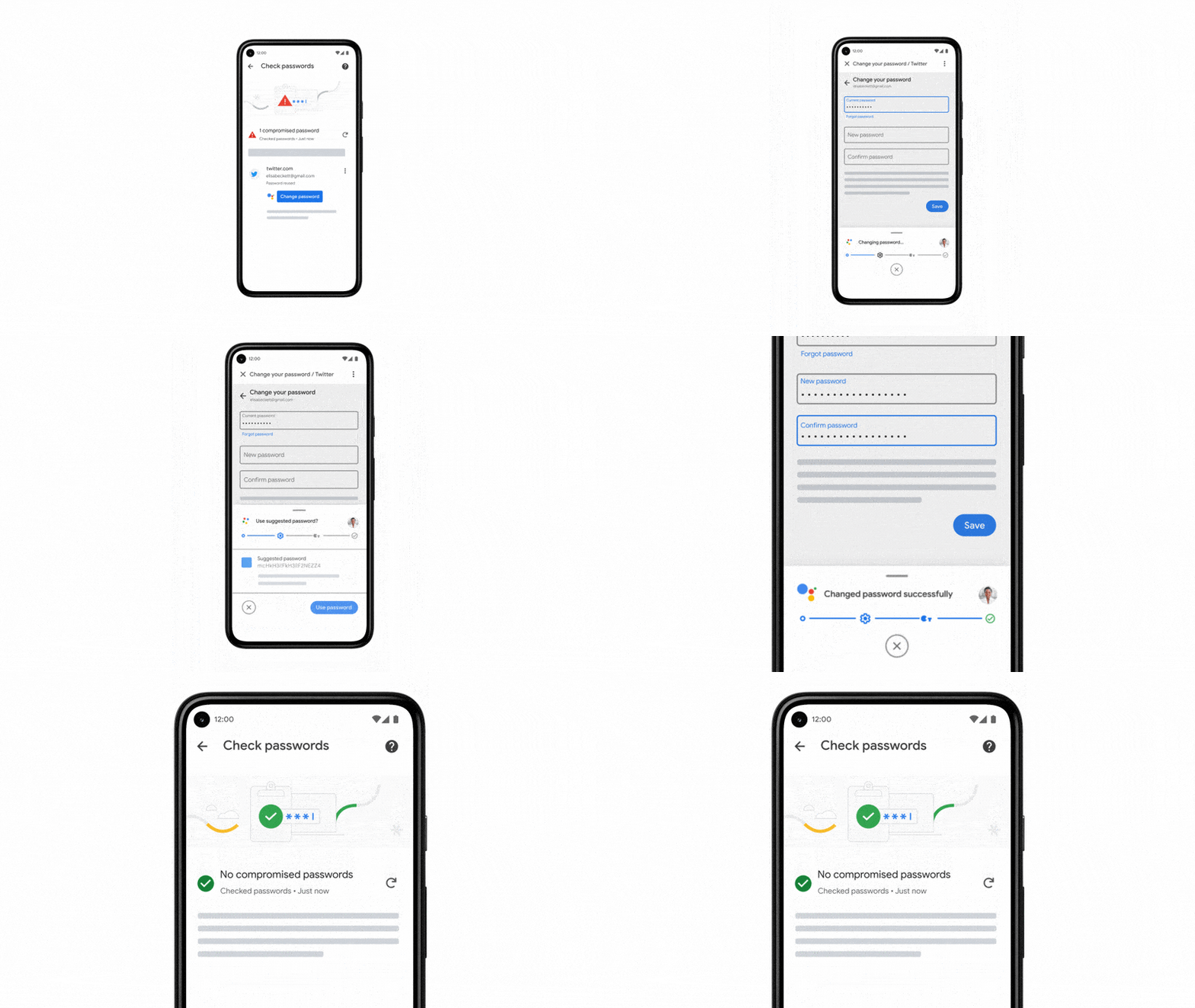
Going forward, Chrome will help you change your passwords with a single tap. On supported sites, whenever you check your passwords and Chrome finds a password that may have been compromised, you will see a “Change password” button from Assistant. When you tap the button, Chrome will not only navigate to the site, but also go through the entire process of changing your password.
More ways we’re making every day safer with Google
Every day, we focus on making sure you’re in control of your data by building products that are secure by default and private by design. At this year’s I/O, we’re introducing new features and technologies to keep you safer with Google.
Putting you in control of your data
Privacy is personal. That’s why we make it easy for you to choose thesettings that are right for you — whether that’s one place to manage settings in your Google Account, Auto-Delete options, or controls that appear in context when you’re using our products. We announced a number of new controls today:
- Quick delete in Search.We’re introducing a new, “quick delete” option to delete the last 15 minutes of your Search history with a single tap from the Google Account Menu.
- A passcode protected Locked Folder in Photos.Have you ever handed your phone to show someone a photo, but worried they might scroll to a personal or sensitive image — like a photo of your passport or a surprise gift? “Locked Folder” is a new feature in Google Photos — a passcode-protected space where select photos can be saved separately. These photos won’t show up as you scroll through your grid or in shared albums. This feature is coming to Google Pixels first, and more Android devices throughout the year.
- Location History reminders in your Maps Timeline.Now, when you see places you’ve visited in your Timeline, we’ll remind you that it’s because you turned on Location History — which you can easily turn off right there in your Timeline.
We’re also introducing new, industry-leading transparency and permission features on Android 12. The new OS includes a Privacy Dashboard where you will see a timeline of when apps accessed your camera, microphone, or device location. We’ve also added indicators that show when your camera or microphone are in use, as well as easy toggles to disable access to both across your device. And you can now choose to share your approximate location with an app instead of a precise one.
Building products that are secure by default
As recent high-profile third-party security incidents show, your information isn’t private if it’s not secure. With AI-driven technologies that protect billions of users around the world, our products are secure by default: every day, we block 100 million phishing attempts and 15 billion spam messages in Gmail and encrypt 4 billion photos. And Safe Browsing on Chrome and most other browsers helps keep the rest of the Internet secure, automatically protecting more than 4 billion devices.
One of the biggest security risks is still the continued reliance on passwords — they’re often easy to crack, used across multiple sites, or stolen in phishing attacks. That’s why we’ve been working towards a password-free future — focusing on safer ways to authenticate your identity and building multiple layers of protection into your Google Account, like automatic enrollment in 2-step verification.
But because passwords are still required for most online accounts, we’ve also continued to improve our Password Manager, built directly into Chrome, Android and now iOS, to help you create, remember, save and auto-fill passwords across the web. Today, we announced new enhancements to Password Manager:
- A new tool that makes it easy to import passwords from other password managers.
- Deeper integrations with Chrome and Android to seamlessly fill your passwords across sites and apps, regardless of whether you’re on desktop or on mobile.
- Password Alerts that automatically warn you if we detect one of your saved passwords has been compromised via a third party breach.
- A smart way to fix compromised passwords in Chrome with a simple tap. For supported sites and apps, whenever Password Manager finds a password that may have been compromised, you’ll see a “change password” button from Assistant. When you tap the button, the Assistant will not only navigate to the site, but also go through the entire process of changing your password. This feature is available on Android devices and will be rolling out to more sites and apps in the future.
Making our products private by design
We’ve pioneered new computing technologies like Federated Learning (invented by Google researchers in 2016) that make it possible to deliver helpful experiences while protecting individual data and privacy. We’ve also led on DifferentialPrivacy, which powers some of our most helpful features and products, from our COVID-19 Community Mobility Reports to traffic predictions in Maps, without revealing individual user data. And this expertise guides our work on broader industry initiatives, like the open-source Privacy Sandbox.
Now, we’re continuing that work with Android’s Private Compute Core, which keeps your information safe and private for a number of popular AI-driven features like Live Caption (which displays captions based on audio), Now Playing (which tells you the song that’s playing) and Smart Reply (which suggests short responses to messages and emails). For these features, the audio and language processing happens exclusively on your device. Like the rest of Android, Private Compute Core is open source — it’s fully inspectable and verifiable by the security community.
We’ll continue our work to make every day safer with Google with new controls, advanced security, and privacy-preserving technologies.
Unveiling our new Quantum AI campus
Within the decade, Google aims to build a useful, error-corrected quantum computer. This will accelerate solutions for some of the world’s most pressing problems, like sustainable energy and reduced emissions to feed the world’s growing population, and unlocking new scientific discoveries, like more helpful AI.
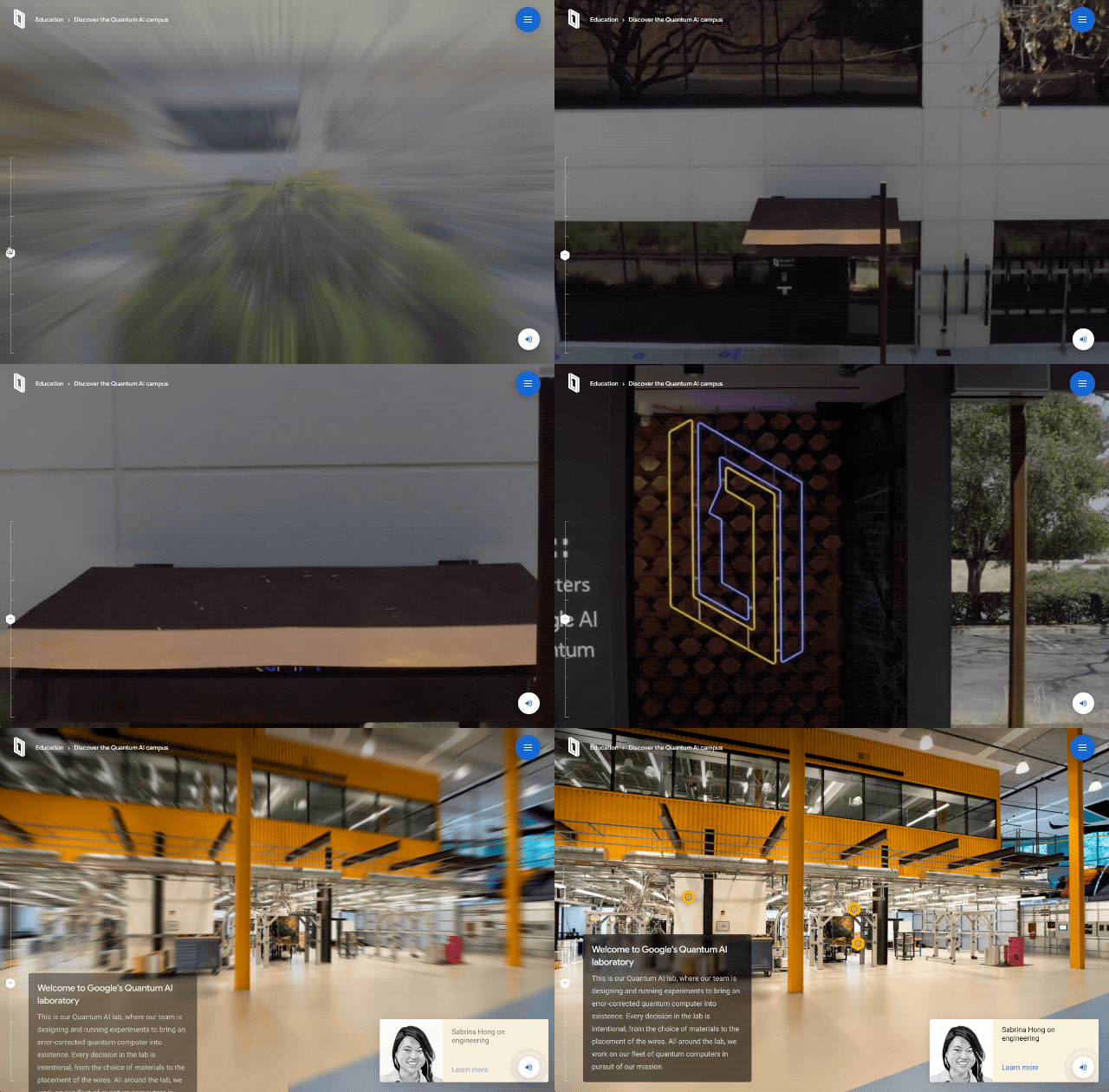
To begin our journey, today we’re unveiling our new Quantum AI campus in Santa Barbara, California. This campus includes our first quantum data center, our quantum hardware research laboratories, and our own quantum processor chip fabrication facilities. Here, our team is working to build an error-corrected quantum computer for the world.
Our new Quantum AI campus in Santa Barbara, CA will include our first quantum data center, new research laboratories, and quantum processor fabrication facilities.
Google began using machine learning 20 years ago (for spell checking in Search), and led the deep learning revolution 10 years ago (advancing neural nets, the leading approach to modern AI). These advances in AI and other technologies have enabled many of the incredible applications we’re seeing today. As we look 10 years into the future, many of the greatest global challenges, from climate change to handling the next pandemic, demand a new kind of computing.
To build better batteries (to lighten the load on the power grid), or to create fertilizer to feed the world without creating 2% of global carbon emissions (as nitrogen fixation does today), or to create more targeted medicines (to stop the next pandemic before it starts), we need to understand and design molecules better. That means simulating nature accurately. But you can’t simulate molecules very well using classical computers. As you get to even modestly sized molecules, you quickly run out of computing resources. Nature is quantum mechanical: The bonds and interactions among atoms behave probabilistically, with richer dynamics that exhaust the simple classical computing logic.
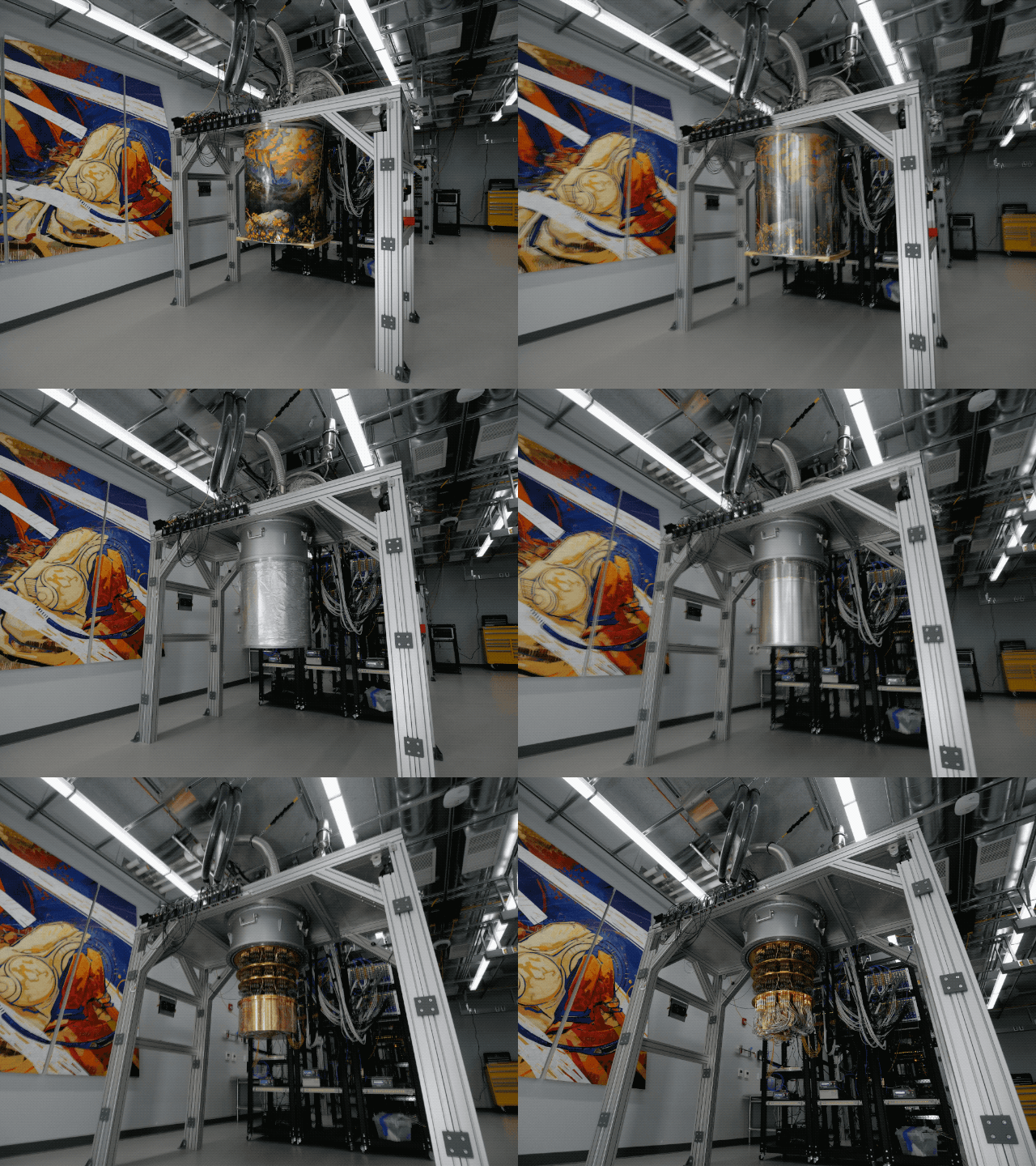
The inside of our cryostats, like the ones found in the Quantum AI campus, are some of the coldest places in the universe, reaching temperatures around 10 milliKelvin
This is where quantum computers come in. Quantum computers use quantum bits, or “qubits,” which can be entangled in a complex superposition of states, naturally mirroring the complexity of molecules in the real world. With an error-corrected quantum computer, we’ll be able to simulate how molecules behave and interact, so we can test and invent new chemical processes and new materials before investing in costly real-life prototypes. These new computing capabilities will help to accelerate the discovery of better batteries, energy-efficient fertilizers, and targeted medicines, as well as improved optimization, new AI architectures, and more.
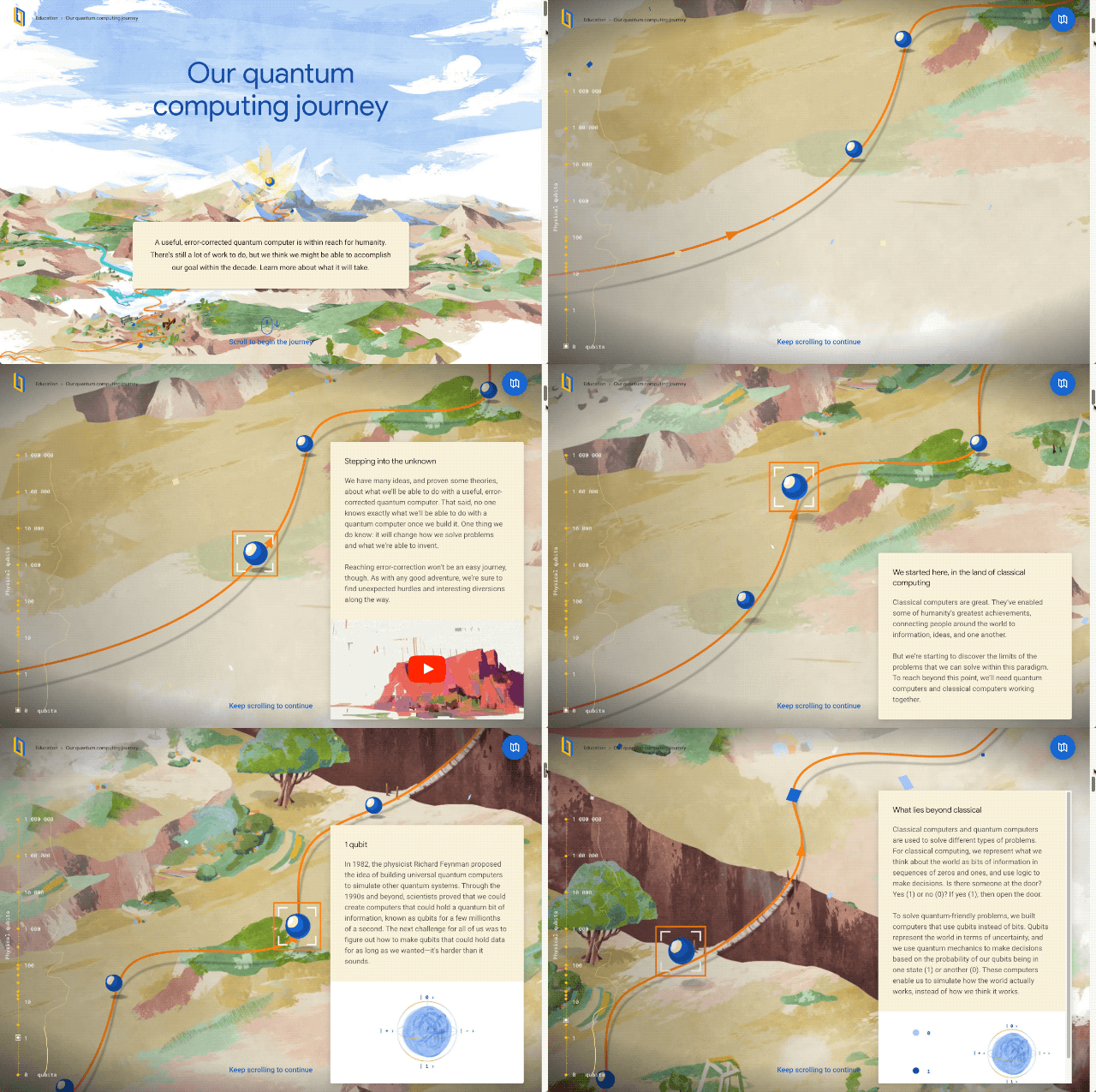
Our journey to build an error-corrected quantum computer within the decade includes several scientific milestones, including building an error-corrected logical qubit.
To reach this goal, we’re on a journey to build 1,000,000 physical qubits that work in concert inside a room-sized error-corrected quantum computer. That’s a big leap from today’s modestly-sized systems of fewer than 100 qubits.
To get there, we must build the world’s first “quantum transistor” — two error-corrected “logical qubits” performing quantum operations together — and then figure out how to tile hundreds to thousands of them to form the error-corrected quantum computer. That will take years.
To get there, we need to show we can encode one logical qubit — with 1,000 physical qubits. Using quantum error-correction, these physical qubits work together to form a long-lived nearly perfect qubit — a forever qubit that maintains coherence until power is removed, ushering in the digital era of quantum computing. Again, we expect years of concerted development to achieve this goal.
And to get THERE(!), we need to show that the more physical qubits participate in error correction, the more you can cut down on errors in the first place — this is a crucial step given how error-prone physical qubits are. We’re doing that research right now on our Quantum AI campus.
Already we run quantum computers that can perform calculations beyond the reach of classical computers. To continue this journey towards a useful error-corrected quantum computer and provide humanity with a new tool tuned to the way nature works, we’re assembling an amazing team to invent the future of computing together right here, right now, at Google’s Quantum AI campus.


LaMDA: our breakthrough conversation technology
We’ve always had a soft spot for language at Google. Early on, we set out to translate the web. More recently, we’ve invented machine learning techniques that help us better grasp the intent of Search queries. Over time, our advances in these and other areas have made it easier and easier to organize and access the heaps of information conveyed by the written and spoken word.
But there’s always room for improvement. Language is remarkably nuanced and adaptable. It can be literal or figurative, flowery or plain, inventive or informational. That versatility makes language one of humanity’s greatest tools — and one of computer science’s most difficult puzzles.
LaMDA, our latest research breakthrough, adds pieces to one of the most tantalizing sections of that puzzle: conversation.
12 Google Workspace updates for better collaboration
Since we launched Google Docs and Sheets 15 years ago, we’ve been pushing work documents away from being just digital pieces of paper and toward collaborative, linked content inspired by the web. Our mission is to build the future of work, and smart canvas is our next big step.
Specifically, we’re enhancing the apps that hundreds of millions of people use every day — like Docs, Sheets, and Slides — to transform collaboration and make Google Workspace even more flexible, interactive and intelligent. Between now and the end of the year, we’re rolling out new features that’ll make it easier for you to do your work and collaborate with your teammates, wherever you are.
Here are 12 new features to help make collaboration even more seamless.
@-mention people, files and meetings
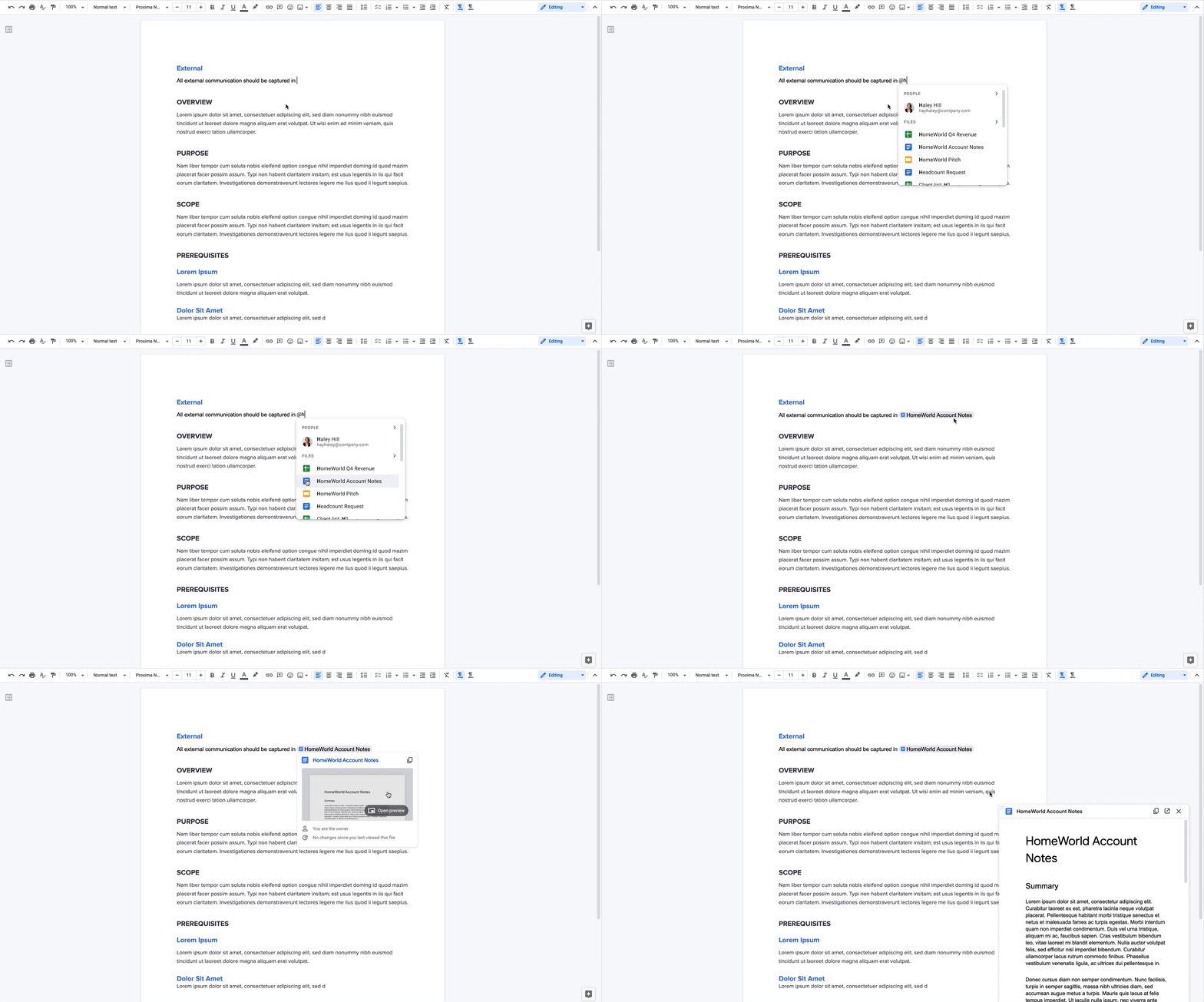
Already available, when you @-mention a person in a document, a smart chip shows you additional information like the person’s location, job title and contact information. And starting now, we’re introducing new smart chips in Docs for recommended files and meetings. To insert smart chips into your work, simply type “@” to see a list of recommended people, files and meetings. From web or mobile, your collaborators can then quickly skim associated meetings and people or preview linked documents, all without changing tabs or contexts. Smart chips will come to Sheets in the coming months.

The story behind the Blob Opera world tour
When artist David Li partnered with Google Arts & Culture on a machine learning experiment in late 2020, he didn’t realize the project would make a return at this week’s I/O. “Opera singers use their voices as expressive and beautiful musical instruments and I was interested in the idea of making interactive versions of these voices, so that anyone could play with them,” he says. At the time, he simply wanted to explore what technology could do with the human voice — but the Blob Opera quickly became a hit.
“I’m definitely not a musician,” says Pamela Peter-Agbia. “I stopped playing piano a very long time ago.” Pamela is a producer for Google, and despite her non-musical background, she’s part of a very special, very experimental musical project: bringing Blob Opera to I/O.
“We were very excited to get the invitation to bring Blob Opera to I/O with new features,” says Laurent Gaveau, who’s the head of Google Arts & Culture lab. Laurent is a musician who studied at a conservatory in France and worked in music for 10 years. “Opera is one of my passions,” he says. “The magic of performing art is one of the most difficult things to grasp from a technical standpoint. So it’s been a pleasure to invite David Li to create this experiment that so playfully guides people to learn more about the voice and music. But we weren’t really expecting how much people would enjoy it when we first introduced Blob Opera.”
Before the experiment’s initial release in December 2020, the team needed samples of opera voices. They turned to four talented freelance opera singers who went into the recording studio alone for hours at a time, using their voices and talent to unearth a huge range of sounds. They explained it to the singers as teaching a computer to sing. “Imagine trying to create a kind of map of sound with different elements — vowels, consonants, all the different notes — and then bringing it all together to train an algorithm,” Pamela says. “We fed 16 hours of singing in a Convolutional Neural Network, which learned how to reproduce each voice type based on what it heard,” David explains. In fact, the team created two models: One that taught the computer to sing, and another that taught it to harmonize. The end result being, of course, the Blob Opera.
There was an added bonus to all that time in the studio. “The singers really enjoyed using their voices in a different way — I remember our soprano, Olivia, was excited to see how young people would use this.”
“Until I saw the Blobs, I couldn’t quite understand it — but when I finally saw it, I loved it!” says Olivia ( whose fiance was the tenor). “The sheet music we received was basically parts of an opera, but all written on one note,” she explains. “So we sang those pieces as one note, in a range of pitches, for hours.” Olivia says that while it could be tricky, she thoroughly enjoyed the process — especially since she’d hardly been able to sing live all year.
Pamela hardly minded logging hours in the studio with them. “It made me realize how much I miss live music!”
Fittingly, Blob Opera’s return (which comes with a new look and new features) had its own performance moment on stage with Tune-Yards at Google I/O 2021. Pamela and Laurent mentioned that Tune-Yards’ lead vocalist Merrill Garbus’s voice was a perfect fit for the Blobs’ operatic sounds and that it was incredible to see a real artist working with the blobs as colleagues.
While the Blob Opera will be a part of the Tune-Yards live performance at I/O, they’ll also be available online, where anyone can interact with it. The interactive Blobs, which have new, colorful styles, can also leave their digital opera house and go on tour to places like Cape Town, London, Mexico City, New York, Paris or Seoul. Each location comes with its own set of traditional, local songs – like “Frére Jacques” or La Bamba. David calls the custom version of Blob Opera, used to create the show, a “massively optimized version.” “We used the new WebAssembly SIMD feature so 16 blobs could all move and sing at the same time,” he says. “It was great to get to push web browsers in this way.”
Laurent says it was a joy to bring the Blobs back in this new way, and both he and Pamela describe the process as one of the smoothest collaborations they’ve worked on. Of course, it’s had something of an effect on them as well. “I have to say, what I’ve found really funny,” Pamela says, “…is that I’m literally eating, sleeping, breathing Tune-Yards and opera songs these days!”
To learn more about this or other musical experiments — such as AR Synth or Assisted Melody – visit the Google Arts & Culture experiments website or get our free app for Android or iOS to discover more about performing arts.

Instagram: pubblicazione foto da computer in arrivo

Apple AirTag, le piccole mele per gli utenti sbadati. La recensione

Amazon, offerta di 9 miliardi di dollari per acquistare MGM

Microsoft Teams, ancora novità per gli utenti consumer
Al via oggi la Conferenza Google I/O: attesi Android 12 e Buds