
I migliori monitor in offerta per la Gaming Week di Amazon
Gaming Week, fino al 47% di sconto sui prodotti Razer

Un anno (di pandemia) con fitbit Sense e Luxe e il monitoraggio di salute e stress
Lo smartphone moto g100 di Motorola al minimo storico
9 apps to help kids sharpen their coding skills
Coding is a skill that’s now part of just about every discipline — and what’s more, it’s fun for kids to learn, and easy for parents and teachers to add to lessons at home or school. As kids get ready to go back to school and Chromebooks are once again on desks at home and in the classroom, it’s a good time to boost students’ coding knowledge. At Google, we believe every student deserves the chance to explore, advance and succeed in computer science. Practical computer science skills can help students learn and create, and bring more relevance to nearly any subject, from history to literature to current events.
Thanks to the devices and apps below, students of all ages can be engaged while learning to code. Fortunately, there are coding apps for just about every grade and skill level. Here are our suggestions for apps and devices to check out this fall, whether you’re in a classroom or at home with learners.
Coding apps to try in the classroom and at home
Whether it’s creating a video game as an assignment in science class, or building a website for a side project (lemonade stand, anyone?), there are coding apps for the whole family and the whole class. Families can find all of these apps on the Google Play Store, and schools can find out more information on the Chromebook App Hub.
Beginning to code
-
Cloud Stop Motion (Play Store) is a fun stop-motion and animation movie creator. Cloud Stop Motion enables kids to work with animations on a zoomable, scrollable timeline. Sound effects, music, titles, credits and speech bubbles can be added before rendering to an MP4 movie. An extensive library of audio, backgrounds and styles included, this app is great for students and parents alike.
-
Grasshopper(Web app) is a coding app for beginning learners that uses games to build skills with JavaScript. Learners can move up through progressively challenging levels to refine their coding prowess.
-
Scratch Jr(Play Store) is tailor-made for younger learners. Scratch Jr is actually based on a programming language that teaches kids how to program by creating their own interactive stories and games.
-
Tynker Jr (Play Store) is perfect for children just learning to read. Children ages 5-7 can learn the fundamentals of coding by connecting picture blocks to move their characters.
More advanced coders
-
Bloxels (Play Store, App Hub) lets anyone build a video game with their own characters and art. Game worlds are quick to build with built-in logic, triggers and actions.
-
Codecademy(Play Store) Codecademy creates an engaging, flexible, and accessible way to learn to code online, making it possible for anyone to gain skills for employability and build something meaningful with technology. Access hundreds of courses in subjects like web development and data science, as well as in-demand languages like Python, CSS, and JavaScript.
-
Piper Make (Play Store, App Hub) is a drag-and-drop coding platform for the Pico, the newest microcontroller board from Raspberry Pi. Using Piper’s hardware packages available online, the Piper Make portal offers new narrative-based tutorials, projects, and ways to start building and coding technology.
-
Replit(Play Store, App Hub) is a simple, yet powerful online coding platform. It’s perfect for beginners, who are coding for the first time, but also scales to the needs of teachers and professional programmers with decades of experience. Replit supports all programming languages, including Python, Java, Javascript + HTML/CSS, and C/C++, and runs on every device, including Chromebooks. It combines an IDE (integrated development environment) with a debugger, built-in testing/autograding, and hosting tools to build websites and applications.
-
Tynker(Play Store, App Hub) features block-based coding challenges that help learners move on to more complex skills like Python coding and advanced computer science. It even offers AP Computer Science courses.
Devices for coding, creating and anything in between
With new devices for learning anywhere or advanced use, students and families can find devices for more robust needs such as content creation and editing, coding, and running apps in virtualized environments simultaneously with large video calls.
There’s a device for everyone in the family or classroom. This includes devices like the Lenovo 500e Gen 3, which works in both laptop and tablet mode and has a rear-facing camera and built-in stylus. It also includes the spill-resistant HP Chromebook x360 11 G4 EE, the Acer Chromebook Spin 512, or the Lenovo 300e Gen 3 with its 3:2 ratio, ideal for reading and working on Docs more comfortably, an Always Connected LTE enabled device with dual cameras. You can find all the latest in this handy guide for schools, or on chromebook.com.
To learn more about Google’s commitment to closing equity gaps in computer science education and discover lessons, research, scholarship opportunities and more, visit our Code with Google page. Educators can also find CS resources on our website and on the Chromebook App Hub. And for more resources for families, with guidance on everything from classroom tools to screen time best practices, visit families.google.com, and sign up for Family Link for parents to help set digital ground rules on their school or personal device.

Sniper Ghost Warrior Contracts 2, nei negozi l’edizione PS5

Joomla 4.0: tutte le novità della nuova versione
Experience the Tokyo 2020 Paralympics with Google and YouTube
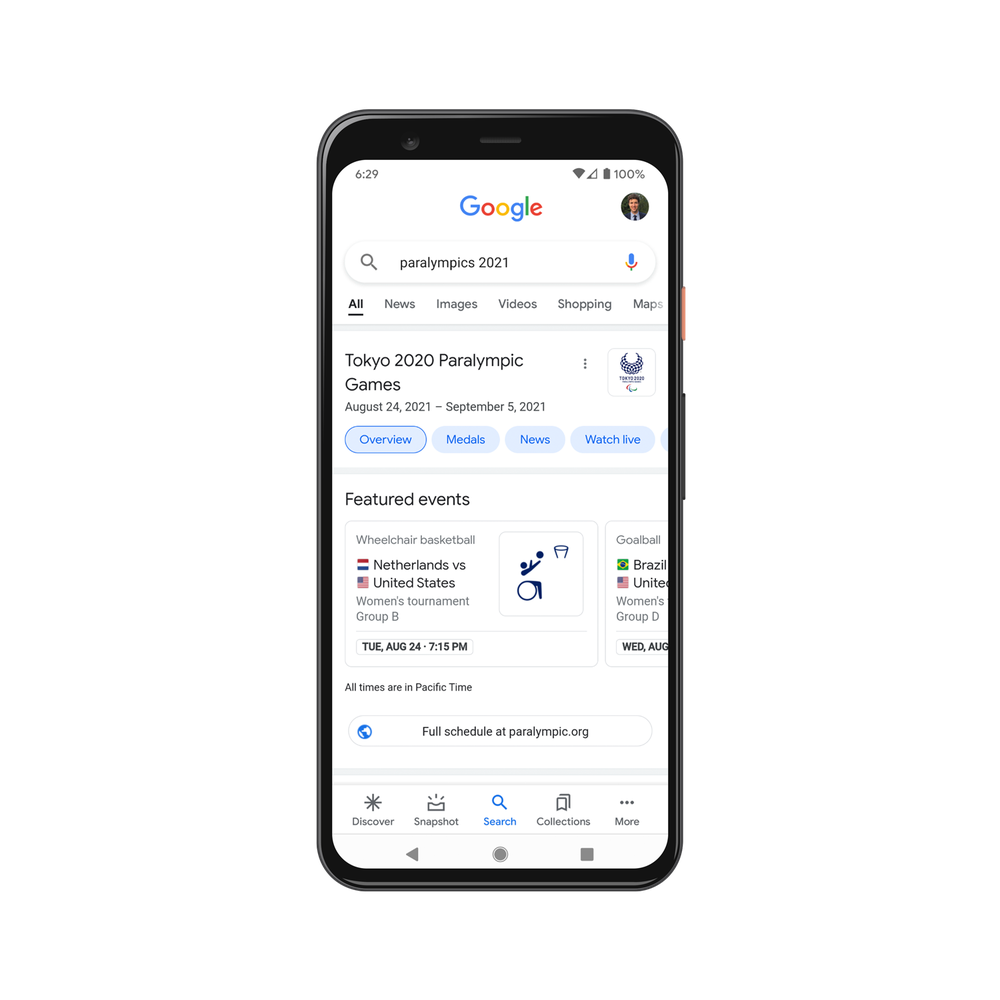
While some of the Tokyo 2020 Games are over, others are just beginning: The Tokyo 2020 Paralympic Games are right around the corner. And just like earlier this summer, there are few ways you can enjoy the action from home.
1. Watch livestreams and highlights on YouTube
Starting August 24, catch livestreams as well as clips and highlights from 13 official Paralympic broadcasters around the world on their YouTube channels. The Paralympic Games channel will also be streaming over 1,300 hours of live sports across 219 countries and territories, as well as sharing highlights, athlete interviews and behind-the-scenes videos with automatic captions available in 13 languages. Livestreams will also be accessible with automatic captions in English.
2. Stay up to speed with Google Search
Find the latest information on your favorite team and Paralympians, and even see where your country ranks in the race for gold. If you can’t tune into the Paralympics live, don’t worry — you can watch a daily recap video, check out the top news related to the events and with Google Images, even see photo galleries of some of the best photos of the day. For data lovers, check out our Trends page to see fun Search stats on your favorite sports. And, for a limited time only, keep an eye out for a fun surprise when searching for the Paralympics — I can’t say too much, I wouldn’t want to spoil the fun!

Facebook, video e chiamate anche senza Messenger?
BAMBINI ED EDUCAZIONE FINANZIARIA: QUANDO INIZIARE?
Per Alfio Bardolla 4 genitori su 5 non sanno come gestire l’educazione finanziaria dei propri figli Ci sono molte sfide quando si tratta di educare i bambini, e una di…
L’articolo BAMBINI ED EDUCAZIONE FINANZIARIA: QUANDO INIZIARE? scritto da Paolo Brambilla proviene da Assodigitale.

Ask a Techspert: How do Nest Cams know people from pets?
The other day when I was sitting in my home office, I got an alert from my Nest Doorbell that a package had been delivered — and right from my phone, I could see it sitting on the porch. Moments later, my neighbor dropped by to return a piece of mail that had accidentally gone to her — and again, my Doorbell alerted me. But this time, it alerted me that someone (rather than something) was at the door.
When I opened my door and saw my neighbor standing next to the package, I wondered…how does that little camera understand the world around it?
For an answer, I turned to Yoni Ben-Meshulam, a Staff Software Engineer who works on the Nest team.
Before I ask you how the camera knows what’s a person and what’s a vehicle, first I want to get into how they detect anything at all?
Our cameras run something called a perception algorithm which looks at objects (people, animals, vehicles, and packages) that show up in the live video stream. For example, if a package is delivered within one of your Activity Zones, like your porch, the camera will track the movement of the delivery person and the package, and analyze all of this to give you a package delivery notification. If you have Familiar Face Alerts on and the camera detects a face, it analyzes the face on-device and checks whether it matches anyone you have identified as a Familiar Face. And the camera recognizes new faces as you identify and label them.
The camera also learns what its surroundings look like. For example, if you have a Nest Cam in your living room, the camera runs an algorithm that can identify where there is likely a TV, so that the camera won’t think the people on the screen are in your home.
Perception algorithms sound a little like machine learning. Is ML involved in this process?
Yes — Nest cameras actually have multiple machine learning models running inside of them. One is an object detector that takes in video frames and outputs a bounding box around objects of interest, like a package or vehicle. This object detector was trained to solve a problem using millions of examples.

TIM, possibile data breach? Rubati i dati di alcuni utenti

Bitcoin, per la prima volta in tre mesi sopra i 50.000 dollari

Mascherine, togliamo l’elastico dopo l’uso, aiutiamo la fauna
Parte una campagna su Whatsapp per evitare di inquinare terra e mare e di danneggiare la fauna Su Whatsapp molte persone attente all’ambiente stanno facendo circolare un messaggio per sensibilizzare…
L’articolo Mascherine, togliamo l’elastico dopo l’uso, aiutiamo la fauna scritto da Paolo Brambilla proviene da Assodigitale.