
Nintendo Switch al prezzo più basso degli ultimi due anni su Amazon

EA Play Live 2021, tutti i trailer e gli annunci più importanti

Dead Space, annunciato il remake per console next-gen e PC

Conclusa la prima fase del progetto HydRON dell’ESA

Plan for business growth with Display & Video 360
At Google Marketing Livestream this spring, we talked about how Google Marketing Platform can help you drive performance while protecting privacy. That’s when we raised the curtain on some Display & Video 360 product announcements designed to help you reach your customers wherever they are — including on connected TV and audio.
Today we’re kicking off a series of articles about Display & Video 360 that cover these new features, as well as upcoming capabilities to support your business recovery and growth. This includes new TV and audio reach forecasting tools and new frequency metrics to help you quickly figure out where your audience is and how to reach them in the most cost-effective way. This series will also introduce new enterprise-level features designed to increase your productivity thanks to automated yet customizable technology. First up is planning.
Get more premium reach with Display & Video 360’s planning tools
Planning is no longer a one-time exercise; it needs to happen on an ongoing basis to keep up with your audience’s rapidly-changing habits. Planning solutions that are tightly connected to your media buying platform can let you more accurately and more quickly assess the potential reach of your plans.
To help media planners adjust to this new way of working, we’re introducing two Display & Video 360 tools that will help you estimate the reach of your campaigns in real-time across any inventory type – including traditional TV, connected TV (CTV) and even audio.
Plan your CTV and audio campaigns alongside your other media buys
Watching CTV and streaming audio are now mainstream behaviors. To help marketers make the most of this extra reach opportunity, we’re adding new signals in Display & Video 360’s reach planning tool so that you can plan the reach of your CTV and audio deals in real time. This will complement existing Display & Video 360 forecasting capabilities which already allow you to estimate the reach of your display and video programmatic deals as well as your CTV open auction buys.
Planners will now be able to more immediately answer questions like, “How much incremental reach could I get by combining a network CTV deal with YouTube reservation and open auction video or audio ads?” They’ll have the option to forecast the reach of their campaign either by picking from their custom list of available CTV and audio deals or by choosing publishers they’re considering adding to their media mix.
Strike the optimal mix of TV and digital media to maximize reach
Planning tools that span across traditional and CTV viewing can help you navigate the shift from linear TV to streaming more effectively. For example, TV in Google Ads Reach Planner lets advertisers like PepsiCo better plan for their reach and frequency goals by allocating optimal budgets across TV and YouTube.
We’re bringing TV planning to Display & Video 360 users in the U.S., France, Germany, Japan and Vietnam. By combining actual historical TV and digital ads data into a single reach curve the tool will show the unduplicated reach of the entire plan across TV, YouTube, broadcast and cable networks on CTV and the rest of your digital campaigns. Display & Video 360 will use data from major single-source panels in each available country or region to understand the TV viewership and how it overlaps with digital media consumption.
We’ll start rolling out this TV planning functionality in beta in the fall. It will be fully self-service and you’ll only need some basic details about your media plan to get started: your core audience demographics, the duration of your campaign and your estimated TV discount so that we can return tailored estimates.
If your budgets are somewhat flexible, we’ll show two curves: one will show the reach you’d get by spending your entire budget on TV and the other will show the optimal reach you’d get by efficiently splitting your budgets across TV and digital. You’ll also be able to set a fixed TV budget and see a single curve showing the extra reach you could get by adding digital channels such as YouTube and CTV ads to the mix.
TV in Display & Video 360 reach planning tool (flexible budget scenario)
The growth of new media types alongside traditional TV has made forecasting reach and ad spend more difficult than ever. With Display & Video 360’s real-time forecasting solutions you’ll be able to approach show premieres seasons this fall with more serenity.

Get ready for the Tokyo 2020 Olympics with Google and YouTube
In a few hours, the best athletes from around the world will come together in Tokyo to compete on the world’s largest stage. While everyone on the ground prepares for the matches and meets, we’re getting ready, too.
We hope technology can help everyone enjoy the Games safely at a distance this year. Here are six ways Google is helping bring you all the action from the Olympic Games Tokyo 2020:
1. Stay up to speed (without breaking a sweat) with Google Search
When you search for the Olympics you’ll be able to find the latest information on your favorite events, sports and players, and even see where your country ranks in the race for gold. If you can’t tune into the Games live, don’t worry — you can watch a daily recap video or check out the top news related to the Olympic Games. For data aficionados, check out our Trends page to see fun Search stats on your favorite sports.
2. Take a timeout with the Doodle Champion Island Games
Join in on the action with our largest-ever interactive Doodle game, created in collaboration with Japanese animation STUDIO 4°C. Click on the Doodle to enter the gameworld, join a team and compete against reigning Champions across skateboarding, rugby, climbing and more — all in retro 16-bit glory. Keep a lookout for dozens of surprises and side quests as you journey through Doodle Champion Island.

OnePlus Nord 2, un ottimo smartphone migliorato solo dove serviva. La recensione
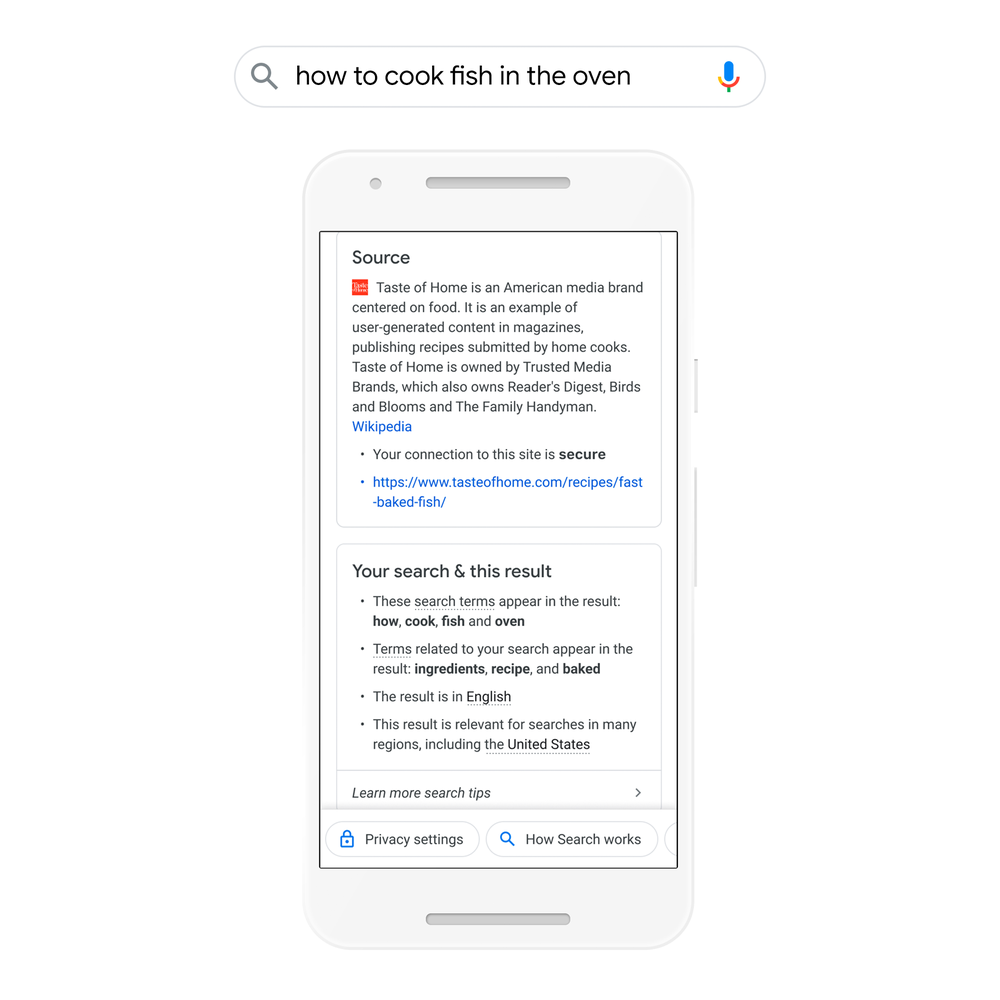
Learn more – and get more – from Search
When you search for information on Google, you’re probably accustomed to seeing a lot of relevant results in a fraction of a second. But maybe you’ve found yourself wondering how Google connected those results to the words you typed, especially if you didn’t get exactly what you were expecting to find.
Now, there’s a quick and easy way to see useful context about how Google returned results for your query, and to find helpful tips to get more out of Google Search. Starting today, when you visit an About This Result panel — the three dots next to most results — you’ll get even more information about your results to help you make sense of the information and figure out which result will be most useful.

Ask a Techspert: What is open source?
When I started working at Google, a colleague mentioned that the group projects I worked on in college sounded a lot like some of the open source projects we do here at Google. I thought there had to be some misunderstanding since my projects all happened in-person with my classmates in the corner of some building in the engineering quad.
To find out how a real life study group could be like a type of computer software, I went straight to Rebecca Stambler, one of Google’s many open source experts.
Explain your job to me like I’m a first-grader.
Well, to start, computer programs have to be written in a language that computers understand — not in English or any other spoken language. At Google we have our own language called Go. When we write in a language to tell a computer what to do, that’s called source code. Just like you can write an essay or a letter in a Google Doc, you have to write your code in an “editor.” I work on making these editors work well for people who write code in Google’s programming language, Go.
What does it mean for software to be open source?
A piece of software is considered open source if its source code is made publicly available to anyone, meaning they can freely copy, modify and redistribute the code. Usually, companies want to keep the source code of their products secret, so people can’t copy and reproduce their products. But sometimes a company shares their code publicly so anyone can contribute. This makes software more accessible and builds a community around a project. Anyone can work on an open source project no matter who they are or where they are.
Anyone can contribute? How do they do it?
Before you actually write open source code, a good first step would be thinking about what you’re interested in, whether that’s web development, systems or front end development. Then you can dive into that community by doing things like attending talks or joining online networks where you can often learn more about what open source projects are out there. Then, think about what topics you’re interested in — maybe it’s the environment, retail, banking or a specific type of web development. Some people write code just because they enjoy it; plenty of these people have contributed to code within Google open source projects. So if you’re looking to contribute, make sure it’s something you’re really interested in.

OnePlus Nord 2 5G già in pre-ordine. Specifiche e prezzi

Amazon Prime Gaming regala Battlefield 1 e Battlefield V

Olimpiadi Tokyo 2020, dove vederle in TV

Google Cloud IDS: nuovi strumenti di sicurezza per le aziende

Clubhouse dice addio agli inviti: ora è aperta a tutti