Collaboration and security in Google Workspace for Education
Google Workspace for Education, previously known as G Suite for Education, offers simple and flexible tools so your school community can better collaborate, manage classes and create safe learning environments. Our latest updates include improved collaboration across our products and security improvements for all Google Workspace for Education customers.
The next evolution of collaboration
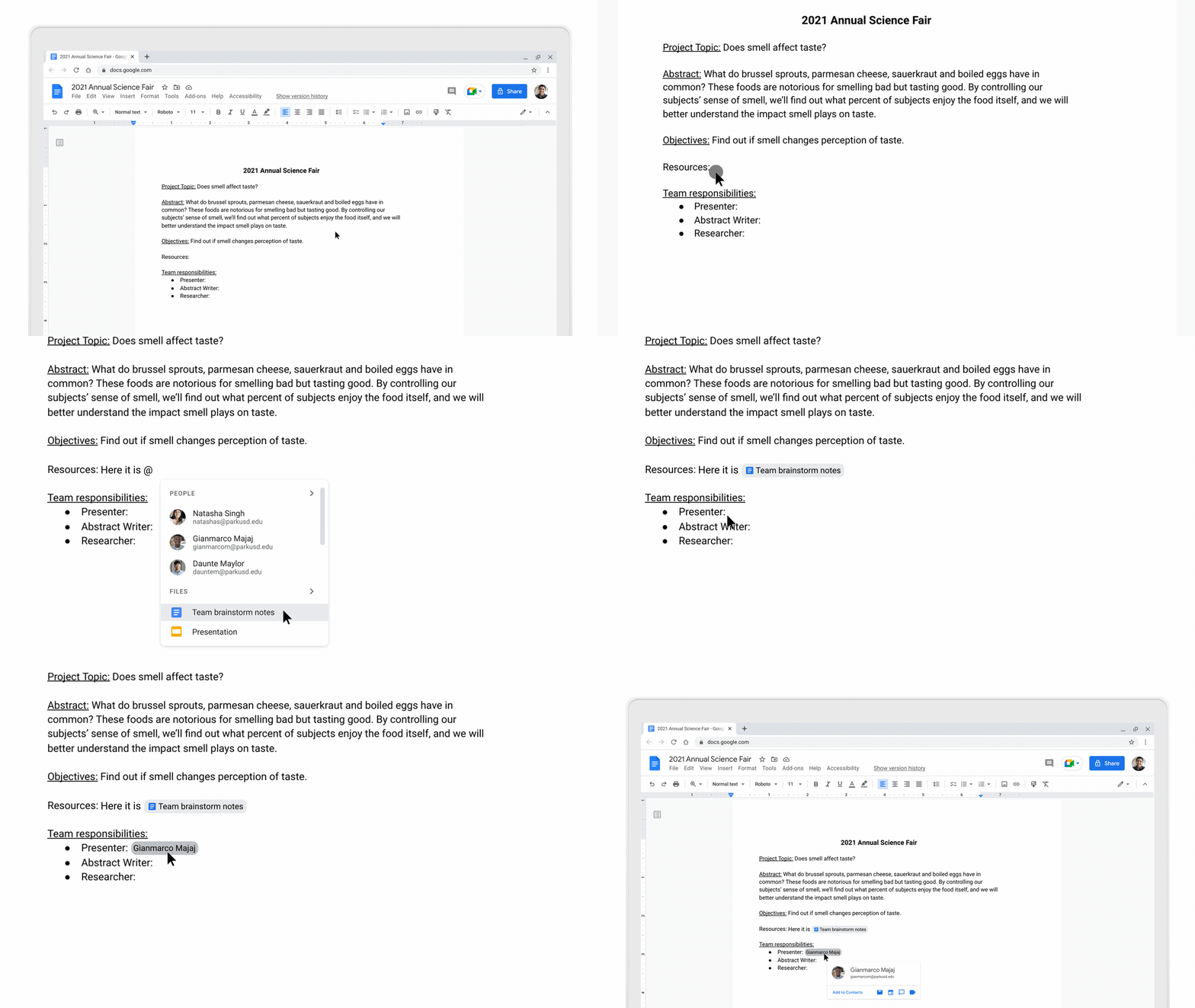
Last month we announced smart canvas, a new experience that enhances collaboration in the tools that you use every day — like Docs, Sheets and Slides—by making them even more interactive and intelligent.
One new feature of this experience is smart chips, which allows you to pull in helpful information from other Google Workspace products while working in a document. For example, if you’re a student working on a group project, you can quickly embed files from Drive or tag other students in your group right into your document by typing the ‘@’ sign. Once people are tagged, just hover over their name to quickly chat, email or set up a meeting.

Google Meet is more secure, easy to use and engaging
Over the past year, video conferencing became essential for teaching, learning and staying connected. Whether you’re still teaching remotely, in a hybrid setting or have returned to in-person instruction, Meet provides an easy, reliable and secure way for your school community to connect. Today, we’re announcing new features to Meet to continue supporting the evolving needs of school communities.
Secure by design
Meetings initiated from Google Classroom will soon be safer and more secure by design, with these updates coming in the next few months:
- Every teacher and co-teacher in a Classroom class will be meeting hosts in Meet by default, so multiple teachers can share the load of managing a class.
- Once a teacher is present, students who are on the Classroom roster will be automatically admitted to the meeting. Students will be placed into a “waiting room” and won’t be able to see or communicate with other participants until a teacher is present.
- Anyone who’s not on the Classroom roster will have to “ask to join” and only the teacher(s) can allow them into the meeting.
All meetings, including those started from Meet or Calendar, will get the following additional security updates in the coming months:
- When a host ends breakout rooms, participants will get a warning and then will be forced back into the main meeting.
- Hosts can match the breakout room safety settings with the safety settings from the main meeting.
- To quickly prevent distractions, hosts will be able to turn off everyone’s video at once with “video lock.”
- For hosts using tablets and mobile phones, we’re adding important meeting safety controls, like the ability to end meetings for everyone on the call and mute everyone at once.
Classroom adapts for the future of learning and teaching
Over the last year, the use of education technology skyrocketed as schools hustled to keep students learning. As some students return to their classrooms and others continue learning from home, we’re optimistic about the role education technology can play to help teachers and school leaders as they make up for lost time.
We saw Classroom become a center for teaching and learning for millions of teachers and students this year, with many schools now using Classroom as their learning management system (LMS). This was only possible thanks to the support and feedback of teachers around the world. We were amazed by how quickly they learned the tools and put them into practice.
Change in education is inevitable. As the needs of institutions evolve, Classroom will keep pace. Today, we’re sharing some important updates to features we previously shared on our roadmap as well as some new ones we developed with input from teachers and education leaders:
Roster import:Starting this summer, U.S. districts with Google Workspace for Education Plus will be able to automatically set up classes and keep rosters in sync with their Student Information System, powered by Clever. IT admins will be able to create and populate classes via Clever, saving teachers valuable prep time.
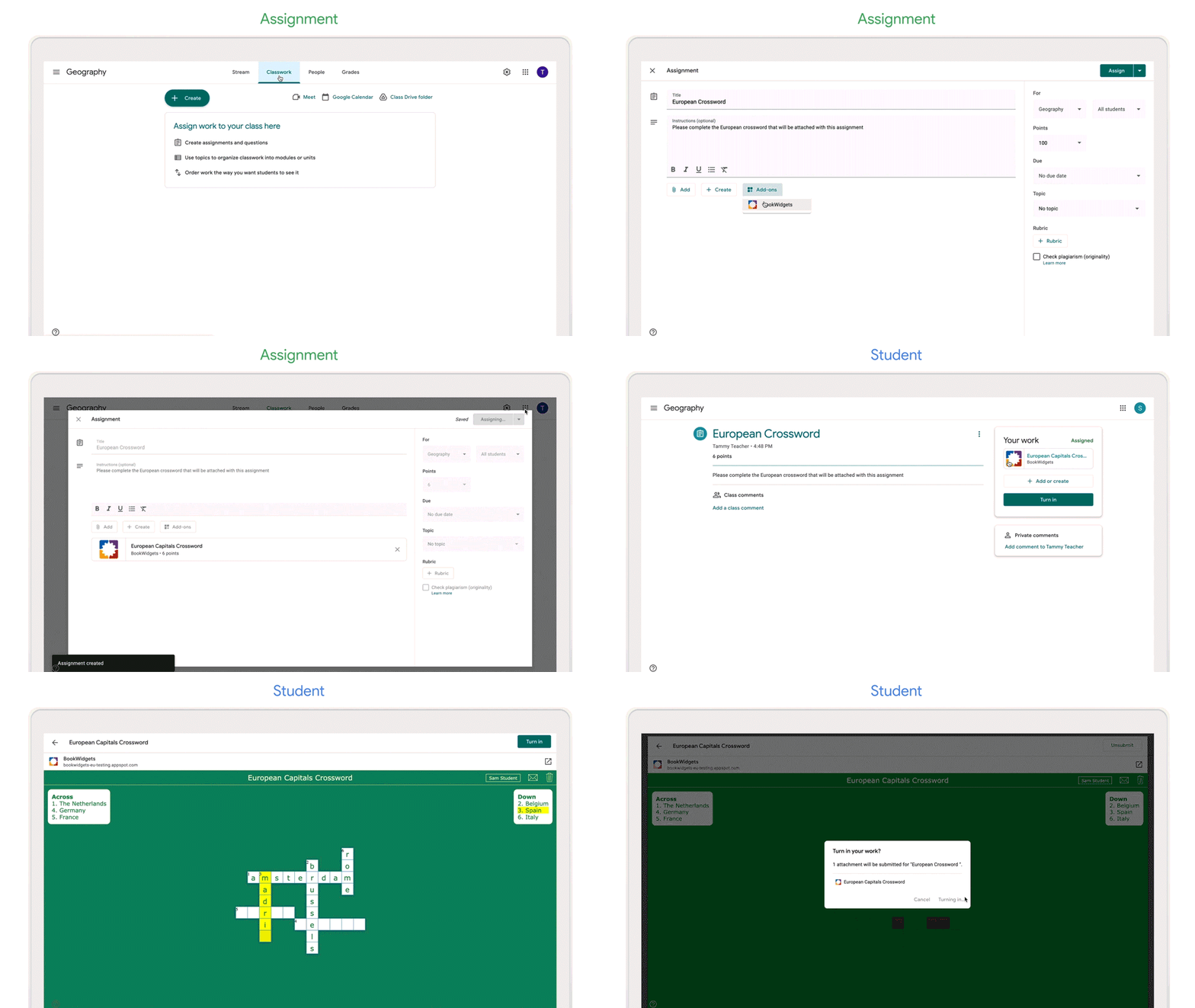
Classroom add-ons:Coming to beta later this year for districts with the Teaching and Learning Upgrade or Education Plus, Classroom add-ons allow you to bring your favorite content and activities from top edtech tools right inside Classroom. Admins will be able to pre-install add-ons for multiple teachers or groups at once.
We’re starting with nine partners including Adobe Spark for Education, BookWidgets, CK-12 Foundation, Edpuzzle, IXL, Kahoot!, Nearpod, Newsela and SAFARI Montage, with plans to expand to many more. Here’s an example of how Bookwidgets is using add-ons to make it easier for teachers to assign an activity and students to complete it, without ever leaving Classroom.
Helping schools prepare for what’s next in education
Today at The Anywhere School, we shared great new ways to use Google Classroom, Google Workspace for Education, Google Meet, and Chrome OS – all focused on helping teachers and school leaders continue to do the amazing work they do.
Classroom is adapting for the future of learning and teaching
Classroom strives to be the simplest, easiest to use learning platform, but we’re continuously making improvements to make it even better. Roster Import will enable admins to set up classes at scale (and save a significant amount of time!) while Classroom add-ons will give educators a simple way to integrate their favorite content and activities. And the new student activity dashboard, the ability to schedule assignments across multiple classes and improvements to the Meet and Classroom integration will make it far easier to engage with students. Learn more in the Classroom blog.
Google Workspace for Education improves collaboration and security
Smart canvas makes Docs, Sheets and Slides more interactive and intelligent. With features like smart chips, checklists, table templates and assisted analysis, smart canvas enables stronger collaboration with anyone, from anywhere. We’re also strengthening the security of all Google Workspace for Education editions with Drive security improvements and additional advanced security for Education Plus and Education Standard customers. Learn more in the Workspace blog.
Google Meet is getting more secure, easy to use and engaging
Google Meet is adding features to continue supporting the evolving needs of school communities. Moderators and admins will have new controls, like the ability to force breakout room participants back into the main meeting and end any meeting from the investigation tool. Meet will also be easier to use now that it supports multiple moderators and the ability to pin multiple presenters at the same time. Video calls will be more engaging and inclusive with public live streaming to YouTube, hand-raising improvements and live translated captions. Learn more in the Meet blog.
Chromebooks get more personalized
As schools transition from shared Chromebook carts to assigned devices, they are also getting much easier to use and manage. Signing in securely is now a breeze with PIN logins. Admins can now easily see when Automatic Update Expiration dates are reached across their fleet with Chrome Insights Reports. And with new built-in accessibility features like Point Scanning mode with Switch Access, and the new panning method for the full-screen magnifier, teachers and students alike can present and access information in a way that works for them. Learn more in the Chromebook blog.
We are constantly humbled by the amazing ways educators use our tools to better collaborate, manage classes, and create safe learning environments. Whether you’re about to wrap up your school year or still have a few months left, we hope that by sharing these updates now, we can help you be better prepared to use these tools in your institution. To get regular product updates, please sign up for our newsletter and follow us on Twitter.
Easy data protection with Android Enterprise Essentials
Mobility is critical to how businesses keep their teams connected, especially in a hybrid world where so many of us can work from anywhere. This trend is great for team productivity, and it gives businesses the tools they need to digitize their work and serve customers.
Yet these businesses must be ever mindful of threats to device security — 47% of companies have seen an increase in cyberattacks since the work from home shift began.
Security breaches can be devastating for any organization, especially with mobile devices being linked to a company’s sensitive data. But unfortunately small to medium-sized businesses (SMBs) are less able to absorb the high costs of these security breaches. According to a National Cyber Security Alliance survey, after experiencing a breach, 10% of SMBs file for bankruptcy and 25% go out of business.
With limited budgets and IT resources, most SMBs must choose between management products that are costly and overly complex for their needs, or no protection at all.
At Google, we take a security-first approach to our products, and are committed to helping businesses of all sizes keep their data safe and secure. That is why we built Android Enterprise Essentials — an automatic and affordable security service for businesses with simpler needs. Essentials is designed and built by the Android team at Google, guided by our deep experience creating secure and helpful solutions for organizations. We’ve put the needs and realities of SMBs first to create a streamlined set of security and management defaults at an affordable price.
Available in more markets
After offering early access to Essentials through our launch partners, it is now generally available through additional partners in the U.S., the U.K, Japan, France and Germany, with more countries coming soon.
Essentials makes securing and managing devices a breeze. Devices with Essentials are automatically enabled with critical features enabled like remote wiping lost or stolen devices and enforcing a screen lock or preventing sideloading of applications. You can send devices directly to your employees, who can automatically set them up and put them to use right away with no training required. If you ever need to take action, you can view and manage devices via an easy-to-use, streamlined portal. And it all comes at an affordable price, with no additional IT investment required.
Essentials also works for larger organizations that wish to extend core protections to devices that don’t need advanced device management. Essentials can serve as a starting point for customers who want to try out simple management at first, and consider upgrading to more sophisticated management solutions in the future.
Simple solutions for customers
National Services for Health Improvement (NSHI) is a U.K.-based organization focused on improving patient outcomes for its network of global healthcare clients. Essentials provided a quick method to mobilize its teams without a complex setup process.
Having Essentials applied to devices out of the box means we don’t need to worry about training employees or having to spend time setting it up.
Morris & Perry, an asphalt and concrete supplier that has been in operation in the U.K. since 1928, wanted to help its drivers stay connected and access important data throughout the day. Essentials offered them a simple path to select devices and quickly get them into employees’ hands with security features like remote wipe and PIN reset automatically enabled.
“Setting up our devices with Android Enterprise Essentials was fast and easy,” says Will Vincent, financial controller with Morris & Perry. “It significantly helped our operations, as we can remotely reset PIN codes while meeting our security guidelines.”
Get started today
Essentials is now available through a wider network of resellers. We’re pleased to welcome The Barcode Warehouse and Telserve in the U.K.; LDLC Pro, DAMS and Saphelec in France; Brodos and Everphone in Germany; Synnex in Japan and Vox Mobile in the U.S.
Essentials brings much needed tools that help make mobility more secure and accessible for businesses. Check out our Essentials website to learn more. And if you’re interested in becoming an Essentials partner, please visit the Android Enterprise Partner Portal to register for our partner community.

Diritti d’autore, la Corte UE dà ragione (in parte) a YouTube

TikTok, ecco Jump, per inserire contenuti extra nei video
JPEG XL, un nuovo standard per le immagini digitali

Find X3 di OPPO in sconto di 250 euro per il Prime Day 2021

AMD FidelityFX Super Resolution (FSR): cos’è, come funziona e prova sul campo
Samsung svela le novità dei monitor gaming Odyssey 2021

La Champions League su TIMVision? TIM tratta con Mediaset

Le migliori stampanti 3D in offerta per il Prime Day 2021
Google lavora su Tivoli, nuova app per apprendere le lingue