SpaceX pronta a lanciare in orbita un mini satellite pubblicitario

Galaxy Buds2: per un suono premium e il massimo del comfort
e su una confortevole vestibilità.

Podcast del Disinformatico RSI 2021/08/13: numeri misteriosi via radio

Ultimo aggiornamento: 2021/08/13 11:00.
È disponibile subito il podcast di oggi de Il Disinformatico della Rete Tre della Radiotelevisione Svizzera, condotto dal sottoscritto: lo trovate presso www.rsi.ch/ildisinformatico. Se volete scaricarlo, ecco il link diretto. Questa è l’edizione estiva, dedicata a un singolo argomento.
I podcast del Disinformatico di Rete Tre sono ascoltabili anche tramite feed RSS, iTunes, Google Podcasts e Spotify.
Buon ascolto, e se vi interessano il testo e i link alle fonti della storia di oggi, sono qui sotto!
Nota: la parola CLIP nel testo che segue non è un segnaposto in attesa che io inserisca dei contenuti. Indica semplicemente che in quel punto del podcast c’è uno spezzone audio. Se volete sentirlo, ascoltate il podcast oppure guardate il video che ho incluso nella trascrizione.
—
CLIP: (in sottofondo) Numbers-intro
State ascoltando uno spezzone di quello che per quasi un secolo è stato uno dei misteri più bizzarri della storia della radiofonia, dell’informatica e della crittografia insieme: numeri, trasmessi via radio in onde corte da stazioni sconosciute ma ricevibili in quasi tutto il mondo. Soltanto numeri, recitati per ore di fila, in questo esempio in spagnolo.
Nessuno capiva cosa fossero, e chi lo sapeva stava ben zitto, per cui vennero chiamate semplicemente numbers station: le stazioni dei numeri. Se giocate a Call Of Duty: Black Ops, avrete notato che il protagonista, Alex Mason, è tormentato da una serie di numeri di cui non capisce il senso.
CLIP: Mason (video)
Quei numeri misteriosi sono quelli delle numbers station. Questa è la storia di questo mistero, di come è stato probabilmente risolto e del suo strano legame con l’informatica.
SIGLA
La più antica tra le stazioni radio sparse per il mondo che trasmettono soltanto numeri, le cosiddette numbers station, risale ai tempi della Prima Guerra Mondiale. Trasmetteva, appunto, numeri, usando il codice Morse. Nei decenni successivi ne comparvero altre, più moderne, che trasmettevano sempre numeri, ma recitati a voce, in varie lingue: spagnolo, tedesco, russo, ceco, con voci maschili o femminili. Poi sono arrivate le voci sintetiche.
Negli anni Settanta del secolo scorso, una di queste stazioni misteriose trasmetteva da Londra, specificamente dalla zona di Bletchley Park, che è suolo sacro per gli informatici, visto che è qui che Alan Turing, uno dei padri dell’informatica, progettò uno dei primi computer durante la Seconda Guerra Mondiale, allo scopo di decifrare i codici segreti delle comunicazioni radio dei nazisti. Questa numbers station diffondeva puntualmente una musichetta e poi una voce con spiccatissimo accento british declamava dei numeri, come in questo esempio:
CLIP: British
A chi fossero destinate queste trasmissioni interminabili, o a cosa servissero, ufficialmente non si poteva dire. Tutti le potevano ascoltare liberamente, e molti radioamatori intrigati dal mistero lo facevano: bastava procurarsi una radio che ricevesse le onde corte.
Nei primi anni Novanta un musicista londinese, Akin Fernandez, si appassionò totalmente a questo mistero e pubblicò addirittura una compilation su quattro CD di registrazioni di queste trasmissioni, intitolata The Conet Project. Il titolo è ispirato a una parola in ceco che Fernandez sentiva spesso negli elenchi di numeri e che vuol dire “fine”.
Questa pubblicazione spinse finalmente un funzionario governativo britannico a parlare pubblicamente di queste number station nel 1998, dichiarando però al quotidiano Daily Telegraph che queste stazioni “sono quello che supponete che siano. La gente non dovrebbe esserne perplessa. Non sono, diciamo, destinate al pubblico”. Tutto qui.
Ancora oggi la documentazione ufficiale sulla natura e l’origine delle numbers station è scarsissima. Ci sono alcuni documenti di un processo svoltosi negli Stati Uniti alla fine degli anni Novanta, dei vecchi rapporti del Ministero degli Interni polacco e ceco, e poco altro: solo pochi indizi sparsi, raccolti dagli appassionati di radioascolto di vari paesi, che negli ultimi decenni si sono organizzati scambiandosi segnalazioni via Internet sulle frequenze radio utilizzate dalle singole stazioni, classificandone gli orari di trasmissione, le lingue utilizzate e altri dettagli. Il loro lavoro ha permesso di localizzare approssimativamente alcune di esse, per esempio a Cuba, a Cipro, in Russia e negli Stati Uniti.
CLIP: Russo
Anche se tutto questo può dare l’impressione di essere una tesi di complotto partorita da gente che non ha di meglio da fare che ascoltare per ore numeri trasmessi da chissà chi, di fatto queste stazioni esistono e hanno dei comportamenti ben precisi, e quindi costituiscono un mistero che ha una base di dati concreta e indagabile.
Mettendo insieme tutti i dati raccolti dagli appassionati e quei pochi accenni pubblicati da fonti ufficiali e da alcuni ex agenti governativi, insieme a un pizzico di conoscenza informatica, viene fuori una spiegazione credibile, coerente e intrigante di queste numbers station: spionaggio internazionale.
Secondo questa spiegazione, le numbers station sono dei sistemi di comunicazione cifrata con agenti in territorio nemico che usano la tecnica del cosiddetto one time pad o cifrario monouso. Gli one time pad sono delle sequenze di numeri casuali, scritte su un foglietto, che vengono usate per cifrare e decifrare un messaggio in maniera molto semplice ma molto robusta, se il sistema viene usato una sola volta (per questo si chiama one time) e senza commettere errori.
Il bello è che non ha bisogno di un computer, bastano carta e penna (per questo si chiama pad, ossia “blocco per appunti”) e basta un minimo di aritmetica.
Il messaggio cifrato risultante è una sequenza di numeri che può essere trasmessa apertamente, perché senza il one time pad esatto corrispondente è impossibile decifrarlo. Chi trasmette e chi riceve devono semplicemente mettersi d’accordo su quale specifico one time pad usare per un certo messaggio.
In pratica, una spia viene mandata all’estero dandole una serie di one time pad, che può essere minuscola (un one time pad sta sul retro di un francobollo). I suoi mandanti possono mandarle poi istruzioni trasmettendole via radio apertamente ma in forma cifrata, e la spia può riceverle liberamente, senza rivelare la propria posizione, usando una banale radiolina a onde corte facilmente acquistabile in qualunque negozio di elettronica di consumo senza creare sospetti. Deve soltanto trascrivere i numeri trasmessi e poi usare il one time pad per delle semplici addizioni. A parte la serie di one time pad, la spia viaggia senza avere con sé nulla di insolito: niente computer, niente programmi sospetti di crittografia, nessun trasmettitore o altro gadget rivelatore.
Le sequenze di numeri vengono trasmesse ripetutamente per evitare errori di trascrizione e compensare eventuali interferenze e interruzioni del segnale radio, che viaggia anche per migliaia di chilometri.
Inoltre vengono trasmesse anche delle sequenze fittizie, perché altrimenti sarebbe facile per il controspionaggio abbinare i periodi in cui vengono effettuate trasmissioni con le attività delle persone sospettate di spionaggio. Per esempio, se una stazione smettesse di trasmettere ogni volta che una presunta spia è in viaggio, allora sarebbe possibile stabilire un nesso fra stazione e spia. Sappiamo tutte queste cose anche grazie a un libro, Compromised, scritto dall’ex agente dell’FBI Peter Strzok, che racconta la vicenda della cattura di due spie russe, Andrey Bezrukov e Elena Vavilova, che avevano operato per vent’anni negli Stati Uniti, fino al 2010, facendosi chiamare rispettivamente Donald Howard Heathfield e Tracey Lee Ann Foley e spacciandosi per cittadini canadesi.
In questo libro l’ex agente dell’FBI spiega di aver sorvegliato le due spie mentre ricevevano e decifravano trasmissioni di numeri in onde corte nella loro casa in Massachusetts. Le trasmissioni arrivavano non dalla Russia, ma da Cuba. Sono proprio quelle di cui avete sentito uno spezzone all’inizio di questo podcast.
CLIP: Numbers-intro (pezzo differente)
L’ex agente Strzok spiega che un errore madornale nelle trasmissioni cubane permise di capire quando venivano inviati messaggi reali e quando invece venivano diffuse sequenze fittizie. L’FBI si accorse che le sequenze fittizie coincidevano esattamente con i momenti in cui le due persone sospettate erano in viaggio.
Il caso delle due spie russe non è l’unico che rivela la natura delle numbers station: ce ne sono almeno altri tre, fra il 2001 e il 2009 e sempre negli Stati Uniti, i cui atti pubblici indicano che le spie ricevevano ordini tramite segnali radio in onde corte. E dato che esistono stazioni di questo tipo di vari altri paesi, Stati Uniti compresi, è presumibile che vengano usate dalle spie di tutto il mondo.
Il mistero delle stazioni di numeri, insomma, sembra ragionevolmente risolto: ma che c’entra con l’informatica, visto che si tratta di un sistema che fa appunto a meno dei computer? La risposta è che il mistero è stato quasi sicuramente risolto grazie alla collaborazione degli appassionati via Internet e grazie alle tecnologie informatiche che hanno consentito la raccolta e la condivisione planetaria dei dati raccolti da questi appassionati.
Ma c’è anche un altro aspetto molto informatico: un one time pad, nonostante la sua semplicità, non è decifrabile da nessun computer, non importa quanto sia potente: la dimostrazione matematica di questa straordinaria proprietà, denominata sicurezza perfetta, fu data negli anni Quaranta del secolo scorso da Claude Shannon, celebre fondatore della teoria matematica della crittografia. La scoperta fu talmente importante che restò un segreto militare per alcuni anni. Oggi ne parliamo apertamente in un videogioco come Call of Duty Black Ops.
Persino gli ormai imminenti computer quantistici non possono violare un one time pad usato correttamente, mentre i sistemi di crittografia che usiamo abitualmente su Internet, nei nostri computer e telefonini, sono certamente violabili se si usa una potenza di calcolo sufficiente.
Insomma, stavolta carta, penna e cervello fino battono il supercomputer. È una soddisfazione sempre più rara, di questi tempi.
Fonti aggiuntive: Matt Blaze, NSA, Il Disinformatico, Washington Post, GameRant, Wikipedia, Salon.
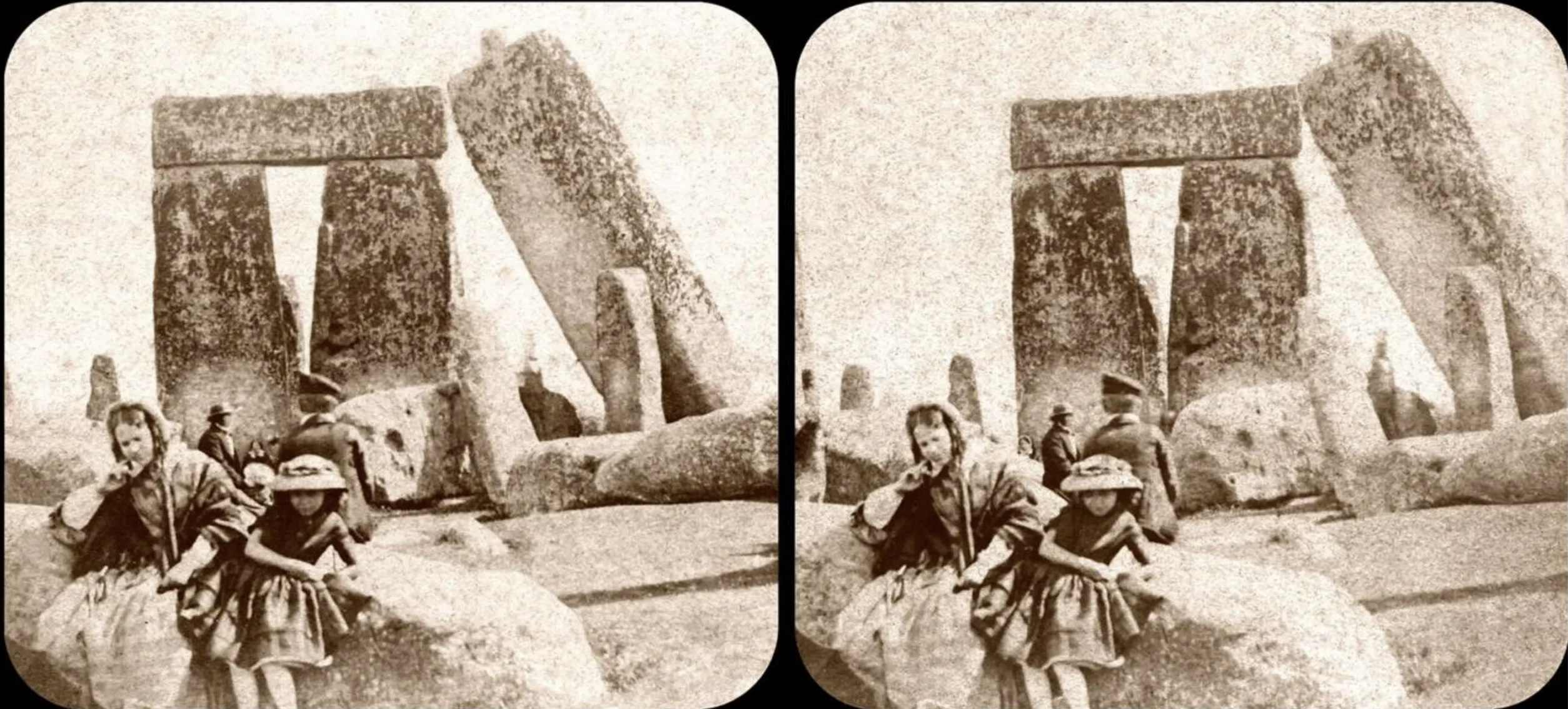
La prima foto “di famiglia” di Stonehenge ha 160 anni ed è in 3D. E conferma: le pietre sono state spostate
In questa storia c’è davvero un po’ di tutto: dalla musica rock all’informatica ai viaggi nel tempo, e anche un pizzico di pseudoscienza. Sulla pagina Web ufficiale di Stonehenge è comparsa di recente la richiesta al pubblico di cercare foto di famiglia scattate presso il celebre monumento megalitico, allo scopo di trovare la più antica e di creare una cronologia del monumento e delle vite dei suoi visitatori.
Il Daily Grail racconta che a questo appello ha risposto nientemeno che Brian May, noto ai più come chitarrista leggendario dei Queen, che è anche astrofisico ma soprattutto è collezionista, sin da bambino, di fotografie stereoscopiche (quelle che oggi chiamiamo 3D), tanto da essere diventato il proprietario di una delle più vaste collezioni al mondo di questo genere di foto (ne ha oltre centomila).
Frugando nella sua collezione, appunto, May ha trovato questa foto:
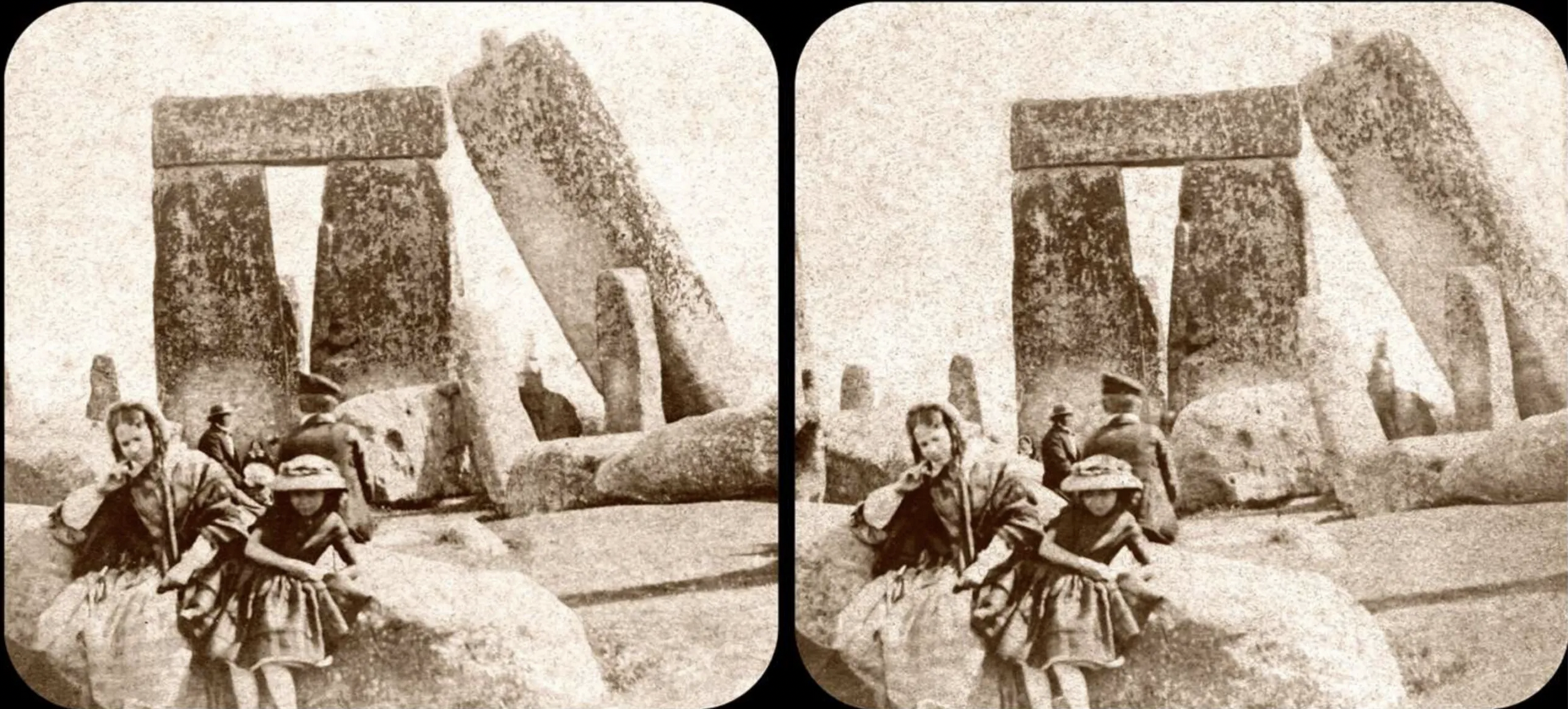
Risale al 1860 circa, ed è appunto tridimensionale. Pochi, oggi, sanno che le foto 3D furono inventate agli albori della fotografia chimica e divennero popolarissime: si guardavano con appositi visori simili a quelli che i più attempati ricorderanno come View-Master.
La foto in questione fu scattata dal fotografo Henry Brooks, di Salisbury. Ritrae sua moglie, Caroline, che sorride, accanto alla figlia Caroline Jane, che guarda il fotografo, e il figlio Frank, di spalle, troppo preso a guardare il monumento per mettersi in posa per la foto.
Fra l’altro, la foto documenta un altro fenomeno poco conosciuto: oggi le pietre gigantesche di Stonehenge non sono affatto nelle loro posizioni originali. La foto d’epoca ritrovata da Brian May mostra infatti la posizione in cui si trovava, intorno al 1860, la Pietra 56, nota come la Leaning Stone perché era appunto inclinata. Fu raddrizzata nel 1901, come spiega il sito dell’English Heritage, e non è l’unica pietra grossolanamente riposizionata, come documenta questa foto 3D piuttosto recente scattata proprio da Brian May dallo stesso punto di vista della foto ottocentesca.

Per cui qualunque considerazione su presunti allineamenti cosmici incredibilmente precisi di Stonehenge realizzati dai suoi costruttori originali andrebbe presa con abbondanti manciate di cautela.

Galaxy for the Planet, la sostenibilità secondo Samsung

Cloud Covered: What was new in July on Google Cloud
Google Cloud has stayed busy over the summer with new programs, events, tools and products making their introductions in July. Here are the most popular posts last month from the Google Cloud blog.
Making hiring more equitable
Last month we announced Google Cloud’s new Autism Career Program, designed to help the expanding cloud industry hire and support more talented people with autism. Working with the Stanford Neurodiversity Project, the program will break down common barriers for candidates with autism, and train Google Cloud managers and others involved in hiring processes. We’ll work effectively and empathetically with autistic candidates to ensure our interview processes are structured to include reasonable accommodations like extended interview time, providing questions in advance or conducting the interview in writing rather than verbally. Stanford will also provide coaching and ongoing support to our new Google Cloud team members with autism.
Expanding access to Google Cloud Next
Our blog announced the opening of registration for Google Cloud Next, taking place from October 12 through 14. Our global digital conference is designed to be open and flexible, with the freedom to create your own personalized experience. Tune in for live broadcasts and keynotes about our latest launches, and learn how customers and partners use Google Cloud to meet their business challenges. Interactive, digital experiences and on-demand sessions that align with your schedule and interests will also be available, including dedicated sessions and programming for our global audiences. Next ’21 is free this year, making the experience inclusive and accessible to all. Register to get informed, be inspired and expand your expertise.
Connecting global customers to higher performance
To help customers and the public sector in India and across Asia Pacific accelerate their digital transformation, we announced the opening of our new Google Cloud region in Delhi National Capital Region (NCR). This new data center joins 25 existing Google Cloud regions on our connected network, helping our customers better serve their users with faster and stronger performance for their applications. The new region will protect against service disruptions and will offer key Google Cloud products like Compute Engine, Google Kubernetes Engine, Cloud Bigtable and BigQuery. We also announced two new submarine cable systems linking the Middle East with southern Europe and Asia. The Blue and Raman Submarine Cable Systems will help Google users and customers around the globe communicate with friends, family, and business partners.
Securing the cloud with new solutions
Last month we also announced a wealth of new security products and solutions that bring together the best of Google, help businesses address critical security challenges and deliver a trusted cloud:
-
Cloud IDS will help customers detect and respond to network threats.
-
Cloud Armor Adaptive Protection uses machine learning (ML) to detect and block attacks targeting applications.
-
Chronicle will integrate with Google Cloud’s analytics platforms Looker and BigQuery to help with reporting, compliance, security-driven data science and more.
-
Autonomic Security Operations will guide businesses through the journey of protecting their assets from modern-day threats.
-
Risk Protection Program connects our Google Cloud customers to insurers with specialized cyber security programs.
All these Google Cloud security solutions are designed to help businesses rethink, reshape and transform their security programs.
Helping IKEA Retail (Ingka Group) recommend the next best purchase
Finally, we shared a story about how global retail giant IKEA experimented with Google Cloud Recommendations AI to deliver a more personalized shopping experience to their customers. Recommendations AI helped IKEA customers in two ways:
-
Customers found products that they liked and established their preferred choice among other options more quickly, reducing the number of clicks needed in their shopping journey and increasing IKEA’s clickthrough rate by 30%.
-
Customers found attractive and complementary products that expanded purchases from a single product to an entire home furnishing solution, giving IKEA a 2% surge in average order value.
Along the way, Google Cloud was there to support IKEA’s testing. With their strong business results, IKEA continues to explore more places in the customer journey to use the options provided by Recommendations AI, which now powers most of IKEA’s site recommendations.
That’s a wrap for July. Stay tuned to the Google Cloud blog for all things cloud.

Social First for B2B Content Marketing: What, Why and How
When I think about social media marketing, especially for B2B, I’m reminded of words of wisdom from one of my favorite bands:
The more you try to shave the cat
The more the thing will bite and scratch
It’s best, I think, to leave its fur
And listen to its silky purr
Some people like to make life a little tougher than it is.
— Cake, Tougher than It Is
(Seriously, give it a listen, it’s a bop).
How does this apply to B2B social media marketing? Well, marketers, we’ve been trying to shave that particular cat for a decade.
The Problem with Most B2B Social Media Marketing
The goal of a social media site is to keep people on the platform — reading, commenting, interacting, infinitely scrolling.
Meanwhile, marketers are trying to get people off the social media platform. We create blog posts, white papers, assets of every flavor, and post links to social media. We want social to be a gateway to our content.
And as we work at cross purposes, social media algorithms bite and scratch: Organic reach shrinks, our posts get buried in the feed, and our engagement goes kaput.
One Solution: “Social First” Content
Now, our agency hasn’t given up on blog posts, or on any other type of long-form content. There’s plenty of value in building a content library, staking out your position in the SERP, creating assets — it’s just that organic social isn’t always the best fit for promoting content.
Instead, we’re creating content that does what the algorithm wants it to do: Engage people on the platform, start a conversation, and rack up comments, likes and shares.
We call it Social First, not Social Only, because it’s still content that can be repurposed in blog posts and other assets. But the primary goal is to maximize engagement on the platform. We measure success by views, comments, reactions and shares.
The result: Content that makes the algorithms purr. It’s more visible in people’s feeds, which leads to more engagement, which leads to more visibility.
In a social first pilot program for LinkedIn Marketing Solutions, the social first posts tripled their usual engagement rate.
How to Create Social First Content
Our platform of choice for social first is LinkedIn. Long-form content doesn’t really work on Twitter, as anyone who has tried to read a Twitter thread can tell you. Facebook supports longer posts, but we want to reach people in a business mindset.
People come to LinkedIn for thought leadership and practical business advice. We’ve found that to be the perfect fit for our content.
Here’s how to create a great social first post:
1 — Hit the Sweet Spot for Word Count
Your posts should be shorter than the average blog post, but longer than the usual social media post. We’ve found that 150-200 words is just the right length to provide substance without exhausting people’s attention spans.
Use more white space than you would for a blog post, too — short paragraphs with 1-2 sentences will keep people reading. And use a hashtag that’s unique to the series, so people can easily find them.
2 — Start a Conversation
Go for a topic that’s thought-provoking and invites people to respond. For example:
- A controversial take on an industry norm
- Sharing a story and inviting others to share their experience
- Recommendations for resources, like a book review
- Reminiscing about the history of the industry and looking at how far you’ve come
So you might share a story of how you got started in your industry, then invite others to do the same. Or you might invite horror stories of outdated technology that people used in their first industry-related job.
AT&T Business is running a social first campaign for #5GFAQ – this post is a good example of a conversation starter that provides value.
3 — Involve Influencers
I know, it’s a big shock to hear our agency recommend influencer marketing. We try to co-create with influencers for every piece of content we produce. That said, though, social first is an ideal fit for influencers:
- It’s a smaller ask than a blog post or interview
- We’re not asking them to link off of social media
- They can engage with responses right on their social feed
- It’s easy for them to promote and re-share the content
If you don’t have influencers on deck for co-creating content, social first can be great for nurturing as well. Our client Prophix ran a campaign highlighting leaders in finance, including customers and many they would like to work with in the future. These posts are earning at least triple the engagement of Prophix’s usual LinkedIn posts. Even better, they’re inspiring the influencer to reply, and for others to add their kudos:
4 — Reuse, Recycle, Repurpose
Once your social first content has had some time to shine, roll up the posts into a blog. Add the link as a comment in each social first post, and be sure to tag any influencers who were featured, or who engaged with the original post.
You can also pull quotes from the posts to make into social media images, add to your next eBook, spice up your next few blog posts — there are plenty of ways to apply this content across your content strategy.
It’s Time to Socialize
In the never-ending struggle to earn attention, B2B marketers have to use every strategy we have. And we have to make sure our goals for each channel line up with that channels’ strengths and weaknesses.
For social media, that means giving the algorithm what it wants: substantial posts designed to provoke comments, likes, reactions and shares. The next time you’re revising your content plan, make sure social first is part of your mix.
Need help creating B2B content that earns attention and inspires action? Let’s talk.
The post Social First for B2B Content Marketing: What, Why and How appeared first on B2B Marketing Blog – TopRank®.

Twitter cambia font: gli utenti si lamentano

WordPress domina ancora il mercato dei CMS

Assassin’s Creed Valhalla, L’Assedio di Parigi disponibile oggi

Samsung Galaxy Z Flip3 5G in pre-ordine con 450 euro di valutazione per l’usato

Samsung Galaxy Z Fold3 5G su Amazon con 450 euro di valutazione per l’usato
Galaxy Watch4: Samsung innova l’esperienza smartwatch
Xiaomi presenta CyberDog, il cane robot semi-autonomo

In person, virtual or hybrid: helpful tools for back to school
As a former director at the largest school district in the United States, I’ve witnessed the challenges of preparing for the back-to-school season. It can be daunting to equip your districts, educators, students and families with the educational resources they need to go back to school with confidence.
We recently sat down with a group of school administrators from around the world to get a sense of what they’re thinking about when using digital tools to overcome challenges for back to school in 2021. Although the term “going back to school” looks different across different schools, states and countries, here are a few of the top things administrators are thinking about to help guide you when going back to the classroom, regardless of whether you’ll be in-person, virtual or a hybrid of the two. To find more tips for how to use Google tools this upcoming school year, check out our Back to School Guide for school leaders.
Tools to enhance teaching and learning
Ruth Yeh, a teacher and technology advisor at Taipei First Girls High School, said she’s thinking a lot about how different it continues to be “to conduct classes the way we used to, and making sure all students are given the attention they need to learn and grow.” Ruth said that using Google tools, educators have been able to connect with students in real time using Google Meet, or do daily check-ins on mood with Google Forms or Google Classroom. Nothing can replace being in person – but tech tools can help bridge the gap in the meantime.
We’ve seen educators using Jamboard to have class brainstorms and discussions (all within a Google Meet!), where students can share ideas by writing and adding images in real time on a digital whiteboard. And for checking for understanding, Google Forms make conducting and grading quizzes easier – and can also be used for student check-ins. Educators are using Forms now to reach out to students with an emotional-health questionnaire and ask simple questions about how they are feeling… and then can set up time to talk to them afterwards.
Supporting students and families beyond the classroom
“Parents and guardians are trying to help their kids with their schoolwork, but sometimes don’t understand the tools and devices,” says Femi Aina, Executive Director of IT at Atlanta Public Schools. The biggest issue: They had trouble finding Meet links for their children’s virtual classes. Atlanta Public School teachers and principals resolved this problem by providing the support and resources guardians needed to understand how to use Google Classroom and other Google for Education tools, including the Tech Toolkit for Families and Guardians video series.
Providing students and families with supplemental resources beyond the classroom curriculum can help them understand how they can use Google for Education tools to support their education. Guardians can learn how to support their children’s education through Google resources like Google Families, Guardian’s Guides to Google for Education Tools and this information on setting up Classroom email summaries for guardians. For more support resources, check out our Help Center.
Google’s commitment to data privacy and security
Chin Song, Director of Technology at Milpitas Unified, told us that he’s planning on updating policies in Google Admin Console to ensure a safe learning environment, like the new age-based access setting, and making sure all of the district’s Chromebooks are updated to the latest operating system. And Ron Caroll, Manager of Instructional Technology at Chicago Public Schools, said in addition to customizing policies to protect students’ online learning experiences, it’s equally important to bring parents and guardians along during the process.
To inform guardians about their children’s use of Google Workspace for Education tools and how these tools protect their security online, Chicago Public Schools is planning on sharing information to help them learn more about Google’s privacy and security policies, like these frequently asked questions.
By customizing settings and updating policies, schools can support safer learning experiences for students through Google Admin console. Leverage resources to help inform families about security and privacy like the Safer Learning with Google for Education Guide, Google’s security commitments, our Be Internet Awesome Family Guide and our Guardian’s Guide to Privacy and Security.
Stay up-to-date with your Google for Education products
Mark Garrison, Chief Academic & Innovation Officer at Breck School, said his previous team typically spent summers focused on Chromebook deployment, helping schools set up and manage their devices. And Chin Song said his district has a secretary that logs every single Chromebook in a consolidated spreadsheet when deploying devices, to keep inventory management efficient. This year, they’re focusing on not only getting devices ready for in school learning, but also preparing them to go home, too.
Setting up and deploying Chromebooks ahead of the back-to-school season can help the return to the classroom be more seamless. For tips on how to set up new user accounts or pre-installing apps and extensions, check out the Chrome Device deployment guide for step-by-step instructions and this guide for sending Chromebooks home.
Regardless of how your school setup will look this year, our team is working to make digital tools easier and more helpful for everyone. For more best practices on heading back to school with Google for Education tools, check out Teaching Resources and our Google for Education Back-to-School Guide.