
Podcast del Disinformatico RSI 2021/10/29: Green pass di Hitler, nuovi Windows e MacOS, finte app di Squid Game, truffa su Booking

È disponibile il podcast di oggi de Il Disinformatico della Rete Tre della Radiotelevisione Svizzera, condotto da me insieme ad Alessio Arigoni. Questi sono gli argomenti trattati, con i link ai rispettivi articoli di approfondimento:
- Escono Windows e MacOS nuovi: non c’è fretta di installarli
- Perché questi codici QR sembrano “green pass” validi di Adolf Hitler, Topolino e Spongebob?
- Squid Game, virus e truffe abusano della popolarità della serie
- Una strana truffa su Booking
Il podcast di oggi, insieme a quelli delle puntate precedenti, è a vostra disposizione presso www.rsi.ch/ildisinformatico (link diretto) ed è ascoltabile anche tramite feed RSS, iTunes, Google Podcasts e Spotify.
Buon ascolto!

Una strana truffa su Booking
Mi capita spesso di raccontare truffe online, ma è raro che la vittima sia una persona che conosco prima che mi contatti per la truffa: stavolta, però, il bersaglio del raggiro è il collega della Rete Tre della Radiotelevisione Svizzera con il quale ho fatto tanti podcast, Alessio Arigoni. Lui stesso l’ha raccontata nel
Ha risposto all’offerta, stando sempre sulla piattaforma Booking.com, e ha prenotato, senza anticipare denaro. Ha ricevuto correttamente la mail di conferma da Booking.com.
Poco dopo gli è arrivato tramite WhatsApp un messaggio che gli ha riepilogato in inglese i dettagli della sua prenotazione (indirizzo, date, numero degli alloggiati, prezzo) e gli ha chiesto conferma della correttezza di questi dati.
Alessio, visto che la persona conosceva i dati esatti della prenotazione, ha dato per scontato che si trattava del gestore dell’alloggio e ha risposto confermando la correttezza dei dati.
La persona ha proseguito dando istruzioni dettagliate per il ritiro delle chiavi, stavolta in italiano, e ribadendo che il pagamento dell’appartamento “viene effettuato solo online tramite booking.com a causa del covid-19” e spiegando il funzionamento del “modulo di caparra”:
Poi ha inviato ad Alessio un link per il modulo di caparra, ma ha misteriosamente iniziato a scrivere in spagnolo. Ovviamente a questo punto Alessio si era già insospettito e questo ulteriore cambio di lingua gli ha confermato che qualcosa non quadrava e che stava comunicando con un truffatore.
Il link del fantomatico “modulo di caparra” portava a un sito che non è affatto il vero Booking.com ma è visualizzato come booking-eu punto id-404958.online/merchant91129291, presso il quale però si trova l’esatta prenotazione fatta da Alessio su Booking.com, con la richiesta di immettere i dati della carta di credito:
Un sito clone pressoché perfetto. Ma come faceva il truffatore (che si firma “Pavel” nei messaggi) a conoscere i dettagli della prenotazione, fatta effettivamente su Booking.com?
C’erano vari indizi sospetti, come il numero di telefono portoghese (l’avevate notato? Alessio ha ricevuto i messaggi WhatsApp da un numero che inizia per +
Non ci sono stati addebiti sulla carta di credito di Alessio (che è stata comunque bloccata e sostituita su sua richiesta) e tutto è finito bene, ma c’è mancato poco.
A settembre 2021 il programma Patti Chiari della RSI si è occupato di Booking.com e dell’affidabilità delle offerte presenti sul sito, trovano numerosi alloggi falsi:
Truffe di questo genere, vissute a mente serena in un racconto come questo, sembrano fin troppo evidenti e quindi molti si chiedono come possano essere efficaci. Ma quando vengono vissute sulla propria pelle i loro campanelli d’allarme spesso non suonano, e soprattutto il truffatore è libero di tentare il raggiro con tante persone, finché non trova quella giusta che abbocca. Siate vigili.

Pixel art: How designers created the new Pixel 6 colors
During a recent visit to Google’s Color, Material and Finish (better known as CMF) studio, I watched while Jess Ng and Jenny Davis opened drawer after drawer and placed object after object on two white tables. A gold hoop earring, a pale pink shell — all pieces of inspiration that Google designers use to come up with new colors for devices, including the just-launched Pixel 6 and Pixel 6 Pro.
“We find inspiration everywhere,” Jenny says. “It’s not abnormal to have a designer come to the studio with a toothbrush or some random object they found on their walk or wherever.”
The CMF team designs how a Google device will physically look and feel. “Color, material and finish are a big part of what defines a product,” Jess, a CMF hardware designer, says. “It touches on the more emotional part of how we decide what to buy.” And Jenny, CMF Manager for devices and services, agrees. “We always joke around that in CMF, the F stands for ‘feelings,’ so we joke that we design feelings.”
The new Pixel 6 comes in Sorta Seafoam and Kinda Coral, while the Pixel 6 Pro comes in Sorta Sunny and Cloudy White, and both are available in Stormy Black. Behind those five shades are years of work, plenty of trial and error…and lots and lots of fine-tuning. “It’s actually a very complex process,” Jenny says.
Mademore complex by COVID-19. Both Jenny and Jess describe the color selection process as highly collaborative and hands-on, which was difficult to accomplish while working from home. Designers aren’t just working with their own teams, but with those on the manufacturing and hardware side as well. “We don’t design color after the hardware design is done — we actually do it together,” Jenny says. The Pixel 6 and Pixel 6 Pro’s new premium look and feel influenced the direction of the new colors, and the CMF team needed to see colors and touch items in order to select and eliminate the shades.
They don’t only go hands-on with the devices, they do the same with sources of inspiration. “I remember one time I really wanted to share this color because I thought it would be really appropriate for one of our products, so I ended up sending my boss one of my sweaters through a courier delivery!” Jenny says. “We found creative workarounds.”
The team that designed the new Pixel 6 and Pixel 6 Pro case colors did as well. “The CMF team would make models and then take photos of the models and I would try to go in and look at them in person and physically match the case combinations against the different phone colors,” says Nasreen Shad, a Pixel Accessories product manager. “Then we’d render or photograph them and send them around to the team to review and see if what was and wasn’t working.” In addition to the challenge of working remotely, Nasreen’s team was also working on something entirely new: colorful, translucent cases.
Nasreen says they didn’t want to cover up the phones, but complement them instead, so they went with a translucent tinted plastic. Each device has a case that corresponds to its color family, but you can mix and match them for interesting new shades.
That process involved lots of experimenting. For example, what eventually became the Golden Glow case started out closer to a bronze color, which didn’t pair as well with the Stormy Black phone. “We had to tune it to a peachy shade, so that it looked good with its ‘intended pairing,’ Sorta Sunny, but with everything else, too. That meant ordering more resins and color chips in different tones, but it ended with some really beautiful effects.”
Beautiful effects, and tons of options. “I posted a picture of all of the possible combinations you can make with the phones and the cases and people kept asking me, ‘how many phones did Google just release!?’” Nasreen laughs. “And I had to be like, ‘No, no, no, these are just the cases!’”
Email is 50 years old, and still where it’s @
50 years ago this month, Ray Tomlinson sent the very first email. He was a programmer working on ARPANET, the system that laid the groundwork for what would become the internet as we know it today. He tested the messaging system by sending emails to himself, and later said that the first note was probably something like “QWERTYUIOP.”
More than 30 years after this breakthrough, a Google engineer named Paul Buchheit conducted his own email experiments. In a 2005 blog post, Paul described the problem he was trying to solve:
“My email was a mess. Important messages were hopelessly buried, and conversations were a jumble…I couldn’t always get to my email because it was stuck on one computer, and web interfaces were unbearably clunky. And I had spam. A lot of it.” These pain points are part of what motivated Paul to come up with a better system — Gmail.
Buchheit created Gmail as a browser-based email program that allowed users to easily search their own messages. “With Gmail, I got the opportunity to change email — to build something that would work for me, not against me.” He wasn’t sure what the reception would be like, but when he released a beta to fellow Googlers, they wanted more.
Eventually, Gmail launched to the public on April 1, 2004. Its search function was lightning fast and it came with 1 GB of storage — 500 times more than prevailing inboxes of the time. But that wasn’t enough to convince people it wasn’t a joke. (The date — April Fool’s Day — likely had something to do with it.)
Despite the launch day hijinks, Gmail won consumers over, and became a central part of the work we do at Google. But we never could have done it if Ray Tomlinson hadn’t hit that @ sign and started it all 50 years ago. To celebrate, we asked a few Googlers to share their favorite Gmail hacks.
Laura Mae Martin, Executive Productivity Advisor
“It’s hard to answer old emails when there are shiny new ones coming in. Use features like Snooze and Starred emails and different inbox setups to make it easier to stay on task.”
John Shriver-Blake, Senior Product Manager, Gmail Enterprise
“I’m a fan of confidential mode in Gmail. It lets you protect sensitive information in messages and attachments and ensures that whoever receives the confidential email can’t forward, copy or print it.”
Neena Kamath, Product Lead, Gmail
“What I love about Gmail is how it’s evolved over the years. Fifteen years ago, I was obsessed with Conversation View! Back then, having all your emails about a single topic in one place hadn’t been done before, and it saved me so much time. Now, I’m obsessed with Smart Reply. It not only saves me time, but also makes me more polite : )!”
Bao Lam, Head of Marketing, Gmail & Chat
“Schedule send in Gmail means that I don’t clutter up people’s inboxes if I’m catching up on emails at odd moments — which is especially helpful when so many of us are working across different time zones.”
You can learn more about the history of email, Gmail and the power of the @ sign over on the Cloud blog.
Tech Bytes: spotlighting Black women engineers at Google
Earlier this year, Google’s Women Techmakers launched “Tech Bytes,” a series featuring Black women engineers and developers at Google. Tech Bytes supports our broader effort to spotlight Black women in tech by sharing their technical expertise, and creating a space for Black women in the industry to connect.
For our latest episode of Tech Bytes, we sat down with Kendra Claiborne, an Application Engineer at YouTube, to learn more about her role and passion for technology.
Tell us about your path to joining the tech industry. Where were you before?
My journey into tech started when I was eight years old, building websites for fun and searching online to learn how the computer works. My passion for programming led me to pursue a degree in Computer Science at the University at Buffalo. During my undergraduate years, I took an internship at a startup that specialized in building custom applications on the Salesforce platform. I was very unfamiliar with Salesforce when I first started, but I was excited to learn something new. Since that internship, I’ve built both frontend (user-facing) and backend solutions on the Salesforce platform for customers in many different industries. Those opportunities led me to the YouTube Content Partnerships Systems team in 2020.
Tell us about your role on that team. What do you do day to day?
I’m an Application Engineer, and I’ve carried my past experience into this role by focusing on building frontend and backend solutions on the Salesforce platform. Each day is slightly different from the next. My team applies the agile methodology for software development, which means we deliver feature requests or fix bugs incrementally instead of all at once. We participate in two-week “sprints” to get these done most efficiently. Leading up to a sprint, I am laser focused on mapping out the design for a feature request, which involves a lot of research and collaboration with the team and project lead. Once we’ve defined our approach and the tasks required to accomplish it, we focus on building out the features. I’ll spend the next 5-8 days coding, testing and submitting my code for peer review — after which, it will get deployed to our staging environments. A staging environment is like a testing ground, where we can make sure our code is working as intended before we push it live. At the end of the sprint, if our deliverables have been approved for Quality Assurance (QA) — meaning they have reliable performance and functionality — they’ll be released to production.
What was the most important class or training that you took? What was a key technical takeaway?
During my undergraduate studies, I took a Data Structures and Algorithms Design course. That class was instrumental in building my problem solving skills. It taught me how to more effectively organize, store, and solve problems based on inputs of data.
Tell us about your Tech Bytes episode. What message did you want to get across?
In my Tech Bytes episode, I discuss three different topics: communicating changes across separate systems through the Publisher-Subscriber Model; building modular, reusable code, which separates functionality into independent pieces of code; and the importance of Test Driven Development. I hope that viewers learn something new and get inspired to find out more about these subjects — and maybe even use them in a future project.
Check out Kendra’s Tech Bytes episode for more, and explore other interviews on our Tech Bytes YouTube channel. You can also learn more about our efforts to spotlight Black women in tech on the Google’s Women Techmakers website.
A Matter of Impact: October updates from Google.org
Note: For this edition, Jacquelline Fuller is passing the pen to her colleague Hector Mujica, who leads our Economic Opportunity work, to share more about how we approach skill building and recent support from Google.org to honor Hispanic Heritage Month.
One of our goals is to help people — especially those without college degrees — gain the skills they need to pursue in-demand, higher-paying careers. This is a topic that is deeply personal to me, as a Latino in tech, and that is important to Google, as a company that strives to create greater equity and access to opportunity — particularly for underserved communities.
We know that 80% of middle-class jobs in the U.S. require a strong knowledge of digital skills, and that these jobs often pay better. That’s why we partner with nonprofit organizations to help them bring digital skilling solutions to historically underserved and excluded people, like the Latino community. We support organizations like the Hispanic Federation and Per Scholas to use solutions, like the Google Career Certificate and other digital skill training programs, that help job seekers gain the right skills to land jobs in the digital economy. These organizations provide not only training, but also the wraparound support needed to make sure participants can access jobs and success at them.
There’s not a single solution to tackle these economic challenges. In an effort to advance the dialog and create fulfilling opportunities for all, we’re also supporting research to unpack how to best support Latino digital inclusion in the workforce with organizations like Opportunity@Work and Aspen Institute’s Latino and Society Program.
In case you missed it
To mark Hispanic Heritage Month (which runs September 15-October 15), we’re announcing a $1M grant to the Latino Community Foundation’s Latino Entrepreneur Fund to support Latino micro-entrepreneurs across rural and urban communities in California; and donating $1M+ in ads to participants in a new Latino Founders Fund, helping them reach new audiences and address funding inequities. We’re also supporting Latinos searching for jobs: we announced a $1 million reinvestment in the Hispanic Federation.
B2B Marketing News: B2B Content Targeting Strategy, Growing Search & Social Ad Spend, YouTube’s Auto-Chapters, & Dark Mode Marketing Insights
Dow Jones Data Identifies B2B Content-Targeting Strategy
73 percent of B2B marketers said they find it reassuring to learn more about a brand even when they’re already in the buying journey, while 68 percent view content about a brand that comes from business news and trade media as more trustworthy than information from the brand’s website — two of several statistics of interest contained in newly-released survey data of interest to digital marketers. MediaPost
LinkedIn Engagement Continues to Grow, Ad Revenue Rising Amid Economic Recovery
Record engagement levels, up some 19 percent from the last quarter, were among the quarterly highlights for Microsoft’s LinkedIn platform (client), accompanied by revenue that grew by 42 percent and advertising demand up some 61 percent, Microsoft recently announced. Social Media Today
With Younger Audiences Going Ad-Free, Brand Integration Is More Important Than Ever
Brand integration is becoming more of a key marketing tactic as more audiences, particularly younger demographics, eschew advertising, leading to new strategic placement options, according to recently-released Nielsen study data. MediaPost
TikTok Shares New Insights into Why People Use the App, and How it Celebrates Authenticity
As more B2B brands test the waters with social platform TikTok, some 53 percent of global TikTok users have said that they trust others to be their authentic selves on the platform, with some 31 percent viewing its content as uplifting, and 53 percent noting a sense of community among its users, according to newly-released TikTok report data . Social Media Today
Facebook tests a new option for cross-posting your Facebook feed posts to Instagram
Marketers utilizing both Facebook and its Instagram platform have been giving new options making it easier to share content among the two services, including the ability to cross-post Reels and Stories elements from Facebook to Instagram, Facebook recently announced. TechCrunch
YouTube Adds Auto-Chapters as a Search Element, the Next Stage of its Chapters Push
Last year YouTube rolled out a smart indexing feature for splitting videos into parts to make finding certain information within a video easier, and recently the Google-owned video platform has given marketers new options for optimizing their video chapter names, along with adding auto-chapter information to provide additional search data insights, YouTube announced recently. Social Media Today
Talent Gap Hinders Marketers’ Use of AI
Some 51 percent of marketing leaders have said that hiring talent with sufficient artificial intelligence (AI), machine learning (ML), and data science skill-sets are among their leading challenges, while tech partnerships, internal cross-training, and selecting the right AI technology were seen as additional top challenges, according to recently-released AI survey data. MarketingCharts
Snapchat Adds 13M More Daily Users in Q3, Now up to 500M Monthly Actives
Snapchat saw 306 million daily active users during the last quarter, with more than 500 million active monthly users, accompanied by the platform’s first ever quarter topping $1 billion in revenue, Snapchat recently announced. Social Media Today
Dark Mode for Email Survey: What Do Marketers Think?
72 percent of marketers said that they have dark mode email creation on their radar, with some 39 percent of B2B brands noting that they incorporate dark mode emails, a practice that nearly half of B2C brands utilize, according to newly-released email advertising report data of interest to online marketers. Mailjet by Pathwire
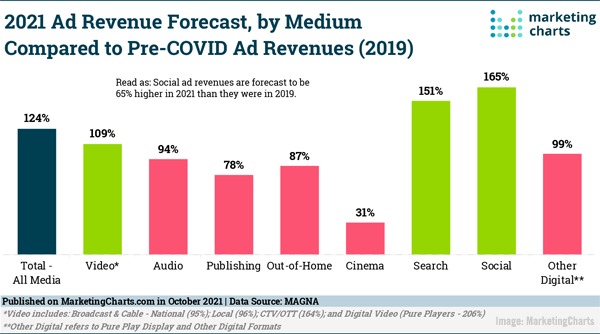
Which Media Are Recovering to Pre-COVID Ad Spend – or Exceeding It?
Search, social, and other forms of digital advertising are among the media types expected to see the greatest gains during 2021, according to recently-released advertising revenue forecast data. MarketingCharts
ON THE LIGHTER SIDE:
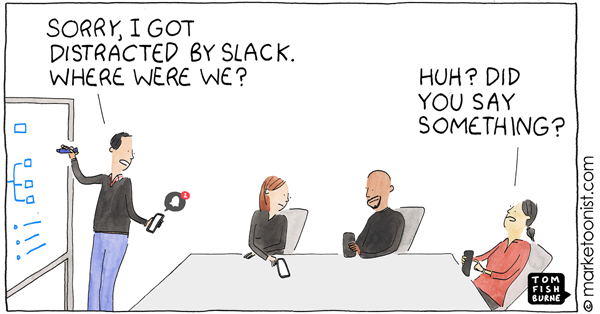
A lighthearted look at the “productivity and interruptions” by Marketoonist Tom Fishburne — Marketoonist
Global IT spending to hit $4.5 trillion in 2022, says Gartner — The Register
TOPRANK MARKETING & CLIENTS IN THE NEWS:
- Nick Nelson — 10 Tips for Finding Your Way as a New Entrepreneur — Small Business Trends
- Lee Odden — 5 SEO Content Writing Tips — InspireFirst
- TopRank Marketing — B2B Influencer Marketing: Your 2021 Guide To Success [+ 3 Examples] — Pop Pays
Have you come across your own leading B2B marketing news from the past week of industry news? Please drop us a line in the comments below.
Thank you for joining us for the week’s TopRank Marketing B2B marketing news, and we hope you’ll return next Friday for more of the week’s most relevant B2B and digital marketing industry news. In the meantime, you can follow us on our LinkedIn page, or at @toprank on Twitter for even more timely daily news.
The post B2B Marketing News: B2B Content Targeting Strategy, Growing Search & Social Ad Spend, YouTube’s Auto-Chapters, & Dark Mode Marketing Insights appeared first on B2B Marketing Blog – TopRank®.

Opening up COP26 to the world with Google Arts & Culture
For nearly three decades, the UN has been bringing together almost every country on Earth for climate summits called COP, which stands for ‘Conference of the Parties.’ Many believe this year’s summit, COP26, is the world’s best chance to get runaway climate change under control. The UK is asking influential world leaders to bring their plans for real world changes to Glasgow, plans that will help swiftly bring down emissions — from coal to cars to cash — and limit global warming to the 1.5 degree maximum.
But while world leaders gather to discuss their commitments, the people and groups who are fighting for climate action are being showcased. Organized by the UK Government, this is the area where the public, civil society, indigenous peoples, youth groups, charities, academics, artists and businesses can have their voices heard at COP26, through an extensive programme of events, workshops, talks and exhibitions that promote dialogue, awareness, education and commitments.
Visit the COP26 Green Zone on Google Arts & Culture
A new virtual exhibition on the Google Arts & Culture platform will be an exciting part of the Green Zone giving people an insight into what’s happening from wherever they are in the world. It will provide a window into climate action, and the Green Zone, with over 60 multimedia stories showcasing some of the organizations and communities that will be present at COP26.
Inspiring stories
By visiting the Green Zone on Google Arts & Culture, people can discover a wide range of exhibitors and stories. This includes Conservation Volunteers in the UK, who connect people to the green spaces that form a vital part of any happy healthy community. Their teams of dedicated, passionate staff and volunteers work with communities across the UK helping preserve nature, build gardens and grow inclusive and diverse communities. By 2025 they pledge to have planted five million trees.
The “India One” Solar Thermal Power Plant illustrates how the Brahma Kumari community came together to build a solar thermal power plant in Rajasthan. People can learn about this and hear how the project was born by a commitment to living in harmony with nature.
And from all sectors, people are considering what climate action means for them. In the arts, Reimagining Museums for Climate Action is an initiative to explore how a fundamental questioning of what a museum is can make them tools to empower the climate vulnerable.
COP26 has four goals, one of which is adaptation, helping communities to adjust to actual or expected future climates. We know that the most vulnerable are at the greatest risk from climate change, and that they have done the least to cause it. Action to address this and build resilience is needed now, before more people lose their lives or livelihoods. The international community must unite and support people who are most vulnerable to the impacts of the changing climate.
In October 2013, a 7.2-magnitude earthquake struck the province of Bohol, Philippines, causing land subsidence in some of its small island communities. Now, the islands of Batasan, Pangapasan, Ubay and Bilangbilangan in the municipality of Tubigon experience partial or complete flooding even during normal spring tides.
Coming face-to-face with a hundred years’ worth of sea level rise, the island communities have demonstrated great resilience. In 2017, the Racing the King Tide research team filmed a series of micro documentaries which were played to the Local Government Unit in Tubigon in 2018.
These and dozens more stories are available in the COP26 Green Zone on Google Arts & Culture and we are delighted to be sharing them with the world. Climate change affects us all. By opening up the Green Zone to the world with Google, we can all learn more about it, be inspired and moved by stories from around the globe, and gain a greater understanding of the challenges and opportunities for our planet.

Escono Windows e Mac OS nuovi: non c’è fretta di installarli
Sono disponibili al pubblico le nuove versioni dei principali sistemi operativi per computer, ossia Windows 11 e Mac OS 12 Monterey.
Una volta tanto non è urgente installarli: non introducono miglioramenti importanti della sicurezza, perlomeno per l’utente comune, per cui aggiornatevi se volete, ma non sentitevi particolarmente in obbligo. Non c‘è fretta: Windows 10 continuerà a essere supportato fino a ottobre del 2025.
Come sempre, prima di aggiornare un sistema operativo, fate un backup completo dei vostri dati e delle vostre applicazioni (meglio ancora, dell’intero sistema), controllate che le applicazioni che usate e il vostro hardware siano compatibili con la nuova versione di Windows/MacOS e ritagliatevi un paio d’ore di tempo per l’aggiornamento.
Ho provato a installare sia Windows 11 sia MacOS Monterey, e anche sui miei computer non particolarmente potenti o recenti non sembrano causare rallentamenti. In entrambi i casi, il computer stesso vi avvisa se è compatibile o meno con l’aggiornamento non appena tentate di avviarlo.
Windows 11
La nuova versione del sistema operativo di Microsoft offre un nuovo design molto pulito, che però ha una scelta probabilmente controversa: il pulsante Start, che per decenni è stato nell’angolo in basso a sinistra, ora sta in basso al centro della Taskbar, sovvertendo abitudini e automatismi ben radicati nella memoria muscolare degli utenti. Si può riportare a sinistra andando nelle impostazioni di Windows 11.
A parte questo, una novità interessante di Windows 11 è che vi girano o gireranno anche le applicazioni Android, grazie al Windows Subsystem for Android (WSA), anche se con alcune limitazioni hardware e geografiche. C’è una gestione più potente dei monitor multipli e delle finestre multiple, arriva un nuovo Store delle app Microsoft e ci sono alcune migliorie per i gamer. Ma non ho visto nulla che mi faccia correre ad installarlo.
MacOS 12 (Monterey)
Il nuovo MacOS è installabile anche su computer piuttosto vecchiotti (ho appena finito di installarlo su un Mini del 2014). Anche qui non ci sono miglioramenti che fanno venire fretta di installarlo: sono arrivati gli shortcut, ossia dei “programmi” o script che permettono di automatizzare le operazioni ripetitive (tipo creare una GIF partendo da un video). I Mac possono ora essere usati come monitor e altoparlanti per altri dispositivi, tramite AirPlay: si può mostrare sullo schermo del Mac lo schermo di un iPhone, per esempio. I MacBook recenti hanno una funzione di consumo energetico ridotto (è nelle impostazioni della batteria). C’è un’opzione che consente di limitare notifiche e distrazioni.
La novità forse più interessante è lo Universal Control, che però non è ancora disponibile ma dovrebbe consentire prossimamente di usare una sola tastiera e un solo trackpad o mouse di un Mac per comandare altri Mac e iPad nelle sue vicinanze (che siano sulla stessa rete Wi-Fi e usino lo stesso Apple ID e soprattutto permetterà di trascinare e mollare un file da un dispositivo all’altro.
I nuovi MacBook Pro, per contro, rivelano una magagna piuttosto comica: il loro schermo ha una tacca, il notch, per ospitare la webcam, ma la barra menu situata in alto non ne tiene conto e alcune sue voci finiscono per essere nascoste dalla tacca. Piuttosto imbarazzante, per un’azienda che ha il culto del design e dell’estetica.
Questo tweet https://twitter.com/thelazza/status/1453307197115490317 mostra un problema serio dei nuovi Mac con la tacca per la webcam:
WTF HAHAHAHA HOW IS THIS SHIPPABLE? WHAT IS THIS?! pic.twitter.com/epse3Cv3xF
— Quinn Nelson (@SnazzyQ) October 26, 2021
Il problema è parzialmente risolvibile cambiando le impostazioni dello schermo in modo da sacrificarne una fettina.
Fonti aggiuntive: Howtogeek, Gizmodo.
Expanding pathways into higher education and the workforce
Google believes that to have sustainable economic growth, we must have inclusive growth. It is why we developed the Grow with Google digital skills training program, which provides free training to help individuals grow their careers and businesses. Through our digital skilling programs and Google.org grantees, we have helped put nearly 170,000 Americans into new jobs, and of these, 67% are from underrepresented groups, including 44% women. Our Google Career Certificates, available on Coursera, have helped people enter high-growth career fields including Data Analytics, IT Support, Project Management and User Experience Design. Because we believe that collective action is key to success, we created a network of more than 150 companies who accept the Grow with Google Certificates as credentials for roles, including Walmart, Infosys, Verizon and of course, Google (and we are hiring, by the way!).
Today, we’re announcing an expansion of our Google Career Certificates program, including furthering our partnerships with community colleges, translating our Google Career Certificates into college credit and partnering with four-year universities to prepare students for in-demand jobs.
1. Providing community colleges with free access to Google Career Certificates
Community colleges are critical to workforce development and economic mobility, providing accessible education options for millions of Americans and opening doors to opportunities that would otherwise be out of reach. With 44% of American undergraduates attending community colleges, and as the primary institutions serving students from underrepresented groups, there is no doubt they play an invaluable role across the U.S.
Beginning today, the Google Career Certificate program is free for all community colleges and career and technical education (CTE) high schools to add to their curriculum. We will also be partnering with the American Association of Community Colleges, the primary advocacy group for U.S. community colleges and their 12 million students. All of these schools will now be able to onboard this curriculum for free.
2. Translating our Google Career Certificates into college credit
All our Google Career Certificates are now recommended by the American Council on Education for up to 12 college credits (the equivalent to four college courses). For the more than 36 million Americans who have some post-secondary education but no college degree, Google Career Certificates can help provide an affordable on-ramp back to earning their diploma.
3. Partnering with four-year universities to prepare students for in-demand jobs
We are also partnering with four-year universities that are accepting credit for the Google Career Certificates, including Northeastern, Purdue Global, Arizona State University and SUNY, to help increase earning potential and provide students with direct pathways to jobs. For example, a psychology major who acquires data analysis skills can unlock more than 100,000 additional entry-level jobs paying on average $60,000, versus $39,000 for psychology majors overall.
What inspires us to do this work are the real-life stories we hear every day. Like Chelsea Rucker, who was struggling to make ends meet before she took the Google IT Support Certificate through our grantee Goodwill and got a job at Google. Or Natalie Burns, who, while attending community college in Texas, earned her IT certificate and got a job in cybersecurity with a salary three times higher than her previous retail role. These are the stories that drive us, and we will continue to help people develop the digital skills they need to participate in this economy, and gain confidence that they have valuable options for their future.

Squid Game, virus e truffe abusano della popolarità della serie
Tutti parlano di Squid Game, la serie coreana distribuita da Netflix, e questa popolarità ha attirato l’interesse dei truffatori.
Circolano finte app Android che fingono di essere sfondi a tema Squid Game ma in realtà installano malware, come nota Lukas Stefanko di ESET. Oltre 200 app in Google Play usano il nome della serie senza però esservi associate ufficialmente e fanno soldi attraverso le pubblicità in-app. Va ricordato che non esiste nessuna app ufficiale della serie.
Secondo Kaspersky (a 29 minuti dall’inizio del podcast), una di queste app fraudolente è stata scaricata oltre un milione di volte e attiva di nascosto abbonamenti a servizi SMS premium a pagamento, i cui incassi vanno ai gestori dell’app, oppure rubano dati o password.
Altre segnalazioni riguardano app che dicono di consentire di vedere una puntata della serie, ma non sono ospitate da Google Play, oppure sono app che fingono di essere giochi legati alla serie ma in realtà mostrano solo un’animazione intanto che si fanno dare i dati degli utenti (o li rubano). Ci sono anche finti negozi ufficiali che rifilano fregature a chi abbocca. Non cascateci.
Fonti aggiuntive: PC Mag, Punto Informatico, Itechpost, TechRepublic, Tomsguide.

Netflix, 5 anime da non perdere a novembre 2021

Call of Duty: Vanguard: scopriamo i cinque eroi principali

Supporting journalism in Africa
Citizen journalism is playing a crucial role in helping South African communities unite. Food for Manzi is one organization which tells the untold stories of rural communities and agriculture in South Africa to challenge stereotypes and spread positivity. With support from the Google News Initiative, they set up the Sinelizwi citizen journalism project which trained 62 citizens from all nine Provinces to tell local stories to empower and unite local communities.
Projects like this are why Google invests in the Google News Initiative (GNI), and this week we held the first GNI for Africa event.
The event is an opportunity for journalists, publishers and content creators in Africa to find out more about Google’s training programmes for journalists and news business professionals. From understanding how small and medium size news organizations can grow their digital business to how to use consumer insights and data to better understand reader preferences and increase profitability and engagement, the event brings together experts from Google and the industry to share tools, training and best practices.
The news landscape in Africa is changing fast. In five years, the number of people accessing digital platforms for news content has almost doubled, opening up access to news and supporting a new generation of independent and digital media. Yet not everyone has the opportunity to access digital media, and many more people and communities are not represented in the news. Organizations working to change this, like Pulse in Nigeria, were also part of the event. They spoke about how they have used new digital formats to engage a mass youth audience and developed formats like Explainers to provide additional — and very much needed — context to the flow of information.
At the event, we also announced a partnership with UNESCO to further invest in training for journalists in Africa. Using its networks of established journalism schools, UNESCO will launch a collaborative programme to update journalism education and training programmes run by over 100 expert institutions in Africa, enabling them to better respond to the major changes in journalism and publishing in recent times. This new training initiative will roll out over the next 18 months.
Google is increasing its investment in and support of journalism in Africa, including hiring a News Lab Teaching Fellow who provides locally relevant training for journalists in Southern Africa and programmes such as the Digital Growth Programme andInnovation Challenges which support publishers in their digital transformation. To be part of this training send an email to newslabsupport@google.com.

Daylight Saving Time tips from Google’s sleep scientist
As the days get shorter and colder, it’s getting much harder for us to step out from under our bed covers and into the dark morning. When Daylight Saving Time ends this weekend in Europe and the weekend after in North America, we’ll need to adjust ourselves even more. So, what’s the best way to deal with the new sleeping schedule?
The Nest team spoke to Dr. Logan Schneider who gave us five tips to get your winter sleep schedule ready. Originally a sleep scientist at Stanford Medicine, Logan is now the sleep expert at Google Health. He’s also the brain behind Sleep Sensing on the new Google Nest Hub, the smart screen that helps you get a better night’s sleep.
Start adjusting on time… or don’t adjust at all
That extra hour of sleep this weekend can feel like jet lag for some. Soon, your sleep rhythm might make you want to go to bed earlier than usual. Logan’s advice is to start preparing a few days in advance to make the transition easier for your body. Dr. Logan says: “Rather than shifting your bedtime and wake time by an hour at once, you could try shifting them over four days, so that’s by 15 minutes a day. Start two days before the clocks change, and wrap up two days after.”
The time change can be even more dreadful for kids and their parents. Dr. Logan applies the same principles to kids as above, but makes the night of the time change extra fun: “I allow my kids to wake up 15 minutes later on the Friday before the time change, and again on Saturday morning. On Saturday night, the kids get to stay up an hour later than usual. I make sure we’re watching a movie in a bright light environment, because that helps push the clock a bit later. They wake up at the usual time on Sunday.”
For adults, there might be an even better way: why adjust to the new schedule at all? “You could simply take advantage of being an early bird and just stay on the earlier schedule”, Logan says. Nest Hub with Sleep Sensing can help you monitor your sleep schedule and provide a new bedtime and wake time recommendation after the transition.