
E se usassimo l’idrogeno per le auto? Parliamone
Ultimo aggiornamento: 2021/01/12 15:15.
Il video di Real Engineering che pubblico qui sotto fa il punto a proposito dell’idrogeno come alternativa alle batterie, non solo per la mobilità terrestre ma anche per l’aviazione, in termini di efficienza energetica. I dati risalgono al 2018, per cui non sono recentissimi e nel frattempo prezzi e tecnologie hanno subìto evoluzioni notevoli, però i concetti di fondo mi sembrano validi e Real Engineering di solito lavora bene.
Visto che molti mi chiedono di discutere la questione idrogeno per le auto, ho pensato di partire da questo video e pubblicarlo qui per creare un punto di discussione. Se avete idee, spunti, aggiornamenti e integrazioni o semplicemente qualche domanda, i commenti sono a vostra disposizione.
NOTA: Se commentate e ricevete un avviso che “Non è stato possibile pubblicare il tuo commento perché disinformatico ha bloccato il tuo account. Per saperne di più.”, non sono stato io a bloccarvi. Scrivetemi una mail per informarmi, così posso sapere quanto è diffuso il problema.
Dopo il video trovate il mio riassunto dei suoi concetti principali.
Sia l’auto elettrica a batteria, sia l’auto a idrogeno sono in realtà auto elettriche: entrambe sono spinte da un motore elettrico. La differenza sta nel modo di trasportare a bordo l’energia che muove quel motore.
In un’auto elettrica “tradizionale”, l’energia viene immagazzinata in batterie; in un’auto a idrogeno viene tenuta in uno o più serbatoi di idrogeno, che alimentano una cella a combustibile (fuel cell) in cui, nonostante il nome, non avviene nessuna combustione termica tradizionale e quindi le emissioni nocive sono minime. Questa cella genera elettricità che alimenta un motore elettrico.
Succede anche che per avere un’autonomia pari a quella delle batterie ti servono tre serbatoi voluminosi che rubano spazio a passeggeri e bagagli.
Le foto sono della nuova Toyota Mirai. pic.twitter.com/p1lKjtVfEM
— Leonardo (@leofala72) December 1, 2021
Entrambe le soluzioni eliminano l’inquinamento e le inefficienze dei motori a pistoni. Idrogeno ed elettricità per caricare le batterie possono essere entrambi prodotti con fonti a basso impatto ambientale e rinnovabili.
A prima vista l’idrogeno sembra molto più promettente. Se compresso, un chilogrammo di idrogeno contiene circa 40 kWh. Un chilo di batterie per auto contiene mediamente circa 0,167 kWh: 236 volte meno. Questo significa che è molto più facile costruire auto a idrogeno a lunga autonomia e molto leggere (e quindi più efficienti e capaci di andare più lontano con lo stesso consumo energetico). Per l’aviazione, dove il peso conta moltissimo, questa differenza di rapporto peso/energia è fondamentale.
Un’auto a idrogeno può rifornirsi in pochi minuti, mentre un’auto elettrica al momento richiede, nel migliore dei casi, almeno venti minuti per una carica che le dia autonomia significativa.
Ma l’idrogeno ha problemi notevoli se si considera l’intera filiera di produzione. Infatti attualmente costa molto più della corrente elettrica equivalente: il video, nel 2018, cita un costo di energia di 2,4 centesimi di dollaro/chilometro per un’auto elettrica (una Tesla Model 3) e un costo di 17,7 cent/km per l’idrogeno equivalente. Sette volte di più.
Produrre idrogeno, infatti, richiede moltissima energia.
- Negli Stati Uniti, la maggior parte della produzione avviene tramite steam reforming, un processo che combina vapore ad alta temperatura e gas naturale. Questo processo richiede molto calore ed è enormemente inefficiente, tanto che l’idrogeno prodotto in questo modo contiene meno energia del gas naturale di partenza. Inoltre questo processo è inquinante e dipende in ogni caso dal gas naturale.
- Un altro modo di produrre idrogeno è l’elettrolisi: la scissione dell’acqua in idrogeno e ossigeno tramite applicazione di una corrente elettrica. Questa corrente elettrica potrebbe essere generata tramite fonti pulite e rinnovabili, magari usando le eccedenze di produzione delle centrali, ma il procedimento ha una perdita di circa il 30%: in altre parole, l’idrogeno prodotto contiene solo il 70% dell’energia che si consuma per generarlo.
- Un terzo metodo è la PEMS (polymer exchange membrane electrolysis) o elettrolisi a membrana di scambio polimerica. Raggiunge efficienze dell’80% e consente la produzione in loco.
Le batterie, invece, hanno un’efficienza di circa il 99% come rapporto fra energia elettrica immessa ed energia immagazzinata dalla batteria. In termini di rapporto fra energia consumata complessiva per chilometro, l’idrogeno perde nettamente il confronto.
L’idrogeno va poi trasportato e immagazzinato. Se si elimina il trasporto con la produzione in loco le cose migliorano, ma resta il costo di immagazzinaggio.
Lo si può immagazzinare altamente compresso (790 atmosfere), ma la compressione richiede circa il 13% dell’energia contenuta.
In alternativa, lo si può raffreddare e rendere liquido, e questo permette di avere serbatoi meno pesanti di quelli pressurizzati. Ma le proprietà fisiche dell’idrogeno richiedono che la liquefazione avvenga a -253°C, e questo raffreddamento ha un costo energetico complessivo di circa il 40%. Per cui la pressurizzazione è il metodo meno inefficiente.
A questo punto c’è la questione del trasporto. La produzione in loco la elimina, ma un impianto piccolo locale è meno efficiente di un grande impianto, per cui il costo finale rischia di non essere molto differente. Se il trasporto avviene via autocisterna o condotte, le perdite energetiche possono variare dal 10 al 40%.
Il trasporto dell’energia elettrica che carica le batterie delle auto elettriche, invece, ha perdite energetiche di circa il 5%.
Combinando tutte queste perdite di generazione, immagazzinaggio e trasporto, insomma, l’idrogeno risulta essere molto inefficiente.
Non è finita: una volta generato l’idrogeno e immesso nel serbatoio dell’auto, bisogna convertirlo in energia elettrica. L’efficienza di questo processo è circa il 60%: il resto se ne va in calore.
Nelle batterie, invece, l’efficienza di conversione complessiva, tenendo conto delle perdite dovute alla trasformazione da corrente alternata a corrente continua e ad altri fattori, è circa il 75%.
Qui c’è uno schema pubblicato nel 2017 da Transport and Environment:
Electric vs hydrogen cars?
Battery electric cars are at least three times more efficient than hydrogen fuel cell cars due to energy losses. pic.twitter.com/Tj662mSmtZ— Transport & Environment (@transenv) August 22, 2017
In sintesi: al momento l’auto a idrogeno offre tempi di rifornimento rapidi e lunghe autonomie, ma a costi enormemente superiori a quelli di un’auto elettrica tradizionale.
Questo articolo vi arriva gratuitamente e senza pubblicità grazie alle donazioni dei lettori. Se vi è piaciuto, potete incoraggiarmi a scrivere ancora facendo una donazione anche voi, tramite Paypal (paypal.me/disinformatico) o altri metodi.

Come regalare un buono per DAZN ad amici e parenti

Facebook, l’Authority britannica intima la vendita di Giphy

Amazon.it: trend e statistiche di Black Friday e Cyber Monday

YouTube svela i video più popolari in Italia del 2021

Disponibile l’ultima stagione di Tom Clancy’s Rainbow Six Siege

Droidcon Italy 2021: le novità di Huawei e App Gallery

The path to Malaysia’s digital potential
When the COVID-19 pandemic hit, Mohd Zaid, from Kajang, Malaysia, felt the pressure of providing for his family in an uncertain environment. To bring in some extra income, he turned first to one of his personal passions — making soy wax candles infused with scented oils — and then he turned to the internet. After learning digital marketing skills through a Grow with Google course, Zaid was able to go beyond word-of-mouth sales and promote his candles online through Google Ads and Search. His revenue jumped 70%.
Zaid is one of a growing number of Malaysian entrepreneurs embracing a more digital economy. Technology has helped Malaysians through the economic effects of the pandemic, enabling people across the country to work, learn and run their businesses in new ways. According to the latest eConomy Southeast Asia report, 81% of all Malaysian internet users now use digital services — including three million people who’ve become new ‘digital consumers’ since the pandemic began. And business owners are adopting technology at a faster pace, using digital tools to serve their customers better. Over 40% of digital merchants in Malaysia believe their businesses wouldn’t have survived the pandemic without digital platforms (the highest proportion anywhere in the region).
Technology is equally important to Malaysia’s long-term future. According to a new report released by AlphaBeta, making the most of digital opportunities could create $61.3 billion in annual economic value for Malaysia by 2030. That’s the equivalent of about 17% of Malaysia’s GDP in 2020.
So the possibilities are enormous — but right now, Malaysia has some catching up to do. Only one-third of Malaysian businesses have a website, compared with 44% globally. The digital economy is also uneven. Some industries, like manufacturing, use technology far more intensively than others, like agriculture, while small businesses face a shortage of workers with the right skills.
Malaysia’s government has developed a Digital Economy Blueprint, aiming to position Malaysia as a regional technology leader by the end of the decade, and the AlphaBeta report sets out three priorities for getting there: digitalizing the public and private sectors, building the nation’s digital talent and promoting digital trade opportunities.
To help, Google Malaysia will continue to expand programs like Mahir Digital Bersama Google, which has already trained more than 36,000 Malaysian small businesses. We’ll keep working to close digital skills gaps through initiatives like Go Digital ASEAN (supported by Google.org and focused on marginalized communities) and AirAsia academy, which provides free digital courses for local small businesses. Through YouTube, we’ll expand our efforts to help Malaysian creators find global audiences and grow revenue for their businesses. And we’ll deepen our efforts with the Ministry of Education to improve digital learning in schools, laying the ground for the next generation of talent.
After a challenging period, I know we can look to the future with confidence — and technology is at the heart of the ambitions we share for our economy and society. We’re looking forward to playing our part in advancing Malaysia’s exciting digital potential together.

Qualcomm Snapdragon 8 Gen1 è il cuore degli smartphone Android del 2022

Prime Video, i film da non perdere a dicembre 2021
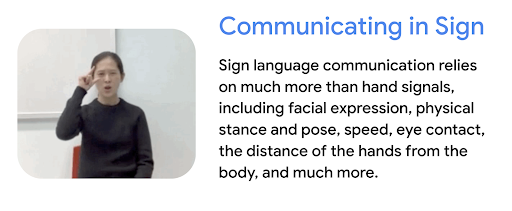
Machine learning to make sign language more accessible
Google has spent over twenty years helping to make information accessible and useful in more than 150 languages. And our work is definitely not done, because the internet changes so quickly. About 15% of searches we see are entirely new every day. And when it comes to other types of information beyond words, in many ways, technology hasn’t even begun to scratch the surface of what’s possible. Take one example: sign language.
The task is daunting. There are as many sign languages as there are spoken languages around the world. That’s why, when we started exploring how we could better support sign language, we started small by researching and experimenting with what machine learning models could recognize. We also spoke with members of the Deaf community, as well as linguistic experts. We began combining several ML models to recognize sign language as a sum of its parts — going beyond just hands to include body gestures and facial expressions.
After 14 months of testing with a database of videos for Japanese Sign Language and Hong Kong Sign Language, we launched SignTown: an interactive desktop application that works with a web browser and camera.
SignTown is an interactive web game built to help people to learn about sign language and Deaf culture. It uses machine learning to detect the user’s ability to perform signs learned from the game.
Project Shuwa
SignTown is only one component of a broader effort to push the boundaries of technology for sign language and Deaf culture, named “Project Shuwa” after the Japanese word for sign language (“手話”). Future areas of development we’re exploring include building a more comprehensive dictionary across more sign and written languages, as well as collaborating with the Google Search team on surfacing these results to improve search quality for sign languages.
Advances in AI and ML now allow us to reliably detect hands, body poses and facial expressions using any camera inside a laptop or mobile phone. SignTown uses the MediaPipe Holistic model to identify keypoints from raw video frames, which we then feed into a classifier model to determine which sign is the closest match. This all runs inside of the user’s browser, powered by Tensorflow.js.
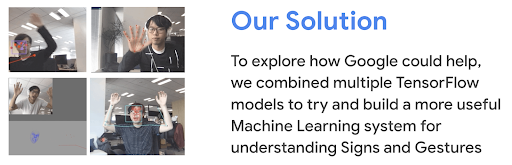
We open-sourced the core models and tools for developers and researchers to build their own custom models at Google IO 2021. That means anyone who wants to train and deploy their own sign language model has the ability to do so.
At Google, we strive to help build a more accessible world for people with disabilities through technology. Our progress depends on collaborating with the right partners and developers to shape experiments that may one day become stand-alone tools. But it’s equally important that we raise awareness in the wider community to foster diversity and inclusivity. We hope our work in this area with SignTown gets us a little closer to that goal.
Do even more with your Chromebook camera
This summer, we shared an update about how we’re continuing to improve video calling on Chromebooks, thanks to performance improvements across Google Meet, Zoom and more. And the camera on your Chromebook is good for more than just video chatting. Hundreds of millions of images and videos have been captured using the Chromebook Camera app so far this year.
Today, we’re sharing a few features that make your Chromebook’s camera even more useful.
Scan documents and more
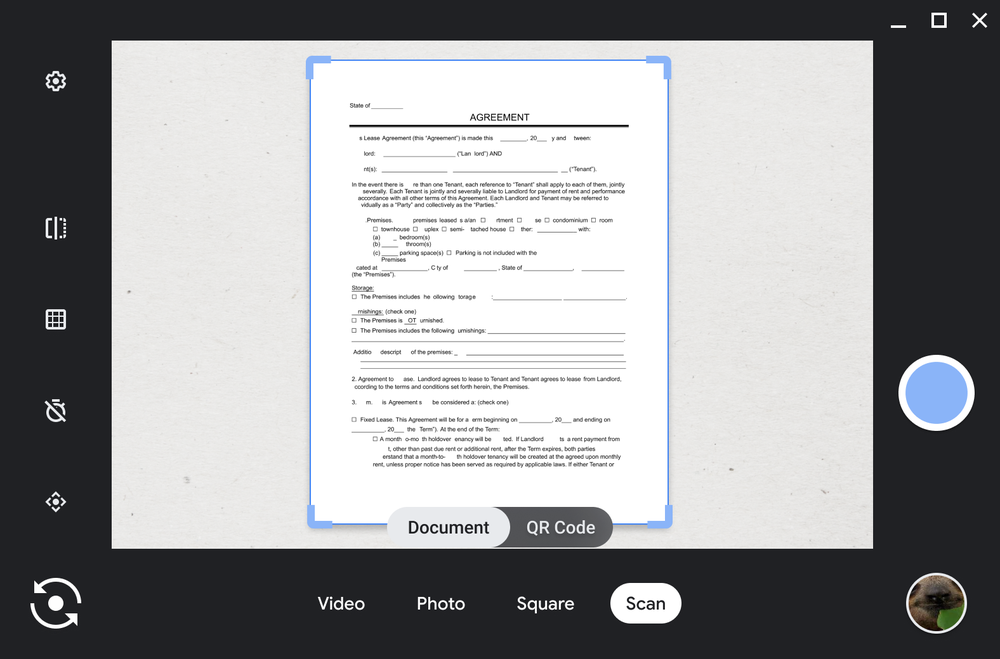
Have you ever wanted to use your Chromebook to share a physical document or image, but weren’t sure how without the help of a scanner? You can now use your Chromebook’s built-in camera to scan any document and turn it into a PDF or JPEG file. If your Chromebook comes with a front and back facing camera, you can use either of these to scan.
Open the Camera app and select “Scan” mode. When you hold out the document you want to scan in front of the camera, the edges will be automatically detected. Once it’s done, it’s easy to share through Gmail, to social media or to nearby Android phones or Chromebooks using Nearby Share.
You can now scan files using your Chromebook’s built-in camera.
Personalize your camera angle
If you use an external camera with your Chromebook, you can use the Pan-Tilt-Zoom feature to have more control over what your camera captures. You can now crop and angle your camera view exactly how you want it. Whether you want to show your furry friend napping in the background or just want to zoom in on yourself, your Chromebook’s got you covered.
With your external camera plugged in and configured, open the Camera app to adjust the angle you want to capture. Your selections will automatically save so when you jump from a Google Meet work call to making a video with your new puppy, your camera angle preferences will stay the same.
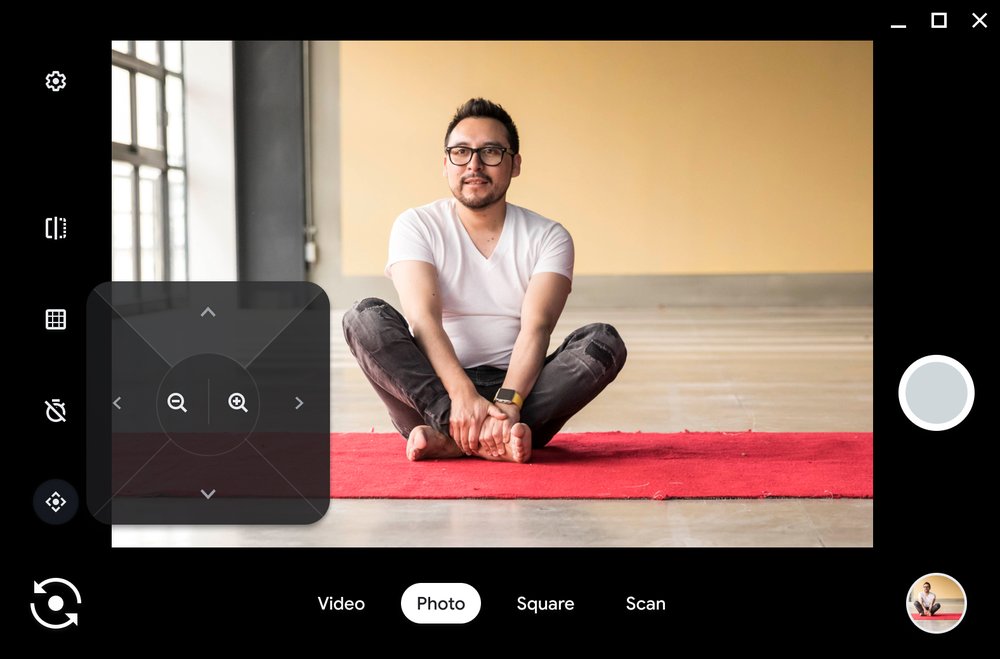
With Pan-Tilt-Zoom you can adjust your camera angle to capture only what you want.
Try other Camera app features
In addition to taking pictures or scanning documents with your Chromebook’s camera, here are a few other features to test out:
- Video mode. If you want to send a quick message to a loved one for their birthday, record a video by clicking on the “Video” mode.
- Self timer. You don’t need to be within arm’s length of your laptop to take a picture. Set the timer, and you can take a few steps back to get the perfect shot.
- QR Code. In addition to new document scanning, you can also use the “Scan” option to scan QR codes. It works just like document scanning, so use your front or back facing camera to scan a QR code.
- Save for later. All your pictures and videos will automatically save to the “Camera” folder in your Files app for easy access later.
And coming soon…
Starting early next year, you’ll be able to create GIFs on the Camera app. Just record a five-second video dancing around with friends, hugging your loved ones, or playing with your favorite pet, and it will automatically turn into a shareable GIF.
If you’re interested in getting a sneak peak and providing feedback on Chromebook features before they launch, join our Chrome OS Beta Community. Sign-up here to be a Chrome OS Beta Tester Product Expert. Currently in Beta is a feature that integrates the Camera app with the Google Assistant. Just say “take a photo,” “record video” or “take a selfie” – you can even use Google Assistant to open the Camera app, so you don’t have to lift a finger.
We’ll be back in the new year to share more new Chromebook features.

Apple Watch 7 e Fitness+: connubio perfetto per la palestra in casa. La recensione
More accessible web images arrive in 10 new languages
Images can be an integral part of many people’s online experiences. We rely on them to help bring news stories to life, see what our family and friends are up to, or help us decide which couch to buy. However, for 338 million people who are blind or have moderate to severe vision impairment, knowing what’s in a web image that isn’t properly labeled can be a challenge. Screen reader technology relies on the efforts of content creators and developers who manually label images in order to make them accessible through spoken feedback or braille. Yet, billions of web images remain unlabelled, rendering them inaccessible for these users.
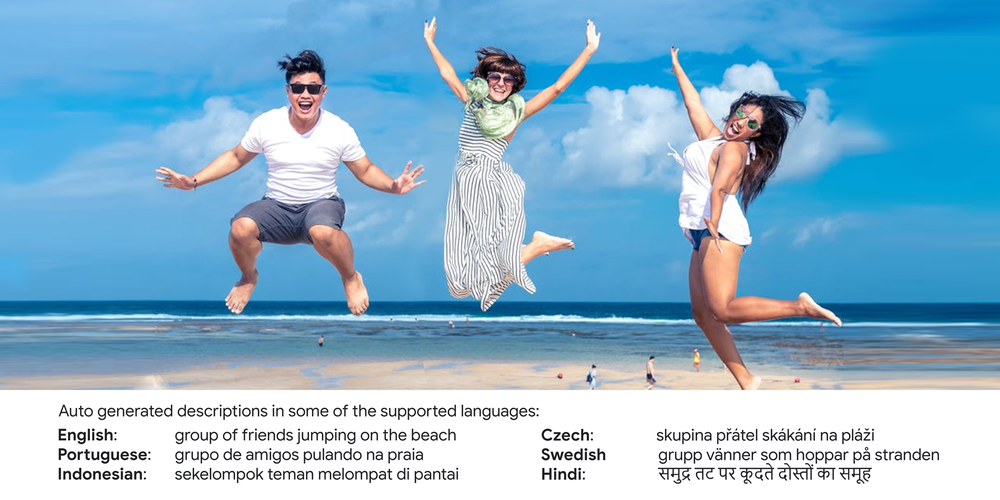
To help close this gap, the Chrome Accessibility and Google Research teams collaborated on developing a feature that automatically describes unlabelled images using AI. This feature was first released in 2019 supporting English only and was subsequently extended to five new languages in 2020 – French, German, Hindi, Italian and Spanish.
Today, we are expanding this feature to support ten additional languages: Croatian, Czech, Dutch, Finnish, Indonesian, Norwegian, Portuguese, Russian, Swedish and Turkish.
The major innovation behind this launch is the development of a single machine learning model that generates descriptions in each of the supported languages. This enables a more equitable user experience across languages in the sense that the generated image descriptions in any two languages can often be regarded as translations that respect the image details (Thapliyal and Soricut (2020)).
Auto-generated image descriptions can be incredibly helpful and their quality has come a long way, but it’s important to note they still can’t caption all images as well as a human. Our system was built to describe natural images and is unlikely to generate a description for other types of images, such as sketches, cartoons, memes or screenshots. We considered fairness, safety and quality when developing this feature and implemented a process to evaluate the images and captions along these dimensions before they’re eligible to be shown to users.
We are excited to take this next step towards improving accessibility for more people around the world and look forward to expanding support to more languages in the future.
To activate this feature, you first need to turn on your screen reader (here’s how to do that in Chrome). From there, you can activate the “Get image descriptions from Google” feature either by opening the context menu when browsing a web page or under your browser’s Accessibility settings. Chrome will then automatically generate descriptions for unlabelled web images in your preferred language.

Why content bundling is the secret sauce for creators
If you make online video content, you’ve probably heard of VidCon, an event where creators, brands, industry experts and fans from around the world converge to celebrate the latest and greatest in digital media. The next VidCon takes place December 3-6 in Abu Dhabi featuring panel discussions, meet and greets and performances with some of the world’s most influential video content creators.
Google for Creators will speak at two sessions at VidCon Abu Dhabi, both of which will focus on helping creators build their brands and monetize their content. On December 3, Head of Creator Relations at Google Paul Bakaus and cosplay designer Yaya Han will discuss how creators can have more control over their futures and businesses. Later that day, Google for Creators writer Crystal Lambert and creator Kaya Marriott will speak at Get the Most from Your Post — How to Create Powerful and Efficient Content Bundles.
On the Google for Creators team, Crystal writes the educational guides for Creators.google. A liaison between the creator community and Google’s expert sources, Crystal researches, compiles and organizes vast troves of information into digestible, easy-to-follow and fun-to-read guides.
We spoke with Crystal to hear more about her upcoming VidCon appearance, and why content bundling is such an important strategy for creators.
Why focus on content bundling at VidCon?
We’re giving two talks at VidCon, and we wanted to focus both of them on the biggest needs in the creator economy. What we’ve learned from creators is that many want to know how to continuously make content without burning out. Content bundling — creating multiple pieces of content on one topic for different formats and platforms — is about tackling content creation in a holistic way. It’s not about approaching all these platforms as individual entities, but grouping what you’re doing together and building on it. It’s one of the easiest and most effective things a creator can do. It’s about content strategy, cross promotion and dealing with brands. Content bundles give you more visibility as a business and credibility when you reach out to brands, or when brands reach out to you.
Who is your VidCon co-presenter?
Kaya Marriott is the founder and content creator behind lifestyle and beauty blog Comfy Girl with Curls. I was super excited to connect with her because she’s on her way to becoming a successful, full-time content creator, and her journey has been so inspiring. She started Comfy Girl with Curls as a natural hair blog, but because so many other creators have come to her for advice, she also shares tips about creating content.
Kaya’s built her own business and she’s been very proficient and proactive about it. She brings a lot of credibility and first-hand knowledge about how and why content bundles work. We’re both excited to speak together.
What else are you excited to see at VidCon?
VidSummit was the first creator-geared conference I went to, and it was inspiring to see how helpful the video creator community is and how enthusiastic they are about what they do. They’re willing to help other creators by teaching them what they’ve learned. I’m excited to see that community at VidCon.
I’m also excited to experience VidCon in another country. I’ve never been to Abu Dhabi, and I’m looking forward to seeing who will be there and what the Abu Dhabi creator community is like.
If you won’t be in Abu Dhabi for VidCon, learn more about content bundles and cross promotion on Creators.google and the Google for Creators YouTube channel.