<div>How we’re improving search results when you use quotes</div>
Sometimes people know they absolutely, positively only want webpages that mention a particular word or phrase. For example, maybe you want to find out about phone chargers but only those that support wireless charging. Fortunately, Google Search has a special operator for that: quotation marks. Put quotes around any word or phrase, such as [“wireless phone chargers”], and we’ll only show pages that contain those exact words or phrases.
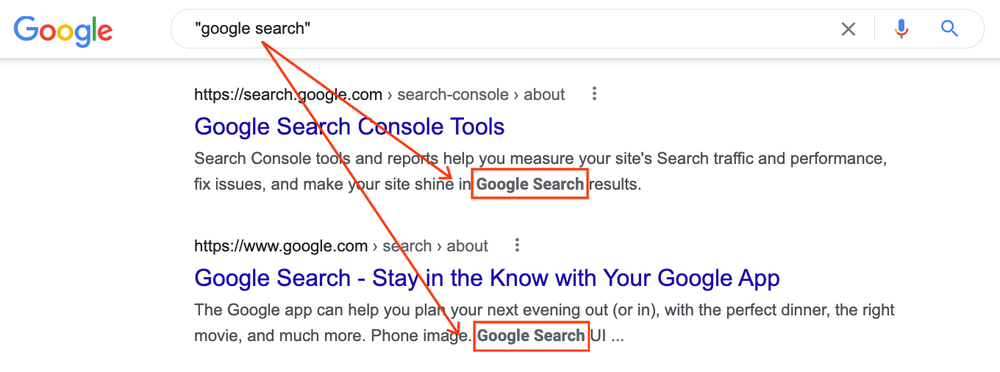
Now we’re making quoted searches better. The snippets we display for search results (meaning the text you see describing web content) will be formed around where a quoted word or phrase occurs in a web document. That means you can more easily identify where to find them after you click the link and visit the content. On desktop, we’ll also bold the quoted material.
For example, if you did a search such as [“google search”], the snippet will show where that exact phrase appears:
![Picture of Google search results for ["google search"] showing two listings and how the words "google search" are bolded in the snippets for each listing.](https://www.bluermes.it/site/wp-content/uploads/2022/08/quotesinSearch.max-1000x1000-1.png)
In the past, we didn’t always do this because sometimes the quoted material appears in areas of a document that don’t lend themselves to creating helpful snippets. For example, a word or phrase might appear in the menu item of a page, where you’d navigate to different sections of the site. Creating a snippet around sections like that might not produce an easily readable description.
We’ve heard feedback that people doing quoted searches value seeing where the quoted material occurs on a page, rather than an overall description of the page. Our improvement is designed to help address this.
Things to keep in mind about quoted searches
For those doing quoted searches, here are some more tips, along with caveats on how quoted searching works.
Quoted searches may match content not readily visible on a page. As referenced above, sometimes quoted searches match content contained within a web page that isn’t readily visible, making it seem like the content isn’t on the page when it actually is present.
For example, content in a meta description tag is looked at for matches, even though that content isn’t visible on the web page itself. ALT text that describes images is considered, as is the text within a page’s URL. Material brought in through inline frames (iframes) is also matched. Google may also see content that doesn’t initially load on a page when you go to it, such content rendered through JavaScript that only appears if you click to make it display.
Pro tip: Sometimes people use the standard Find command in a browser to jump to the phrase they want, after arriving on a page. If that doesn’t work, though, you can try using a developer tools option. For instance, in Chrome, you can search from within Developer Tools to match against all rendered text, which would include the text in drop-down menus and other areas of the site.
Pages may have changed since Google last visited them. While Google revisits pages across the web regularly, they can change in between visits. This means quoted material might appear on a page when we saw it, but it no longer exists on the current page. If available, viewing the Google cached copy may show where the quoted content appeared on the version of the page we visited.
Quoted terms may only appear in title links and URLs. Quoted terms won’t appear in web page snippets if they only appear within title links or URLs of a web page. We also do not bold matches that happen in title links and URLs.
Punctuation is sometimes seen as spaces. Our systems see some punctuation as spaces, which impacts quoted searches. For example, a search for [“don’t doesn’t”] tells our systems to find content that contains all these letters in this order:
don t doesn t
As a result, we’ll match content like the ones below, where punctuation like commas or hyphens break up words — because when you remove the punctuation, the letter patterns are the same:
- don’t, doesn’t
- don’t / doesn’t
- don’t – doesn’t
Snippets might not show multiple quoted terms. If a search involves multiple quoted terms, the snippet may not show all of them if they are far apart from each other. Similarly, if quoted material appears several times on a page, a snippet will show what seems to be the most relevant occurrence.
We mainly bold quoted content for web page snippets on desktop.
Our new bolding of quoted content generally only works for web page snippets on desktop. Bolding won’t appear in snippets for recipe or video boxes, and it also won’t appear when using some special modes such as image or news search. However, anything listed in these boxes or special modes will contain the quoted terms. Bolding also doesn’t work for mobile results.
Quoted searches don’t work for local results. Quote restriction does not work for results in our local box where listings usually appear with a map; we’ll be looking more at this area in the future.
To quote or not to quote?
Using quotes can definitely be a great tool for power users. We generally recommend first doing any search in natural language without resorting to operators like quotation marks. Years ago, many people used operators because search engines sometimes needed additional guidance. Things have advanced since then, so operators are often no longer necessary.
By default, our systems are designed to look for both the exact words and phrases entered and related terms and concepts, which is often useful. If you use a quoted search, you might miss helpful content that uses closely related words.
Of course, there are those times when the exact word being on a page makes all the difference. For those situations, quoted searches remain available and are now even better.
iPhone 13 mini: nell’iconico colore Rosa e con 300€ di sconto è da comprare SUBITO
Ryzen 7000: lancio il 15 settembre, presentazione il 29 agosto
AMD si prepara al lancio e alla presentazione della serie Ryzen 7000: annuncio atteso a fine agosto con debutto a metà settembre.
Leggi Ryzen 7000: lancio il 15 settembre, presentazione il 29 agosto
Galaxy Book Go LTE, il laptop DEFINITIVO costa 100€ in meno su Amazon
Microsoft Edge potenzia la sicurezza con l’ultimo aggiornamento
Microsoft ha pubblicato un nuovo aggiornamento del browser Edge che abilita l’opzione per una maggiore sicurezza.
Leggi Microsoft Edge potenzia la sicurezza con l’ultimo aggiornamento
Galaxy Book Go LTE, il laptop DEFINITIVO oggi costa 100€ in meno
Galaxy Book Go LTE completa l’ecosistema Galaxy, integrandosi perfettamente con smartphone, tablet e dispositivi wearable. Prendilo ora.
Leggi Galaxy Book Go LTE, il laptop DEFINITIVO oggi costa 100€ in meno
Multipresa da scrivania, 6 prese elettriche e 2 USB, compatta e GENIALE (19€)
Cambia l’abbonamento a Clipchamp: solo Essentials
Essentials è ora l’unica formula di abbonamento premium offerta dall’editor video Clipchamp: nel nome della semplificazione.
Ecco l’offerta FOLLE che stavi aspettando: Asus Chromebook a 99€
Lampada ventilatore da soffitto al LED, illumina e rinfresca a basso consumo
OPPO Band Style Tracker: lo smartwatch TOP finalmente in offerta su Amazon
Gen Z: Come Comunicare Con Le Nuove Generazioni
“Bae, il messaggio di Giò mi ha triggerato, ma ora sto in super hype per il date con il tipo”. Di fronte a una frase del genere, chi non strabuzzerebbe gli occhi perplessə? Ebbene sì, comprendere il linguaggio della Generazione Z può risultare complicato. Lessico americaneggiante, corsivo parlato, termini e modi di dire fantasiosi: è […]
The post Gen Z: Come Comunicare Con Le Nuove Generazioni appeared first on Studio Cappello Blog.