How we kept information on Maps reliable in 2021
In a world that’s constantly changing, it’s important for Google Maps to give you the freshest, most up-to-date information possible — so you can know whether the restaurant down the street from you reopened or if your neighborhood grocery store has curbside pickup. One way we do this is through contributed content.
Every day we receive around 20 million contributions from people using Maps. Those contributions include everything from updated business hours and phone numbers to photos and reviews. As with any platform that accepts contributed content, we have to stay vigilant in our efforts to fight abuse and make sure this information is accurate. Thanks to a combination of machine learning and human operators, we continue to decrease the amount of content seen on Maps that is fraudulent or abusive – in fact, it’s less than one percent of all the content that is viewed on Maps. Today, we’re sharing more about how we kept irrelevant and offensive information off of Google Maps throughout 2021.
Keeping business information reliable
The world shifted throughout 2021 with the rollout of vaccines, updates to mask mandates, and new COVID variants. Our community of Maps users showed up in full force to update Google Maps with fresh information about their communities. In fact, throughout 2021, their contributions helped us add updated business information, such as a place’s hours of operation or its health and safety protocols, for 30% more businesses than in 2020.
But sometimes fraudsters try to update business information on Google Business Profiles with abusive edits. In 2021, we blocked more than 100 million of these edits from going live thanks to our continued advancements in machine learning models that improved our ability to catch bot activity and unearth suspicious activity patterns. Here’s a deeper look at the information we removed from Maps:
- Thanks to advancements in our technology, we identified and removed more than 7 million fake Business Profiles — more than 630,000 of which were reported directly to us.
- We stopped more than 12 million attempts from bad actors to create fake Business Profiles and nearly 8 million attempts from bad actors to claim Business Profiles that didn’t belong to them.
- Thanks to continued improvements in our machine learning, our technologies and teams disabled more than 1 million user accounts due to policy-violating activity, such as online vandalism or fraud.
Verifying photos, videos and reviews on Business Profiles
As the world reopened throughout 2021, people relied on Google Maps reviews to get the information they needed about places before visiting them — like what health and safety protocols were enforced or if there was outdoor dining and open spaces.
However, we also saw individuals and groups attempt to use fake reviews as a tactic to hurt local businesses — oftentimes spurred by public attention on differences in opinions. In 2021, to prevent violative content from appearing on Google Business Profiles, we put protections on over 100,000 businesses after detecting suspicious activity and abuse attempts. Here’s what else we did in 2021 in our efforts to keep the content in Google Maps reliable:
- We blocked or removed more than 95 million policy-violating reviews, over 60,000 of which were taken down due to COVID-related instances.
- We took down more than 1 million reviews that were reported directly to us.
- As a result of continued advancements in our machine learning, our technologies and teams blocked or removed more than 190 million photos and 5 million videos that were blurry, low quality, or violated our content policies.
Local knowledge that our global community contributes is a huge part of what makes Google Maps more than a navigation tool. We’ll continue to invest in keeping this information fresh and reliable so you can discover information about the world around you.
Countering threats from North Korea
On February 10, Threat Analysis Group discovered two distinct North Korean government-backed attacker groups exploiting a remote code execution vulnerability in Chrome, CVE-2022-0609. These groups’ activity has been publicly tracked as Operation Dream Job and Operation AppleJeus.
We observed the campaigns targeting U.S. based organizations spanning news media, IT, cryptocurrency and fintech industries. However, other organizations and countries may have been targeted. One of the campaigns has direct infrastructure overlap with a campaign targeting security researchers which we reported on last year. The exploit was patched on February 14, 2022. The earliest evidence we have of this exploit kit being actively deployed is January 4, 2022.
We suspect that these groups work for the same entity with a shared supply chain, hence the use of the same exploit kit, but each operate with a different mission set and deploy different techniques. It is possible that other North Korean government-backed attackers have access to the same exploit kit.
In this blog, we will walk through the observed tactics, techniques and procedures, share relevant IOCs and analyze the exploit kit used by the attackers. In line with our current disclosure policy, we are providing these details 30 days after the patch release.
Campaign targeting news media and IT companies
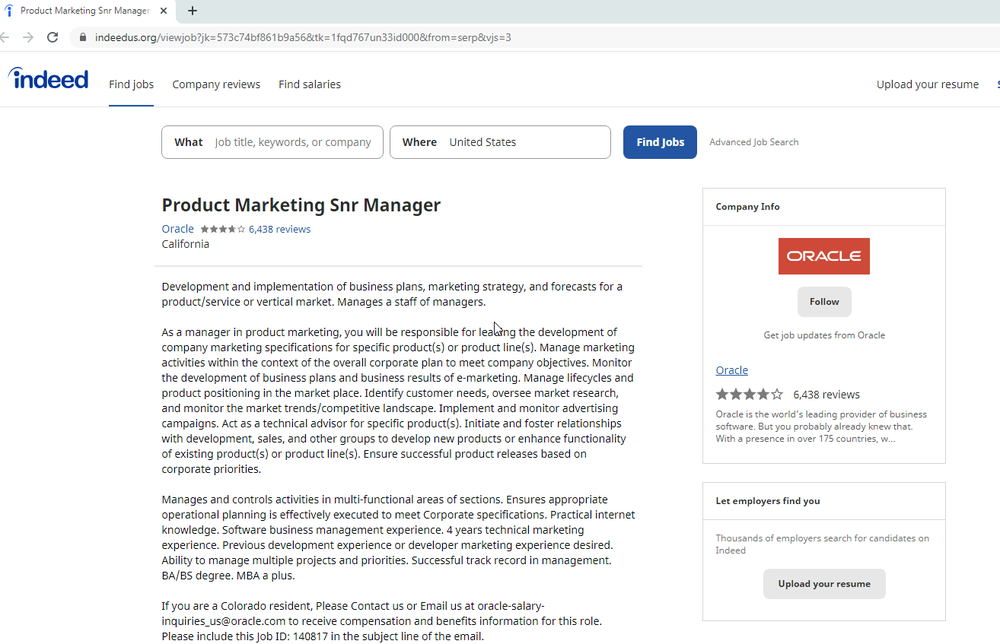
The campaign, consistent with Operation Dream Job, targeted over 250 individuals working for 10 different news media, domain registrars, web hosting providers and software vendors. The targets received emails claiming to come from recruiters at Disney, Google and Oracle with fake potential job opportunities. The emails contained links spoofing legitimate job hunting websites like Indeed and ZipRecruiter.
Example of spoofed job hunting websites
Victims who clicked on the links would be served a hidden iframe that would trigger the exploit kit.
Attacker-Owned Fake Job Domains:
- disneycareers[.]net
- find-dreamjob[.]com
- indeedus[.]org
- varietyjob[.]com
- ziprecruiters[.]org
Exploitation URLs:
- https[:]//colasprint[.]com/about/about.asp (legitimate but compromised website)
- https[:]//varietyjob[.]com/sitemap/sitemap.asp
Campaign targeting cryptocurrency and Fintech organizations
Another North Korean group, whose activity has been publicly tracked as Operation AppleJeus, targeted over 85 users in cryptocurrency and fintech industries leveraging the same exploit kit. This included compromising at least two legitimate fintech company websites and hosting hidden iframes to serve the exploit kit to visitors. In other cases, we observed fake websites — already set up to distribute trojanized cryptocurrency applications — hosting iframes and pointing their visitors to the exploit kit.

Attacker-Owned Websites:
- blockchainnews[.]vip
- chainnews-star[.]com
- financialtimes365[.]com
- fireblocks[.]vip
- gatexpiring[.]com
- gbclabs[.]com
- giantblock[.]org
- humingbot[.]io
- onlynova[.]org
- teenbeanjs[.]com
Compromised Websites (Feb 7 – Feb 9):
- www.options-it[.]com
- www.tradingtechnologies[.]com
Exploitation URLs:
- https[:]//financialtimes365[.]com/user/finance.asp
- https[:]//gatexpiring[.]com/gate/index.asp
- https[:]//humingbot[.]io/cdn/js.asp
- https[:]//teenbeanjs[.]com/cloud/javascript.asp
Exploit kit overview
The attackers made use of an exploit kit that contained multiple stages and components in order to exploit targeted users. The attackers placed links to the exploit kit within hidden iframes, which they embedded on both websites they owned as well as some websites they compromised.
The kit initially serves some heavily obfuscated javascript used to fingerprint the target system. This script collected all available client information such as the user-agent, resolution, etc. and then sent it back to the exploitation server. If a set of unknown requirements were met, the client would be served a Chrome RCE exploit and some additional javascript. If the RCE was successful, the javascript would request the next stage referenced within the script as “SBX”, a common acronym for Sandbox Escape. We unfortunately were unable to recover any of the stages that followed the initial RCE.
Careful to protect their exploits, the attackers deployed multiple safeguards to make it difficult for security teams to recover any of the stages. These safeguards included:
- Only serving the iframe at specific times, presumably when they knew an intended target would be visiting the site.
- In some email campaigns the targets received links with unique IDs. This was potentially used to enforce a one-time-click policy for each link and allow the exploit kit to only be served once.
- The exploit kit would AES encrypt each stage, including the clients’ responses with a session-specific key.
- Additional stages were not served if the previous stage failed.
Although we recovered a Chrome RCE, we also found evidence where the attackers specifically checked for visitors using Safari on MacOS or Firefox (on any OS), and directed them to specific links on known exploitation servers. We did not recover any responses from those URLs.
Example Exploit Kit:
The attackers made multiple attempts to use the exploit days after the vulnerability was patched on February 14, which stresses the importance of applying security updates as they become available.
Protecting Our Users
As part of our efforts to combat serious threat actors, we use results of our research to improve the safety and security of our products. Upon discovery, all identified websites and domains were added to Safe Browsing to protect users from further exploitation. We also sent all targeted Gmail and Workspace users government-backed attacker alerts notifying them of the activity. We encourage any potential targets to enable Enhanced Safe Browsing for Chrome and ensure that all devices are updated.
TAG is committed to sharing our findings as a way of raising awareness with the security community, and with companies and individuals that might have been targeted or suffered from these activities. We hope that improved understanding of the tactics and techniques will enhance threat hunting capability and lead to stronger user protections across industry.
LAPSUS$: il responsabile è un sedicenne?

Fairy Original, 248 pastiglie per lavastoviglie SCONTO 18€ su Amazon

Presa intelligente, con 9€ ogni tuo elettrodomestico è subito smart

Apple sta utilizzando l’alluminio “carbon-free” per i MacBook Pro da 16″

AVIRA INTERNET SECURITY in offerta a soli 26,95 euro

MacBook Air 15 potrebbe essere il computer PERFETTO
Nuova tecnica rubapassword: il BITB o “Browser in the Browser”
Quando si insegnano le basi della sicurezza informatica e in particolare come difendersi dai ladri di password, una delle regole più importanti, ripetute fino alla noia, è che prima di digitare la propria password bisogna sempre verificare di essere nel sito vero e non in una sua imitazione fabbricata dai truffatori.
Per fare questa verifica in modo facile e usabile anche da persone non esperte, si consiglia di ignorare l’eventuale contenuto grafico della pagina che sta chiedendo le credenziali di accesso e di guardare con attenzione il nome del sito, ossia l’URL (quello indicato in alto nella schermata).
Per esempio, se voglio verificare di essere davvero nella schermata di login di Google e non in quella imitata da un truffatore, dovrò controllare che in alto ci sia scritto accounts.google.com e non pincopallino.com oppure googIe.com.
Come ulteriore verifica, cercherò anche l’icona di un lucchetto chiuso accanto al nome del sito: se non c’è, saprò per certo che mi trovo nel sito di un truffatore e quindi non digiterò la mia password. Se c’è, invece, non mi potrò fidare, perché i truffatori più abili possono fare in modo che il lucchetto chiuso compaia; ma se manca, sarò sicuro di aver evitato un raggiro.
Semplice e pratico, insomma: due piccoli abitudini (guarda il nome, cerca il lucchetto) che si imparano facilmente e diventano automatiche come guardare a sinistra e a destra prima di attraversare la strada.
Ma lascia fare agli informatici: è stata pubblicata da poco una tecnica che sovverte queste regole di sicurezza, perché è in grado di imitare quasi perfettamente sia il nome del sito, sia la presenza del lucchetto.
Questa tecnica si chiama Browser in the Browser, abbreviato in BITB, ed è stata annunciata da un ricercatore di sicurezza che si fa chiamare semplicemente mr.d0x.
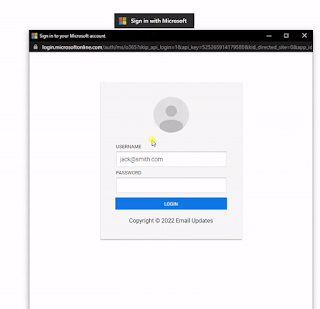
Funziona così: avete presente quelle finestre di dialogo che compaiono spesso quando si accede la prima volta a un sito? Quelle che per evitarvi di dover creare un account e una password appositamente vi dicono “login con Facebook”, “login con Microsoft”, “continua con Apple” , “collegati usando Google” o cose simili e vi propongono appunto di usare un vostro account esistente per il nuovo sito? Il ricercatore mostra che è estremamente semplice, per un esperto, creare una versione fraudolenta di queste finestre di dialogo e farla apparire sullo schermo della vittima.
Fin qui niente di speciale, ma il trucco di mr.d0x è che aggiunge alla finestra di dialogo un bordo superiore che imita la testata di un browser.

La vittima, di conseguenza, crede che la finestra di dialogo sia la finestra del browser, e quando va a controllare il nome del sito e la presenza del lucchetto, seguendo le classiche regole di sicurezza, guarda il nome del sito mostrato nella finta testata del browser, che è sotto il controllo del truffatore.
Il ladro di password, infatti, può far comparire in questa testata un nome di sito a suo piacimento, per cui se vuole per esempio rubare una password di un account Google metterà in questa falsa testata accounts.google.com. E per di più potrà anche inserire l’icona del lucchetto, fintamente rassicurante.
Un video pubblicato su YouTube illustra in dettaglio il procedimento necessario per creare un sito rubapassword che usi questa tecnica, con tanto di modelli predefiniti (anche qui) e sito dimostrativo (Getgophish.com). La semplicità di questo metodo è preoccupante, ed è inevitabile che questa tecnica verrà utilizzata dai truffatori e non solo dai ricercatori di sicurezza.
Anzi, è già stata usata almeno una volta, nel 2020, per rubare password del servizio di distribuzione di videogiochi Steam.
A questo punto occorre insomma aggiornare le regole di sicurezza: non basta più controllare il nome del sito e l’eventuale assenza del lucchetto. Gli esperti notano che c’è un modo abbastanza semplice per distinguere un sito fraudolento che usa questa tecnica rubapassword da un sito autentico. Consiste nel provare a spostare la finestra di dialogo: se è vera, sarà possibile spostarla in modo che si sovrapponga alla vera testata del browser; se è falsa, questo spostamento la farà finire sotto la vera testata. Ma l’utente medio si ricorderà di fare ogni volta tutti questi controlli?
È improbabile, per cui si consiglia di usare un approccio differente, di prevenzione: attivare l’autenticazione a due fattori su ogni account, usando le istruzioni apposite facilmente reperibili in Google. In questo modo, se si sbaglia e si digita la propria password in un sito che la ruba, i ladri non potranno comunque prendere il controllo dell’account e si dovrà semplicemente cambiare la password.
Come sempre, anche in informatica, prevenire è meglio che curare.
Huawei: un nuovo battery-phone all’orizzonte

Huawei annuncia HUAWEI nova 9 SE: prezzo lancio di 349 euro

iPhone 15 Pro: sarà lui quello da comprare
Google Cloud Pro: al via le iscrizioni al corso per sviluppatori

8 anni di FRITZ!Box: dalla nascita della rete locale al più veloce device da 10 Gbit/s