Le grandi domande dell’informatica: perché James Bond usa un Nokia?
Sta uscendo finalmente nelle sale No Time to Die, il più recente film della serie dedicata al celeberrimo agente segreto britannico inventato da Ian Fleming. La pandemia ne ha ritardato l’uscita, per cui è comprensibile che alcuni degli oggetti usati o indossati da James Bond ormai non siano più l’ultimissimo modello.
Ma può sembrare davvero strano che lo 007 famoso per le sue ipertecnologie sfoderi, in No Time to Die, dei telefonini Nokia. Specificamente il 3310, il 7.2 (perlomeno nel trailer originale) e l’8.3 5G, che sono usciti rispettivamente vent’anni fa (a meno che si tratti della riedizione del 2017), a fine 2019 e a ottobre 2020. Oltretutto Nokia oggi è un produttore quasi di nicchia (0,7% del mercato). Come mai questa scelta così particolare?
Ovviamente c’è di mezzo un contratto di sponsorizzazione, e in proposito c’è un dettaglio curioso da sapere: Apple non consente che i propri smartphone vengano usati dai cattivi nei film e nei telefilm (come segnalato dal regista Rian Johnson in questo video a 3:00). Per cui la prossima volta che guardate un giallo, per esempio, sapete con certezza che se un personaggio ha in mano uno smartphone di Apple non può essere un cattivo sotto mentite spoglie.

Detto questo, e tenendo presente che i film di 007 sono delle opere di fantasia che non hanno quasi nessun legame con la realtà dello spionaggio, vale la pena di chiedersi se ha senso per un personaggio come James Bond avere uno smartphone o un telefonino “vecchio stile” come un Nokia 3310.
Lo ha fatto Wired.com, e la risposta è che nessuno smartphone sarebbe una buona scelta, mentre un telefonino semplice sarebbe già più accettabile. Ma la vera sicurezza sarebbe non avere addosso nessun dispositivo elettronico.
Anche gli smartphone più recenti, infatti, hanno vulnerabilità come Pegasus che possono copiare messaggi, registrare chiamate e accedere alla telecamera, e per natura sono difficili da blindare completamente: sarebbe necessario evitare il WiFi, collegarsi fisicamente con un cavo Ethernet, installare un password manager e un adblocker, bloccare tutti i cookie, disabilitare Javascript, il tracciamento e il fingerprinting, non usare la mail, eccetera, secondo Edward Snowden. Conviene decisamente un telefonino “normale”, che già in partenza non ha nulla di tutto questo.
Secondo gli esperti consultati da Wired, se si è a rischio di sorveglianza elettronica da parte di malintenzionati molto esperti la soluzione migliore (dopo il non avere dispositivi) è uno smartphone Android appositamente modificato, sul quale è installato un sistema operativo ad alta sicurezza come GrapheneOS (che non manda dati a Google, tanto per cominciare) e nel quale sono stati fisicamente rimossi il microfono interno (si usa una cuffia, da collegare solo quando serve) e i sensori. Questo genere di servizio viene fornito, a caro prezzo, da aziende come NitroKey, Purism e Blackphone.
Ovviamente significa che bisogna fidarsi di queste aziende e sperare che fra i loro dipendenti non ci sia un agente della SPECTRE.

Prime Video: problemi video in 4K durante Juventus – Chelsea
Cellulari che ascoltano? Il Garante Privacy italiano indaga

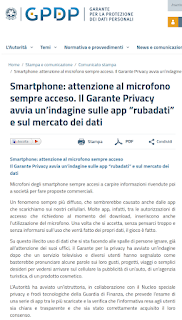
Molti giornali stanno riprendendo l’annuncio del Garante italiano per la protezione dei dati personali, che ha avviato un’indagine sulle app che userebbero il microfono dello smartphone per ascoltare le conversazioni degli utenti ed estrarne parole chiave a scopo pubblicitario.
Ma l’annuncio va letto attentamente, per evitare informazioni ingannevoli come quella del Messaggero, che dice che “Secondo il Garante della privacy [lo smartphone] verrebbe utilizzato per carpire informazioni rivendute poi a società per fare proposte commerciali.”
Il Garante non ha detto questo. Ha semplicemente avviato un’istruttoria che prevede l’esame di “una serie di app tra le più scaricate” a seguito di segnalazioni di “un servizio televisivo e diversi utenti”, secondo i quali “basterebbe pronunciare alcune parole sui loro gusti, progetti, viaggi o semplici desideri per vedersi arrivare sul cellulare la pubblicità di un’auto, di un’agenzia turistica, di un prodotto cosmetico.”
In altre parole, il Garante per ora non ha prove che esista questo abuso del microfono dello smartphone. Sta agendo, stando perlomeno al suo comunicato, soltanto sulla base di queste segnalazioni di utenti e di un servizio TV (non specificato). Segnalazioni e servizi che potrebbero anche aver preso un granchio, visto che la questione è già stata affrontata varie volte con test di esperti ed è risultato che quello che molti utenti credono che sia stato carpito ascoltando le loro conversazioni è in realtà semplicemente il risultato dell’analisi incrociata della montagna di informazioni personali che riversiamo nei nostri smartphone.
Usate Gmail? Google legge tutta la vostra posta e quindi sa i vostri gusti, cosa comprate online e altro ancora. Usate i social network? Facebook (anche con Instagram e WhatsApp) sa quali sono i vostri interessi. Questi servizi sanno anche dove siete e con chi siete, grazie alla geolocalizzazione e alla co-localizzazione: se due smartphone sono a lungo nello stesso posto e i due utenti hanno avuto una comunicazione social o via mail, probabilmente si conoscono e si parlano su argomenti che interessano a entrambi, quindi i servizi pubblicitari mandano a ciascuno pubblicità dei prodotti che interessano all’altro.
Aggiungiamoci poi la cosiddetta illusione di frequenza che ci spinge a notare le coincidenze e a dimenticare le non coincidenze, è il gioco è fatto: si ha l’impressione che il telefonino ci ascolti.
In realtà che io sappia esiste un solo caso conclamato di ascolto ambientale effettuato da un’app: nel 2019 l’app ufficiale del campionato spagnolo di calcio, LaLiga, fu colta a usare il microfono e la geolocalizzazione degli smartphone per identificare i locali che trasmettevano le partite senza autorizzazione. L’agenzia spagnola per la protezione dei dati diede all’organizzazione sportiva una sanzione di 250.000 euro.
In attesa dei risultati dell’indagine del Garante italiano, è comunque sensato andare nelle impostazioni del proprio smartphone e guardare quali applicazioni hanno il permesso di accedere al microfono, levandolo nei casi sospetti. La procedura varia a seconda del tipo di smartphone (Apple o di altre marche) e della versione di sistema operativo (iOS o Android).

Microfono aperto nei telefonini: Garante indaga su app rubadati
Lo strano spam targato “Presentazioni Google”
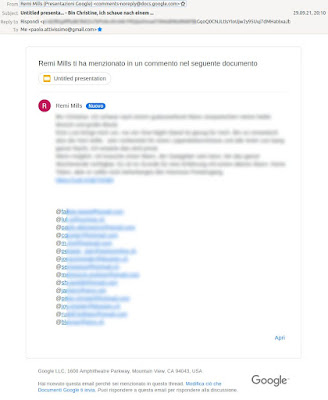
Capita anche a voi di ricevere strani messaggi come questo, con un mittente che ha come indirizzo “comments-noreply@docs.google.com”?

Si tratta chiaramente di spam: il testo parla di un’offerta di natura sessuale e include un link abbreviato che porta a un sito inequivocabilmente pornografico.
Di spam del genere ce n’è tantissimo, ma questo ha la particolarità di eludere i filtri e di sembrare credibile perché il mittente apparente è Google. Qual è il trucco?
La chiave è nella frase “ti ha menzionato in un commento nel seguente documento”, che linka una presentazione: lo spammer ha infatti creato una presentazione vuota in Google Docs e vi ha inserito un commento che contiene il testo del messaggio di spam e cita il mio indirizzo di mail.
Questo fa sì che Google mandi a tutti gli indirizzi citati nel commento una mail di notifica che contiene il testo del commento, che in questo caso è il messaggio di spam.
In questo modo, lo spammer ottiene due vantaggi: il primo è che non ha bisogno di spedire le mail usando dei propri server di mail e sfrutta invece quelli di Google; il secondo è che lo spam è “firmato” Google, che è considerato un mittente fidato e quindi elude i filtri antispam di Google e di molti altri servizi.
Questa tecnica circola già da qualche tempo (Netskope; Google; 9to5Google) e Ars Technica segnala che Google sta finalmente cominciando a rimediare offrendo la possibilità di bloccare un utente spammer su Google Docs.
La difesa è semplice:
- non cliccate sui link contenuti in queste mail, neppure per curiosità;
- segnalate la mail come spam: questo aiuta i filtri a riconoscere questo tipo di spam;
- bloccate il mittente in Google Drive come descritto qui. Questo, fra l’altro, rivela il vero indirizzo di mail dello spammer.


Climate Pledge Friendly, la rivoluzione ecologica passa anche da Amazon

Search On 2021, come Google cambierà le nostre ricerche

#SBHack21 – Lo Swiss Blockchain Hackathon approda a Lugano
Lo Swiss Blockchain Hackathon approda al Campus Est USI-SUPSI di Lugano. L’evento avrà luogo per la prima volta anche in Ticino nell’ambito del NTN Innovation Booster Blockchain Nation Switzerland, network…
L’articolo #SBHack21 – Lo Swiss Blockchain Hackathon approda a Lugano scritto da YOUR_DIGITAL_VOICE! proviene da Assodigitale.

How 5 cities plan to use Tree Canopy to fight climate change
Planting trees in cities helps provide shade, lower temperatures and contribute to cleaner air — all of which are huge benefits when it comes to adapting to the effects of climate change. That’s why we’re expanding our Environmental Insights Explorer Tree Canopy insights to more than 100 cities around the world next year, helping local governments fight climate change. We chatted with city officials in Los Angeles, Louisville, Chicago, Austin and Miami to learn more about how they plan to use Tree Canopy insights to build thriving, sustainable cities in 2021 and beyond.
Los Angeles

Come l’intelligenza artificiale rende più utili le informazioni
Rendere possibile la ricerca multimodale con MUM


Una pagina di Ricerca rinnovata per aiutarvi ad esplorare


Ottenete di più dai video

Una Google più utile

How AI is making information more useful
Today, there’s more information accessible at people’s fingertips than at any point in human history. And advances in artificial intelligence will radically transform the way we use that information, with the ability to uncover new insights that can help us both in our daily lives and in the ways we are able to tackle complex global challenges.
At our Search On livestream event today, we shared how we’re bringing the latest in AI to Google’s products, giving people new ways to search and explore information in more natural and intuitive ways.
Making multimodal search possible with MUM
Earlier this year at Google I/O, we announced we’ve reached a critical milestone for understanding information with Multitask Unified Model, or MUM for short.
We’ve been experimenting with using MUM’s capabilities to make our products more helpful and enable entirely new ways to search. Today, we’re sharing an early look at what will be possible with MUM.
In the coming months, we’ll introduce a new way to search visually, with the ability to ask questions about what you see. Here are a couple of examples of what will be possible with MUM.

Nuovi modi in cui l’intelligenza artificiale e le mappe mantengono le comunità al sicuro e informate
Il nuovo livello di dettaglio Incendi su Google Maps

Tree Canopy Insights si estende a 100 nuove città

Assegnare indirizzi su larga scala con la nuova app Address Maker


Helpful Search tools for evaluating information online
Whether you’re looking for facts about the COVID vaccine or information on how to apply for a loan, having access to relevant, credible information is crucial. People turn to Google for trustworthy, high quality results — especially when it matters most.
That’s why we design our ranking systems to prioritize the most useful, highest quality content and provide direct access to reliable information for important topics. We’re also looking into new ways to give you more context about the information you find online, and introducing more information literacy features, based on research and best practices from experts.
More insights from About This Result
Earlier this year, we launched the About This Result feature, which provides details about a website before you visit it, including its description, when it was first indexed and whether your connection to the site is secure. In the coming weeks, we’re expanding these panels to help you learn more about the sources and topics you find on Search.
We’re bringing new and important insights to About This Result. When you tap the three dots on any search result, you’ll be able to learn more about the page. You can:
- See more information about the source: In addition to seeing a source description from Wikipedia, you’ll also be able to read what a site says about itself in its own words, when that information is available.
- Find what others on the web have said about a site: Reading what others on the web have written about a site — news, reviews and other helpful background context — can help you better evaluate sources.
- Learn more about the topic: In the “About the topic” section, you can find information such as top news coverage or results about the same topic from other sources.
People don’t just come to Google looking for quick facts. They often really want to explore the information that’s out there, and learn about where it’s coming from — especially in situations where there’s a source they may not be familiar with. We want to make it easier to evaluate information with this update to About This Result, which will be rolling out in the coming weeks in English in the United States. And we’re working to bring About This Result to more countries around the world.

New ways to find shopping inspiration on Google
Shopping online is as much about inspiration and discovery as it is about the final purchase. People are shopping across Google more than a billion times a day, and we have been working to make those experiences even more helpful by expanding your options. We’re here to help you find new ideas, discover unique products or get the best value from the widest possible range of merchants — from large retailers, marketplaces and well-known brands, to local stores and new direct-to-consumer companies.
We’ve made a number of changes over the last couple of years to improve your shopping experience, including giving you more choice when you shop on Google. For example, we’ve made it free for merchants to list on Google and made it easy for sellers on Shopify and other digital platforms to start selling on Google, so their products and inventory are discoverable for shoppers.
And today, we’re adding new tools to make it easier for shoppers to browse for inspiration, find new products and brands and ultimately find what they’re looking for in a more visual way.
Shop in the moment with Google Lens
We know that inspiration can strike at any time. Whether it’s an image that you see online, a photo you saved on your phone or something in the real world that catches your eye, Google Lens makes the products you see instantly shoppable.
Starting soon, iOS users will see a new button in the Google app to make all the images on a page searchable through Google Lens. Now, finding this lamp or that shirt (and ones like it) is just a tap away.
We’re also bringing Lens to Chrome on your desktop. Soon, you will be able to select images, video and text content on a website with Lens to quickly see search results in the same tab — without leaving the page you’re on.

New ways maps and AI keep communities safe and informed
With Google’s AI technology and mapping information, people and organizations all over the world can access helpful, reliable information needed to make progress toward tackling global challenges like climate change. At Search On today, we’re sharing new mapping features that help keep communities safer, more sustainable, and discoverable — no matter where they are in the world.
Introducing the wildfire layer on Google Maps
With climate change, wildfires are growing increasingly more common in many parts of the world. Last year, we launched a wildfire boundary map powered by satellite data to help people in the U.S. easily understand the approximate size and location of a fire — right from their device.
Building on this, we’re now bringing all of Google’s wildfire information together and launching it globally with a new layer on Google Maps. With the wildfire layer, you can get up-to-date details about multiple fires at once, allowing you to make quick, informed decisions during times of emergency. Just tap on a fire to see available links to resources from local governments, such as emergency websites, phone numbers for help and information, and evacuation details. When available, you can also see important details about the fire, such as its containment, how many acres have burned, and when all this information was last reported.
The wildfires layer will start to roll out globally this week on Android, with iOS and desktop coming in October, and will display most major fires that cause significant evacuations. In the U.S., the layer will expand to include more fires thanks to data from the National Interagency Fire Center (NIFC). We plan to expand this level of detail to more countries, starting with Australia, in the coming months.