Your Chromebook now works better with your other devices
Easily access your recent photos
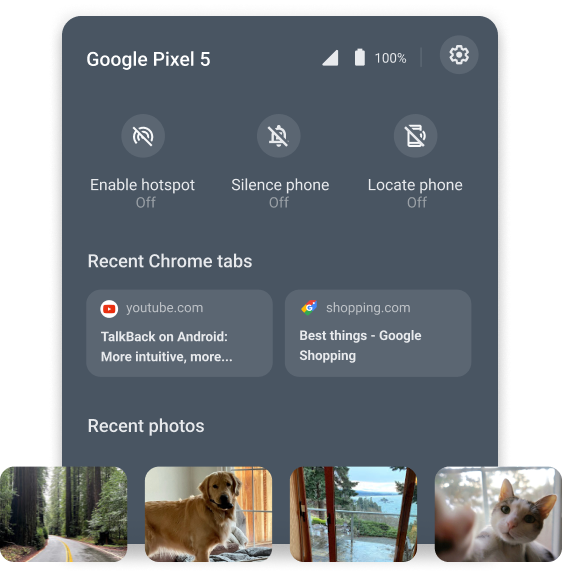
When you’re trying to stay on task, there’s nothing more distracting than switching between your phone and your laptop to get something done. Last year, we introduced Phone Hub, a built-in control center that lets you respond to text messages, check your phone’s battery, turn on tethering and more, all from your Chromebook.
With the latest update, you’ll now also have instant access to the latest photos you took on your phone — even if you’re offline. After taking a picture on your phone, it will automatically appear within Phone Hub on your laptop under “recent photos.” Just click on the image to download it, then it’s ready to be added to a document or email.
No more sending yourself emails with pictures or going through multiple steps to get an image from your phone to your laptop. The next time you’re recapping yesterday’s hike in an email to your friends, you can easily add your best photos to the message, without ever having to pick up your phone.
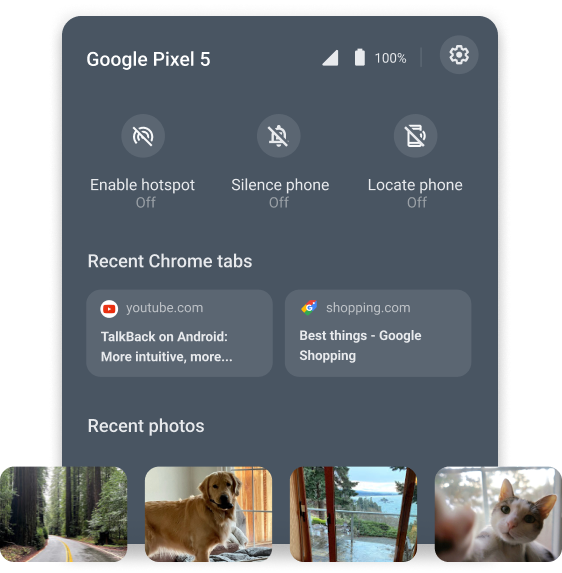
In Phone Hub, you can see recent pictures that were shot on your Android phone.
Coming soon: connect headphones with a tap
Bluetooth-enabled headphones help you stay connected without wires, but that can be difficult when you can’t figure out how to set them up. We’ve all been there – trying to decipher the deeper meaning of tiny blue pulsing LEDs. With Fast Pair coming later this summer, it’s easier than ever to sync headphones or other compatible accessories to your Chromebook.
Just turn on your Chromebook’s Bluetooth, and it will automatically detect when a new pair of Bluetooth headphones are on, are nearby and are ready to be set up. A pop-up notification will appear and with one tap, your new accessory is connected and ready to go. No more digging through settings or struggling to figure out the right button to press to pair your headphones. Fast Pair also saves the connection to your Google Account, so both your Chromebook or a new Android phone will remember your headphones and seamlessly connect to them in the future.
Whether you want to use new headphones to watch a video, join a virtual meeting or listen to music, Fast Pair will make it hassle-free. This feature will be compatible with hundreds of different headphone models — and counting.
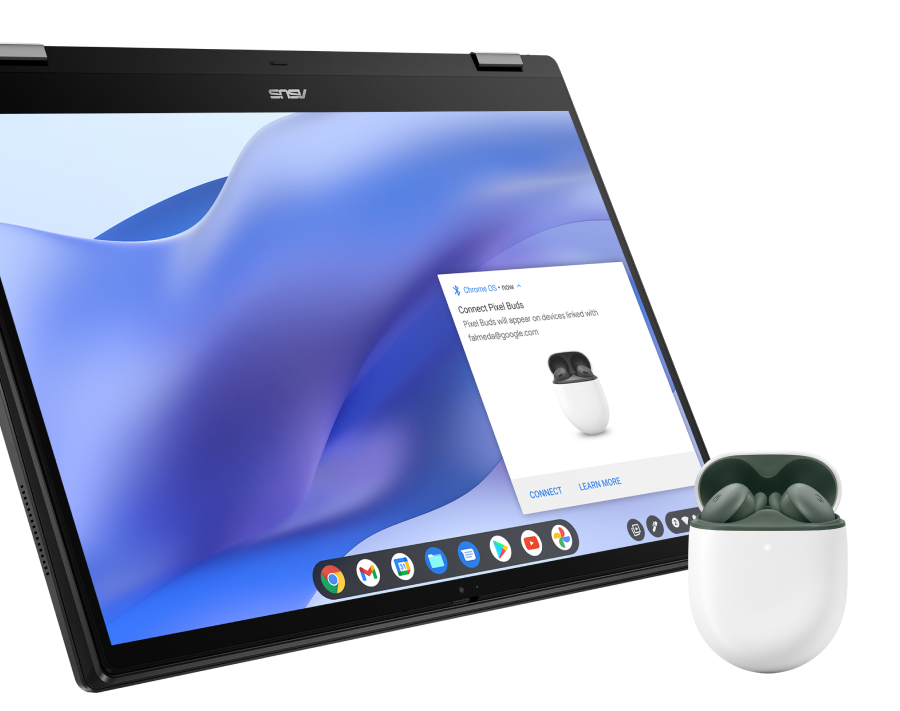
Fast Pair on Chromebook will work with hundreds of headphones, including Pixel Buds.
Plus, share your ideas with Screencast
In case you missed it, earlier this month we announced the new, built-in Screencast app. Screencast lets anyone record, trim, and share transcribed videos automatically uploaded to Google Drive. You can even draw or write on the screen as you record using a touchscreen or stylus to diagram or illustrate key concepts.
Screencast makes it easy for anyone to record instructional videos, software demos, presentations, and more. It will start rolling out this week, so give it a go by tapping the Everything Button and searching for the Screencast app.
Later this year, we’ll introduce even more helpful features that will make all of your devices work better together. In the meantime, we’ll be back to share more exciting Chromebook announcements this summer. Stay tuned.
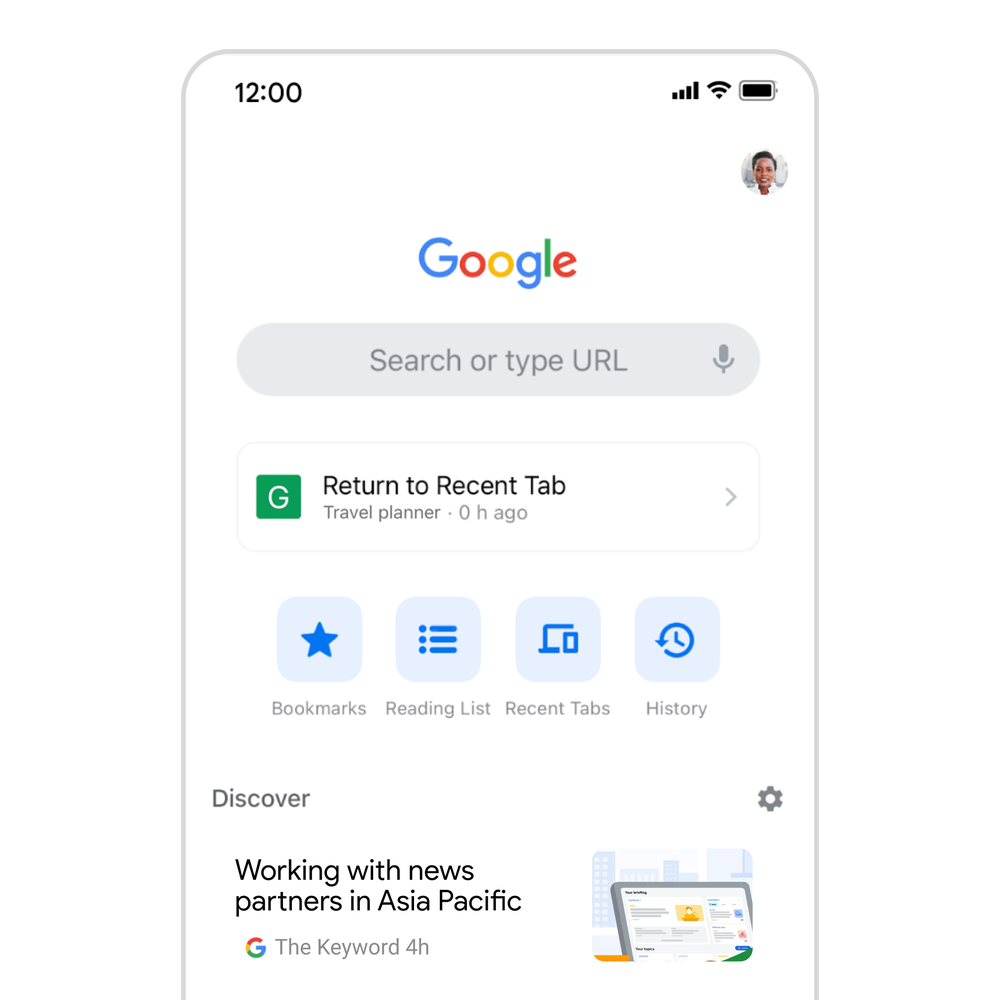
5 new features for Chrome on iOS
When it comes to getting things done on your iPhone and iPad, there’s no place like Chrome. With the Chrome iOS app, you can securely save your passwords so there’s no need to keep guessing. Your payment and shipping info can be automatically filled when you’re ready to check out, and your favorite tabs and bookmarks can be synced across your devices, whether you’re on your phone, tablet, or laptop.
With the next release on Chrome on iOS, we’re bringing five new features to iPhone and iPad users.
1. Stronger protection from phishing and malware
Enhanced Safe Browsing can give you more proactive and tailored protections from phishing, malware and other web-based threats — and now we’re extending it to iOS. If you turn on Enhanced Safe Browsing on your iPhone or iPad, Chrome predicts and warns you proactively if web pages are dangerous by sending information about them to Google Safe Browsing to be checked. When you type your credentials into a website, Chrome can warn you if your username and password have been compromised in a third-party data breach. Chrome will then suggest you change them everywhere.
2. Fill in passwords on any app
Google Password Manager is built into Chrome on your computer or Android phone. On iOS, you can set it up as your Autofill provider so Chrome can help you quickly and securely create, store and fill in your passwords into any website or app on your iOS device.
3. Discover something new, or pick up where you left off
We’re making it easier for you to discover new content or start a fresh search in Chrome for iOS when you’ve been away for a while. You’ll still be able to find all your recent tabs, but we’re also making it easier to browse content, start a new Search or easily get back to your most frequently visited sites. This change will also come to Android soon.
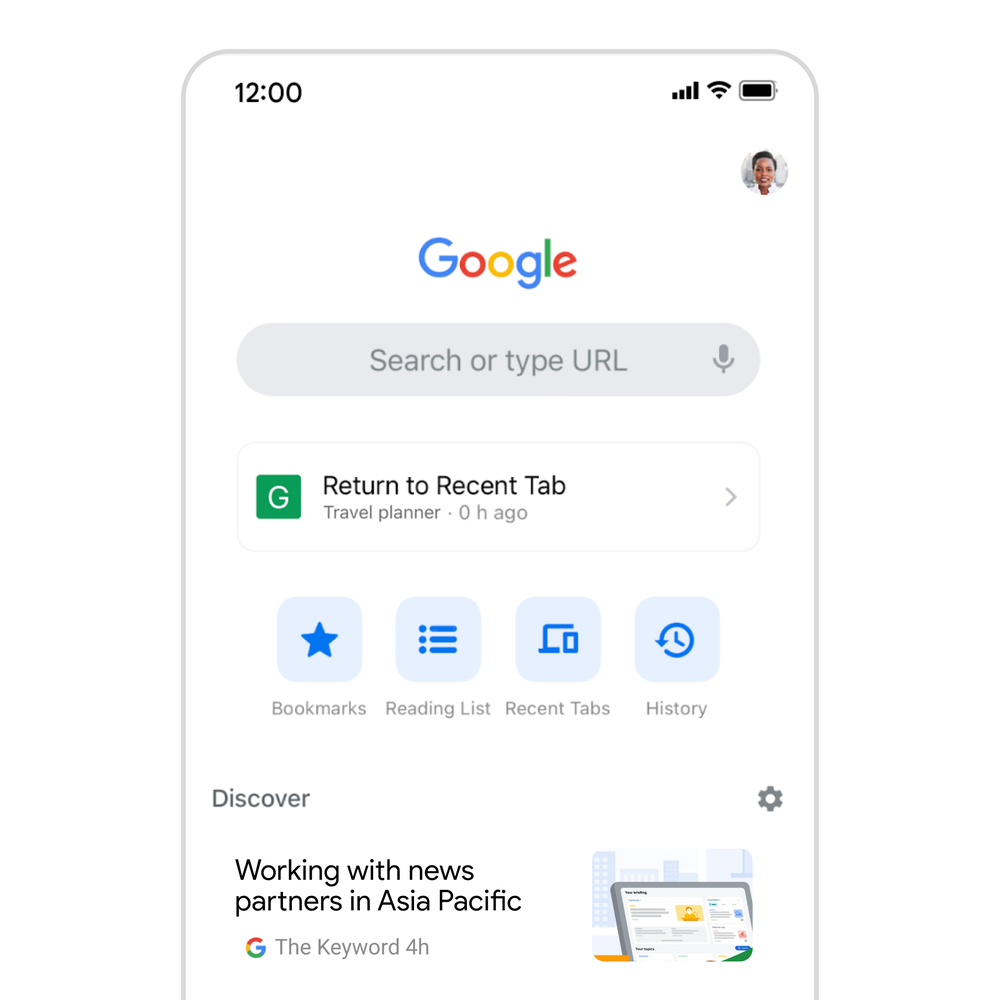
4. Translate websites faster into your language
We’re also using on-device machine learning to make those websites available in your preferred language. In particular, we are launching an updated language identification model to accurately figure out the language of the page you’re visiting, and whether it needs to be translated to match your preferences. As a result, we’re seeing many more successful translations every day.
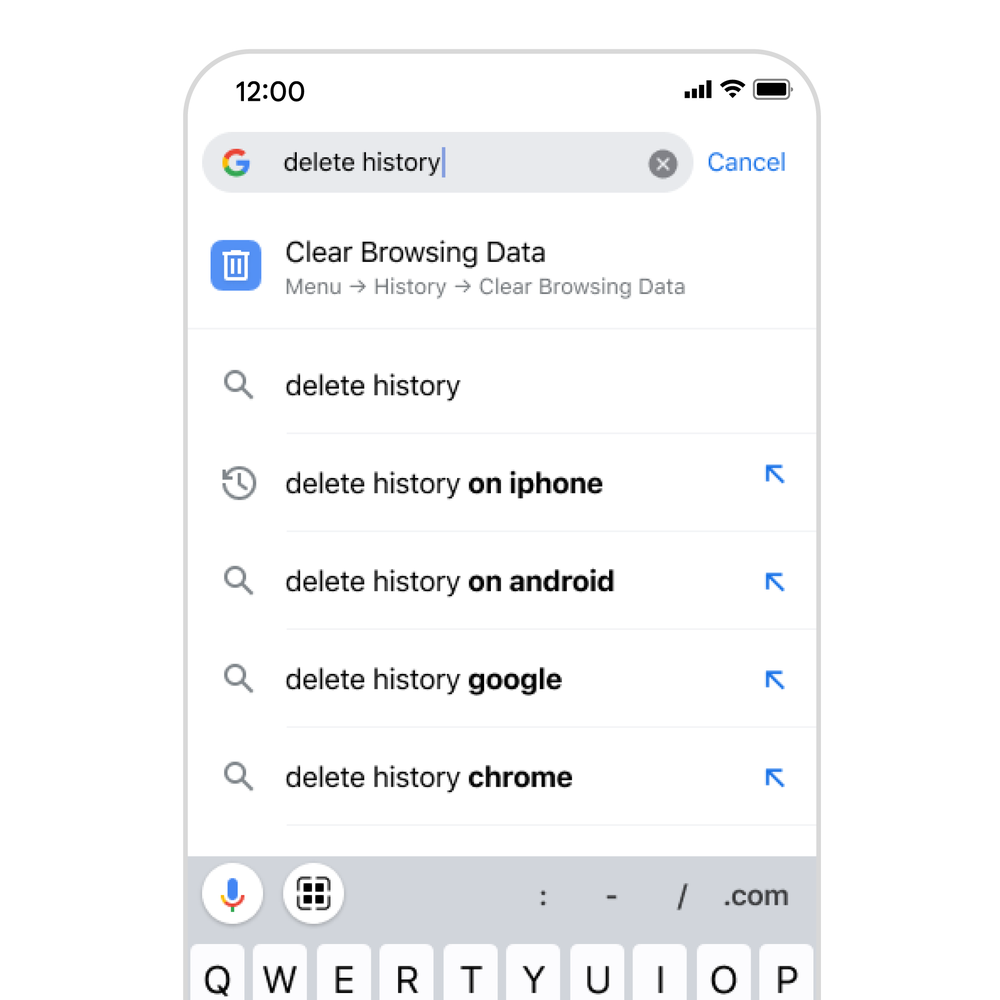
5. Use Chrome Actions to quickly get things done
Coming soon, we’ll roll out Chrome Actions on iOS to help you get more things done quickly from the Chrome address bar. Soon, you’ll be able to save time by typing an action’s title into the address bar. The Chrome address bar also predicts when you could benefit from a Chrome Action based on the words that have been typed. Chrome Actions make it faster to do common activities on Chrome for iOS such as:
- Clear Browsing Data
- Open Incognito Tab
- Set Chrome as Default Browser
We plan to bring even more innovation to Chrome on iOS in the coming weeks, so stay tuned. In the meantime, let us know if there are any features that you want to see by reaching out to us on Twitter @googlechrome.

Interpol, duemila arresti per truffe informatiche, 50 milioni di dollari recuperati

Buone notizie sul fronte della lotta al crimine informatico: l’Interpol ha annunciatodi aver identificato circa 3000 sospettati, arrestato circa 2000 operatori, truffatori e riciclatori di denaro, congelato circa 4000 conti correnti e intercettato circa 50 milioni di dollari di fondi illeciti. Questi, perlomeno, sono i dati preliminari dell’operazione First Light 2022, che è iniziata a marzo scorso e si è conclusa ai primi di maggio, coinvolgendo 76 paesi.
Le forze di polizia che hanno partecipato all’operazione hanno perquisito i call center dai quali si sospetta che partissero truffe telematiche di tutti i generi, dal romance scam (il finto corteggiamento che si conclude con una richiesta di denaro per un’emergenza inesistente) alle frodi bancarie online. Paradossalmente, l’Interpol segnala che sono in aumento i criminali che si fingono funzionari dell’Interpol e si fanno dare denaro dalle vittime che credono di essere sotto indagine.
L’annuncio dell’Interpol è interessante non solo per la vastità dell’azione di polizia, ma anche per la varietà delle tecniche di raggiro descritte.
Per esempio, a Singapore, la polizia ha salvato una persona molto giovane che era stata convinta con l’inganno a fingere di essere stata rapita, mandando ai genitori video in cui mostrava finte ferite e veniva fatta una richiesta di riscatto di un milione e mezzo di euro.
In Papua Nuova Guinea, un cittadino cinese è stato arrestato perché sospettato di aver frodato circa 24.000 vittime, per un totale di circa 34 milioni di euro, usando uno schema Ponzi di vendita piramidale.
Altri otto sospettati sono stati arrestati, sempre a Singapore, con l‘accusa di aver creato uno schema Ponzi legato alle offerte di lavoro, nel quale le vittime dovevano reclutare altri membri per guadagnare delle commissioni.
L’Interpol sottolinea inoltre il fenomeno in crescita dei money mule, ossia degli utenti che ricevono denaro sui propri conti, credendo di fare un lavoro onesto di intermediazione finanziaria, e scoprono solo in seguito che i soldi ricevuti provengono da reati e che quindi loro sono dei riciclatori inconsapevoli. L’Interpol cita anche il problema delle “piattaforme dei social media che stanno alimentando il traffico di esseri umani, intrappolando le persone in forme di schiavitù lavorativa o sessuale o in prigionia nei casinò o sui pescherecci.”
Naturalmente questi arresti da soli non bastano a fermare le attività criminali di questo genere, anche se sono un aiuto notevole oltre che una consolazione per le vittime. Serve anche una diffusa conoscenza di queste truffe e delle loro tecniche, in modo da saperle riconoscere. Magari voi avete già questa conoscenza, ma qualcuno nella vostra famiglia è più vulnerabile e meno informato. Parlatene e mettete in guardia:
- mai fidarsi dei contatti esclusivamente telefonici o via mail o messaggi;
- mai dare informazioni personali, anche se sembrano poco pericolose, se non si è sicurissimi dell’identità dei propri interlocutori;
- mai inviare denaro a nessuno, non importa quanto sia commovente la sua storia o quanto sia promettente la sua offerta di moltiplicare questo denaro;
- mai accettare proposte troppo belle per essere vere;
- nel dubbio, fermatevi, non fatevi mettere fretta da nessuno e chiedete aiuto a una persona fidata
- e per finire, se un amico o un familiare vi dice che forse qualcuno sta cercando di truffarvi, ascoltatelo: come dice Paul Ducklin della società di sicurezza informatica Sophos, non lasciate che i truffatori vi separino dalle persone che amate, oltre che dai vostri soldi.
Mantieni in ordine il tuo taglio con il Rowenta TN5200 Advancer (22€)
Sembra un Apple Watch ma costa meno della metà: Rinsmola a prezzo FOLLE
Samsung Galaxy Z Flip3: TUO a meno di 500€, prendilo ADESSO
iPhone 13 (Mezzanotte) da 256 GB: prezzo PAZZESCO su Amazon
Questa BELVA di robot aspirapolvere autoricaricante può essere tuo a prezzo SHOCK
ASUS ProArt: assembliamo da zero il PC perfetto per creator e professionisti
Robot aspirapolvere autoricaricante, fallo tuo a prezzo SHOCK su Amazon
Questo piccolo ma potente robot aspirapolvere è davvero incredibile e ti costa appena 127€. Corri a comprarlo con l’offerta lampo di oggi.
Leggi Robot aspirapolvere autoricaricante, fallo tuo a prezzo SHOCK su Amazon

Meet Nathalia Silva, a Cloud Googler and DEI leader
Welcome to the latest edition of “My Path to Google,” where we talk to Googlers, interns and alumni about how they got to Google, what their roles are like and how they prepared for interviews.
Today’s post features Nathalia Silva — a Toronto-based program manager on the Google Cloud Learning team, and a leader of two employee resource groups supporting Latino Googlers.
Can you tell us a bit about yourself and your role at Google?
I work on the Google Cloud Learning team, whose mission is to train and certify millions of people on Google Cloud. As a program manager, I oversee processes that help design learning content, offerings and solutions for Google Cloud professionals. Outside of my core work, I’m a diversity, equity and inclusion (DEI) advocate, Star Wars fan and soccer lover — Fluminense is my favorite team!
How did you first become interested in tech?
I grew up in Rio de Janeiro, a beautiful city in Brazil. My mom and dad always believed in the power of education, but good high schools are expensive in my hometown. They both worked hard to provide access to a quality education for me and my brother. Through my parents’ efforts and the support of my grandparents, uncles and aunts, I was able to attend an engineering university. Once I got there, I earned an academic scholarship to study in Toronto. After moving to Canada, most of my new friends were computer science students. They used to tell me about their projects and assignments, which inspired me to start studying computer science and eventually join the tech world.
Why did you apply to work at Google?
While working with local tech communities in Toronto, I met many Googlers who always spoke highly of their jobs and the company culture. This made me want to join the Google family. I also always wanted to work at a global company that fosters curiosity, and Google definitely does that. Most of my teammates love traveling and learning about different cultures — just like me!

Nathalia in the office.
How did you first get involved in DEI work?
Being a first-generation Latina has helped shape my passion for DEI initiatives. Like many other first-gen college students, I struggled with financial challenges, racial discrimination, frequent homesickness and a lack of networking opportunities. So I founded an academic club offering networking events, workshops and career guidance to college students in Toronto. The club earned several academic awards and has evolved into a group that aims to connect women and kickstart their careers in tech.
How have you continued your DEI advocacy work at Google?
In addition to my previous work supporting groups such as women in tech and immigrants in Canada, I’ve always looked for a chance to help the Latino community. Once I started working at Google, I got involved with HOLA@ Google, an employee resource group that creates community for Latino Googlers and allies. Today, I am a global lead for HOLA@ and a founder of our local chapter, HOLA@ Toronto.
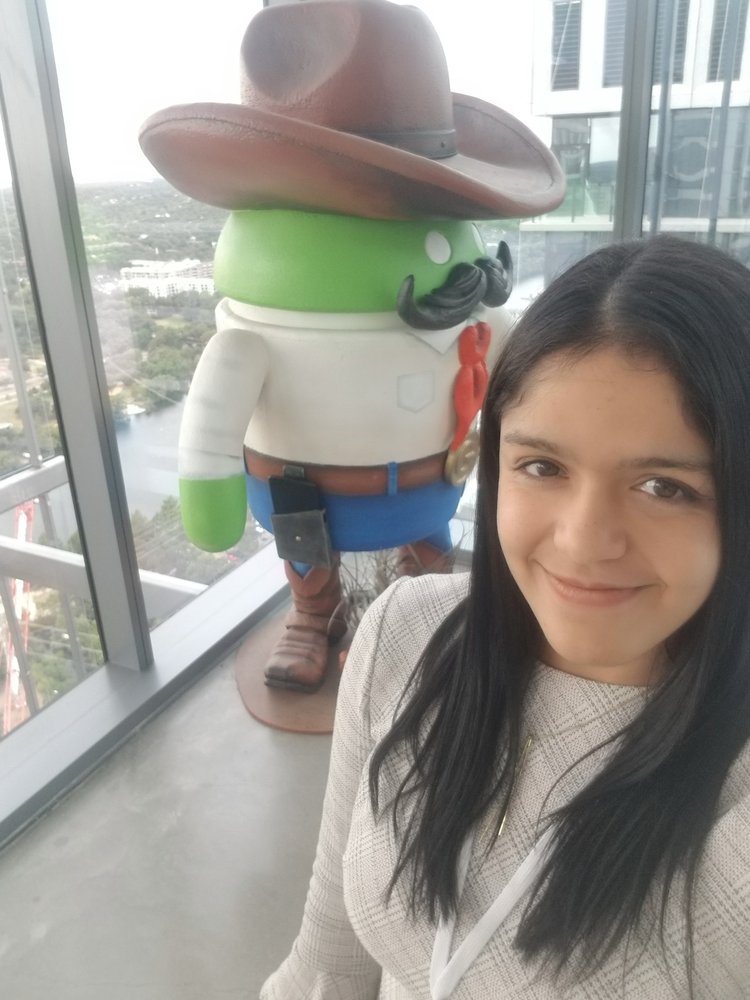
Nathalia at Google’s Austin office during a Women in Tech conference in 2019.
What was it like interviewing for Google?
I loved every minute of it. My recruiter was really supportive, which helped make the process feel much more straightforward. It was also amazing to meet many different Googlers. Every Googler who interviewed me was attentive and supportive, which made a big difference in my interview performance.
Any tips for aspiring Googlers?
Never stop learning. Once you get an interview at Google, I recommend visiting both the Google Careers site and, if applicable to the role you’re applying for, Google Cloud’s training website. I didn’t have much experience working with the cloud, so Google Cloud’s training website was a key tool for me. It houses a number of resources to help you better understand core cloud products and services. Attending community events can also be helpful, since you get access to industry content and networking sessions.
Any advice for your past self?
I wish I could tell my past self to never stop believing in my potential. For some time, I doubted if I could get a job at Google, and this brought a lot of stress and anxiety into my life. Once I fully believed in my capabilities and knowledge, I built the confidence to apply to the role that I have now!
OPPO, Ericsson e Qualcomm, successo per i test del 5G Enterprise Network Slicing
OPPO guarda al 5G Enterprise Network Slicing, una soluzione progettata per garantire connessioni più sicure, affidabili e flessibili.
Leggi OPPO, Ericsson e Qualcomm, successo per i test del 5G Enterprise Network Slicing

Mettete al sicuro i vostri dati su un disco condiviso QNAP? Aggiornatelo per evitare ricatti

Molti utenti informatici hanno preso la buona abitudine di archiviare i propri dati, soprattutto foto, video, film e musica, su un disco di rete condiviso, in modo che tutti i dati siano comodamente accessibili da qualunque dispositivo digitale domestico e magari anche via Internet quando si è per esempio in vacanza.
Una delle marche più note nel settore dei dischi condivisi o NAS (network attached storage) è QNAP, ma quest’azienda ha diffuso da poco un avviso di sicurezza importante: chi non ha aggiornato il software presente a bordo di questi NAS è a rischio di ricatto e di furto o perdita di dati.
L’azienda segnala infatti che è in corso una campagna di ransomware ai danni degli utenti dei suoi dispositivi. Criminali non identificati riescono a localizzare e a infettare via Internet i NAS QNAP non aggiornati, usando un malware denominato DeadBolt per mettere una password su tutti i dati che contengono e poi chiedono un riscatto per dare alla vittima la password di sblocco dei suoi dati.
Chi non paga il riscatto e non ha una seconda copia di questi dati rischia di perderli per sempre, e c’è il rischio aggiuntivo che eventuali foto e video di natura intima archiviati sul NAS possano essere oggetto di ulteriore ricatto o finire nelle mani sbagliate.

QNAP consiglia quindi agli utenti di aggiornare al più presto il software di gestione dei propri dischi di rete condivisi, seguendo la procedura indicata nell’avviso. Aggiunge inoltre che se si è già stati attaccati è importante fare uno screenshot della richiesta di riscatto prima di aggiornare il software, perché l’aggiornamento cancellerà la richiesta, rendendo impossibile comunicare con i criminali per un eventuale recupero dei dati.
A prescindere dal caso specifico, gli esperti di sicurezza raccomandano di non collegare mai nessun NAS, di nessuna marca, direttamente a Internet, ma di farlo solo se strettamente necessario e comunque proteggendolo tramite un apposito firewall ben configurato.
SSD Samsung 870 EVO da 1 TB ad un prezzo SUPER su Amazon
Uno dei migliori SSD sul mercato, l’870 EVO di Samsung è in offerta ad un prezzo incredibile su Amazon
Leggi SSD Samsung 870 EVO da 1 TB ad un prezzo SUPER su Amazon