
How live streaming helps this creator connect with fans
Tokes Ojo-Ade is a marketing professional, wife, mother — and successful web creator. Her blog,Tokes’ Take On Style, offers fashion, styling and shopping tips for busy working women.
“As a working mom, I know we all juggle a lot,” says Tokes, who lives in the Washington, D.C. area and works full time in the financial services industry. “Given how time-strapped a lot of us are, we could all use effortless styling and shopping tips along with easy style inspiration,” she says.
Fashion, style and beauty influencer Tokes blogs for busy, working women.
Tokes works to keep her blog’s content fresh and engaging, like adding tappableWeb Stories andYouTube videos to the mix.
She also live streams to connect with her fan base more directly. On her biweekly Instagram TV (IGTV) live stream, “Thursday Tips with Tokes,” she shares quick and easy styling tips with her audience — sometimes reaching over 21,000 views. Fans are drawn to Tokes’ warm, personal style, and her take on fashion and beauty to help women feel more confident.
Tokes spoke with us to share a few tips on how to create a successful live stream.

Through her blog, videos and live stream shows, Tokes helps women find style on a budget.
Prepare before you go live
While trial and error is part of the learning process, Tokes says preparation is key to live streaming success. “You have to figure out what the intent is, what the goal is, what you’re trying to do,” Tokes says. “If I’m sharing tips, do I need props? If I’m showing and telling, what are the pieces that I want to share? How long am I going live for? How many outfits can I fit in during that time? Also, I have to anticipate questions that people may have.” She suggests making a list of everything you need for your live stream and reviewing it in advance to avoid any mid-stream glitches.
Tokes also recommends preparing based on the platform you’re using. She says while Instagram is great for quick and spontaneous live streams, her Amazon Live shows require more prep with choosing products to feature that are a good fit for her audience.
Involve your audience and other influencers
Tokes kicks off every live stream with some audience banter, welcoming her viewers by name. Engaging with the audience as soon as she goes live helps them feel like they’re part of the show. “I always ask where people are joining from because you’re bringing them along,” Tokes shares. “It doesn’t feel as much like you’re talking to a screen because there’s that engagement and interaction going on.”
Tokes also features other influencers on her shows as a way to expand her content and build community between their audiences. “I did [a live stream] recently with two plus-sized influencers, and we talked about styling tips for plus-sized women.”
While popular influencer live stream shows have a casual, laid-back feel, successful creators like Tokes put in plenty of prep time. That foundation makes it easier for creators to relax and have fun with their audiences, knowing they’ve mapped everything out in advance.
Want to hear more from Tokes? Watch our full interview on the Google for Creators YouTube channel and check out her Web Story.
A Googler’s story of overcoming obstacles and doubts
Welcome to the latest edition of “My Path to Google,” where we talk to Googlers, interns and alumni about how they got to Google, what their roles are like and even some tips on how to prepare for interviews.
Today’s post is all about Ernesto Gutierrez Gasca — a Partner Development Manager in our Mexico City office — and the obstacles he overcame on his journey to Google.
What’s your role at Google?
As an ISV Partner Development Manager at Google Cloud, I am responsible for opening the ISV (Independent Software Vendors) area in Mexico. Our goal is to help these software vendors use the Google Cloud Platform, and I help them do this. One of the things I really enjoy about this role is that I get to meet and promote so many passionate partners throughout the region.
What’s your typical work day like?
In the morning, I check my schedule to see what adventures await me throughout the day. I then wake up my 4-year-old twins — my motivation and the reason for everything I do. Together, we head to my home office, where they occasionally join in on my meetings throughout the day. These meetings are often with my partners to review our progress and identify challenges. Each partner has a very particular vision of the future and the strategy we need to get there — I learn a lot from them. I also meet with my manager to go over what I’ve learned and the way I think we should move forward. Last, I devote time to closing out pending issues and planning my next day. I spend the rest of my evening in my most important role — having fun and laughing with my twins.
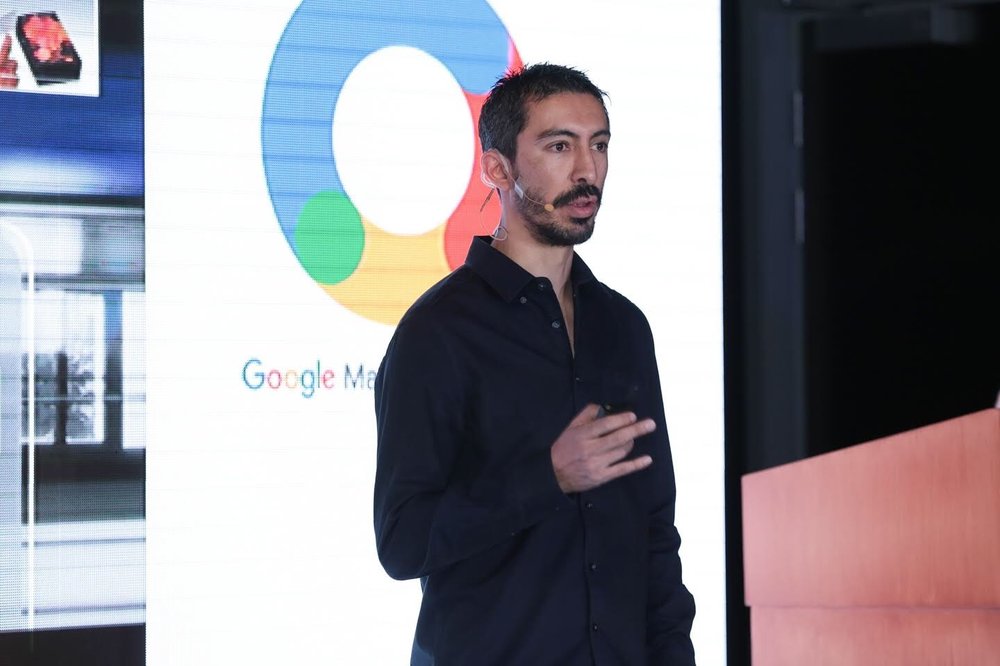
Ernesto speaking at a Google Marketing event.
What was your path to this role like?
Since I was a student, I dreamed of working at Google. However, I feared I lacked the professional experience needed to apply, so I didn’t until I received an email from a Google recruiter. During my interviews I focused on just being myself — and I got an offer.
When I joined Google, I became Partner Manager for large agencies in Latin America and was responsible for promoting the use of data driven marketing. I was constantly learning new things. Around this time, I realized that the future is cloud computing, so I decided to make the change to my current role. While I didn’t have much experience with Google Cloud before, I am grateful for the ample opportunity I was given to grow into this role.
What resources did you use to prepare for your interview?
I prepared a lot for my interviews. I started by researching and reading everything I could find about Google’s Marketing Platform until I understood very well where the company was going. I also studied other companies in this space, which gave me a lot of clarity around how the same industry objective can be approached from different perspectives. Once I learned all of this information, I organized my thoughts around my own career. I reread the success stories from what I developed or participated in and I practiced articulating how my focus on innovation could add to Google’s objectives. I also spoke with people who worked in companies similar to Google to measure my knowledge and test answers to possible complex questions. And finally, the support and trust of my family before and after each interview helped me get here.
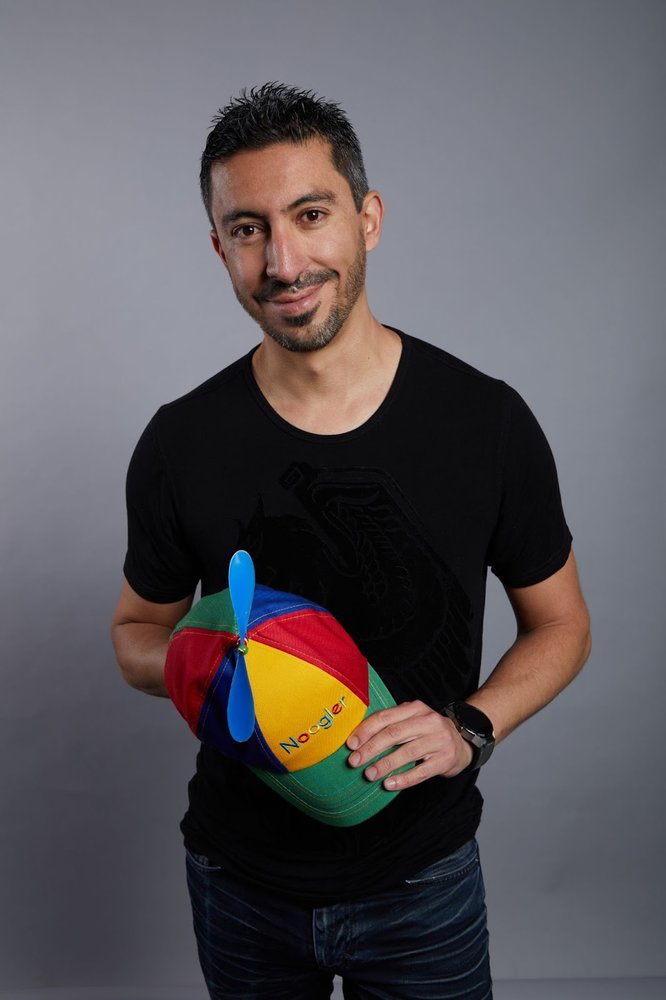
Ernesto proudly holding his Noogler hat.
Any tips for aspiring Googlers?
Be your true self, and don’t be afraid to apply because you feel inadequate. Google looks for people capable of learning and problem-solving over people who have complete technical mastery. After you apply, be sure to prepare for the interview so you are able to confidently speak about yourself and your experiences.
What’s something people might not know about you?
I was born with a cleft lip, a condition that required seven surgeries, years of speech therapy and counseling to cope with the bullying. This condition made it difficult for me to speak publicly and socialize. But my mother challenged me to have big aspirations — she pushed me to dream big regardless.
Today I’m an Ambassador of the Smile Train Foundation, an organization helping children born with cleft palates and lips. I’m committed to inspiring these children that they can achieve any dream they set their minds to. I am extremely grateful for everything I have.
What advice do you have for your past self?
Never be afraid to express when I don’t know, and never try to hide my cleft lip and palate. Acknowledge that if I don’t know how to do something today, I can learn it tomorrow.
TCL annuncia al CES 2022 il più sottile TV Mini LED 8K da 85”
A new kind of “resolution” for the New Year
I love New Year’s resolutions, and because of the pandemic, in 2020 and 2021, I had plenty of time to focus on them. In 2020, I decided I might as well finally train for and run a marathon…and then because, well, I still had the extra hours in 2021, I decided to try to do it again, only faster. I also resolved to give back, so I began fostering dogs (and when you already have two, trust me, it’s a challenge). My husband and I also finished remodeling our basement, turning it into a separate studio apartment.
Honestly, that’s a lot of doing. And as 2022 approaches, I think instead of using any extra time or spare motivation I have to come up with another challenge, maybe it’s time for a New Year’s non-resolution for me — a year where I focus on resting and recharging, instead of on constant doing.
I’m likely not the only one feeling this way. In 2021, search interest in “anxiety” and “therapy” reached all-time highs, as did “how to maintain mental health” and “self care ideas.” And every year, “yoga” and “journaling” spike in January. In 2022, I want to do less and focus on taking care of myself, and here are a few tools I’m going to use to do that.
Rest more
2022 is going to be my year of sleep. The Nest Hub’s new Sleep Sensing will offer a better look at the quality of sleep I’m getting, and already the message I’ve received is: Get more of it. One piece of advice Sleep Sensing has given me based on my sleeping patterns is to try and get less light in my room — and I’m going to try waking up a little less abruptly by using Nest’s Gentle Wake Up feature, which slowly brightens my lights. And in stark comparison to my running goals from the past two years, in 2022 I’m going to try and run…less. Fitbit’s Daily Readiness feature tells me when it’s time for a rest day, a reminder I definitely need. (I blame running endorphins!)
Practice mindfulness
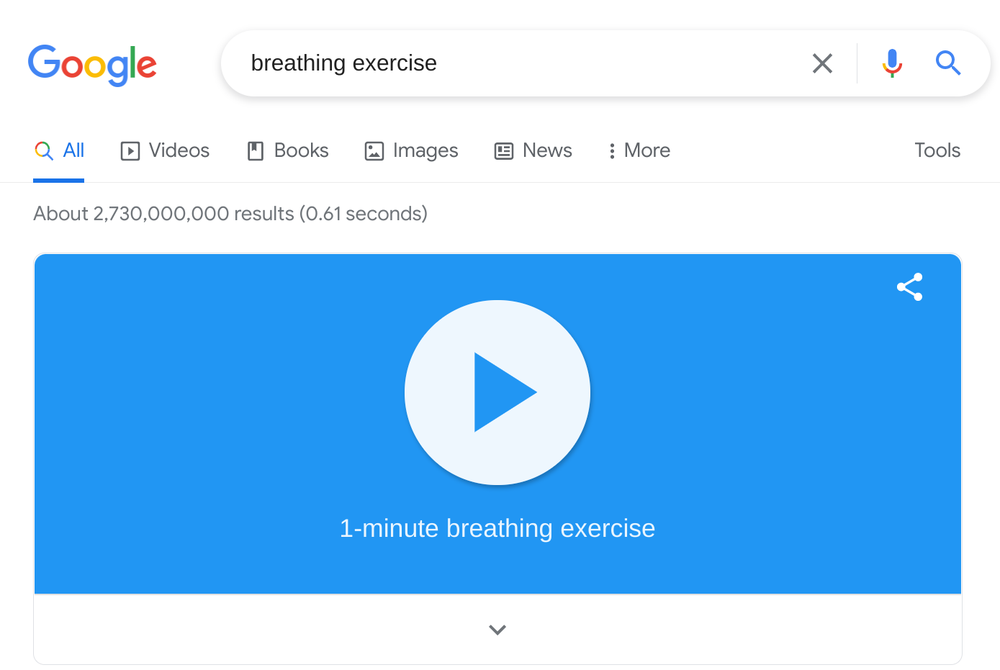
For me, mindfulness and meditation are more difficult than jumping up to physically do something. Search has a quick fix: Search “breathing exercise” and use the one-minute meditation.
Take a solo trip
I tend to over-plan trips — ask my family (there are a variety of Google Sheets dedicated to my vacations). In 2022, I’m not sure I can drop the side hustle of being my own personal travel agent, but I’m going to do the planning for a solo vacay. I like to think of myself as a Google Flights power user, and since I only have myself to think about, I only have to take my calendar into consideration when I set up a price alert for destinations I’m interested in. And I’ll use the Explore feature to select “outdoors” to narrow it down.
Maybe I’ll decide on a low key break, though and just stay home. In 2021, searches for staycation reached an all-time high — if I truly want to “do less,” maybe I’ll consider that option instead…but the year is young, so I have plenty of time to decide.
How Abigail Annkah is using AI to improve maps in Africa
As a university student, Abigail Annkah fell in love with mathematics, which soon led to her interest in artificial intelligence. After graduating from the African Institute for Mathematical Sciences, Abigail made it through the competitive process to become an AI resident at Google Research, Accra. After her residency, Google offered her a job and she’s now a research software engineer working on several high-profile projects.
As Google grows its presence in Accra, we spoke to Abigail about the mapping project that motivates her, starting a new job while becoming a mother and the importance of inspiring young girls to enter STEM careers.
How did your science background lead you to Google?
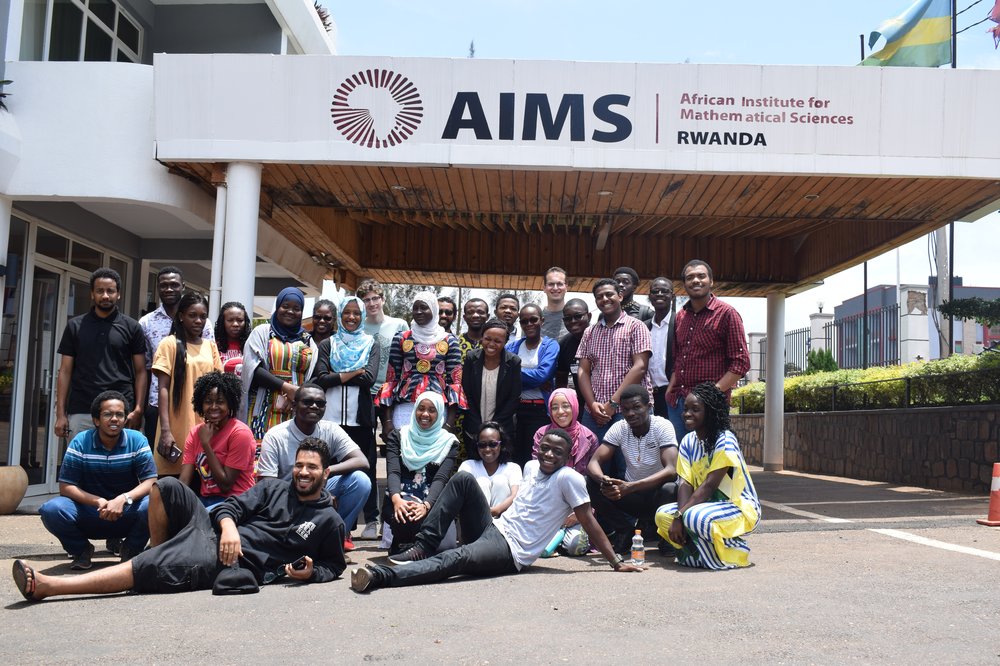
I did my undergraduate degree in Bachelor of Science Statistics at the University of Ghana, finishing with a combined major in Mathematics and Statistics. During the second year of study, I stumbled upon Computational Maths, leading to my first taste of coding. I started taking extra credit courses, which really kickstarted my entry into AI. Then I joined the first cohort of the African Masters of Machine Intelligence program at African Institute for Mathematical Sciences with the support of Google and Facebook. The program intends to bridge the AI education gap in Africa and strengthen the growing data science ecosystem in the region — this was my first exposure to the world of Machine Learning.
Abigail and her cohort at The African Institute for Mathematical Sciences
I quickly developed an interest in using data-driven approaches to solving pressing societal challenges, leading me to work on biochemical image segmentation for my master’s thesis. I then joined the Google AI center in Ghana as an AI resident and after two years gained a full-time role as a research software engineer. There, I used my expertise in computer vision to help build better image segmentation models that led to significant improvement of Google maps. This project created new possibilities for using improved satellite imagery analysis tools for purposes like disaster response or census planning.
Is there a specific project you’re especially proud to have worked on?
The aforementioned Google maps project — also known as the Open Buildings open-access dataset project — is close to my heart as an African. Open Buildings uses AI to provide a digital footprint of building locations and geometry across most of Africa. Our aim is to map Africa’s built environment using satellite imagery, and I dedicated almost all my residency to contributing to that work.
Cities in Africa aren’t constructed the same as in other parts of the world. For example, AI models in a U.S. city won’t be as useful here but the problem is actually bigger than just one product. Many large-scale digital maps today are usually missing that AI context. It was exciting to see the potential and unanticipated use cases that helped us refine the dataset, and we saw it make an impact on local communities. For example, the data we collected about buildings can also be used to analyze the density of the built landscape for environmental science purposes.
After identifying and adding millions of previously unmapped buildings to our dataset, we decided to open source the dataset, making it available for anyone to download.
How do you hope your work inspires the next generation of young scientists in STEM?
That’s a funny question because sometimes I think I haven’t gone that far in my career — but that’s only because I want to achieve so much more. When I’ve spoken to students they always ask about my journey to Google, especially starting a new role as a new mother. I want them to look at me and think if she did it, then I can do it too! It’s really important to me that my work reaches people so that they in turn can reach out to others when they achieve career success.
I’m very pleased there are more programs today encouraging girls and women to get into STEM. I was fortunate enough to participate in one of these programs early on, and it helped me get where I am today. Currently, the Accra team is launching Mind the Gap in Ghana and I get to interact with young students to inspire them to pursue STEM along with other members of the team.
How did you balance motherhood with your new position at Google?
Having a newborn at home while start my residency was stressful, especially following a difficult pregnancy. I was anxious about how much of myself I could give to my work, but I was able to make valuable contributions to the work and still be a trusted member of the team. When I became a full-time researcher, I thought to myself that if I can succeed as a working mother, then I should have confidence that I had earned this position. I also had a great maternity package and a super supportive team. I had a support system where I could ask colleagues, “How did you get through this? What did you do?” I didn’t have to figure out everything on my own.
Who are your heroes in real life?
I think the younger me is my greatest hero! I’ve had so many amazing people pushing me, but whenever I hit a roadblock, she’s the one who inspires me and reminds me that yes I can.
Lenovo svela al CES una serie di soluzioni per la realtà ibrida
Google, tutte le novità dal CES 2022, da Android a Chrome OS
ASUS presenta la sua linea di laptop premium Zenbook 2022
HannSpree HG392PCB: ampia diagonale ad un prezzo accessibile
CES 2022: Sempre più connessi con Android e non solo
Bloccare e sbloccare i dispositivi
Completare le attività e condividere i contenuti multimediali tra i vari dispositivi
Aumentate la vostra produttività con PC Windows e Android

Google migliora le connessioni fra dispositivi Android
CES 2022: Better together with Android and beyond
Editors note: Google planned to attend CES 2022 but pulled out due to concerns over COVID-19.
The average U.S. household had 25 connected devices in 2021, up from 11 in 2019. If you’re like me, you want to pick and choose the devices that work best for you regardless of brand. You also want to easily set up and move from one device to the next throughout your day, and without having to pull up the same song or task over and over again.
Android was built for everyone, everywhere and to give people more choice in devices, whether it’s based on the design, features or overall value. Over the years, we’ve evolved Android to support more devices in your life such as watches, tablets, TVs and even cars. And beyond Android, our work at Google includes laptops, headphones and speakers, smart home devices and much more.
That’s why we’re building on our efforts and introducing more simple and helpful ways to make your devices, from Android’s ecosystem and beyond, work better together.
Quickly set up and connect your new devices
It can be fun and exciting to get a new device — but that can turn into a headache when you start setting it up. We’re making this process a little less daunting with pairing support for more devices.
Fast Pair has already helped people connect their Android phones with Bluetooth accessories over 100 million times. It enables instant set up and device pairing, bringing up the companion app for installation and transferring your Google credentials. We’re continuing our work with partners to further extend Fast Pair’s functionality beyond audio connectivity with wearables, headphones, speakers and cars and extending it to TVs and smart home devices, so you can instantly start using all the devices in your life.
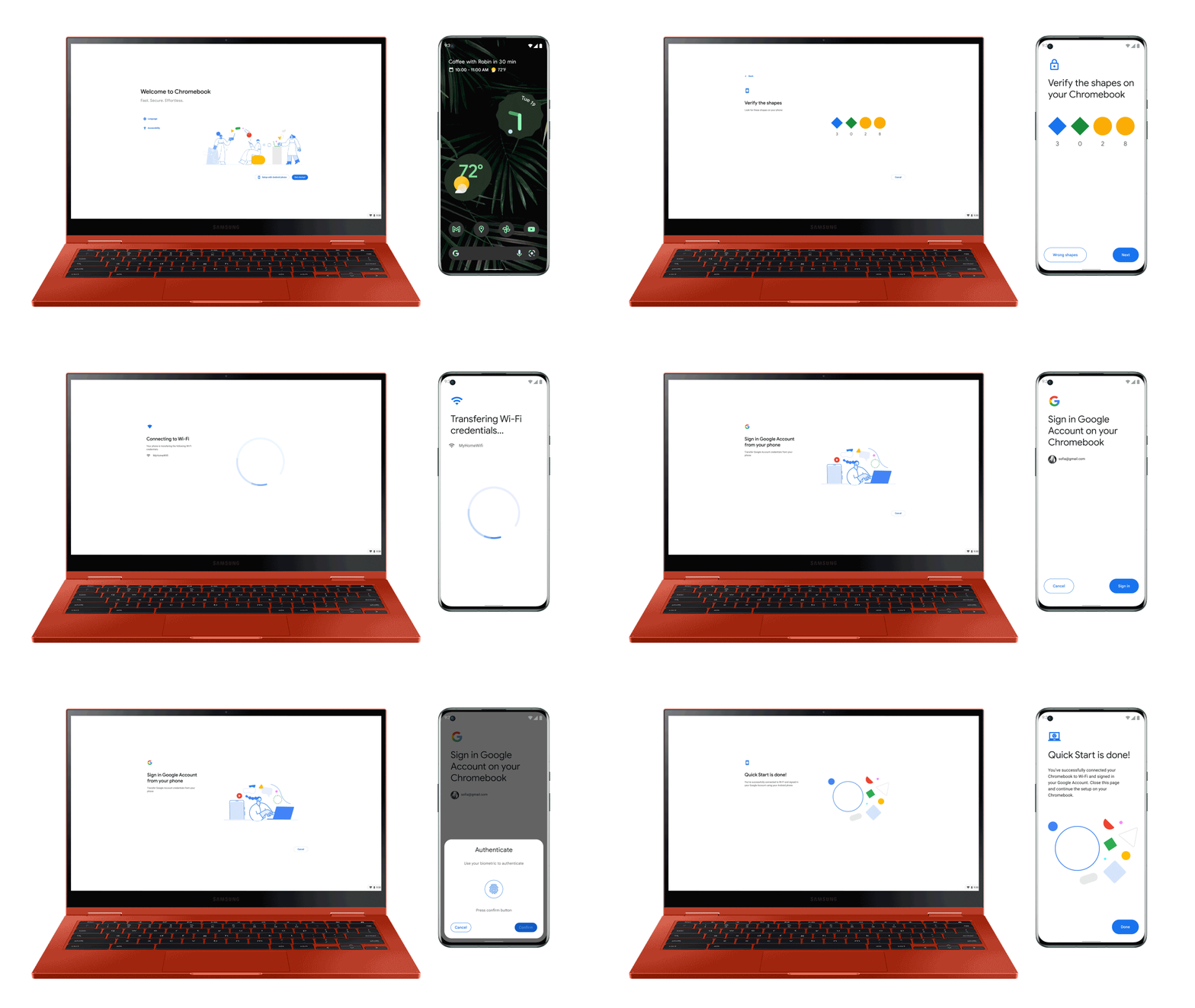
Starting in a few weeks, when you turn on your Fast Pair-enabled headphones, your Chromebook will automatically detect it and pair with it in a single click, letting you stay focused when studying or working wherever you are. If you get a new Chromebook later this year, you can use your Android phone to quickly set it up and get immediate access to all of the information you’ve already saved, like your Google login and your Wi-Fi password.
In the coming months, you’ll be able to set up your headphones for when you need to watch quietly with your Google TV or Android TV OS device at home. And with built-in support for Matter on Android, you’ll be able to use Fast Pair to quickly connect new Matter-enabled smart home devices to your network, Google Home and other accompanying apps all in just a few taps.

Lock and unlock your devices
Today, you can already unlock your Chromebook with your Android phone to quickly get right to work. In the coming months, we’ll bring this feature to your paired Wear OS smartwatch so you can instantly unlock and access your Chromebook and Android phone or tablet when you’re close by.

And with a digital car key, you can now use your compatible Samsung or Pixel phone to lock, unlock and start your supported BMW vehicles from your phone. Starting later this year, on phones with Ultra Wideband (UWB) technology, you won’t even have to take your phone out to use it as a car key. You’ll also be able to securely and remotely share your car key with friends and family if they need to borrow your car. We’re working to bring digital car keys to more Android phones and vehicles later this year.

Complete tasks and share media across devices
To amplify your visual and audio experiences, your devices should instinctively know which of them you want to use and when. We’re building a technology for Bluetooth-enabled headphones that will enable them to automatically switch the audio to whatever device you’re listening to. So if you’re wearing headphones to watch a movie on your Android tablet and you receive a phone call, the movie will pause and the headphone audio will automatically switch to your Android phone and then switch back to the movie when you’re done. Spatial audio on your headsets will make you feel like you’re really there by adapting the sound based on your head movements, positioning the audio in the space all around you. These features will be available in the next few months on supported headphones.

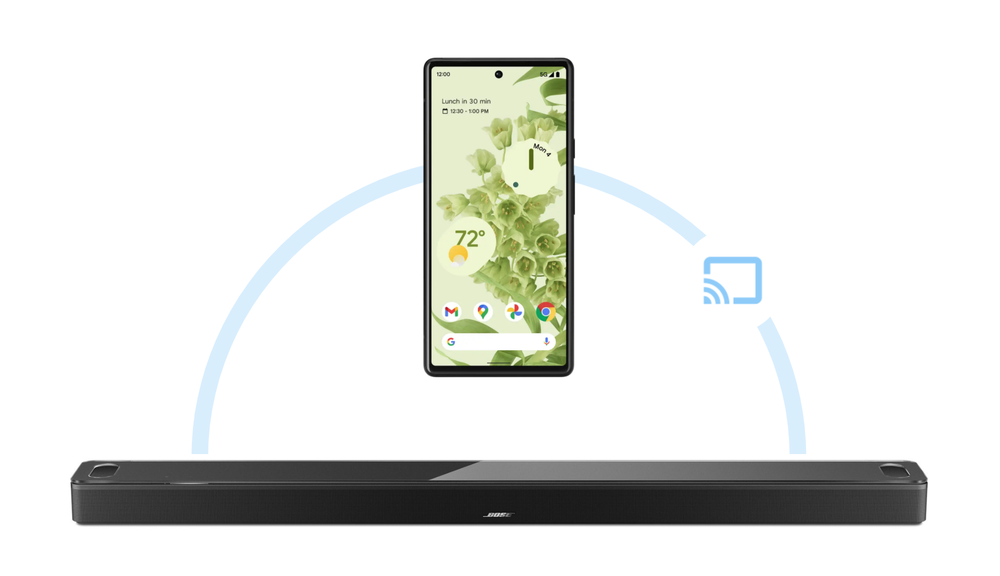
We’re also making it easier to move and manage your content across any device. With Chromecast built-in, your Android phone already allows you to share videos to displays and TVs as well as audio content to select speakers from Nest and others. To help you cast music and podcasts you’re listening to from your Android phone to more of your speakers, we’re bringing Chromecast built-in to more brands, starting with all Bose smart speakers and soundbars in the next few months.
Whether you’re at home or on the go, we’re also adding features to Phone Hub on Chromebooks later this year that help you accomplish more across your devices. Today, you can use your Chromebook to view and respond to chat notifications, toggle Do Not Disturb, set off the ringtone to find your phone or continue browsing recent Chrome tabs. Later this year, if you’re working on your Chromebook and your Android phone is out of reach (such as charging in a different room), you’ll be able to stay in touch by accessing chat apps from your phone directly to your Chromebook –without needing to install them again on your Chromebook. We’re also excited to add Camera Roll to the Phone Hub, which makes access to your most recent photos and videos as easy as one click.

Today, you can already use your voice while driving to close the garage door, turn off the kitchen lights, turn down the thermostat and check if you locked the front door. You’ll soon be able to ask Google for help even before you leave the front door. With remote actions, you can use your voice to warm up and cool down your car, lock and unlock and get information (like how much battery you have left) on all Assistant-enabled devices. These capabilities are coming first to vehicles from Volvo Cars in the coming months, with more to follow.
Do more with Android and Windows PCs
For the first time with Android, we’re also focused on building for other platforms, like Windows, whether it’s in gaming, productivity or other areas. For example, by connecting your Android phone to your Windows PC with Fast Pair, you’ll be able to quickly set up Bluetooth accessories, sync text messages and share files with Nearby Share. We’re working with Acer, HP and Intel to bring these experiences to select Windows PCs first later this year.

These features will be rolling out throughout the year. Moving forward, you’ll continue to see us invest in more helpful ways for your devices to work better together.

CES 2022: Making the most of your drive with Google
Editor’s note: Google planned to attend CES 2022 but pulled out of having an in-person presence due to concerns over COVID-19.
Google’s vision of helpfulness on the road is to provide a safe and seamless connected experience. Today, we’re introducing several updates for cars compatible with Android Auto and cars with Google built-in.
Your Android phone as your car key
With digital car key, you can now use select Samsung Galaxy or Google Pixel phones to lock, unlock and start supported BMW vehicles from your phone. Starting later this year, phones with Ultra Wideband (UWB) technology will allow you to unlock your compatible car without taking your phone out at all, and key sharing will allow you to securely and remotely share your digital car key to trusted friends and family. We’re working to bring these features to even more Android phones and vehicles later this year.
Unlock your car with your mobile phone and a simple tap.
A more helpful drive with Android Auto
Now available on nearly 150 million cars around the world, Android Auto brings the best of Google onto your car display via your Android phone. Most of the world’s top car brands are bringing wireless Android Auto to their newest models, meaning you never need a cord to connect. And with just one tap, Fast Pair makes it easier than ever to connect your phone and wireless Android Auto. It’s available today on select BMW and Ford cars, with more to come. Also, with new accessories like the Motorola MA1 wireless adapter, you can now enjoy the wireless Android Auto experience even if your car doesn’t have wireless support built-in. Connected via USB, the adapter stays in your car and wirelessly projects Android Auto from your phone to your car display as soon as you step inside.
You can already enjoy thousands of media, messaging, navigation, parking and charging apps that support Android Auto. And this summer, we’re bringing you more. We’re partnering with Lyft and Kakao Mobility to integrate their driver apps into Android Auto, so drivers will be able to view and accept rides right from their car display. And with access to points of interest apps like MochiMochi, Fuelio and Prezzi Benzina, you can explore more of the world, find and pay for all types of car services, and track your mileage and costs.
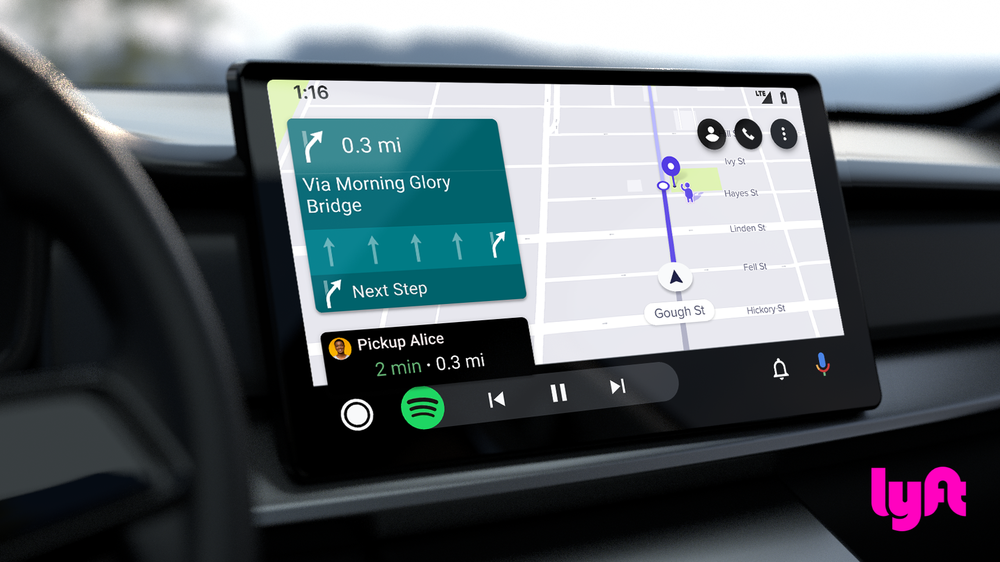
Lyft Driver app for rideshare drivers will be projected onto their car display (UI for illustration purposes only and may not reflect final product).
New capabilities for cars with Google built-in
Car manufacturers like Polestar, Volvo Cars, and General Motors – with more to come – are already shipping select cars with Google technology built right into their infotainment systems, allowing you to get more use out of helpful features.
With Google Play built-in, you can soon download navigation apps like Sygic and Flitsmeister, charging apps like ChargePoint and PlugShare, parking apps like SpotHero and ParkWhiz and points of interest apps. In fact, later this year, you will be able to access video entertainment in the car while parked, starting with Volvo Cars with content from providers like YouTube. Suddenly, waiting for curbside pickup or for your car to charge isn’t so boring anymore.
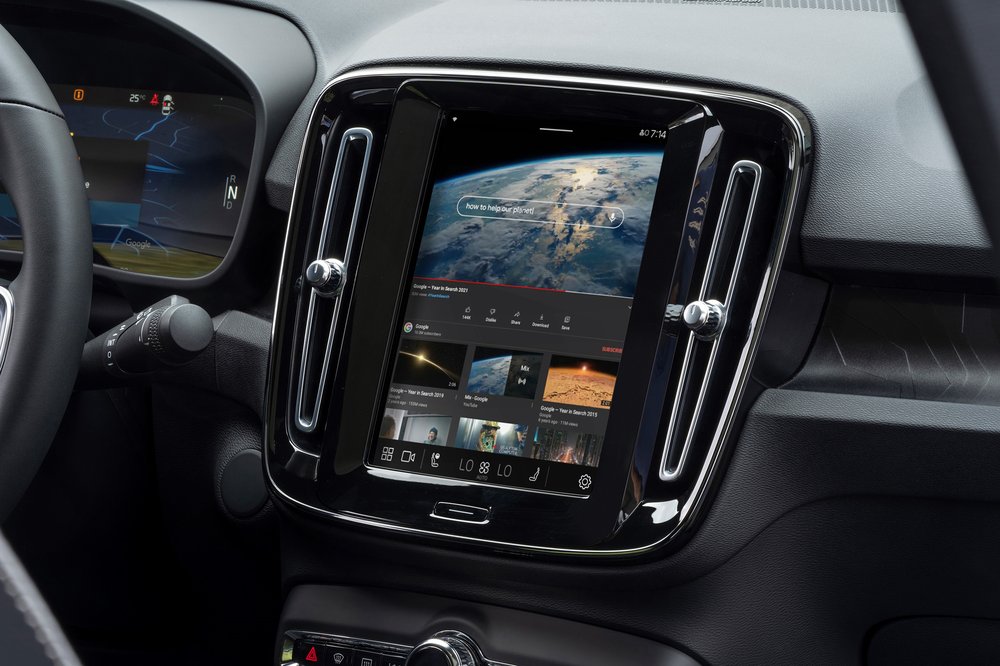
Enjoy watching YouTube while parked on select Volvo Cars with Google built-in.
This deeper integration allows you to get help from Google beyond the car display. Coming this spring to Volvo Cars, you’ll be able to check on and adjust even more car settings by asking Google. From activating features like lane keeping assist to checking when your next service is due, your voice can replace looking around for the right button or scrolling through settings.
Smart home, meet smart car
With remote actions, you will soon be able to ask Google for help even before leaving the front door. Ask Google to warm up or cool down your car, lock and unlock it and check on the status of things like your battery charge, all from the comfort of your own home with the help of any Google Assistant-enabled device. This is coming first to select Volvo Cars, with more to follow.
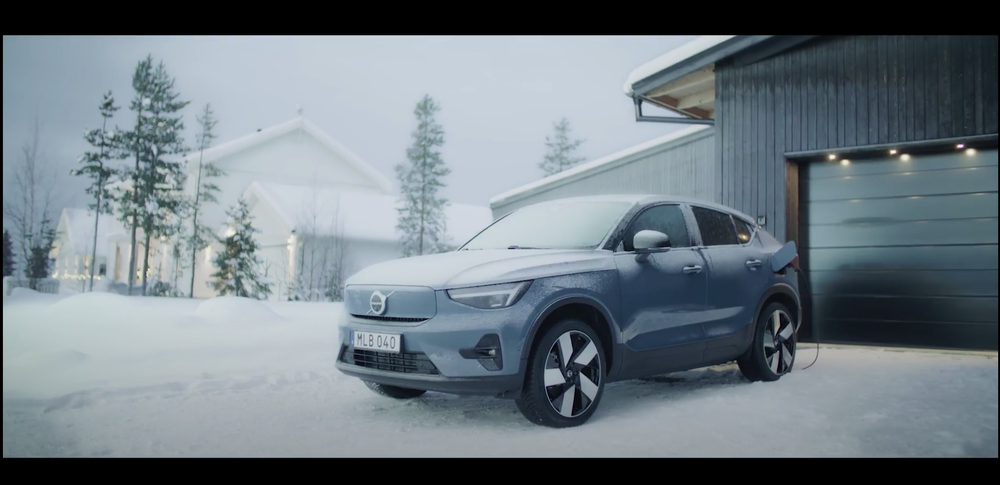
Whether you’re getting ready for a drive or already on the road, we’re working hard to make sure Google helps make every ride a safe, smart and seamless experience.

ASUS fa incetta di premi CES Innovation Awards Performance
