Funzionano i filtri antipubblicità? Stando alle preoccupazioni di Facebook, pare di sì
Gli adblocker e le versioni più recenti dei sistemi operativi per smartphone, tablet e computer bloccano o perlomeno riducono fortemente il tracciamento pubblicitario, ossia la raccolta invisibile di informazioni sui nostri gusti, sulle nostre letture e i nostri acquisti che avviene quando sfogliamo Internet e in particolare quando usiamo i social network.
Persino gli esperti di sicurezza dell’NSA e della CIA — gente che di sorveglianza se ne intende un tantino — raccomandano (PDF) di bloccare le pubblicità potenzialmente ostili perché “nonostante la natura benigna della maggior parte del contenuto pubblicitario, la pubblicità è un noto vettore di distribuzione di malware da oltre un decennio” e la CISA (Cybersecurity and Infrastructure Security Agency) consiglia di “usare software di ad blocking sia per proteggersi contro le pubblicità ostili, sia contro la raccolta di dati da parte di terzi.”
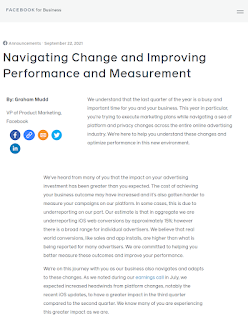
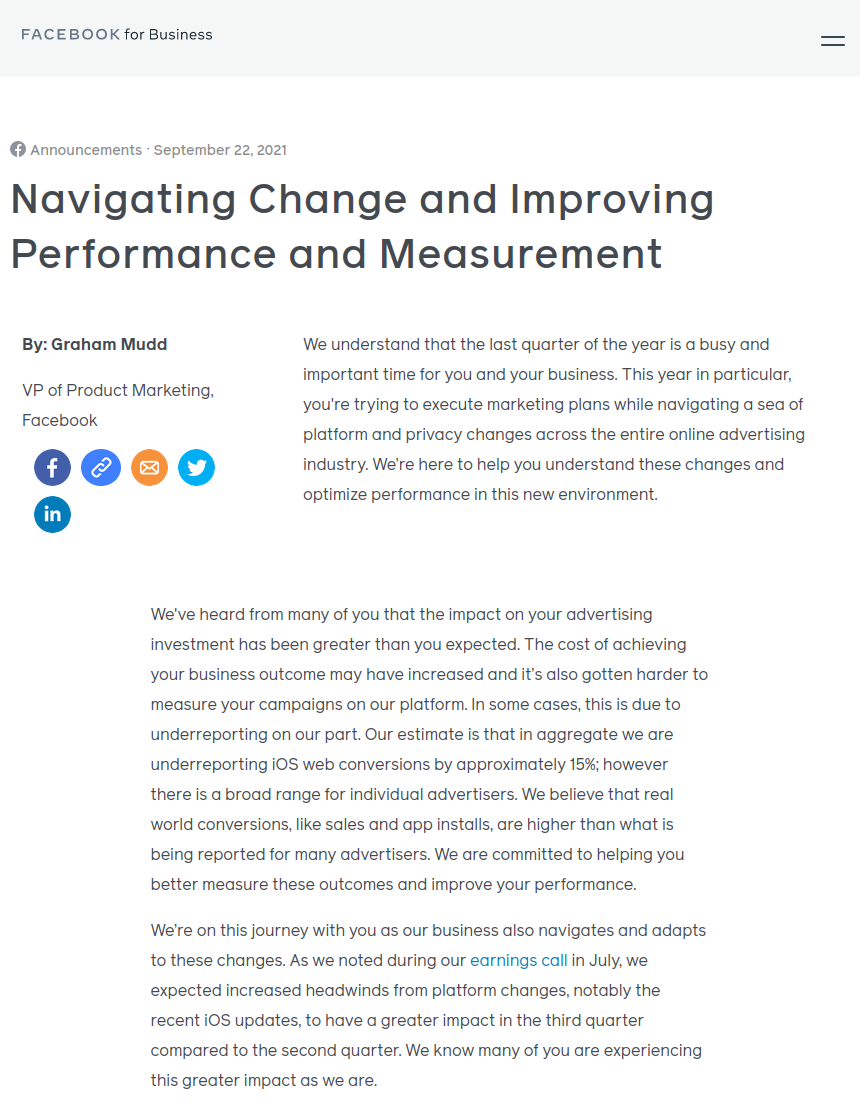
Ma il dubbio rimane: sono davvero efficaci queste misure? Parrebbe di sì, a giudicare dai toni e dai contenuti di un annuncio pubblicato su Facebook da Graham Mudd, vicepresidente del product marketing del social network, segnalato da Gizmodo.
Mudd si rivolge ai clienti di Facebook, le aziende che pagano le inserzioni pubblicitarie sul social network, e dice che “ci aspettavamo che i venti contrari più forti derivanti dai cambiamenti delle piattaforme, in particolare i recenti aggiornamenti di iOS, avrebbero avuto un impatto maggiore nel terzo trimestre che nel secondo” e che Facebook ha saputo che “l’impatto sul vostro investimento pubblicitario è stato maggiore di quello che avevate previsto.”
Il VP di Facebook, insomma, cita esplicitamente iOS come fattore di questo impatto. Aggiunge poi un dato significativo: Facebook ammette di non poter rendicontare circa il 15% delle conversion, ossia degli scaricamenti di app o dei clic sulle pubblicità mostrate ai propri utenti.
È un cambiamento di rotta non da poco, considerata la passata riluttanza di Facebook a rendere pubblici, o almeno controllabili indipendentemente, i risultati delle sue campagne pubblicitarie, e la sua documentata tendenza a gonfiare quei risultati rispetto alla realtà.
Le tecniche anti-tracciamento, insomma, qualcosa fanno. Più gente le usa, più fanno.

iOS 15, nuove impostazioni salvaprivacy

Wired UK ha pubblicato un elenco delle impostazioni di protezione della privacy, particolarmente efficaci contro il tracciamento pubblicitario, presenti in iOS 15. Cito qui brevemente le principali:
- In Impostazioni – Mail – Protezione della privacy, controllate che sia attiva l’opzione Proteggi le attività di Mail. Questo riduce il tracciamento pubblicitario, impedendo ai mittenti delle mail di vedere il vostro indirizzo IP e di sapere quando aprite il loro messaggio.
- Per contrastare il tracciamento pubblicitario potete inoltre andare in Impostazioni – Safari – Nascondi indirizzo IP – Ai tracker.
- Un’altra funzione salvaprivacy molto consigliabile di iOS 15 è l’analisi di cosa fanno le app con i sensori dello smartphone, per esempio per sapere quali hanno accesso al microfono o alla localizzazione: si va in Impostazioni – Privacy – Registra attività app. Questo genererà un riepilogo di sette giorni. Se volete levarvi il dubbio, una volta per tutte, che il vostro telefonino ascolti le vostre conversazioni, questo è un buon punto di partenza.
- Un altro modo, più immediato ma un pochino più laborioso, per sapere quali app hanno accesso a microfono, fotocamera o localizzazione è andare in Impostazioni – Privacy e poi scegliere Localizzazione oppure Fotocamera oppure ancora Microfono.
- Se invece volete sapere quali app tracciano la vostra attività quando usate altre app o visitate determinati siti, andate in Impostazioni – Privacy – Tracciamento e assicuratevi che sia attiva l’opzione Richiesta tracciamento attività.
Funzionano davvero queste misure salvaprivacy? A giudicare dalla preoccupazione espressa da Facebook, parrebbe proprio di sì.

What this Cloud Googler learned from the military
Welcome to the latest edition of “My Path to Google,” where we talk to Googlers, interns and alumni about how they got to Google, what their roles are like and even some tips on how to prepare for interviews.
Today we spoke with Dennis James, Director of Cloud Customer Experience for the US East Region and a veteran of the United States Army. Dennis talks to us about his time in the military, his transition to Google and why it’s important to keep trying — even if you don’t succeed the first time.
Can you tell us a bit about yourself?
I grew up in Long Island, New York. Both of my parents were educators, and my father was also a volunteer (and eventually Chief) firefighter and paramedic. There was always a strong theme of leadership, academics and service in our household.
That environment undoubtedly influenced my decision to attend the United States Military Academy — otherwise known as “West Point.” Once I got there, I participated in many physical activities while also pursuing my passion for electronics. I majored in electrical engineering and spent most of my downtime tinkering with gadgets at West Point’s computer lab.
After graduation, I served as an infantry officer in the US Army with the 25th Infantry Division and deployed to Iraq from December 2007 to February 2009. When I returned, I left active duty to become an IT strategy consultant in Washington DC, while also serving as a Military Intelligence Officer in the Army Reserves. I attended Columbia Business School two years later, where I was accepted to the Google MBA internship program. I started full time at Google in 2013, and have been here ever since!
What do you do at Google?
I’m on the Google Cloud Customer Experience team, which provides consulting, training, technical account management and support services to our customers and partners. One example of our work that I’m particularly proud of is how we helped the New York City Department of Education support a quick transition to remote teaching and learning with Google Classroom.
What made you decide to apply to Google?
During my deployment to Iraq, I realized I was ready for a new challenge outside of the military — ideally in the technology world. I started looking through a directory of former service members who now worked at tech companies, and connected with a Naval Academy graduate and Aviator who worked at Google. He shared helpful advice about his own journey, and helped me think about jobs I might like and what skills they required. Through his ongoing coaching and support, he became an important mentor and part of my path to joining Google.
I loved the idea of working at Google, but I hesitated to apply at first. I was worried that I wouldn’t be considered a good fit because of my background, and that it would be hard to convey my experiences to someone outside of the military. It took me a lot of time (and work!) to overcome these feelings. But by continuing to meet with my Google mentor, growing my skills in the military, and earning my MBA, I ultimately built up my confidence to apply for an internship.

Spanish arrives on Nest Hub and Hub Max in the U.S.
Ver abajo versión en español
Whether you’re learning, practicing or a native Spanish speaker, getting help around the house just got a little easier with the latest updates en español on Nest Hub and Hub Max in the U.S.
Starting today, Spanish on Nest Hub and Hub Max gets even better, with more queries and display text in Spanish. To add or switch to Spanish, just go to Languages in Assistant settings in the Google Home app. Now you can do more in Spanish – whether that’s enjoying music, video chatting with your family, watching your favorite sports teams or controlling your smart home devices.
Rock out to your favorite music legends by simply saying “Hey Google, reproduce Rock en Español.” Choose to listen from several free and subscription-based music services. Just ask Google for your favorite artists, songs, albums or genres — todo en español.
Now, with a YouTube TV subscription, you can also stream Univision to watch your favorite live shows and sports. Just say, “Hey Google, quiero ver Univision en YouTube TV” and enjoy.

Financially motivated actor breaks certificate parsing to avoid detection
Introduction
Google’s Threat Analysis Group tracks actors involved in disinformation campaigns, government backed hacking, and financially motivated abuse. Understanding the techniques used by attackers helps us counter these threats effectively. This blog post is intended to highlight a new evasion technique we identified, which is currently being used by a financially motivated threat actor to avoid detection.
Attackers often rely on varying behaviors between different systems to gain access. For instance, attacker’s may bypass filtering by convincing a mail gateway that a document is benign so the computer treats it as an executable program. In the case of the attack outlined below, we see that attackers created malformed code signatures that are treated as valid by Windows but are not able to be decoded or checked by OpenSSL code — which is used in a number of security scanning products. We believe this is a technique the attacker is using to evade detection rules.
Technical Details
Code signatures on Windows executables provide guarantees about the integrity of a signed executable, as well as information about the identity of the signer. Attackers who are able to obscure their identity in signatures without affecting the integrity of the signature can avoid detection longer and extend the lifetime of their code-signing certificates to infect more systems.
OpenSUpdater, a known family of unwanted software which violates our policies and is harmful to the user experience, is used to download and install other suspicious programs.The actor behind OpenSUpdater tries to infect as many users as possible and while they do not have specific targeting, most targets appear to be within the United States and prone to downloading game cracks and grey-area software.
Groups of OpenSUpdater samples are often signed with the same code-signing certificate, obtained from a legitimate certificate authority. Since mid-August, OpenSUpdater samples have carried an invalid signature, and further investigation showed this was a deliberate attempt to evade detection. In these new samples, the signature was edited such that an End of Content (EOC) marker replaced a NULL tag for the ‘parameters’ element of the SignatureAlgorithm signing the leaf X.509 certificate.
EOC markers terminate indefinite-length encodings, but in this case an EOC is used within a definite-length encoding (l= 13).
Bytes: 30 0D 06 09 2A 86 48 86 F7 0D 01 01 0B 00 00
Decodes to the following elements:
SEQUENCE (2 elem)
OBJECT IDENTIFIER 1.2.840.113549.1.1.11 sha256WithRSAEncryption (PKCS #1)
EOC
Security products using OpenSSL to extract signature information will reject this encoding as invalid. However, to a parser that permits these encodings, the digital signature of the binary will otherwise appear legitimate and valid. This is the first time TAG has observed actors using this technique to evade detection while preserving a valid digital signature on PE files.
As shown in the following screenshot, the signature is considered to be valid by the Windows operating system. This issue has been reported to Microsoft.

How life’s twists helped Lisa Mensah find her passion
Editor’s note: This is part of a series of interviews between expert panelists for the Google.org Impact Challenge for Women and Girls.
Lisa Mensah works to make sure business owners who “don’t get a fair shake” can get the capital they need to grow. She’s the president and CEO of the Opportunity Finance Network(OFN), which provides capital, advocacy, and capacity building to community development financial institutions (CDFIs). Driven by a mission to serve rural, urban and Native communities underserved by mainstream finance, CDFIs lend to small businesses and community developers who build thriving communities.
Lisa brings her experience working at the crux of finance and advocacy to the Google.org Impact Challenge for Women and Girls. As one of our expert panelists, she helps us decide what organizations will receive funding from Google.org to help women and girls reach their full economic potential. I recently sat down with her to learn more about her path to OFN and why supporting women-led businesses is crucial.
What got you started on your path?
I’m from a bi-racial, bi-cultural family, and lived in Ghana as a young kid. I always thought I would do something in international relations.
While I was getting my master’s degree, I was most interested in helping refugees and women in developing countries. But I felt I was missing out on powerful conversations — often led by men — on how nations develop. These conversations were frequently about money. So, my path pointed me to the financial industry, where I could be involved in strategic decision-making that would ultimately affect issues surrounding women.
I began my career in commercial banking at Citibank. From there I moved to the Ford Foundation where I used my banking knowledge to help the Foundation build its program in microfinance and development finance. That’s where I fell in love with CDFIs, and I’ve worked with them ever since. Life’s twists pointed me to my true north, which is a combination of finance and advocating for change for people in poverty.
What sparked your interest in inclusion for women in finance?
From an early time, I was interested in the economy at the grassroots. That’s usually the economy that women inhabit. I wanted to understand: Who is really feeding everyone? Who is keeping kids healthy? Who is providing income to families? Women across the world, often in informal employment, were leading this.
Poverty in the U.S. is a phenomenon that is quite gendered, often women-led households are lower income. By getting involved in development finance, I was able to see who controls the money and found that women-led enterprises and activities were being left out.
How have CDFIs been transformative for female-led businesses?
Female and minority entrepreneurs have a harder time accessing affordable bank financing than their male counterparts. This is where CDFIs shine: where others see risk, we see opportunity. CDFIs take time to understand our clients and tailor products for them. This played out again and again during the pandemic when CDFIs provided great relief to women-owned small businesses.
Why did you get involved with the Google.org Impact Challenge for Women and Girls?
The Google.org Impact Challenge will surface leaders that are flying under the radar in their countries and areas of work. We’ll resource them to operate at a new level, like a venture capitalist finding the next big company. There aren’t enough philanthropic dollars for all the ideas that are out there in the world, but Google.org’s intention is to find efforts that are benefitting women and girls and support them at scale. That’s powerful, and I’m really pleased to be a part of it.
Pretend you have a megaphone to reach every little girl around the world. What’s your message for them?
Your dreams are yours and they are real. They’re in you for a reason. You’ve got your contribution to make to this world — don’t ever let anyone tell you otherwise. And even if your path changes, like mine did, you’ll find your way. Along your journey, look for your cheerleaders and helpers — find the people who believe in you and will support you in your dreams and ambitions.
The Google.org Impact Challenge for Women and Girls
Learn more about the Google.org Impact Challenge for Women and Girls, and the 29-woman expert panel who is supporting the effort.

The promise of using AI to help prostate cancer care
In 2021, nearly 250,000 Americans will be diagnosed with prostate cancer, which remains the second most common cancer among men in the U.S. Even as we make advancements in cancer research and treatment, diagnosing and treating prostate cancer remains difficult. This National Prostate Cancer Awareness Month, we’re sharing how Google researchers are looking at ways artificial intelligence (AI) can improve prostate cancer care and the lessons learned along the way.
Our AI research to date
Currently, pathologists rely on a process called the ‘Gleason grading system’ to grade prostate cancer and inform the selection of an effective treatment option. This process involves examining tumor samples under a microscope for tissue growth patterns that indicate the aggressiveness of the cancer. Over the past few years, research teams at Google have developed AI systems that can help pathologists grade prostate cancer with more objectivity and ease.
These AI systems can help identify the aggressiveness of prostate cancer for tumors at different steps of the clinical timeline — from smaller biopsy samples during initial diagnosis to larger samples from prostate removal surgery. In prior studies published in JAMA Oncology and Nature Partner Journal Digital Medicine, we found our AI system for Gleason grading prostate cancer samples performed at a higher rate of agreement with subspecialists (pathologists who have specialized training in prostate cancer) as compared to general pathologists. These results suggest that AI systems have the potential to support high-quality prostate cancer diagnosis for more patients.
To understand this system’s potential impact within a clinical workflow, we also studied how general pathologists could use our AI system during their assessments. In arandomized study involving 20 pathologists reviewing 240 retrospective prostate biopsies, we found that the use of an AI system as an assistive tool was associated with an increase in grading agreement between general pathologists and subspecialists. This indicated that AI tools may help general pathologists grade prostate biopsies with greater accuracy. The AI system also improved both pathologists’ efficiency and their self-reported diagnostic confidence.
In our latest study in Nature Communications Medicine, we directly examined whether the AI’s grading was able to identify high-risk patients by comparing the system’s grading against mortality outcomes. This is important because mortality outcomes are one of the most clinically relevant results for evaluating the value of Gleason grading, ensuring greater confidence in the AI’s grading. We found that the AI’s grades were more strongly associated with patient outcomes than the grades from general pathologists, suggesting that the AI could potentially help inform decision-making on treatment plans.
Contributing to reducing variability in AI research
We first began training our AI system using Gleason grades from both general pathologists and subspecialists. As we continued to develop AI systems for assisting prostate cancer grading, we learned that both training the AI and evaluating the model’s performance can be challenging because often the “ground truth” or reference standard is based on expert opinion. Because of this subjectivity, for some cases, two pathologists examining the same sample may arrive at a different Gleason grade.
To improve the quality of the “ground truth”, we developed a set of best practices that we have shared this week in Lancet Digital Health. These recommendations include involving experienced prostate pathology experts, making sure that multiple experts look at each sample, and designing an unbiased disagreement resolution process. By sharing these learnings, we hope to encourage and accelerate further work in this area, particularly in earlier-phase research when it’s impractical to train or validate a model using patient outcomes data.
Our research has shown that AI can be most helpful when it’s built to support clinicians with the right problem, in the right way, at the right time. With that in mind, we plan to further validate the role of AI and other novel technologies in helping improve prostate cancer diagnosis, treatment planning and patient outcomes.
Upgrade your drive with Google as your copilot
Do you drive with your phone clipped to your air vent? Or does your car have the latest built-in infotainment system? No matter what kind of car you own, Google is ready to make your drive better. We’re bringing updates to Google Assistant driving mode, Android Auto and cars with Google built-in (welcome Honda!) to help every driver find their way around, stay entertained, and keep in touch.
Google Assistant driving mode on Android phones gets a new dashboard
Millions of people in more than 12 countries use Google Assistant driving mode every day, by offering voice-activated help via your Android phone in older cars. We originally launched it for active navigation in Google Maps, helping drivers manage tasks, like answering a call or responding to text messages with minimal distraction.
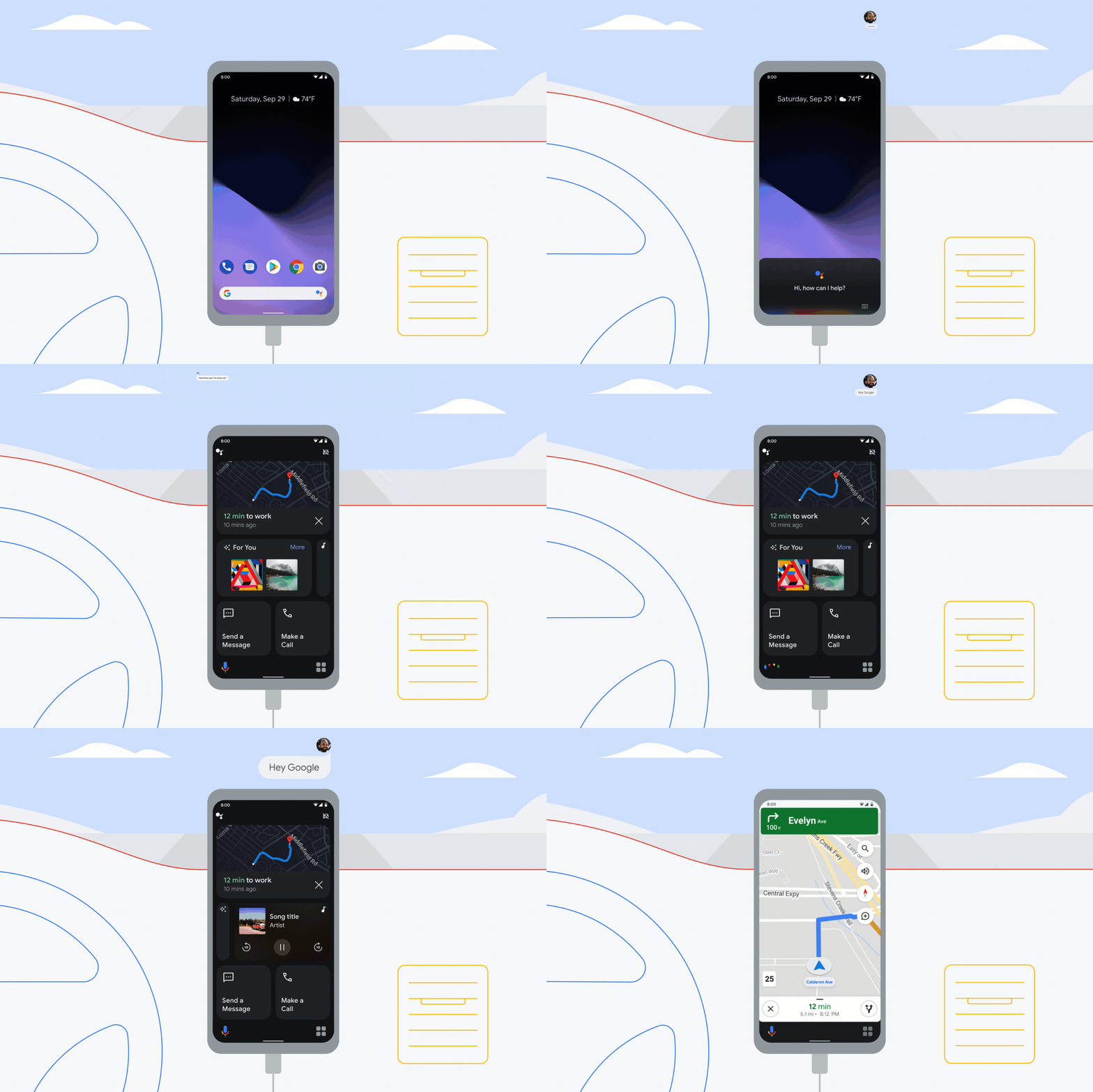
Thanks to early feedback, we heard how important it is to have your go-to apps handy for your drive, even when you don’t need turn-by-turn navigation. So coming soon, you’ll be able to say “Hey Google, let’s drive” (or connect your phone to your car’s Bluetooth) to open the new driving mode dashboard, reducing the need to fiddle with your phone while also making sure you stay focused on the road. With glanceable, tappable cards, the basics you’ll need for the road are available with a single tap — no scrolling required: Start your navigation, see who called or texted recently and quickly resume media from Amazon Music, Audible, iHeartRadio, JioSaavn, Pandora, Podcast Addict, SoundCloud, Spotify, YouTube Music and more providers. Plus, there’s a new messaging update: Just say “Hey Google, turn on auto read” to hear new messages read aloud as they come in and to respond by voice.
Driving mode will be the primary experience for Android phones going forward and will fully roll out in the next few weeks for Android phones in English (U.S., Australia, Canada, Ireland, India, Singapore and U.K.), German, Spanish (Spain, Mexico), French and Italian.

New Android features coming this season
With Android, you can look forward to your device getting better and better throughout the year. From accessibility to Android Auto to features that make your life just a little easier, like Assistant and Gboard, we’re rolling out new features that help you do more, stay secure and have more fun with your Android phone.

Two new tools that make your phone even more accessible
Every day, people use voice commands, like “Hey Google,” or their hands to navigate their phones. However, that’s not always possible for people with severe motor and speech disabilities.
To make Android more accessible for everyone, we’re introducing two new tools that make it easier to control your phone and communicate using facial gestures: Camera Switches and Project Activate. Built with feedback from people who use alternative communication technology, both of these tools use your phone’s front-facing camera and machine learning technology to detect your face and eye gestures. We’ve also expanded our existing accessibility tool, Lookout, so people who are blind or low-vision can get more things done quickly and easily.

Bring performance and privacy together with Server-Side Tagging
It’s important for businesses to have the insights they need to drive more conversions on their websites. But rising expectations and regulations around user privacy can make it hard to meet both performance and privacy needs. We’re continuing to invest in solutions to help you find that balance.
Server-Side Tagging in Google Tag Manager allows you to move measurement and advertising tags off your website and into a secure server container. This helps protect your customers by restricting access to their information, and helps increase conversion rates on your site by reducing page load times.
To ensure all businesses can use this feature, Server-Side Tagging now works with any cloud or server provider that supports Docker — an open source platform for developing and running applications. We’ve also integrated Server-Side Tagging into more Google products and services to help you move more tags off your website and achieve better site performance. With these improvements, we’re moving Server-Side Tagging out of beta and making it generally available to all customers in Tag Manager and Tag Manager 360.
Support for more Google advertising products
Server-Side Tagging now supports Google Ads and Google Marketing Platform products, including Campaign Manager 360, Display & Video 360 and Search Ads 360. Previously, you had to continue using a client-side tag for each marketing product you use, and keep them all running directly on your site.
Now, when customers interact with your site, a single client-side tag can activate multiple tags for these products directly in your server container. This means you’ll have fewer tags on your site, which can help improve your site’s page load time.
Integration with other privacy solutions
Marketers often ask us how to use Server-Side Tagging with other privacy solutions like Consent Mode and enhanced conversions. Consent Mode helps you customize how Google tags behave before and after users make their consent decisions; and enhanced conversions help you use consented, first-party, user-provided data to better understand how users convert after engaging with your ads.
We’re now making it simpler to use these products together. Advertisers with Google Analytics 4 on their sites will soon be able to use enhanced conversions in Google Ads without needing to add additional tags to their site. And once you’ve set up Consent Mode, any Google tags implemented in your server container will automatically respect consent choices that users have made on your website.
We’re also making it easier for you to ensure that user data is handled according to your security preferences. Server-Side Tagging automatically anonymizes your users’ IP addresses before the information is shared with Google’s reporting tools. And in cases where you need more control, you have the option to eliminate users’ IP addresses from your data completely before they’re shared.
Success with Server-Side Tagging
Since launching Server-Side Tagging last year, we’ve seen businesses around the world use this feature to uphold higher expectations around user privacy and drive better marketing performance.
Nemlig, Denmark’s leading online grocer, saw a large rise in visitors to its site as people turned to online shopping and home delivery for their daily essentials last year. This resulted in longer page load times, which negatively impacted conversion rates on Nemlig’s site. After adopting Server-Side Tagging, the company was able to move tags from the browser into its secure server container, improving its page load time by 7%. Read the full story here.
Square has also found success with Server-Side Tagging. The San Francisco-based company helps businesses of all sizes reach buyers online and in person, manage their business and access financing. Since implementing Server-Side Tagging, Square has seen a 46% increase in reported conversions.
Server-Side Tagging is our preferred method for sending measurement data to our marketing partners. It allows us to collect data from the website in a secure manner while improving data collection and enabling event enrichment.
With Server-Side Tagging, you can improve both user trust and website performance. As we continue to work on new features and updates, our goal is to help you achieve your privacy and performance goals across all of your measurement needs.

Acquisire Nuovi Clienti Con Linkedin

La vostra PS5 si accende da sola? Ecco come risolvere