The promise of using AI to help prostate cancer care
In 2021, nearly 250,000 Americans will be diagnosed with prostate cancer, which remains the second most common cancer among men in the U.S. Even as we make advancements in cancer research and treatment, diagnosing and treating prostate cancer remains difficult. This National Prostate Cancer Awareness Month, we’re sharing how Google researchers are looking at ways artificial intelligence (AI) can improve prostate cancer care and the lessons learned along the way.
Our AI research to date
Currently, pathologists rely on a process called the ‘Gleason grading system’ to grade prostate cancer and inform the selection of an effective treatment option. This process involves examining tumor samples under a microscope for tissue growth patterns that indicate the aggressiveness of the cancer. Over the past few years, research teams at Google have developed AI systems that can help pathologists grade prostate cancer with more objectivity and ease.
These AI systems can help identify the aggressiveness of prostate cancer for tumors at different steps of the clinical timeline — from smaller biopsy samples during initial diagnosis to larger samples from prostate removal surgery. In prior studies published in JAMA Oncology and Nature Partner Journal Digital Medicine, we found our AI system for Gleason grading prostate cancer samples performed at a higher rate of agreement with subspecialists (pathologists who have specialized training in prostate cancer) as compared to general pathologists. These results suggest that AI systems have the potential to support high-quality prostate cancer diagnosis for more patients.
To understand this system’s potential impact within a clinical workflow, we also studied how general pathologists could use our AI system during their assessments. In arandomized study involving 20 pathologists reviewing 240 retrospective prostate biopsies, we found that the use of an AI system as an assistive tool was associated with an increase in grading agreement between general pathologists and subspecialists. This indicated that AI tools may help general pathologists grade prostate biopsies with greater accuracy. The AI system also improved both pathologists’ efficiency and their self-reported diagnostic confidence.
In our latest study in Nature Communications Medicine, we directly examined whether the AI’s grading was able to identify high-risk patients by comparing the system’s grading against mortality outcomes. This is important because mortality outcomes are one of the most clinically relevant results for evaluating the value of Gleason grading, ensuring greater confidence in the AI’s grading. We found that the AI’s grades were more strongly associated with patient outcomes than the grades from general pathologists, suggesting that the AI could potentially help inform decision-making on treatment plans.
Contributing to reducing variability in AI research
We first began training our AI system using Gleason grades from both general pathologists and subspecialists. As we continued to develop AI systems for assisting prostate cancer grading, we learned that both training the AI and evaluating the model’s performance can be challenging because often the “ground truth” or reference standard is based on expert opinion. Because of this subjectivity, for some cases, two pathologists examining the same sample may arrive at a different Gleason grade.
To improve the quality of the “ground truth”, we developed a set of best practices that we have shared this week in Lancet Digital Health. These recommendations include involving experienced prostate pathology experts, making sure that multiple experts look at each sample, and designing an unbiased disagreement resolution process. By sharing these learnings, we hope to encourage and accelerate further work in this area, particularly in earlier-phase research when it’s impractical to train or validate a model using patient outcomes data.
Our research has shown that AI can be most helpful when it’s built to support clinicians with the right problem, in the right way, at the right time. With that in mind, we plan to further validate the role of AI and other novel technologies in helping improve prostate cancer diagnosis, treatment planning and patient outcomes.
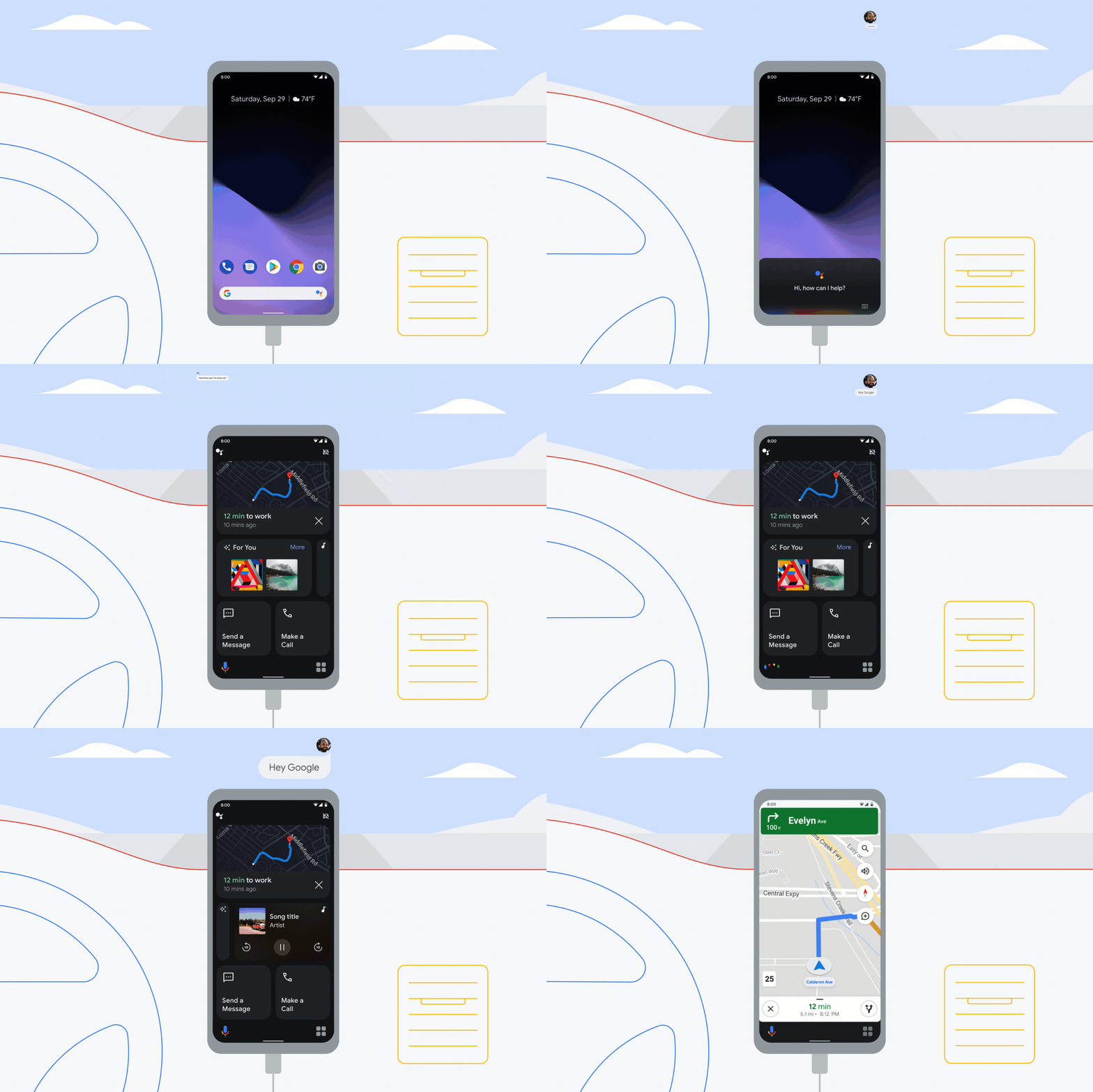
Upgrade your drive with Google as your copilot
Do you drive with your phone clipped to your air vent? Or does your car have the latest built-in infotainment system? No matter what kind of car you own, Google is ready to make your drive better. We’re bringing updates to Google Assistant driving mode, Android Auto and cars with Google built-in (welcome Honda!) to help every driver find their way around, stay entertained, and keep in touch.
Google Assistant driving mode on Android phones gets a new dashboard
Millions of people in more than 12 countries use Google Assistant driving mode every day, by offering voice-activated help via your Android phone in older cars. We originally launched it for active navigation in Google Maps, helping drivers manage tasks, like answering a call or responding to text messages with minimal distraction.
Thanks to early feedback, we heard how important it is to have your go-to apps handy for your drive, even when you don’t need turn-by-turn navigation. So coming soon, you’ll be able to say “Hey Google, let’s drive” (or connect your phone to your car’s Bluetooth) to open the new driving mode dashboard, reducing the need to fiddle with your phone while also making sure you stay focused on the road. With glanceable, tappable cards, the basics you’ll need for the road are available with a single tap — no scrolling required: Start your navigation, see who called or texted recently and quickly resume media from Amazon Music, Audible, iHeartRadio, JioSaavn, Pandora, Podcast Addict, SoundCloud, Spotify, YouTube Music and more providers. Plus, there’s a new messaging update: Just say “Hey Google, turn on auto read” to hear new messages read aloud as they come in and to respond by voice.
Driving mode will be the primary experience for Android phones going forward and will fully roll out in the next few weeks for Android phones in English (U.S., Australia, Canada, Ireland, India, Singapore and U.K.), German, Spanish (Spain, Mexico), French and Italian.

New Android features coming this season
With Android, you can look forward to your device getting better and better throughout the year. From accessibility to Android Auto to features that make your life just a little easier, like Assistant and Gboard, we’re rolling out new features that help you do more, stay secure and have more fun with your Android phone.
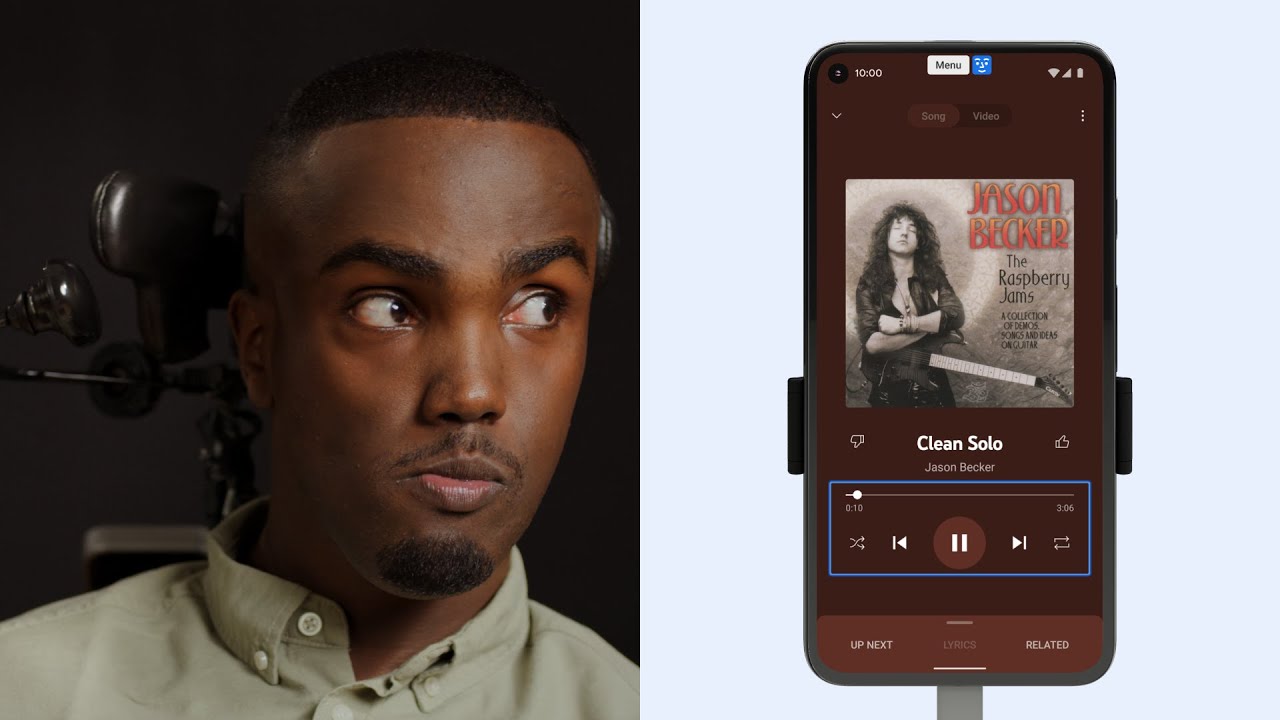
Two new tools that make your phone even more accessible
Every day, people use voice commands, like “Hey Google,” or their hands to navigate their phones. However, that’s not always possible for people with severe motor and speech disabilities.
To make Android more accessible for everyone, we’re introducing two new tools that make it easier to control your phone and communicate using facial gestures: Camera Switches and Project Activate. Built with feedback from people who use alternative communication technology, both of these tools use your phone’s front-facing camera and machine learning technology to detect your face and eye gestures. We’ve also expanded our existing accessibility tool, Lookout, so people who are blind or low-vision can get more things done quickly and easily.

Bring performance and privacy together with Server-Side Tagging
It’s important for businesses to have the insights they need to drive more conversions on their websites. But rising expectations and regulations around user privacy can make it hard to meet both performance and privacy needs. We’re continuing to invest in solutions to help you find that balance.
Server-Side Tagging in Google Tag Manager allows you to move measurement and advertising tags off your website and into a secure server container. This helps protect your customers by restricting access to their information, and helps increase conversion rates on your site by reducing page load times.
To ensure all businesses can use this feature, Server-Side Tagging now works with any cloud or server provider that supports Docker — an open source platform for developing and running applications. We’ve also integrated Server-Side Tagging into more Google products and services to help you move more tags off your website and achieve better site performance. With these improvements, we’re moving Server-Side Tagging out of beta and making it generally available to all customers in Tag Manager and Tag Manager 360.
Support for more Google advertising products
Server-Side Tagging now supports Google Ads and Google Marketing Platform products, including Campaign Manager 360, Display & Video 360 and Search Ads 360. Previously, you had to continue using a client-side tag for each marketing product you use, and keep them all running directly on your site.
Now, when customers interact with your site, a single client-side tag can activate multiple tags for these products directly in your server container. This means you’ll have fewer tags on your site, which can help improve your site’s page load time.
Integration with other privacy solutions
Marketers often ask us how to use Server-Side Tagging with other privacy solutions like Consent Mode and enhanced conversions. Consent Mode helps you customize how Google tags behave before and after users make their consent decisions; and enhanced conversions help you use consented, first-party, user-provided data to better understand how users convert after engaging with your ads.
We’re now making it simpler to use these products together. Advertisers with Google Analytics 4 on their sites will soon be able to use enhanced conversions in Google Ads without needing to add additional tags to their site. And once you’ve set up Consent Mode, any Google tags implemented in your server container will automatically respect consent choices that users have made on your website.
We’re also making it easier for you to ensure that user data is handled according to your security preferences. Server-Side Tagging automatically anonymizes your users’ IP addresses before the information is shared with Google’s reporting tools. And in cases where you need more control, you have the option to eliminate users’ IP addresses from your data completely before they’re shared.
Success with Server-Side Tagging
Since launching Server-Side Tagging last year, we’ve seen businesses around the world use this feature to uphold higher expectations around user privacy and drive better marketing performance.
Nemlig, Denmark’s leading online grocer, saw a large rise in visitors to its site as people turned to online shopping and home delivery for their daily essentials last year. This resulted in longer page load times, which negatively impacted conversion rates on Nemlig’s site. After adopting Server-Side Tagging, the company was able to move tags from the browser into its secure server container, improving its page load time by 7%. Read the full story here.
Square has also found success with Server-Side Tagging. The San Francisco-based company helps businesses of all sizes reach buyers online and in person, manage their business and access financing. Since implementing Server-Side Tagging, Square has seen a 46% increase in reported conversions.
Server-Side Tagging is our preferred method for sending measurement data to our marketing partners. It allows us to collect data from the website in a secure manner while improving data collection and enabling event enrichment.
With Server-Side Tagging, you can improve both user trust and website performance. As we continue to work on new features and updates, our goal is to help you achieve your privacy and performance goals across all of your measurement needs.

Acquisire Nuovi Clienti Con Linkedin

La vostra PS5 si accende da sola? Ecco come risolvere

L’UE vuole un caricatore universale per tutti i prodotti elettronici
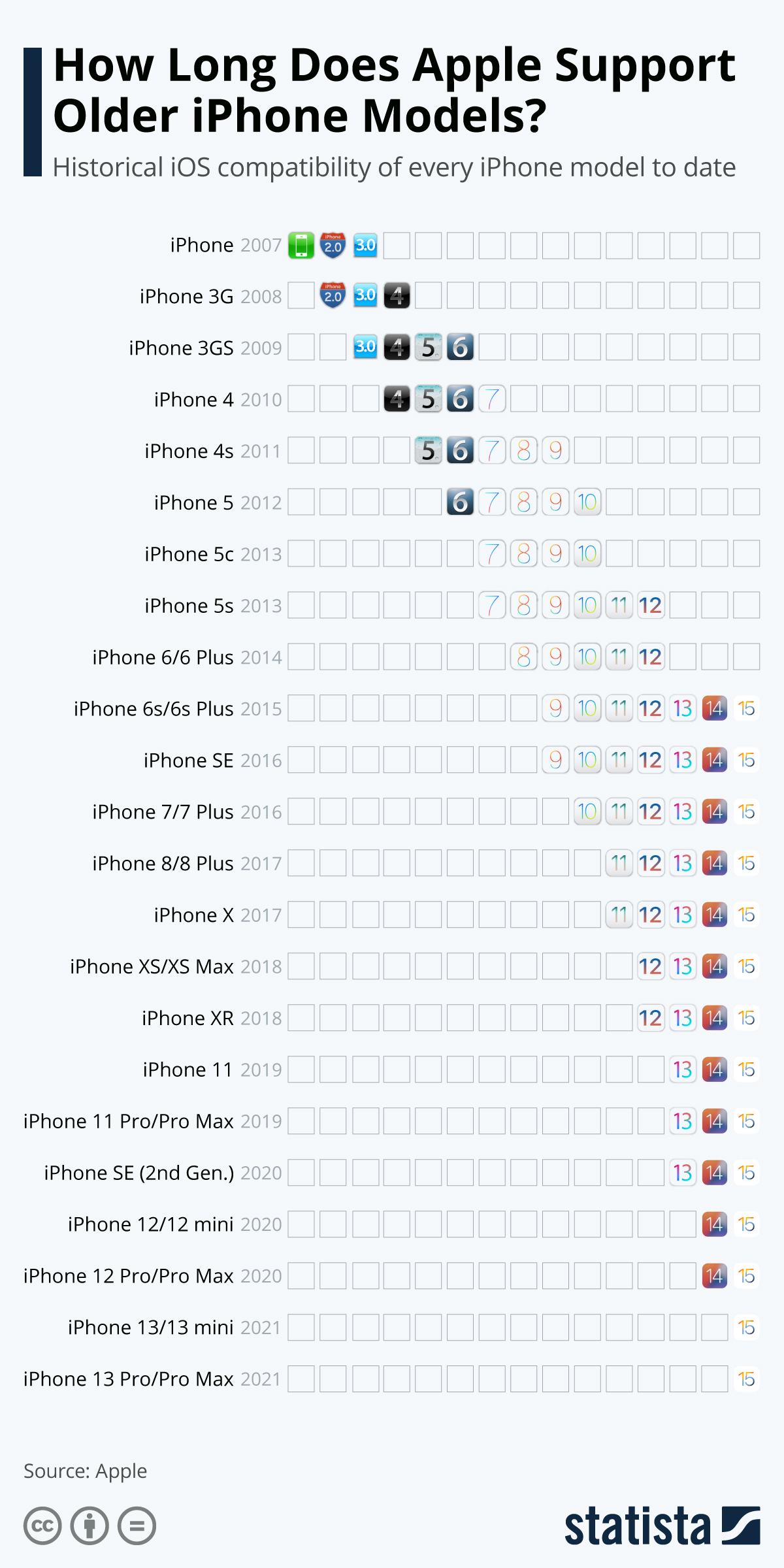
Quanto dura uno smartphone? Il problema degli aggiornamenti software. Provo un iPhone ricondizionato ancora aggiornabile
L’uscita di iOS 15 il 20 settembre scorso pone il solito problema degli aggiornamenti e dell’obsolescenza degli smartphone. Uno smartphone non più aggiornabile è un rischio di sicurezza, ma comprare un dispositivo nuovo ha un costo non trascurabile, per cui molti tengono lo smartphone che hanno, senza aggiornarlo, e si espongono quindi a pericoli.
C’è però un’alternativa: comperare uno smartphone non nuovo ma ancora supportato per quanto riguarda gli aggiornamenti. Esistono aziende che offrono smartphone ricondizionati non recentissimi ma supportati e lo fanno a prezzi nettamente inferiori a quelli di listino di uno smartphone nuovo.
Il problema è sapere se uno specifico smartphone ricondizionato è ancora aggiornabile. Nel mondo Android non è facile, a causa della varietà e del numero di marche che usano questo sistema operativo; nel mondo Apple, invece, trovare quest’informazione è molto più semplice.
Per esempio, per sapere se uno smartphone Apple è ancora supportato si può fare riferimento a questo grafico pubblicato da Statista.com:
Da questo grafico risulta che Apple consente di aggiornare ad iOS 15 persino telefoni di sei anni fa (gli iPhone 6s e 6s Plus, usciti nel 2015). Ovviamente uno smartphone così vecchio non avrà le nuove funzioni consentite dall’hardware moderno, ma perlomeno sarà aggiornato in termini di sicurezza e protezione dei dati. In più non ha l’impatto ambientale di un telefono nuovo.
Sto provando concretamente questo approccio: ho appena acquistato un iPhone 8 da 64 GB ricondizionato da Recommerce.com. Ho speso 300 CHF (277 EUR) per uno smartphone Apple che alla sua uscita, nel 2017, costava 839 CHF (774 EUR).
Il telefono è in condizioni estetiche perfette: sembra nuovo. Viene consegnato sbloccato, controllato e con un anno di garanzia, insieme a un alimentatore, a una cuffia e un cavetto completamente nuovi (non marchiati Apple). Fra l’altro, ordinandolo online la sera (su Interdiscount.ch) mi è arrivato a casa a mezzogiorno del giorno successivo, senza spese aggiuntive.
È la prima volta che compro un iPhone: tutti quelli che ho usato fin qui per i miei test mi sono sempre stati donati da amici o conoscenti che li sostituivano. Personalmente trovo indecenti e immorali i prezzi degli iPhone nuovi, strapieni di funzioni che non userò mai, ed è anche per questo che uso un Android di fascia media come smartphone primario.
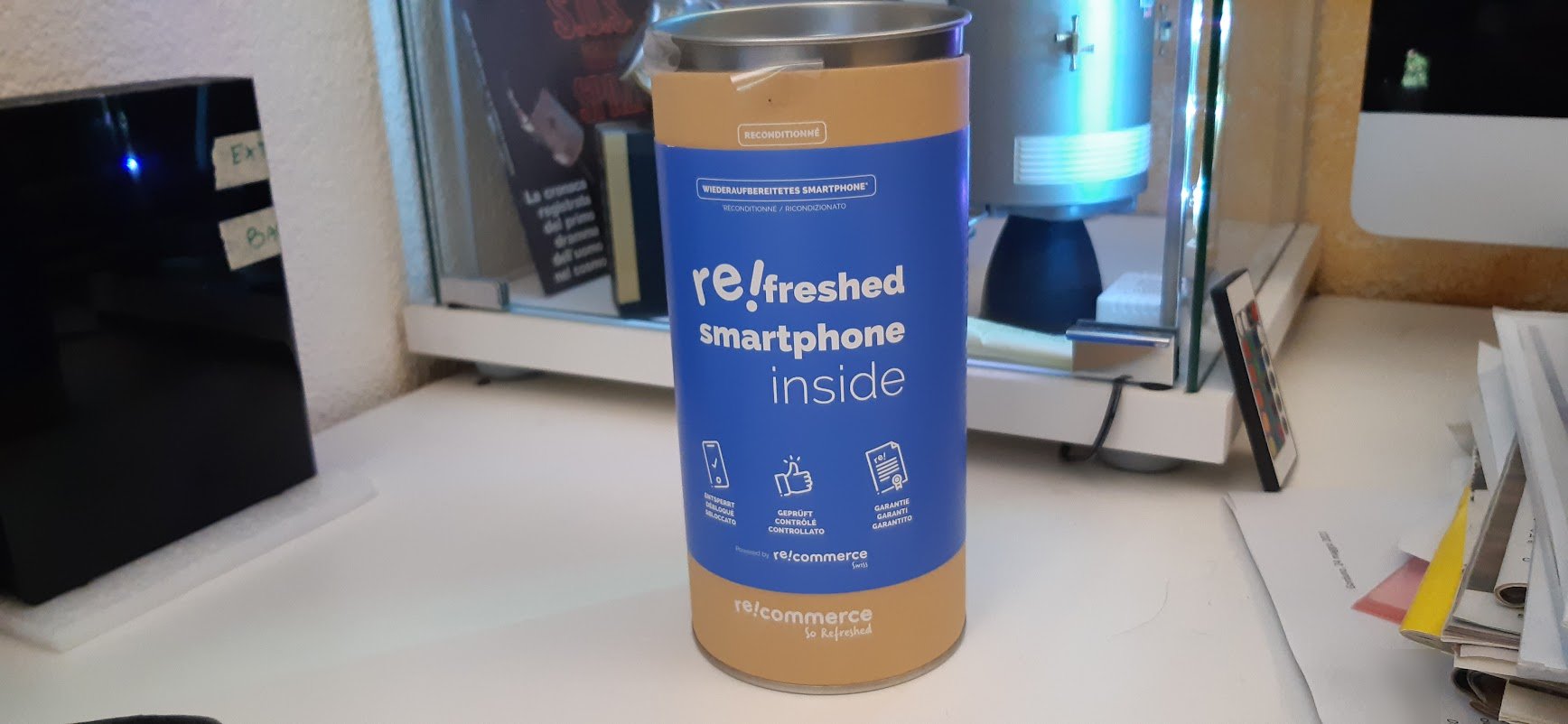
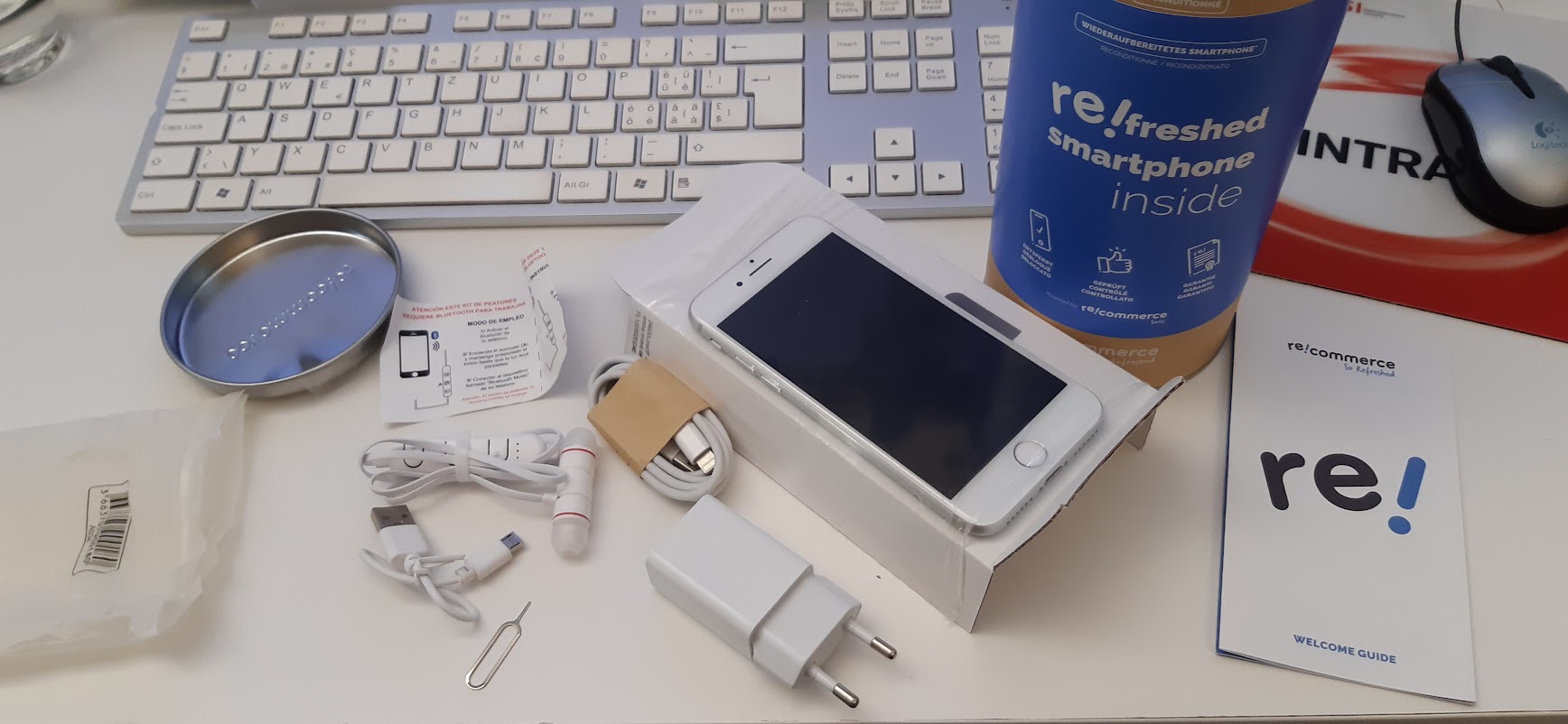
La migrazione dal vecchio iPhone che usavo per i test (un 5) a quello ricondizionato è stata banale: ho collegato l’iPhone 5 a un mio Mac via cavo, ho dato l’autorizzazione sul telefono e sul Mac (nel Finder), ed è partita la funzione di backup. Terminato il backup, ho spento il 5, ho tolto la SIM e l’ho messa nell’iPhone 8, che ho collegato al Mac dicendogli di fidarsi di questo nuovo dispositivo e di fare un restore su di esso partendo dal backup appena fatto. Dopo un reboot il nuovo telefono è risultato configurato in modo identico al precedente, con tutte le app al loro posto. Ho dovuto migrare a parte WhatsApp (che ha recuperato tutti i messaggi dell’account di test).
Ho scaricato e installato iOS 14.8 e poi sono andato in Impostazioni – Generali – Aggiornamento software – Aggiorna ad iOS 15 per aggiornare al nuovo iOS.
Se avete un iPhone aggiornato ad iOS 15, consiglio di andare in Impostazioni – Mail – Protezione della privacy e controllare che sia attiva l’opzione Proteggi le attività di Mail. Questo riduce il tracciamento pubblicitario, impedendo ai mittenti delle mail di vedere il vostro indirizzo IP e di sapere quando aprite il loro messaggio.
Un’altra funzione molto consigliabile di iOS 15 è l’analisi di cosa fanno le app con i sensori dello smartphone, per esempio per sapere quali hanno accesso al microfono o alla localizzazione: si va in Impostazioni – Privacy – Registra attività app. Questo genererà un riepilogo di sette giorni.
Per contrastare il tracciamento pubblicitario si può inoltre andare in Impostazioni – Safari – Nascondi indirizzo IP – Ai tracker.
Fonte aggiuntiva: Wired.com.

Facebook svela i nuovi smart display Portal Go e Portal+

Kindle Paperwhite al prezzo più basso soltanto per oggi!

Surface Pro 8 e Surface Go 3, i nuovi arrivati nella famiglia di Microsoft

YouTube testa il download dei video su desktop fino a ottobre

Twitter, i tweet non scorreranno quando la timeline si aggiorna