A path to growth for Asia’s women founders
After Khushboo Aggarwal’s dad suffered a cardiac event brought on by complications from diabetes while she was traveling abroad, she realized there was a need for a better support system for Indian patients and their worried loved ones.
Khushboo co-founded Zyla Health: a digital care management platform, providing personalized care to patients with chronic illnesses. Zyla offers services like live chat support and algorithms that can issue alerts when there are causes for concern in patient data. It also recently extended its services to help COVID-19 patients recover at home.
For Khushboo, turning her original idea into a fully-fledged health management platform wasn’t easy. In 2020, Khushboo was part of the inaugural class of the Google for Startups Women Founders Academy in APAC, where she was able to gain valuable skills and tap into the advice of mentors — enabling her to take Zyla to the next level.
Today, we’re opening applications for this year’s class, focused on women founders leading startups at an early stage of their growth. We will be accepting applications until June 25.
The Google for Startups Women Founders Academy: APAC is a twelve-week program designed to help founders improve their leadership skills, build strong teams and address their unique growth needs, including funding. Participants will take part in workshops where we’ll share lessons from Google’s experiences to help them tackle some of the key challenges they might face. To connect founders to a wider network, we’ll bring together a community of Google advisors, venture capitalists and business executives. And selected startups will work with a dedicated mentor.
There are women like Khushboo across APAC and around the world, motivated to solve problems they see in their everyday lives. We are dedicated to supporting these women entrepreneurs, because we know their solutions build up our communities and help local economies grow. We look forward to helping the class of 2021 take their ideas forward.
How the Chromebook team uses Nearby Share
Earlier this year we announced that Nearby Share is coming to Chromebooks, so you can quickly and securely share files between your Chromebook and other Chrome OS or Android devices. It’s rolling out today, alongside new additions like wallpapers, app notifications and an easier way to share files for offline use.
Our colleagues on the Chrome OS team have been using Nearby Share for some time now, so we asked them how they use it to share images, transfer files and get things done.
Sharing images and content with family and friends
“My wife and I are avid travelers: the more off the beaten path, the better! At the end of each vacation day, we combine our photos and choose the best to share with friends and family back home, which isn’t always possible when we’re camping or staying somewhere without internet. With Nearby Share, now we can transfer photos between our devices offline, so we’re always ready to share that special memory.” – Jesse Johnston, product manager
“My pandemic hobby is de-stressing by surfing real estate listings. With Nearby Share I’ll be able to conveniently share screenshots, links and photos of home decor from my Chromebook to my husband’s even when he’s only five feet away from me in our tiny San Francisco apartment.”– Shiba Sheikh, design lead
“Spring weather has arrived and I’m spending more time outdoors with friends. Since we’re staying socially distant, I’m looking forward to using Nearby Share to show them my dog’s latest trick: jumping through a hoop. I also appreciate that I can choose to keep my contact details hidden, so my information stays private.” – Shea Ritchie, product marketing
Transferring files between Chrome OS and Android devices
“As a software engineer, I often have to troubleshoot an issue on one device using data collected from a different device. So it’s really helpful that Nearby Share works seamlessly across Chromebooks and Android phones.” – Kyle Horimoto, engineer
“Nearby Share recently came in handy when I was helping my kids with a school project on ‘Fascinating Birds.’ On my phone, we found and edited the perfect image of a peregrine falcon. In a few taps I shared the image with a Chromebook, and it became the opening slide of their presentation.” – Vishal Ohri, technical program manager
Helping people get things done more easily
“Like many people, I often switch between my phone and laptop. My favorite part of testing Nearby Share has been the ability to quickly share not just files or MP3s, but also text snippets and URLs, without the effort and hassle of emailing myself. I like to send news articles or shopping links from my phone to my Chromebook so I can read or comparison shop on a larger screen.” – Ryan Hansberry, engineer
“The team was excited when Nearby Share was stable enough to start to use – we actually used Nearby Share as an internal tool to help us finish building Nearby Share! I like that it lets me bypass email’s attachment size limit, so it’s fast and easy to securely send multiple files at once.” – Josh Nohle, engineer
A few more new things on Chromebooks this month…
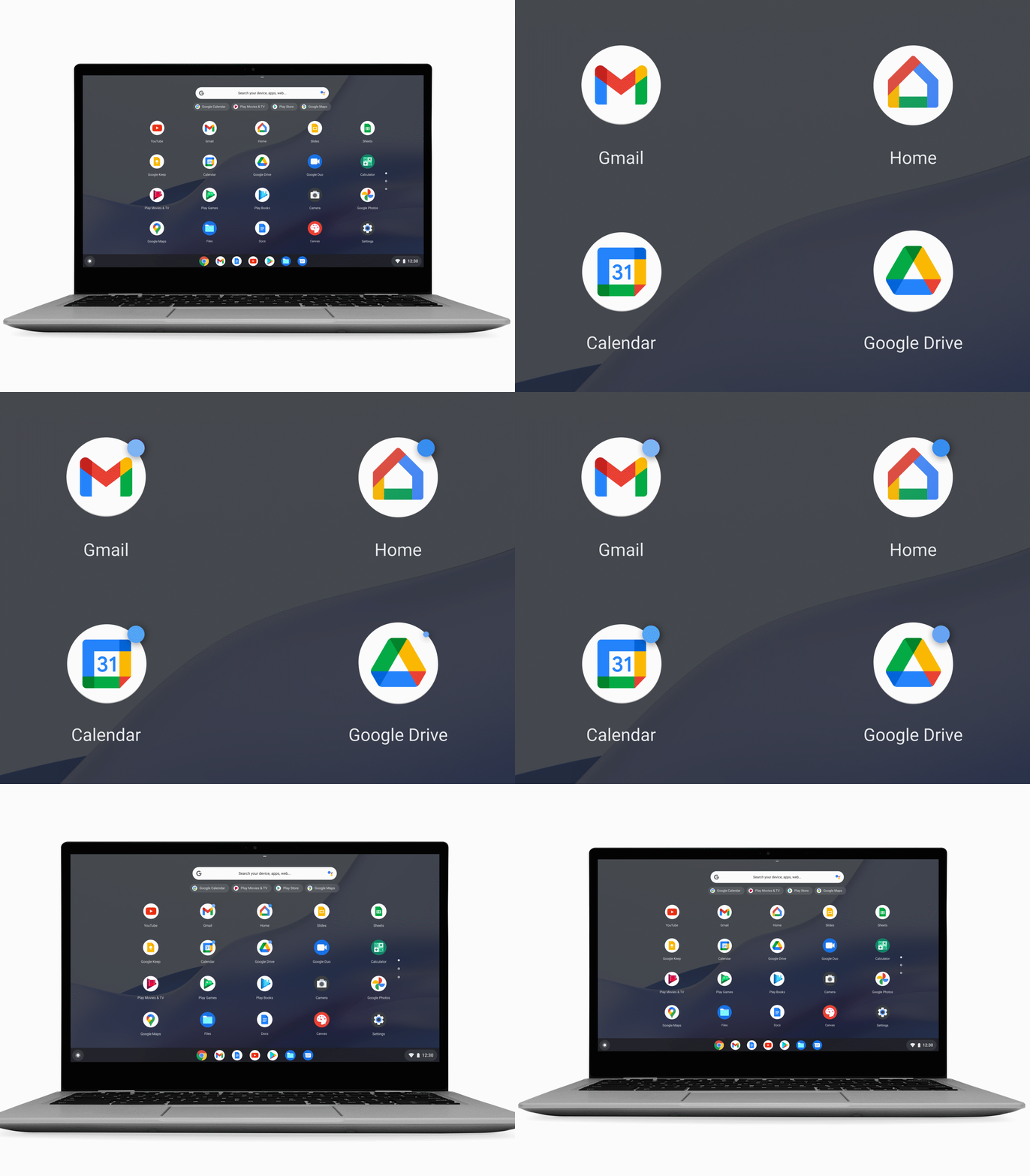
See which of your apps need your attention with a glance. A small circular badge will appear on an app icon to notify you that the app has active notifications available or something new for you to view. You can turn these badges off by visiting your Quick Settings and clicking “Notifications.”
App badges make it easy to see if you have a notification.
We’ve added new wallpapers and account images for Chromebooks. Artist Leo Natsume created these fun, digitally-sculpted designs. The bright, cheerful scenes are great for kids or adults. To check them out, go to Quick Settings, then “Personalization,” or right-click your desktop and select “Set wallpaper,” the “Imaginary.”
Save your Google Docs, Sheets and Slides files for offline access right from your Files app. Once you’ve saved a file, you can open and edit it even if you aren’t connected to the internet. To try it, go to your Files app, select the Drive files you want to save and flip the “Available offline” toggle on. You’ll see a check mark next to saved files, and you can also find them in the dedicated “Offline” folder. This feature will start rolling out later this month.

MSI MPG Artymis 343CQR: tutto quello che serve al giocatore

The Nemesis e la prima Expo virtuale dedicata agli NFT ambientata in un video gioco: in palio anche 2 ETH.
The Nemesis si prepara ad ospitare la sua prima NFT Expo, un evento di cui si è già parlato molto nelle community a tema NFT. Gli utenti avranno l’opportunità di…
L’articolo The Nemesis e la prima Expo virtuale dedicata agli NFT ambientata in un video gioco: in palio anche 2 ETH. scritto da YOUR_DIGITAL_VOICE! proviene da Assodigitale.

Bitcoin è Un Gioco Da Ragazzi? Perché è Ora Di Iniziare a Educare i Giovani Sui Rischi Dell’investimento
Bitcoin è Un Gioco Da Ragazzi? Perché è Ora Di Iniziare a Educare i Giovani Sui Rischi Dell’investimento È stata citata un’insolita combinazione di colpevoli: la rapida inversione a U…
L’articolo Bitcoin è Un Gioco Da Ragazzi? Perché è Ora Di Iniziare a Educare i Giovani Sui Rischi Dell’investimento scritto da YOUR_DIGITAL_VOICE! proviene da Assodigitale.

Le Banche Crittografiche Stanno Guadagnando Slancio Rispetto Alle Banche Tradizionali
L’enorme popolarità della cripto-industria è visibile in numeri. Ad esempio, la capitalizzazione di mercato dei bitcoin ha raggiunto più di $ 1 miliardo e si prevede che blockchain raggiungerà $…
L’articolo Le Banche Crittografiche Stanno Guadagnando Slancio Rispetto Alle Banche Tradizionali scritto da YOUR_DIGITAL_VOICE! proviene da Assodigitale.

La Polizia Trova Una Miniera Di Bitcoin Che Usava L’elettricità Rubata
La polizia ha scoperto un’operazione di criptovaluta che utilizzava l’elettricità rubata per estrarre bitcoin nelle Midlands occidentali. Gli agenti della polizia delle Midlands Occidentali hanno fatto irruzione in un edificio…
L’articolo La Polizia Trova Una Miniera Di Bitcoin Che Usava L’elettricità Rubata scritto da YOUR_DIGITAL_VOICE! proviene da Assodigitale.

Alcuni Lo Chiamano Frode: Più Persone Che Mai Odiano La Criptovaluta
Un certo numero di paesi – finora Cina, Iran e Turchia – ha vietato l’uso dei token per vari motivi. Gli ambientalisti americani lo hanno denigrato e il CEO di…
L’articolo Alcuni Lo Chiamano Frode: Più Persone Che Mai Odiano La Criptovaluta scritto da YOUR_DIGITAL_VOICE! proviene da Assodigitale.

Green pass, da oggi più facile averlo. In Europa chiesta all’UE una DPIA

Iliad cambia le condizioni di contratto: rischio future rimodulazioni?
EURO 2020. I gadget ufficiali sono in vendita su Amazon

6 B2B Content Marketing Summertime Sizzlers To Increase Audience Engagement
I’m going to knock on wood as I type this, but: It looks like we might have a (mostly) normal summer this year in the U.S. After the lockdowns, isolation, anxiety and fear of 2020, it finally feels like things are opening up.
This is all great for everything except getting people to read your marketing content. In 2020 we had a captive audience starved for entertainment. Now we’ll be competing with everything from music festivals to movies to walking in the park.
The way to break through and have a “hot brand summer?” First, don’t use phrases like “hot brand summer,” because you’ll just make people hate you. Second, it’s all about customer engagement. That means connecting with people on a personal level, offering something novel and fascinating, and using that contact to build a meaningful relationship.
No sweat, right? According to a recent survey, though, 54% of brands have trouble connecting with customers on an emotional level. And only 22% say they excel when it comes to customer experience!
How can B2B marketers make their content more engaging? Here are a few tips.
1 — Go Live
Uncensored. Interactive. Up close and personal. There’s nothing quite like a live stream to break free from safe and boring content. There’s a reason every social media site, from Instagram to LinkedIn, is doing live streams.
Granted, going live is not without its risks. If you’re concerned about potential slip-ups or off-message chatter, you can always practice ahead of time. Live doesn’t have to mean “completely improvised and unscripted.”
A few more tips for going live:
- Consider hiring a host to help keep the conversation flowing
- Have someone behind the scenes to watch the comment thread and engage the audience
- Use a tool like restream for multi-platform streaming
- Prime the pump for audience questions by having employees in the audience with pre-written questions.
- Make sure to record the stream for repurposing later
2 — Take People Behind the Scenes
“Authenticity” is one of those marketing buzzwords that makes an easy thing seem difficult. People like brands that are “authentic?” No, people like to know there are actual people of good will at work behind the brand’s messaging. That’s all authenticity means: Real people saying true things.
Let your employees be brand ambassadors on social media. Go behind the scenes to meet the folks who make your brand’s magic happen. Highlight employee stories, even if they aren’t directly related to the brand. For example, if an employee is an Eagle Scout who now runs their own scouting troop, that’s a heartwarming and engaging story that subtly shows off your brand values.
In short, when you’re going behind the scenes, look to celebrate your people and even your customers.
3 — Try Interactive Content
None of us would use a cellphone from the late 90s today. So why are we still so enamored of a content format that hasn’t changed in the past 30 years? That old standby, the static PDF, has lost a lot of its power to persuade.
Our agency has been seeing better results with interactive, animated assets. For example, this one from client Mitel brings our stats and influencer contributions to life. Tools like Ceros make developing an interactive asset almost as easy as a static one.
You don’t have to create an entire immersive VR experience to snag people’s attention, either — just a few touches of animation, interactivity and sound can go a long way.
4 — Explore Social-First Content
We all know how the blog to social media pipeline works: You publish a blog, link to it on your social media, and hope people click that link. If they don’t click through, it’s a lose-lose situation. Neither your brand nor your audience is getting any utility out of the content.
One way to change the equation is through social-first content: That is, content designed to be consumed right there in the social media feed. For B2B marketers, LinkedIn is the right destination for social-first content.
For example, consider slicing a blog post into 150-200 word segments and posting it on LinkedIn, with a hashtag to make it easy to find all the installments. Ask a question at the end of each segment that’s designed to elicit discussion, then participate in that conversation as long as it goes.
Ultimately, social-first content can help grow your brand’s social media presence and deepen relationships with your audience. And you can still collect the content and publish it as a blog later, too!
5 — Collaborate with Influencers
As you may have noticed, TopRank Marketing is pretty sold on influencer marketing. There’s one simple reason: When you do it right, it gets results. Every time. Everything from a social media post to a blog post to a 5,000 word interactive asset is better with influencer contributions.
We co-create content with influencers for many reasons, including:
- Increased organic amplification of the content
- More diverse and informative content
- Reaching new audiences
- Developing relationships with influential experts
Over time, you can build up a community of influencers to co-create content that benefits them, your brand, and your audience.
6 — Measure Engagement Metrics
One key element for increasing engagement is to … well … measure it. If you’re still looking at overall blog traffic or bounce rates to define your content success, you need to recalibrate your metrics to include engagement signifiers like:
- Comments on social media posts
- Reshares on social posts
- New social media followers
- Scroll depth on interactive assets
- Time on page for long-form blog posts
Break Out of Your Comfort Zone
Ready to have a hot brand summer (sorry)? It’s as simple and as complex as doing things that you haven’t done before. It’s pushing your brand away from the staid and static old-school B2B mindset and putting out content that people want to interact with, comment on, and share.
Need more proof? Here’s how interactive content for our client Prophix led to a 642% increase in engagement.
The post 6 B2B Content Marketing Summertime Sizzlers To Increase Audience Engagement appeared first on B2B Marketing Blog – TopRank®.

Tutti i prezzi per seguire la Serie A su DAZN

Guida a TikTok per genitori, in italiano

Per molti genitori TikTok è un mistero assoluto, ma in realtà esiste una guida in italiano che ne spiega il funzionamento di base e le principali impostazioni di sicurezza e di privacy: è la pagina Per i genitori del Centro Sicurezza.
Spiega cose molto pratiche e utili, come i limiti minimi di età fissati nell’app (TikTok è destinato a utenti di almeno 13 anni). L’app di TikTok è classificata come riservata a chi ha più di 12 anni nell’App Store di Apple ed è classificata come app per adolescenti sul Play Store di Google. Di conseguenza, se il telefonino del minore è impostato in modo da usare i controlli parentali, TikTok non sarà scaricabile. Se volete sapere come impostare questi controlli parentali, consultate le istruzioni per dispositivi Apple e per dispositivi di altre marche (anche queste disponibili in italiano).
Se non volete essere così drastici ma preferite accompagnare il minore su TikTok, c’è l’opzione Collegamento Famigliare, che permette di decidere quanto tempo può essere speso su TikTok giornalmente, limitare la visibilità dell’account, i commenti ricevuti e altro ancora. Per attivare questa opzione bisogna che il genitore abbia un proprio account TikTok e poi bisogna collegare i due account come descritto nella guida Per i genitori.
TikTok consiglia inoltre di rendere “privati” gli account dei minori. Questo non vuol dire che le cose che fanno su TikTok siano realmente private (la foto, il nome utente e la biografia, per esempio, restano visibili a tutti), ma offre un po’ di protezione in più. Per esempio, un account “privato” permette di scegliere chi guarda i contenuti pubblicati dal minore, chi lo segue e chi gli manda messaggi. Certo, questo è contrario all’idea di TikTok che molti hanno, ossia di cercare il maggior numero possibile di follower; ma è una scelta prudente.
TikTok offre, nel Centro Sicurezza, anche una guida contro il bullismo. Ma se volete ancora di più, la versione inglese del Centro Sicurezza offre anche una Guardian”s guide molto completa e più ampia di quella in italiano. In ogni caso, le risorse per informarsi non mancano. Se avete fatto la scelta di acquistare uno smartphone per i vostri figli, conviene fare anche quella di investire un po’ di tempo per capire come funzionano i servizi accessibili tramite quello smartphone.