Chiavetta USB 32GB in metallo FORTE e ECONOMICA (6€)
Lenovo Tab P11, tablet di fascia media BELLO e POTENTE a prezzo WOW
Ask a techspert: How does Lens turn images to text?
When I was on holiday recently, I wanted to take notes from an ebook I was reading. But instead of taking audio notes or scribbling things down in a notebook, I used Lens to select a section of the book, copy it and paste it into a document. That got me curious: How did all that just happen on my phone? How does a camera recognize words in all their fonts and languages?
I decided to get to the root of the question and speak to Ana Manasovska, a Zurich-based software engineer who is one of the Googlers on the front line of converting an image into text.
Ana, tell us about your work in Lens
I’m involved with the text aspect, so making sure that the app can discern text and copy it for a search or translate it — with no typing needed. For example, if you point your phone’s camera at a poster in a foreign language, the app can translate the text on it. And for people who are blind or have low vision, it can read the text out loud. It’s pretty impressive.
So part of what my team does is get Lens to recognize not just the text, but also the structure of the text. We humans automatically understand writing that is separated into sentences and paragraphs, or blocks and columns, and know what goes together. It’s very difficult for a machine to distinguish that, though.
Is this machine learning then?
Yes. In other words, it uses systems (we call them models) that we’ve trained to discern characters and structure in images. A traditional computing system would have only a limited ability to do this. But our machine learning model has been built to “teach itself” on enormous datasets and is learning to distinguish text structures the same way a human would.
Can the system work with different languages?
Yes, it can recognize 30 scripts, including Cyrillic, Devanagari, Chinese and Arabic. It’s most accurate in Latin-alphabet languages at the moment, but even there, the many different types of fonts present challenges. Japanese and Chinese are tricky because they have lots of nuances in the characters. What seems like a small variation to the untrained eye can completely change the meaning.
What’s the most challenging part of your job?
There’s lots of complexity and ambiguity, which are challenging, so I’ve had to learn to navigate that. And it’s very fast paced; things are moving constantly and you have to ask a lot of questions and talk to a lot of people to get the answers you need.
When it comes to actual coding, what does that involve?
Mostly I use a programming language called C++, which enables you to run processing steps needed to take you from an image to a representation of words and structure.
Hmmm, I sort of understand. What does it look like?
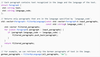
This is what C++ looks like.
The code above shows the processing for extracting only the German from a section of text. So say the image showed German, French and Italian — only the German would be extracted for translation. Does that make sense?
Kind of! Tell me what you love about your job
It boils down to my lifelong love of solving problems. But I also really like that I’m building something I can use in my everyday life. I’m based in Zurich but don’t speak German well, so I use Lens for translation into English daily.
Questo mini PC targato SHUNMU è potente e costa davvero poco
Il mini PC SHUNMU è potente e versatile, completo di tutto e dal basso consumo energetico, oggi un prezzo davvero fuori di testa.
Leggi Questo mini PC targato SHUNMU è potente e costa davvero poco
Teclast F15 Pro Plus, il laptop versatile OGGI in super offerta: costa pochissimo
Questo potente e multifunzionale Teclast F15 Pro Plus lo trovi adesso in offerta su Amazon, con 80€ di super sconto.
Leggi Teclast F15 Pro Plus, il laptop versatile OGGI in super offerta: costa pochissimo
A soli 9€ questa GENIALE chiave universale DEVI farla TUA
Amazon sgancia la BOMBA: PC portatile con W11 e schermo 16” scontato di 700€
Questo super versatile computer portatile viene letteralmente svenduto da Amazon, che lo sconto di ben 700€ circa. Solo per poche ore.
Leggi Amazon sgancia la BOMBA: PC portatile con W11 e schermo 16” scontato di 700€
Smart TV Hisense 43″ 4K: PREZZO da FAVOLA con lo sconto del 34%
Auricolari TWS Life Note 3S: dopo aver letto il prezzo sarai costretto a comprarle
Amazon sgancia la BOMBA: questo potente PC portatile è scontato di 700€.
HONOR Band 5, il prezzo va giù in picchiata: lo sconto è INCREDIBILE
Peak Season 2022: Come Prepararsi E Quali Strategie Adottare
La “Peak Season” è alle porte, hai già pianificato la tua strategia e-commerce? Questi i prossimi momenti promozionali più importanti per le vendite ecommerce e retail: singles day (11 novembre)mondiali di calcio (dal 20 novembre)black friday (25 novembre)cyber monday (28 novembre)last shipping days (dal 10 al 18 dicembre circa)saldi invernali (dal 5 gennaio 2023) È […]
The post Peak Season 2022: Come Prepararsi E Quali Strategie Adottare appeared first on Studio Cappello Blog.
Helping you easily identify information sources in Search
People come to Google to find information from a wide range of sources and formats, from big brands to individual creators, across text, images and video. As we’ve introduced features and design elements to help you explore information in new ways, we’ve also continued to bring greater context to the search results page, helping you make sense of the information you see. Today, we’re making a few new updates to the search page that build on this work, providing even more information about the sites that you see so you can feel confident about the websites you visit.
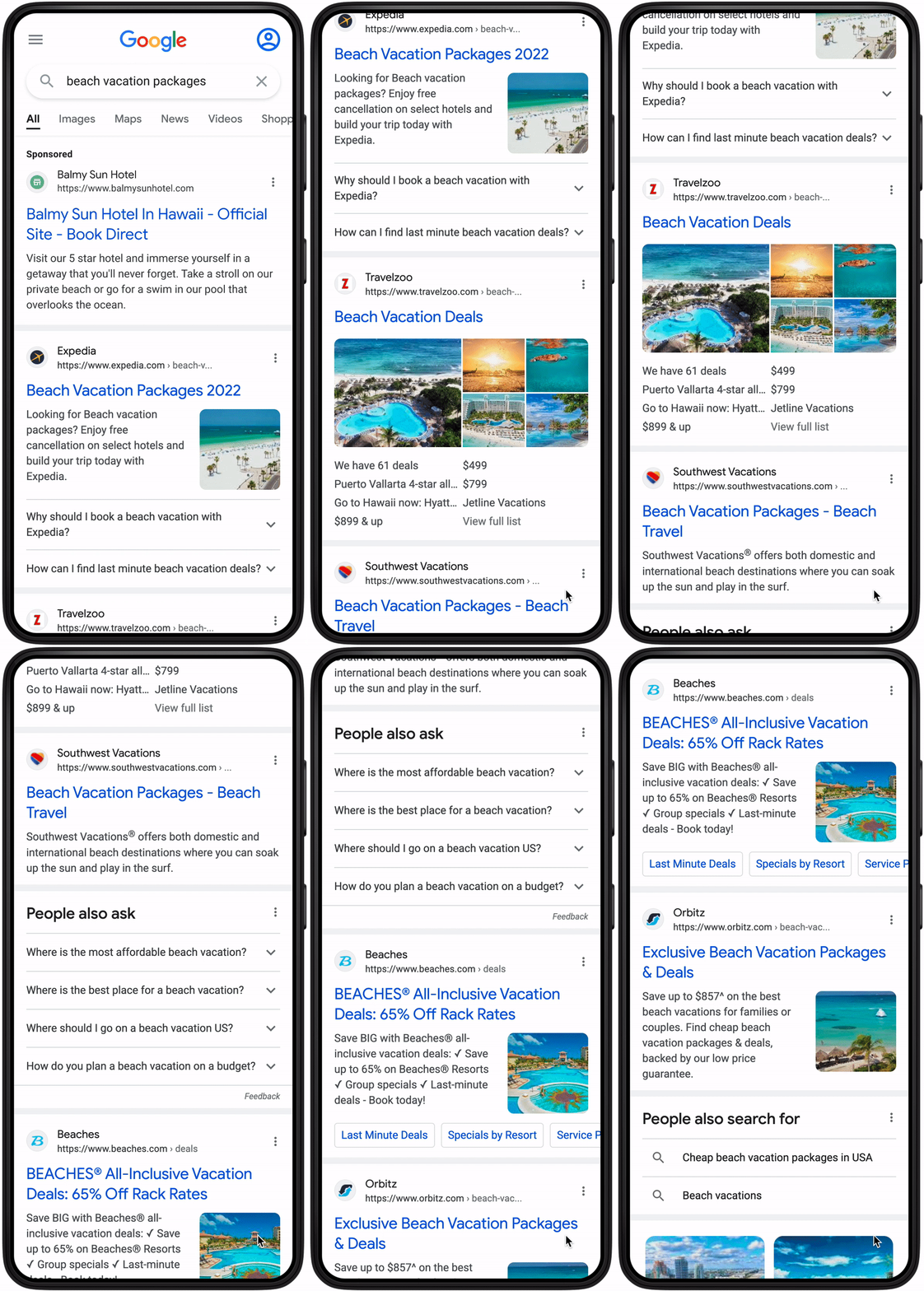
We’re adding site names to search results on mobile, so you can easily identify the website that’s associated with each result at a glance. We’re also updating the size and shape of the favicon (a website’s logo or icon) that appears in Search, to make it easier to see on the page. We’ll extend these changes to Search ads to increase clarity and advertiser transparency at a glance.
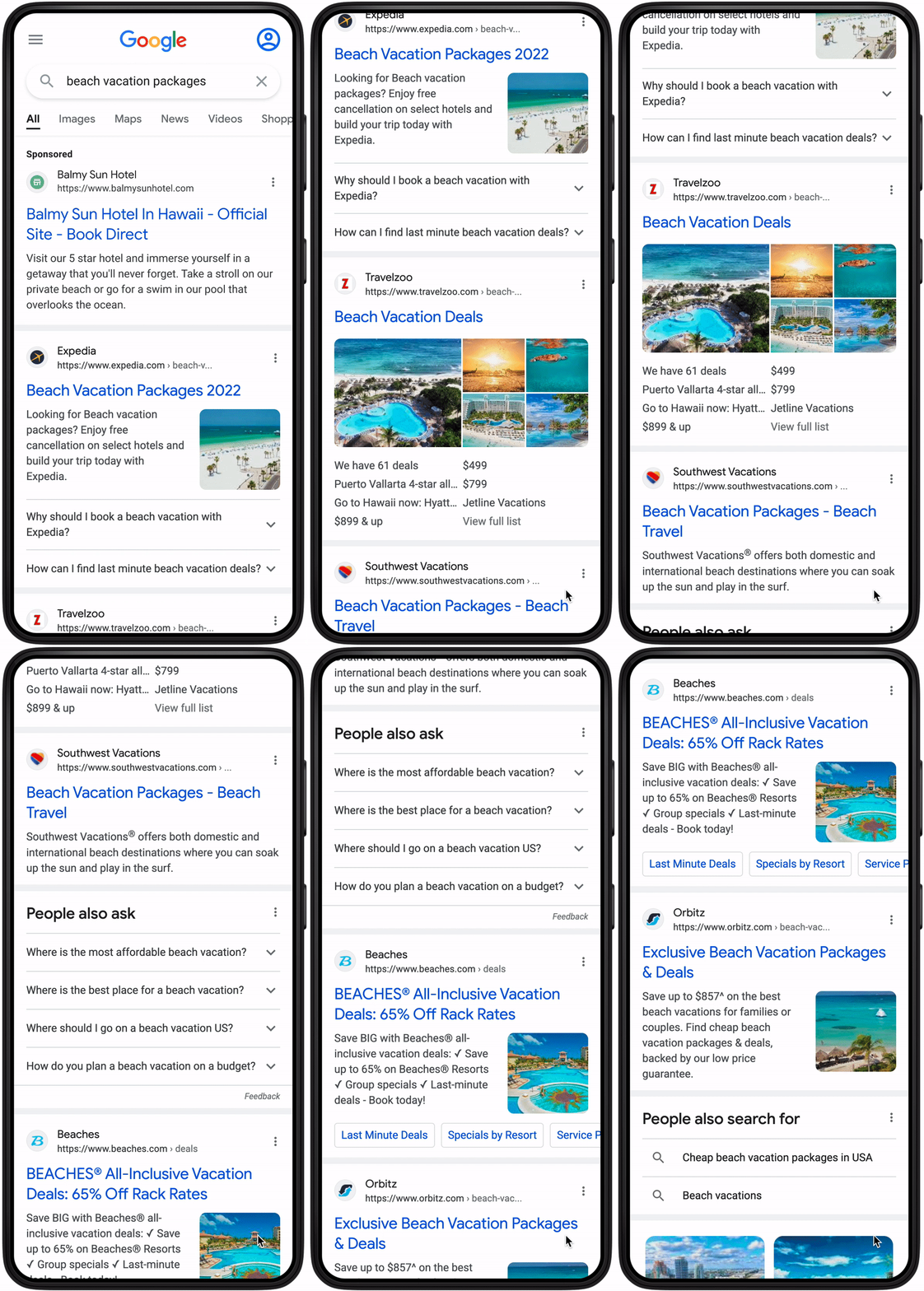
Part of helping you make sense of the information you see is ensuring that ads are clearly labeled, which is why our label will now be featured on its own line in the top-left corner of Search ads. We also want the label to be prominent and clear across different types of paid content. That’s why when ads show on mobile search results, they will now be labeled with the word “Sponsored” in bold black text. This new label and its prominent position continues to meet our high standards for being distinguishable from search results and builds on our existing efforts to make information about paid content clear.
This search page update is starting to gradually roll out on mobile and we’ll soon begin testing a similar experience on desktop, helping people more easily find what they’re looking for, no matter where they’re searching.