We’ve seen Chromebooks being used in so many ways, from virtual classrooms to entertainment hubs this year. Chromebooks have become the number-one device in K-12 education around the world because they are powerfully simple: opening a world of possibilities for every student and teacher, whether they’re at school, at home or anywhere in between.
We’ve seen a huge transition to schools assigning devices for every individual student, giving them a real sense of ownership over their Chromebooks. As a result, we’re making changes to support schools as they send Chromebooks home. These changes will also help students connect and participate in hybrid classrooms, while creating and sharing their ideas with a wide range of learning tools from podcasting to screencasting.
Easy to use
With Chromebooks, it’s easy to set up the right environment for your school from wherever you are. With over 40 new devices for education in 2021 alone, and Chrome Education Upgrade, admins can enable more than 500 policies in Google Admin Console. And with policies like Zero Touch Enrollment, IT admins can drop ship devices to any location and have the device be ready to go – without ever having physically touch the device.
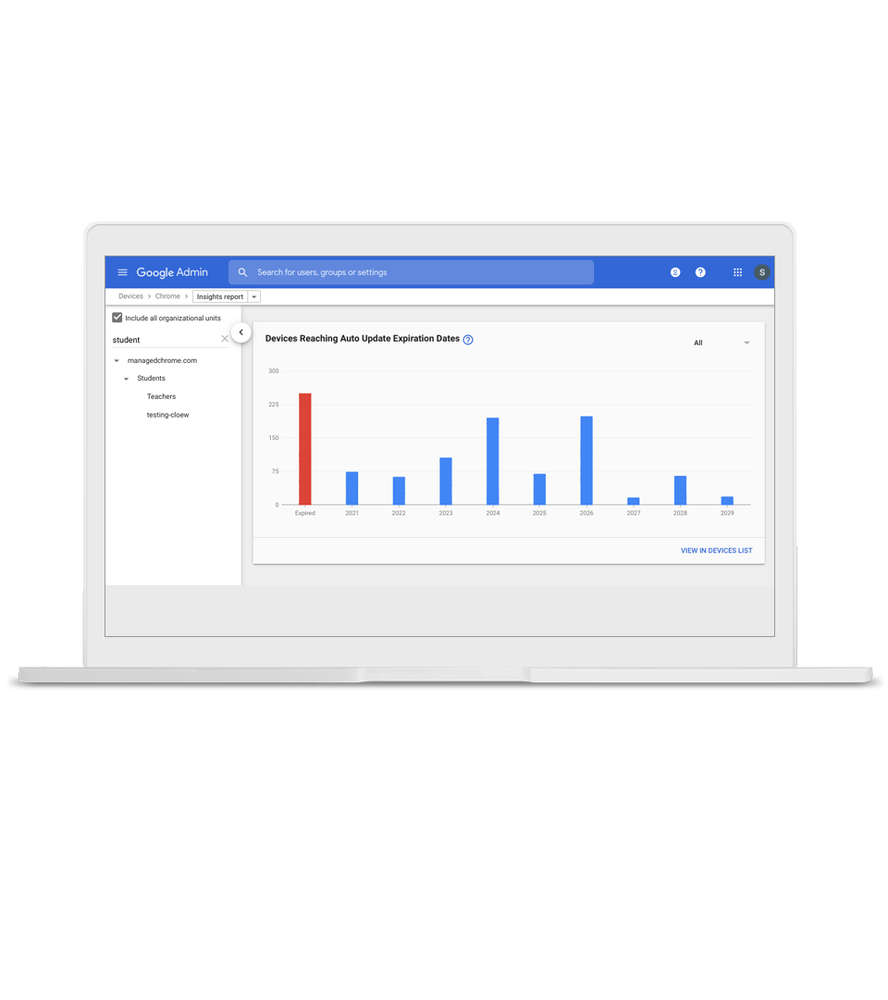
Automatic updates for up to eight years on devices keep them safe and secure – and with all of the latest and greatest security updates and new features. But it can be challenging to know when devices are reaching their Automatic Update Expiration date. Last year, we updated the Devices page of Google Admin Console to show when devices reach their AUE — and now, we’re adding a new page in Admin Console that enables admins to view Chrome Insights Reports. The first report will be a view of AUE dates of the device fleet, which helps you understand when and how many devices have reached, or are going to reach, their AUE dates. These reports will help you prepare for when you should be thinking about purchasing new devices, and how often.