Since we launched Google Docs and Sheets 15 years ago, we’ve been pushing work documents away from being just digital pieces of paper and toward collaborative, linked content inspired by the web. Our mission is to build the future of work, and smart canvas is our next big step.
Specifically, we’re enhancing the apps that hundreds of millions of people use every day — like Docs, Sheets, and Slides — to transform collaboration and make Google Workspace even more flexible, interactive and intelligent. Between now and the end of the year, we’re rolling out new features that’ll make it easier for you to do your work and collaborate with your teammates, wherever you are.
Here are 12 new features to help make collaboration even more seamless.
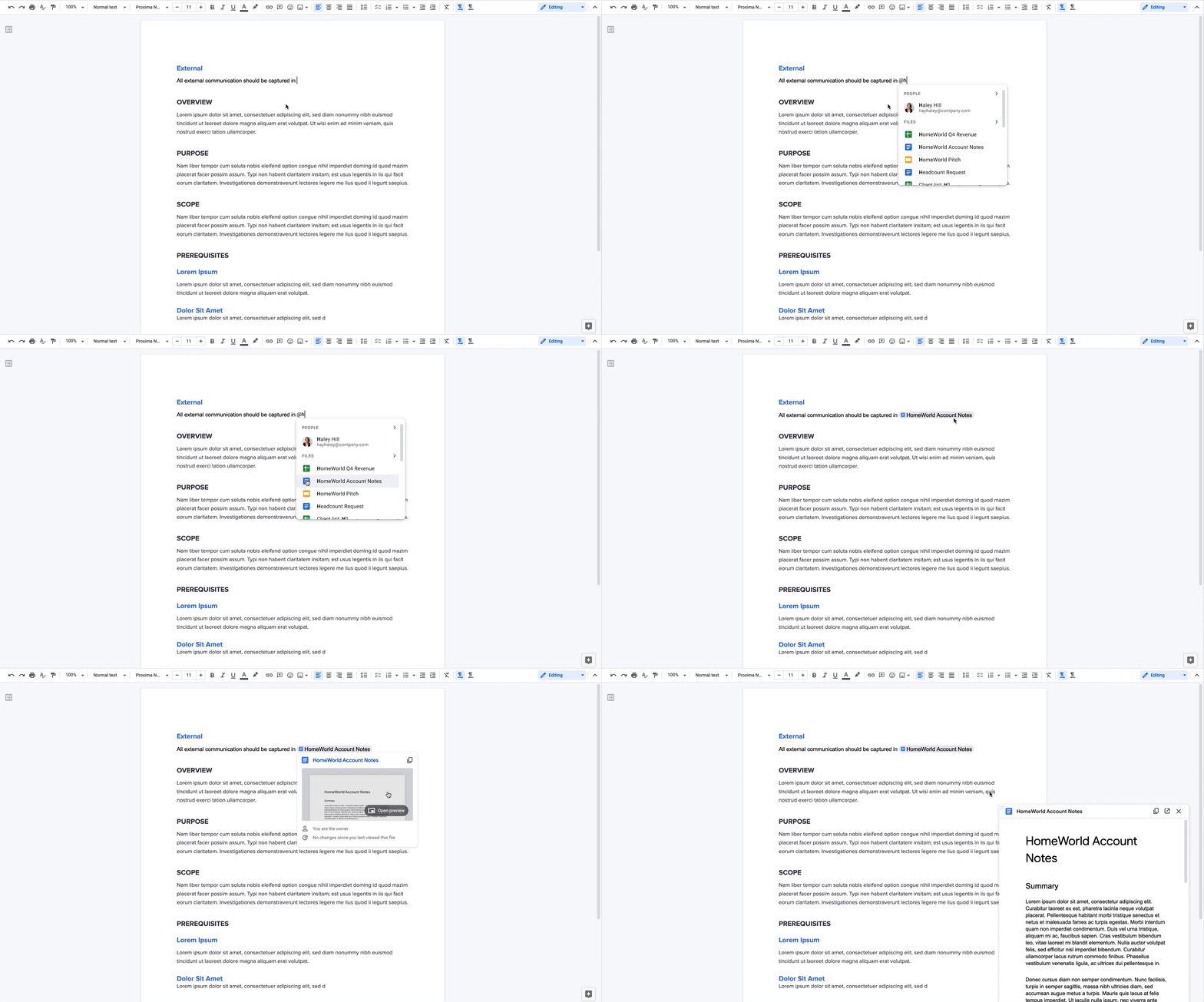
@-mention people, files and meetings
Already available, when you @-mention a person in a document, a smart chip shows you additional information like the person’s location, job title and contact information. And starting now, we’re introducing new smart chips in Docs for recommended files and meetings. To insert smart chips into your work, simply type “@” to see a list of recommended people, files and meetings. From web or mobile, your collaborators can then quickly skim associated meetings and people or preview linked documents, all without changing tabs or contexts. Smart chips will come to Sheets in the coming months.