Windows 11: Microsoft ufficializza le schede per il Blocco note
Con la build 25281 di Windows 11 riservata agli Insider del canale Dev, Microsoft ha implementato l’interfaccia a schede per il Blocco note.
Leggi Windows 11: Microsoft ufficializza le schede per il Blocco note
Ransomware: si riducono i guadagni per i cybercrminali
Secondo il nuovo report di Chainalysis, i guadagni dei crybercrminali derivanti dai ransomware si sono ridotti notevolmente nel 2022.
Leggi Ransomware: si riducono i guadagni per i cybercrminali
reMarkable 2: una delle migliori esperienze di scrittura digitale! La recensione

5 Steps For Aligning B2B Brands With Customers’ Changing Needs

When you were getting started in B2B marketing or selling, did you suspect you’d be selling your product more or less the same way for years at a time, or maybe for even longer?
What a sweet dream that was. But a few years in B2B shook you awake.
The truth is, the B2B consumer doesn’t just change as quickly as the B2C consumer; they actually change considerably faster. Your B2B customer’s needs are constantly morphing and evolving just as fast as their industry develops, their competition stiffens, and new technologies enter the fore.
The B2B brand that keeps its existing customers and brings in new ones has to evolve even faster than its customers. As a B2B marketer or B2B salesperson, your job is to understand what your customer’s need just as quickly (or even faster than) they realize they need it and demonstrate that you can provide it.
While there’s not exactly a foolproof, one-size-fits-all model for prognosticating your customer’s needs and speaking to them (wouldn’t that be nice), there is a generalized five step process savvy B2B marketers like you can follow to double and triple check that you understand your customer’s needs and that you’re speaking to them as directly and effectively as possible.
Let’s follow the data and break down that process:
Step 1: Reassess & prioritize your Category Entry Points
Your Category Entry Points, or CEPs, are the main, recurring pain points and motivations your buyers experience that cause them to seek out a product or service like yours in the first place. CEPs create your buyer’s initial need to find your product.
First, ask yourself if your primary CEPs are still relevant. Are customers still experiencing the pain points and motivations that cause them to seek out your category of products and services? Just as importantly, do they perceive those pain points and motivations in a way that’s still causing them to seek out products like yours, or has something shifted?
If your CEPs have shifted, why is that? Is there a new product or technology that is solving your original CEP concerns in a different way? Have your customer’s businesses changed such that their motivations and pain points aren’t what they once were? Most importantly: what is motivating your customers to seek out new products now?
Broaden your CEPs to include the new ways your customers are thinking about and approaching their pain points, then focus on addressing these newly broadened topics of concern across your marketing initiatives. As vice president of marketing at LinkedIn Marketing Solutions* Jim Habig recently shared when speaking about B2B marketing in 2023, “The key to making your promise valuable is in understanding your customer. Essentially you need to understand what they need to do, when they need to do it, why it will help them, and who needs to be on board to move forward.”
[bctt tweet=”“The key to making your promise valuable is in understanding your customer. Essentially you need to understand what they need to do, when they need to do it, why it will help them, and who needs to be on board to move forward.” — @JimHabig” username=”toprank”]Step 2: Contextualize CEPs according to customer pain points
Did you know that 76% of of B2B buyers now expect a personalized sales pitch that speaks directly to their specific goals and pain points? This remains true, despite the fact that the majority (57%) of B2B buyers also prefer to analyze their initial needs and identify possible solutions online before involving a sales professional.
As this graph from Gartner’s report on “The B2B Buying Journey” illustrates, the typical B2B buyer actually spends 10% more time researching solutions online independently than they do meeting with potential suppliers and sales reps.
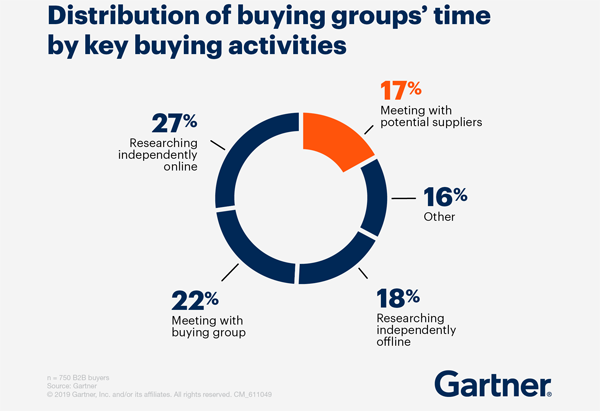
Source: Gartner
Perhaps most eye-opening of all: a staggering 83% of B2B buyers prefer ordering or paying through digital commerce. Taken together, these stats spell it out: that “personalized sales pitch” customers are asking for can’t just happen when they’re in front of a sales rep anymore. It has to start as soon as they interact with your brand’s content online.
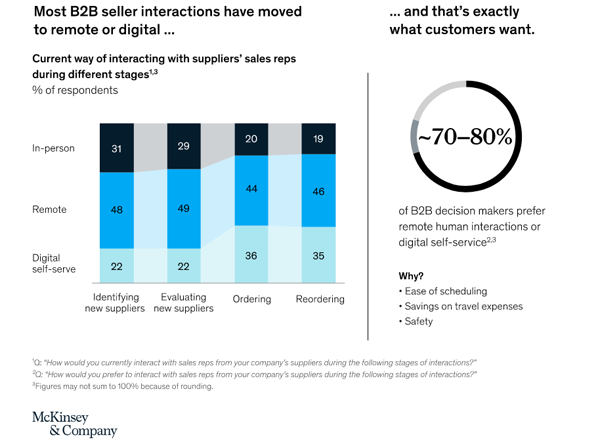
Source: McKinsey
Figure out exactly how your customers are thinking about their pain points and create online marketing content laser-targeted toward addressing those concerns as early and often as possible.
In her predictions for the state of B2B marketing in 2023, eMarketer’s analyst Kelsey Voss emphasized focusing on a B2B’s most urgent needs throughout the marketing funnel, rather than trying to entice them with secondary benefits.
“Investments will focus on the tech that meets a business’s need rather than bells and whistles that deliver little value,” Voss said. “We know the martech landscape is enormous with an ever-increasing long tail of solutions. This has led many businesses to purchase unnecessary tech that they think will solve all known and unknown problems. But economic stressors will help put a kibosh on any unnecessary investments that don’t show a tangible impact on marketing goals while drawing on minimal resources.”
“Tangible impact” is the key phrase here. Align your CEPs with your customer’s biggest worries and make the case for how you can solve those worries as explicitly as possible.
Step 3: Address CEPs across the entire buying cycle & for all buyer roles
Of course, in order to identify your customer’s biggest worries, you have to identify all of your customers. That’s getting harder, too. According to a Forrester Consulting and Outreach survey, 75% of B2B buyers say there are more people involved in their decision-making process than ever.
Gartner’s report finds that a typical B2B purchase now involves six to 10 decision makers, each armed with four or five pieces of information they’ve gathered independently… and, as this chart demonstrates, each with their own role in the ultimate decision.
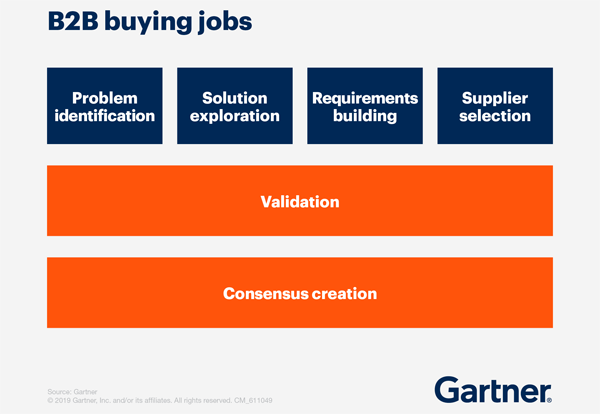
Source: Gartner
According to Insider Intelligence, 75% of B2B buyers say that the time an average buying cycle takes is also getting longer in general.
The longer the B2B buying cycle takes and the more decision makers are involved in it, the less linear the purchase journey ultimately becomes, as this chart from Gartner demonstrates:
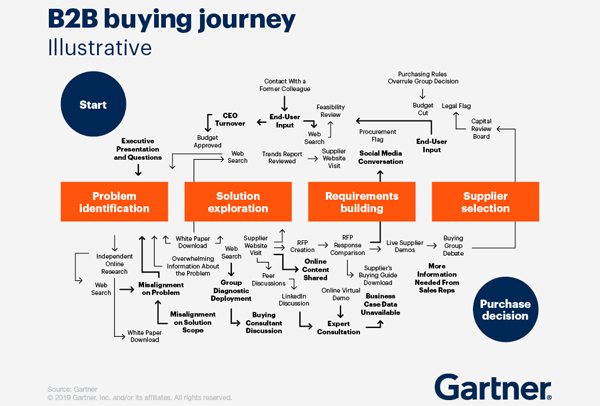
Source: Gartner
Frustrating though the complexity of the modern B2B buying journey may seem, however, it also represents an opportunity. Each of the members of your customer’s buying committee will be conducting their own research and contributing their findings to the group. The more you appear in their findings, the more mental availability you’ll build with the entire committee.
As you develop your brand’s marketing content, keep every member of your customer’s buying committee in mind. Hit these members with targeted content along each and every step of their buyer’s journey, from problem identification to supplier selection, repeatedly. You objective is to show up with answers to their questions and concerns no matter where they are in the process and no matter how many times they return to that point in the process.
Persistent messaging and patience are key here. Keep providing useful information, and your customer will find it eventually.
Step 4: Provide new information & contextualize existing information
B2B buyers are five times more likely to engage with a sales rep who provides new insights about their business over someone who tells them what they already know. This insight can be extended to brand marketing material, as well.
Gartner research found that customers who perceived the information they received from suppliers to be helpful in advancing across their buying jobs were 2.8 times more likely to experience a high degree of purchase ease, and three times more likely to buy a bigger deal with less regret.
Don’t underestimate today’s B2B buyer: the typical buying committee is highly-engaged with the latest studies, insights, and opinions circulating in their industry. They’ve read your content, your competitor’s content, and how their competitors feel about both. They have arrived at their own conclusions. Your job is to speak to those conclusions and make the case for your product on their terms.
As you’re creating your marketing content, pay close attention to what you – and your competition – have already told the buying committee. Don’t just repeat yourself. Contextualize and respond to the information that your committee will already be processing. Bring up the studies that they’ve seen in your own content. Provide new insights and takeaways about the stats they’ve been arguing about. Demonstrate that your brand is every bit as up to speed and interested in the contemporary challenges of their industry as they are.
Then, make the case for your product in this new context.
Step 5: Rinse & repeat
The final step in this process is the most important of all: you have to keep doing this constantly. The B2B buying committee is going to keep evolving just as quickly as their industries. The faster their industries grow and develop, the quicker your buyer’s needs and concerns will change.
Return to this five step process and reevaluate your CEPs from the ground-up every couple of months to keep ahead of a curve that’s growing ever-steeper and keep speaking to your customer’s needs no matter how quickly they change.
And remember, if you need help with any step in this process, from content ideation to creation to targeting, TopRank Marketing is ready to help.
* LinkedIn is a TopRank Marketing client.
The post 5 Steps For Aligning B2B Brands With Customers’ Changing Needs appeared first on B2B Marketing Blog – TopRank®.

Google spaventato da ChatGPT cerca di correre ai ripari con una soluzione alternativa
 L’Intelligenza Artificiale (IA) sta diventando sempre più popolare e sofisticata, con nuovi sviluppi che vedono la creazione di software sempre più avanzati in grado di emulare il ragionamento umano. Uno…
Un asteroide passerá vicinissimo alla terra: rischio per la terra?
 Incontro ravvicinato con un asteroide: 2023 BU H3: Scoperta dell’asteroide L’asteroide 2023 BU è stato avvistato dall’ingegnere ed astronomo amatoriale Gennadiy Borisov il 21 gennaio, presso l’osservatorio Margo di Nauchnij,…
ENTRO IL 2030 IL RICICLO DELLE BATTERIE DOVRÀ AUMENTARE DI 25 VOLTE: LO STUDIO DI ERION ENERGY
 La costante produzione globale di prodotti elettronici, in particolare dei dispositivi elettrici portatili, comporta un costante aumento della domanda delle batterie. Numerosi sono gli studi di mercato che confermano la…
YOURENTAL si occupa di noleggio a breve termine con veicoli di lusso
 Non è mai stato cosi semplice noleggiare un’auto di lusso a Milano; il parere degli esperti di YouRental Il valore e il concetto della proprietà di una macchina è cambiato…
Cose PAZZE Amazon: cinque gadget sotto ai 15€ di cui non potrai più fare a meno

Liberare spazio in una casella Gmail eliminando gli allegati ma non le mail: Unattach
Le caselle gratuite di Gmail sono capienti (circa 15 GB) e aumentarne le dimensioni pagando non è difficile. Ma se ricevete o mandate tanti allegati, noterete che riempiono molto spazio. È facile dimenticarsi che un singolo allegato da 10 MB equivale a circa 10.000 mail, in termini di spazio occupato (presumendo che una mail di solo testo occupi mediamente 1 KB).
La soluzione semplice è cancellare le mail che contengono allegati pesanti che non vi servono più: è possibile elencarle andando in Gmail e digitando nella casella di ricerca
has:attachment larger:[dimensioni]
Per esempio,
has:attachment larger:10M
elenca tutte le mail che hanno un allegato di dimensioni superiori ai 10 MB.
Questo filtro può essere affinato ulteriormente, per esempio specificando un mittente se avete qualcuno che vi manda tanti allegati che dopo qualche tempo non vi serve più avere in archivio nella mail. Per esempio,
has:attachment larger:1M from:pippo@pippo-e-pluto.com older_than:1y
elenca tutte le mail con allegato grande almeno 1 MB che avete ricevuto da pippo@pippo-e-pluto.com almeno un anno fa. L’elenco completo degli operatori di Gmail offre molte altre opzioni.
—
Questo metodo, però, ha il difetto che elimina non solo l’allegato ma anche la mail associata all’allegato. Se avete bisogno di conservare la mail, che è leggera, ma non il suo ingombrante allegato, per esempio per tenere traccia di comunicazioni di lavoro, in Gmail non c’è modo di farlo. Alcuni client, come per esempio Thunderbird, offrono quest’opzione, ma Gmail no.
Una soluzione è la web app Unattach, che consente appunto di eliminare gli allegati lasciando però intatte le mail corrispondenti; l’allegato viene sostituito da una nota, in calce alla mail, che descrive l’allegato rimosso.
Per usare Unattach, che è gratuita nella versione limitata a 30 mail/mese e costa 10 euro/dollari/franchi l’anno nella versione Basic che non ha questo limite, si va a https://unattach.app e si clicca su Get Started o su Try with our free plan, poi si clicca su Sign up with Google (oppure si crea un account con mail e password), si accetta la richiesta di collegare il proprio account Gmail a Unattach (è un permesso revocabile), si accettano le condizioni d’uso e l’informativa sulla privacy e si clicca su Start Unattach.
Fatto questo, si clicca su Sign in to Gmail per dare gli ulteriori consensi (Unattach deve poter leggere e scrivere nell’account di posta) e si può cominciare.
Nella scheda Basic search si può fare una ricerca semplice, basata sulle dimensioni degli allegati: compare un elenco delle mail che soddisfano il criterio, ordinabile per dimensioni, data, mittente e oggetto.
Nella scheda Advanced search, invece, si possono immettere gli stessi operatori che si possono usare in Gmail, e quindi per esempio si possono cercare le mail che hanno allegati e sono state inviate da uno specifico mittente prima di una certa data.

Si può scegliere di cancellare la mail, scaricare gli allegati, rimuoverli o ridurne le dimensioni se sono immagini. Fatto questo, si selezionano le mail che interessano, si clicca su Process Selected Emails, e il gioco è fatto. Nel mio caso ho 2265 mail con allegati risalenti a più di due anni fa provenienti da un singolo cliente; ho già salvato in archivio gli allegati e quindi non mi serve tenerli nella casella di mail. Eliminarli mi libererà quasi 3 GB di spazio su Gmail, dopo che avrò vuotato il Cestino di Gmail (volendo, si può automatizzare questa vuotatura andando nelle Advanced Options).
Le mail alle quali è stato rimosso l’allegato ora hanno in calce un avviso se le apro in Gmail:

Se usate (anche) un client di posta in IMAP, come me, la modifica ci metterà un po’ ad arrivare anche alla copia locale delle mail. E ovviamente l’eliminazione degli allegati riduce anche lo spazio occupato sul disco locale dalla mail.
La spiegazione del metodo usato da Unattach è fornita in questo articolo, che sottolinea che Unattach è una web app che gira localmente nel browser dell’utente e usa le API di Google per accedere alla mail dell’utente; le mail non vengono mandate agli sviluppatori di Unattach o ad altri, come descritto nell’informativa sulla privacy. Questo, però, significa che l’app non è un fulmine: eliminare qualche migliaio di allegati richiede un’oretta abbondante.
Passare alla versione a pagamento è facile: si può pagare con PayPal o con le principali carte di credito.