Cosa fare se Gmail è pieno? Ecco come liberare spazio

“Capitale donna”. Scai Comunicazione avvicina agli investimenti l’universo femminile
 AVVICINARE L’UNIVERSO FEMMINILE AGLI INVESTIMENTI E RENDERE LE DONNE SEMPRE PIU’ PARTECIPI E COSCIENTI DELLE PROPRIE SCELTE ECONOMICHE SCAI COMUNICAZIONE LANCIA “CAPITALE DONNA” Nel mondo degli investimenti c’è un capitale…
10 new reasons to love Messages by Google
We use messaging apps to feel connected, without the headache of needing to know what phone or network we’re on. That is why our focus with Messages by Google is to help you build connections. It’s also built around RCS, a modern messaging protocol that supports richer text features, higher resolution images and videos, and enables end-to-end encryption. With RCS, we can give everyone a secure and modern messaging experience. We continue to advocate for RCS across the industry so key players #GetTheMessage and make the experience better for everyone.
As RCS adoption accelerates, we’re doing what’s possible to improve messaging between Android and iOS, like adding support for reactions. This builds on a suite of features that you already love, like an organized inbox that separates personal and business messages, the ability to share sharper videos and scheduled messages. And we’re doing even more.
Here are 10 ways Messages is evolving with safer, smarter and more modern features.
1. Ever been in a chat where the conversation with friends is flowing and you’re catching up with tons of messages? Soon you’ll be able to respond to an individual message in a conversation when RCS is enabled, making it easier to respond to a specific message without breaking the flow.
2. Earlier this year, we started displaying emoji reactions from iPhone users on your Android phone. Now we’re taking a step further by letting you react to SMS texts from iPhone users with emoji as well. While RCS is the ultimate solution, we’re doing what we can to help Android users have a way to consistently react to messages.
3. We’re making voice messages more accessible. Using machine learning, Voice Message Transcription auto-transcribes the message so you can access it with ease. Say you’re in a crowded space and get an audio message from a loved one: transcripts will let you “view” the audio like you would a traditional text message. In addition to Pixel 7 and Pixel 7 Pro, this feature is also available on Pixel 6, Pixel 6A, Pixel 6 Pro, Samsung Galaxy S22 and the Galaxy Fold 4.
4. Reminders are now included directly in Messages to help you remember important moments without navigating across several apps on your phone. Remind yourself to call Mom on her birthday, or schedule that appointment during regular business hours. And if you save someone’s birthday or anniversary in your phone’s contacts app, you’ll get a gentle reminder about them when you open the Messages app.
5. You can now watch YouTube videos within Messages without ever leaving the app. So when someone sends you a YouTube link, you can quickly watch and respond without the hassle of switching back and forth.
6. If you are like me and always scrolling through messages endlessly to find the address that your friend sent you a while back, we got you covered. Messages will now intelligently suggest you “star” messages that contain texts like addresses, door codes and phone numbers to help you easily keep track and quickly find important conversations.
7. Sometimes texting is too slow and impersonal, so you need to get yourself on a video call. Messages will recognize texts like “Can you talk now?” and suggest a Meet call by showing an icon right next to the message. It will also suggest adding calendar events for messages like “Let’s meet at 6pm on Tuesday”, to help you stay on top of important events.
8. In some countries, we’re experimenting with a feature that lets you chat with businesses you found on Search and Maps directly through Messages, so all conversations appear in one place that’s searchable, private and secure. You can plan your next trip, score tickets to the big game and find deals from your favorite retailers — all without leaving the Messages app.
9. Messages work across your favorite devices, from your phone to Chromebook to your smartwatch. Try sending a message from your new Pixel Watch by asking Google Assistant.
10. Your messaging apps should work wherever you are—even in the air! That’s why we partnered with United Airlines to offer messaging on United flights, when you have RCS turned on. It will be available on United WiFi for most carriers starting this fall, with broader support coming soon.
A fresh new look
We’re updating the Messages icon over the coming weeks to better reflect today’s modern messaging experience and share the same look as many of Google’s other products. It takes more than one side to have a conversation, and that’s reflected in the design, with overlapping messaging bubbles coming together as one.
Our Phone and Contacts apps will also be updated with the same look and feel to signal their shared purpose: helping you communicate.
Each is designed to adapt to Material You themes, so they can always match your personal style. And of course, we obsessed over every pixel to ensure these new icons are instantly recognizable as communication tools and accessible to everyone.
There’s more to come as we continue to build new tools and features into the app — all with the safety and security of Google. Download the Messages app on Google Play today to give it a spin, and try out the new features that will begin rolling out in the coming weeks.
Se la stanchezza vi riduce come gli zombi di The Walking Dead, ecco la soluzione
Replicache: framework JavaScript anche offline
Replicache è un framework JavaScript per realizzare Web App collaborative ad alte prestazioni con supporto per la modalità offline
“Wake Up Call” di Alfio Bardolla. La formazione finanziaria va in scena il 21-22-23 ottobre
 Alfio Bardolla – Libertà Finanziaria — Per celebrare i suoi 10 anni, l’evento di ABTG che insegna a raggiungere la “Libertà Finanziaria” torna anche in format fisico presso il polo…
Con le Apple AirTag ti ritrovano anche a Silent Hill: fai scorta con lo sconto Amazon
<div>Preserving one of Nigeria’s last sacred groves</div>
On the forested banks of the Osun river in Osogbo, Nigeria lies one of the last cultural sites of its kind. In this sacred grove, Yoruba deities are embodied in shapely, sculpted shrines and creativity and spirituality come to life. The Osun Osogbo Sacred Grove is a truly unique and special place.
I’m truly delighted that, for the first time ever, the shrine and its surroundings have been digitized thanks to a collaboration between CyArk, Adunni Olorisa Trust/Osun Foundation and Google Arts & Culture. Now both are protected for posterity, so anybody from anywhere can explore them.
I said when I visited in 2019 that it was important to refocus national and global attention on this site, and I’m glad we achieved our purpose. For even though this place of active worship and art is a UNESCO World Heritage Site and priceless cultural asset, it is in danger of destruction. Flooding and heavy rain due to climate change, along with a number of other risks to conservation, threaten the groves’ survival.
This is why CyArk and the Adunni Olorisha Trust / Osun Foundation partnered with Google Arts & Culture to digitize the shrines and surroundings at Osun Osogbo Sacred Grove – and to tell the stories of its spiritual, artistic and cultural significance. In 2019, the grove’s Busanyin Shrine was wrecked in a flood; the 3D imagery captured in the early phases of the project were among the last images to be taken of the site before it was destroyed. So while this project may not stop the impact of flooding or the activities of land grabbers, it will ensure that future generations can see it as it is today.
According to Kacey Hadick, CyArk Director of Programs and Development, “CyArk’s work in Osogbo has been a true collaboration between Nigerian government officials, local NGOs, the community of Osogbo and His royal highness Jimoh Oyetunji Olanipekun Larooye II, who have partnered with CyArk and are working together to share the stories of Osogbo with a wider audience.”
Although the 2019 flood was a devastating loss, it reinforces the importance of using a variety of tools to preserve the world’s cultural and spiritual places, from digital documentation to on-site restoration work. And this project highlights the broad spectrum of preservation that, in this case, can help protect a rich Yoruba cultural heritage – through 3D models, Street View, archival and contemporary photographs, video and audio interviews and written stories.
Olufemi A. Akinsanya Akinsanya is Chair of the Save Our Art! Save Our Heritage! Campaign. He says, “We want to expose the world to this incredible Yoruba heritage and art treasure, introduce the remarkable artists of the New Sacred Art Movement who saved it from destruction in the 1960’s and champion the next generation who are preserving it now.”
While a virtual experience of the site can never replace the real thing, we invite you to get lost in the Sacred Grove of Osun Osogbo and experience its art, culture, and preservation like never before on Google Arts & Culture.
This work forms part of the Google Arts & Culture Heritage on the Edge project, which tells of how people around the world are using technology to help protect cultural sites against the effects of climate change.
Google Arts & Culture and CyArk have collaborated with cultural heritage site managers to carry out similar digitization training sessions. Learn more about the stories of five other cultural sites impacted by climate change in Scotland, Bangladesh, Tanzania, Peru and Rapa Nui.
WUBEN L50, la potente torcia LED ricaricabile da acquistare subito (-42%)
TECLAST M40 Pro 10.1”, il tablet versatile che va comprato subito: ecco perché
Your ads, your choice
Online advertising doesn’t need to be confusing or out of your control. Whether you’re watching tutorials on YouTube or looking up recipes on Search, you should have a say in the ads you see online.
That’s why today, My Ad Center will start rolling out to users around the world to help you control the kinds of ads you see across Google on Search, YouTube and Discover. You’ll also be able to block sensitive ads and learn more about the information used to personalize your ad experience.
Ads about the things you care about
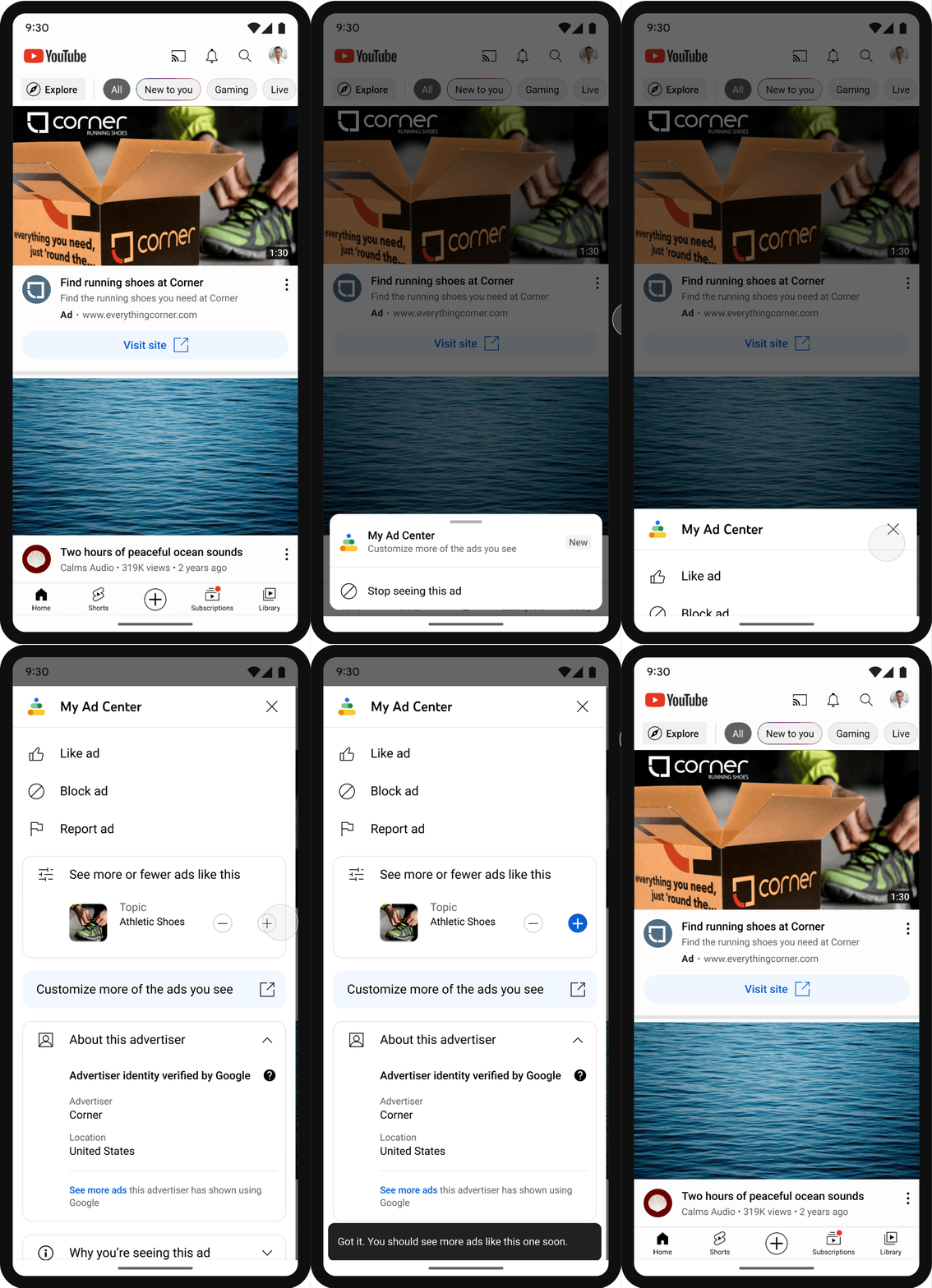
My Ad Center was designed to give you more control over your ad experience on Google’s sites and apps. When you’re signed into Google, you can access My Ad Center directly from ads on Search, YouTube and Discover, and choose to see more of the brands and topics you like and less of the ones you don’t. You will never have to spend time searching for the right control or decoding how your information is used. Instead, you can manage your ad preferences without interrupting what you’re doing online.
Imagine you spent months researching your latest beach trip, and now that you’re back, you don’t want to see vacation ads. With My Ad Center, you can just tap on the three-dot menu next to a vacation ad and choose to see less of those types of ads. You can also choose to see ads about things that you care about, like deals for sneakers or holiday gifts for your loved ones.
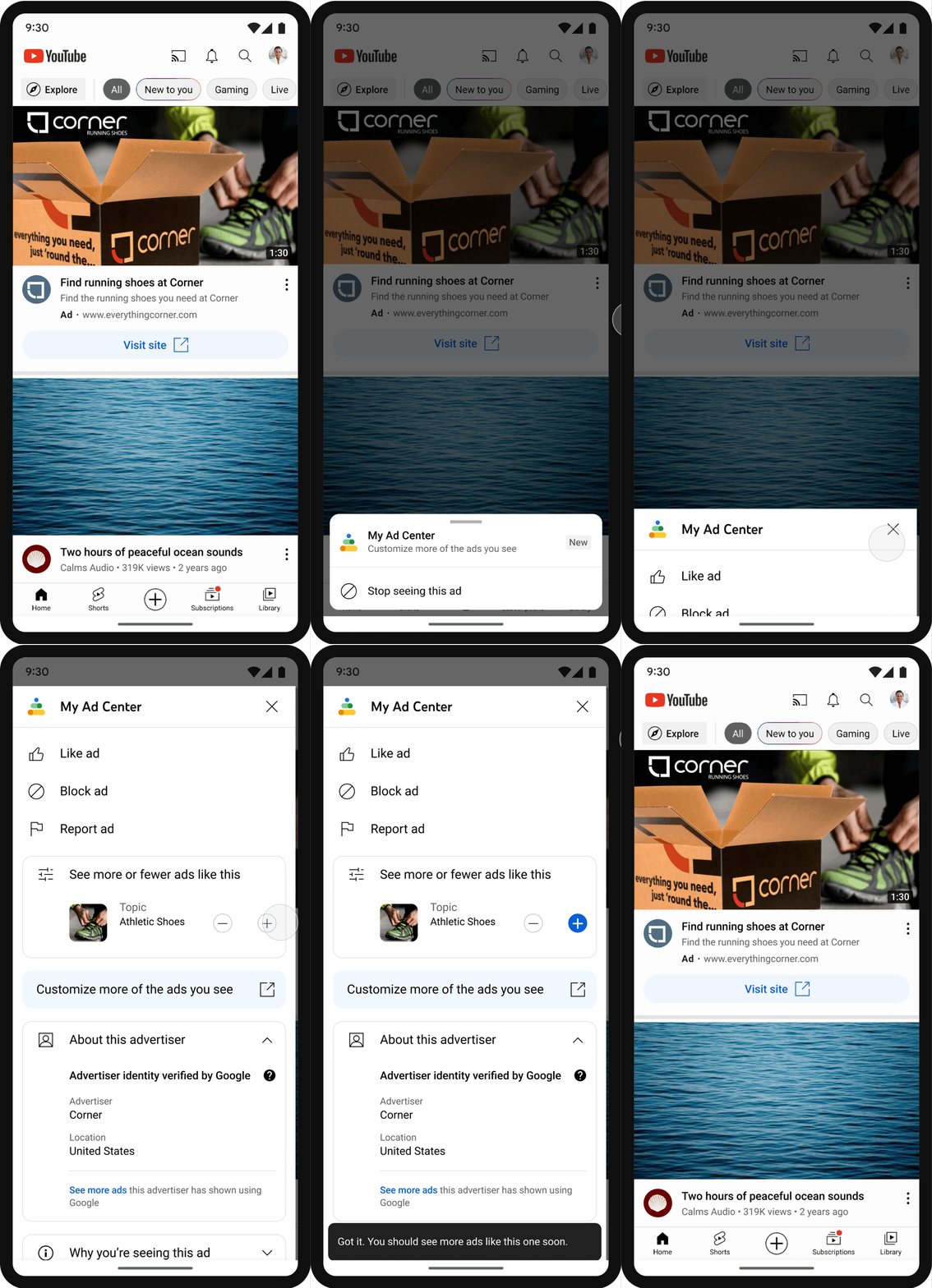
On YouTube, you can tap on the three-dot menu next to an ad to access My Ad Center and choose the topics and brands you want to see more or less of.
You can also turn off ads personalization completely. My Ad Center makes this control easy to find by putting it front-and-center in the product. If you choose not to see personalized ads, you’ll still see ads, but you may find them less relevant or useful. This will apply anywhere you’re signed in with your Google Account.
There also may be certain ad topics that you don’t want to engage with at all. With My Ad Center, you can choose to limit ads related to topics such as alcohol, dating, weight loss, gambling, pregnancy and parenting.
In My Ad Center, you can tap on “Customize Ads” to choose the topics and brands you want to see more or less of.
Ad controls that put your privacy first
We follow a set of core privacy principles that guide what information we do and don’t collect. We never sell your personal information to anyone, and we never use the content you store in apps like Gmail, Photos and Drive for ads purposes. And we never use sensitive information to personalize ads — like health, race, religion or sexual orientation. It’s simply off limits.
My Ad Center builds on those commitments by giving you the ability to control what information is used to personalize the ads you see. And if you’re not sure what you’re sharing, it’s easy to quickly see what information we use, and control it based on your preferences.
You can decide what types of your activity are used to make Google products work for you — independent of the ads you’re shown. In the past, if your YouTube History was on, it automatically informed how your ads were personalized. Now, if you don’t want your YouTube History to be used for ads personalization, you can turn it off in My Ad Center, without impacting relevant recommendations in your feed.
You may also see ads meant for certain audiences based on your Google activity – categories such as education, relationship status or the industry you work in. Now you’ll be able to choose and adjust how categories inform your ads, or turn them off completely. This way, you can more easily choose the ad experience that’s right for you.

You can turn on or off YouTube History for ads personalization.
Ad controls beyond Google
Finally, there are times you may see ads from businesses which use Google tools to advertise on other sites and apps. The option to turn off personalized ads in My Ad Center applies to ads you see on and off Google, and will automatically apply on any device where you’re signed in to your Google account. If you’re not signed into Google, you can still control your preferences in Ad Settings.
It’s our responsibility to strengthen the ways we keep you in control of your ad experiences, while ensuring that every day, people are safer with Google. To learn more about our commitment to privacy, you can visit our Safety Center.
Intel Core i9-13900K e Core i5-13600K alla prova: più E-core e frequenza fanno la differenza
Windows 11 2022 Update: ancora problemi con NVIDIA
I problemi tra Windows 11 2022 Update e NVIDIA non sono ancora risolti, molti recensori continuano a lamentare difficoltà nei test di gioco.
L’SSD Kingston A400 da 240GB: il prezzo scivola su Amazon fino a 24€
Microsoft: un server configurato male espone i dati dei clienti
A causa di un server configurato male, i dati di numerosi clienti Microsoft sono stati esposti online, si parla di circa 65.000 record.
Leggi Microsoft: un server configurato male espone i dati dei clienti