
Darth Vader diventa immortale. O perlomeno lo diventa la sua voce

“No. Io sono tuo padre.” È una delle battute di dialogo più celebri della storia del cinema, detta da Darth Vader a Luke Skywalker ne L’Impero colpisce ancora e resa memorabile dal doppiaggio italiano di Massimo Foschi.
La voce originale inglese di Darth Vader (“No. I am your father”) è però quella inconfondibile di James Earl Jones. E ora, grazie all’intelligenza artificiale che sta facendo capolino davvero dappertutto in questo periodo, quella voce diventerà immortale.
James Earl Jones, infatti, ha ormai 91 anni, e la sua voce è cambiata parecchio rispetto a quella che aveva all’epoca della trilogia originale di Star Wars, fra il 1977 e il 1983. Però il personaggio di Darth Vader è uno dei protagonisti di una nuova miniserie televisiva, Obi-Wan Kenobi, ambientata nello stesso periodo di quella trilogia, e quindi è nato il problema di dargli una voce conforme a quell’originale.
Nel doppiaggio in lingua italiana siamo abbastanza abituati al fatto che questo problema si risolve semplicemente cambiando doppiatore, e infatti nella nuova miniserie Darth Vader è doppiato da Luca Ward.
Niente da dire per quanto riguarda recitazione e qualità di entrambi i doppiatori, ma rimane il fatto che sono due voci differenti. Nell’originale, invece, sono uguali.
La voce inglese di Darth Vader nella nuova miniserie è infatti ancora quella di James Earl Jones; anzi, è quella del giovane James Earl Jones.
Questo risultato, secondo quanto pubblicato dalla rivista Vanity Fair, è stato ottenuto grazie al fatto che le battute del personaggio non sono state recitate direttamente da Jones di persona, ma sono state pronunciate da una voce sintetica basata su quella di Jones.
Un software di intelligenza artificiale ha infatti analizzato un vasto campionario di registrazioni giovanili dell’attore e ha “imparato”, per così dire, a parlare come lui, e poi Bogdan Belyaev, uno specialista di un’azienda ucraina, Respeecher, ha scelto la cadenza e l’intonazione di ogni singola parola e frase, completando il lavoro proprio nei giorni iniziali dell’invasione russa del suo paese.
L’effetto finale è talmente realistico che moltissimi spettatori non si sono accorti che Darth Vader parla con una voce sintetica. Probabilmente questo successo è dovuto almeno in parte al fatto che il personaggio ha comunque una voce metallica e artificiale perché, per dirla con le parole di Obi-Wan Kenobi in Il Ritorno dello Jedi, Darth Vader “è più una macchina, ora, che un uomo.” Ma di fatto è un successo che segna un punto di svolta.
James Earl Jones ha dato il proprio consenso esplicito al campionamento e allo sfruttamento della sua voce con questo sistema, già usato anche per “ringiovanire” un altro attore, Mark Hamill, quello che interpreta Luke Skywalker e che compare in un’altra miniserie di Star Wars. Ma viene da chiedersi come reagiranno gli attori, e soprattutto i doppiatori, all’idea che la loro voce possa essere registrata una sola volta e poi riutilizzata all’infinito per interpretare nuovi ruoli. La tecnologia rischia di renderli disoccupati, ma al tempo stesso crea nuove opportunità di lavoro per altri artisti digitali come Bogdan Belyaev e i suoi colleghi, che sono grandi fan di Star Wars e orgogliosi di contribuire alla loro saga preferita con la loro competenza informatica.
Per citare Darth Vader: “Non essere troppo fiero di questo terrore tecnologico che hai costruito.”
Fonti aggiuntive: Lega Nerd, The Register, BBC.
Piccoli aerei elettrici crescono: Eviation Alice
Il 27 settembre scorso questo aereo elettrico ha effettuato il suo primo breve volo dimostrativo. Si chiama Alice, lo fabbrica la statunitense Eviation ed è in grado di trasportare nove passeggeri con un’autonomia teorica massima di 440 miglia nautiche (circa 880 chilometri). Le prime consegne sono previste per il 2026.
Today, our all-electric Alice aircraft electrified the skies and embarked on an unforgettable world’s first flight. See Alice make history in the video clip below. We’re honored to celebrate this groundbreaking leap towards a more #sustainable future.#electricaviation pic.twitter.com/Q9dFoTPyiB
— Eviation Aircraft (@EviationAero) September 27, 2022

Aggiornate subito WhatsApp per chiudere due falle critiche

Il 27 settembre scorso è stato rilasciato un aggiornamento di sicurezza molto importante per WhatsApp per Android e iOS, che va installato appena possibile, perché chiude due falleestremamente gravi che permettono a un aggressore di prendere il controllo degli smartphone semplicemente avviando una videochiamata oppure inviando alle vittime un video appositamente alterato.
Le falle sono identificate formalmente con le sigle CVE-2022-36934 e CVE-2022-27492. La prima è presente in WhatsApp normale e in WhatsApp Business per Android e per iOS nelle versioni prima della 2.22.16.12; la seconda è presente in Whatsapp per Android nelle versioni prima della 2.22.16.2 e in WhatsApp per iOS nelle versioni prima della 2.22.15.9.
Se vi perdete nei numeri di versione, nessun problema: è sufficiente che aggiorniate WhatsApp alla versione più recente disponibile in Google Play o nell’App Store.
Per gli amanti dei dettagli, la prima falla è un classico integer overflow, ossia una situazione in cui un valore intero usato nell’app diventa troppo grande per lo spazio che gli è assegnato, un po’ come quando occorre compilare un formulario e le caselle a disposizione non bastano per immettere il numero che dovete scrivere. Questo produce un errore di calcolo, e se il risultato di quel calcolo viene usato per controllare il comportamento dell’app, l’errore può portare a problemi di sicurezza.
La seconda falla è invece l’esatto contrario, vale a dire un integer underflow, un errore nel quale un calcolo produce un risultato troppo piccolo, per esempio una sottrazione di un numero grande da un numero più piccolo che produce un valore negativo in una situazione nella quale i valori negativi non sono previsti.
E se pensate che questo tipo di falla sia troppo esotica per essere sfruttata, tenete presente che una vulnerabilità analoga che era presente nelle chiamate vocali di WhatsApp è stata utilizzata nel 2019 da una società che produce software spia, l’NSO Group, per iniettare un suo programma di sorveglianza nascosta, denominato Pegasus, negli smartphone di bersagli politici, docenti, avvocati e collaboratori di organizzazioni non governative.
Fonte aggiuntiva: The Hacker News.
WordPress: 3 vulnerabilità comuni e come risolverle
Anche WordPress potrebbe cadere vittima di vulnerabilità. Ecco quali sono le tre più comuni e come risolvere.
La prima donna europea comandante della Stazione Spaziale Internazionale
Poche ore fa il cosmonauta russo Oleg Artemyev ha trasferito il comando della Stazione Spaziale Internazionale all’astronauta europea Samantha Cristoforetti, che diventa così la prima donna europea a ricoprire questo ruolo. La cerimonia di passaggio delle consegne, con il rituale affidamento di una chiave simbolica, è stata trasmessa in diretta.
Il video completo sottotitolato è qui:https://t.co/6PmooY0KAI
— AstronautiCAST (@AstronautiCAST) September 28, 2022
Nel video integrale, inizialmente Oleg Artemyev parla in russo, poi Samantha prosegue in inglese e a 7:10 parla in italiano. Stando a quanto mi dicono alcuni lettori russofoni e la traduzione nel reel Instagram dell’ESA, il tubetto contiene della torta (presumo sotto forma di pasta).
L’annuncio dell’ESA (in italiano qui) spiega che Samantha è stata lead del segmento orbitale statunitense (USOS) sin dall’inizio della sua missione Minerva, ad aprile 2022, e ha supervisionato le attività nel moduli e componenti europei, giapponesi, statunitensi e canadesi della Stazione.
Assumendo ora il ruolo di comandante, diventa la quinta persona europea a farlo dopo Frank De Winne, Alexander Gerst, Luca Parmitano e Thomas Pesquet.
Formalmente, la nuova mansione di Samantha Cristoforetti è denominata International Space Station crew commander (Comandante dell’equipaggio della Stazione Spaziale Internazionale) e i suoi compiti sono descritti dall’ESA come segue: “Mentre sono i direttori di volo nei centri di controllo a presiedere alla pianificazione e all’esecuzione delle operazioni della Stazione, il/la comandante della Stazione è responsabile del lavoro e del benessere dell’equipaggio in orbita, deve mantenere una comunicazione efficace con i team a terra e coordina le azioni dell’equipaggio in caso di situazioni di emergenza. Dal momento che Samantha assumerà il comando nelle ultime settimane della sua permanenza a bordo, uno dei suoi compiti principali sarà quello di garantire un efficace passaggio di consegne al successivo equipaggio.”
Domani (giovedì) tre cosmonauti, Oleg Artemyev, Denis Matveev e Sergey Korsakov, lasceranno la Stazione a bordo della loro Soyuz MS-21, sganciandosi dal modulo Prichal alle 3:34 a.m. EDT (9:34 CET) per atterrare in Kazakistan circa tre ore e mezza più tardi, concludendo una missione durata sei mesi.
Samantha e i suoi compagni di missione, Kjell Lindgren, Bob Hines e Jessica Watkins, torneranno sulla Terra a ottobre a bordo della capsula Crew Dragon di SpaceX.
Fonte aggiuntiva: NASA.

Bringing more voices to Search
One of the ways Google Search helps you make sense of the world is by connecting you with the widest range of perspectives, from everyday people to authoritative reporting. Today we’re announcing two new features that will help bring you even more viewpoints, so you can have additional context and choices when you search.
Find out what people are saying in online discussions and forums
Forums can be a useful place to find first-hand advice, and to learn from people who have experience with something you’re interested in. We’ve heard from you that you want to see more of this content in Search, so we’ve been exploring new ways to make it easier to find. Starting today, a new feature will appear when you search for something that might benefit from the diverse personal experiences found in online discussions.
The new feature, labeled “Discussions and forums,” will include helpful content from a variety of popular forums and online discussions across the web. For example, if you search for the best cars for a growing family, in addition to other web results, you’ll now see links to forum posts that include relevant advice from people, like their experience with minivans for transporting multiple children.
Today it will be rolling out for English users on mobile in the U.S. As with all Search features, we’ll continue to learn about whether people are finding this new feature valuable over time, and may update it in the future as we learn what’s most useful for people.

An example of the Discussion and forums feature
Breaking down language barriers in news
We’re also announcing a new way we’re helping to avoid language barriers when it comes to getting local perspectives on international news stories. Today when you search, you see results in your preferred language. In early 2023, we’ll launch a new feature that will give people a simple way to find translated news coverage using machine translation.
Say you wanted to learn about how people in Mexico were impacted by the more than 7 magnitude earthquake earlier this month. With this feature, you’ll be able to search and see translated headlines for news results from publishers in Mexico, in addition to ones written in your preferred language. You’ll be able to read authoritative reporting from journalists in the country, giving you a unique perspective of what’s happening there.

An example of how the news translation feature could work for showing translated headlines from publishers in Mexico.
This feature connects readers looking for international news to relevant local reporting in other languages, giving them access to more complete on-the-ground coverage and making new global perspectives available.
Building off our earlier translation work, we’ll be launching this feature to translate news results in French, German and Spanish into English on mobile and desktop.
Our goal is to help you find the most relevant information from across the web. These two new features will bring more perspectives to your search, helping you make informed choices and learn more about what’s going on around the world.
<div>Search outside the box: How we’re making Search more natural and intuitive</div>
For over two decades, we’ve dedicated ourselves to our mission: to organize the world’s information and make it universally accessible and useful. We started with text search, but over time, we’ve continued to create more natural and intuitive ways to find information — you can now search what you see with your camera, or ask a question aloud with your voice.
At Search On today, we showed how advancements in artificial intelligence are enabling us to transform our information products yet again. We’re going far beyond the search box to create search experiences that work more like our minds, and that are as multidimensional as we are as people.
We envision a world in which you’ll be able to find exactly what you’re looking for by combining images, sounds, text and speech, just like people do naturally. You’ll be able to ask questions, with fewer words — or even none at all — and we’ll still understand exactly what you mean. And you’ll be able to explore information organized in a way that makes sense to you.
We call this making search more natural and intuitive, and we’re on a long-term path to bring this vision to life for people everywhere. To give you an idea of how we’re evolving the future of our information products, here are three highlights from what we showed today at Search On.
Making visual search work more naturally
Cameras have been around for hundreds of years, and they’re usually thought of as a way to preserve memories, or these days, create content. But a camera is also a powerful way to access information and understand the world around you — so much so that your camera is your next keyboard. That’s why in 2017 we introduced Lens, so you can search what you see using your camera or an image. Now, the age of visual search is here — in fact, people use Lens to answer 8 billion questions every month.
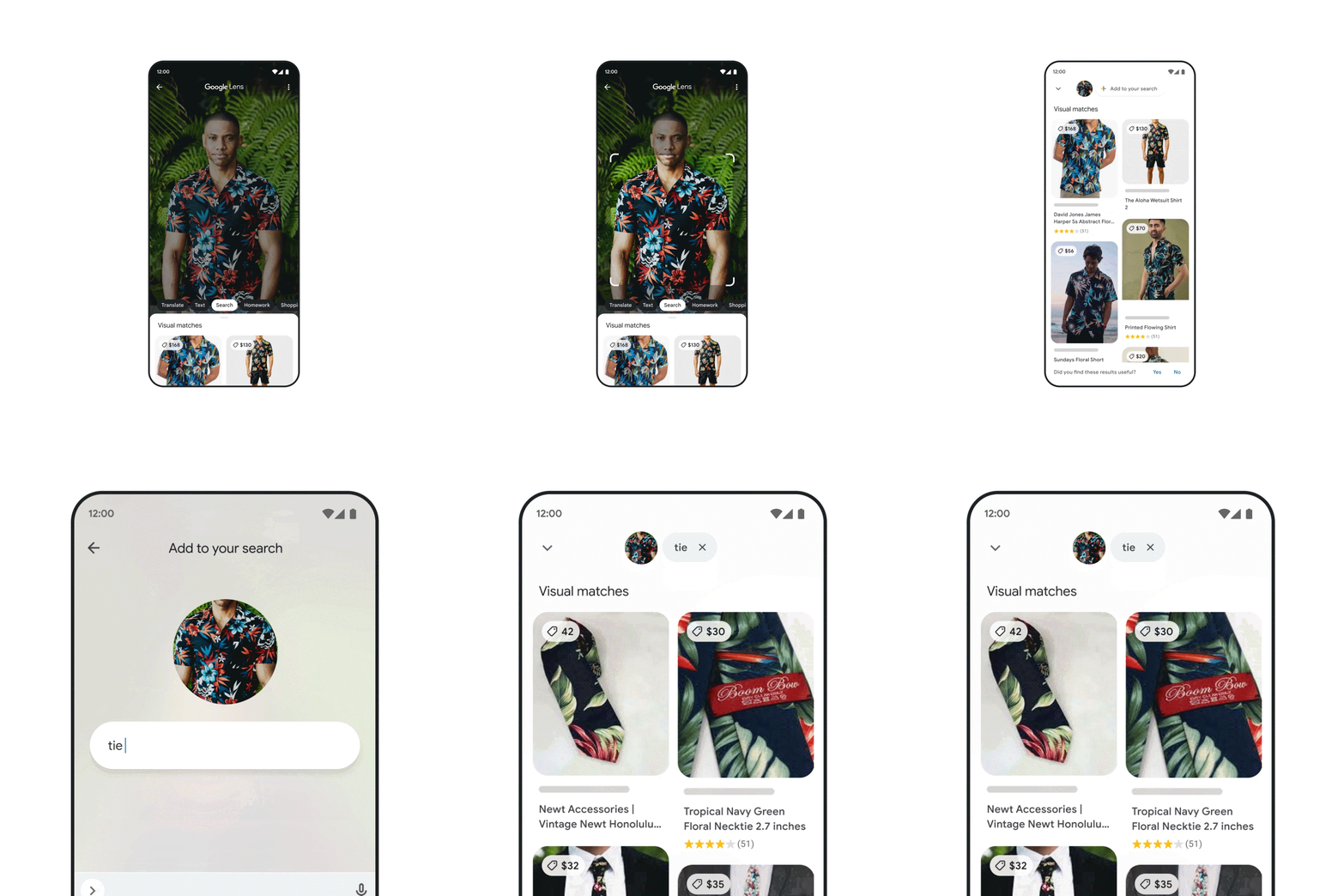
We’re making visual search even more natural with multisearch, a completely new way to search using images and text simultaneously, similar to how you might point at something and ask a friend a question about it. We introduced multisearch earlier this year as a beta in the U.S., and at Search On, we announced we’re expanding it to more than 70 languages in the coming months. We’re taking this capability even further with “multisearch near me,” enabling you to take a picture of an unfamiliar item, such as a dish or plant, then find it at a local place nearby, like a restaurant or gardening shop. We will start rolling “multisearch near me” out in English in the U.S. this fall.
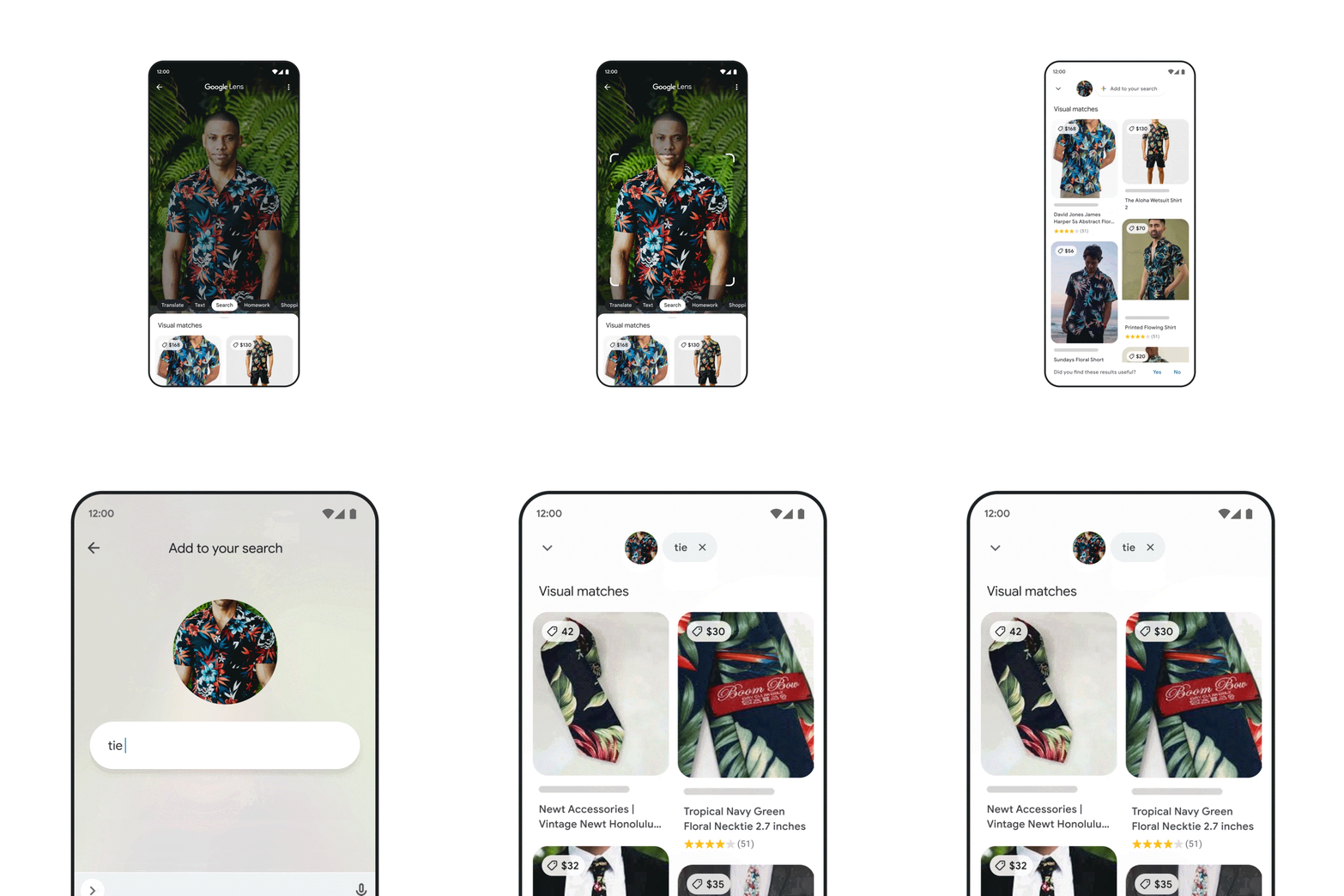
Multisearch enables a completely new way to search using images and text simultaneously.
Translating the world around you
One of the most powerful aspects of visual understanding is its ability to break down language barriers. With advancements in AI, we’ve gone beyond translating text to translating pictures. People already use Google to translate text in images over 1 billion times a month, across more than 100 languages — so they can instantly read storefronts, menus, signs and more.
But often, it’s the combination of words plus context, like background images, that bring meaning. We’re now able to blend translated text into the background image thanks to a machine learning technology called Generative Adversarial Networks (GANs). So if you point your camera at a magazine in another language, for example, you’ll now see translated text realistically overlaid onto the pictures underneath.

With the new Lens translation update, you’ll now see translated text realistically overlaid onto the pictures underneath.
Exploring the world with immersive view
Our quest to create more natural and intuitive experiences also extends to helping you explore the real world. Thanks to advancements in computer vision and predictive models, we’re completely reimagining what a map can be. This means you’ll see our 2D map evolve into a multi-dimensional view of the real world, one that allows you to experience a place as if you are there.
Just as live traffic in navigation made Google Maps dramatically more helpful, we’re making another significant advancement in mapping by bringing helpful insights — like weather and how busy a place is — to life with immersive view in Google Maps. With this new experience, you can get a feel for a place before you even step foot inside, so you can confidently decide when and where to go.
Say you’re interested in meeting a friend at a restaurant. You can zoom into the neighborhood and restaurant to get a feel for what it might be like at the date and time you plan to meet up, visualizing things like the weather and learning how busy it might be. By fusing our advanced imagery of the world with our predictive models, we can give you a feel for what a place will be like tomorrow, next week, or even next month. We’re expanding the first iteration of this with aerial views of 250 landmarks today, and immersive view will come to five major cities in the coming months, with more on the way.
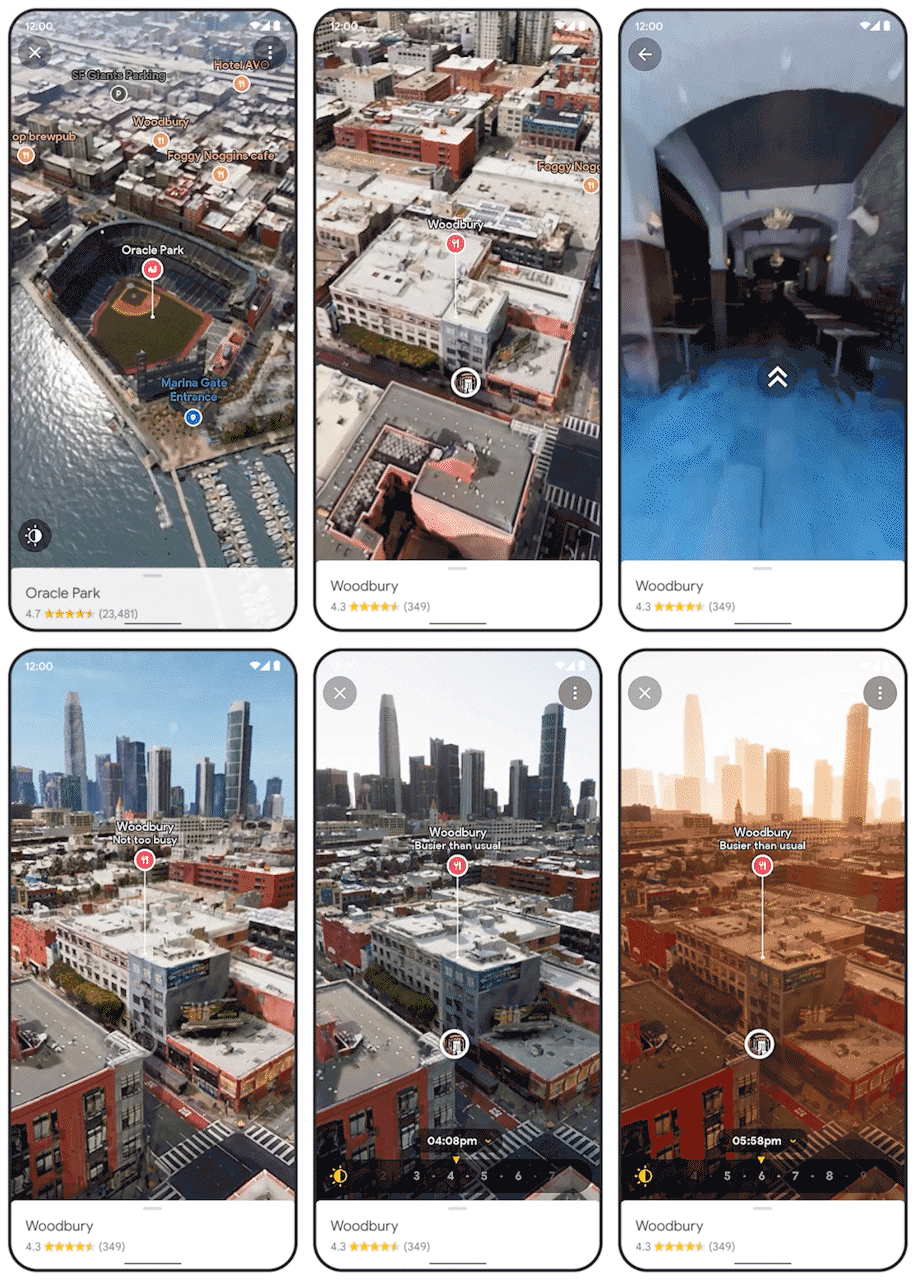
Immersive view in Google Maps helps you get a feel for a place before you even visit.
These announcements, along with many others introduced at Search On, are just the start of how we’re transforming our products to help you go beyond the traditional search box. We’re steadfast in our pursuit to create technology that adapts to you and your life — to help you make sense of information in ways that are most natural to you.

9 new features and tools for easier shopping on Google
Shopping isn’t just about buying. It’s also about exploring your options, discovering new styles and trends, and researching to make sure you’re getting the right product at the right price. Today at our annual Search On event, we announced nine new ways we’re transforming the way you shop with Google, bringing you a more immersive, informed and personalized shopping experience.
Powering this experience is the Shopping Graph, our AI-enhanced model that now understands more than 35 billion product listings — up from 24 billion just last year.
Let’s browse through all these new features and tools:
More visual ways to shop
1. Search with the word “shop”: Today we’re introducing a new way to unlock the shopping experience on Google. In the U.S., when you search the word “shop” followed by whatever item you’re looking for, you’ll access a visual feed of products, research tools and nearby inventory related to that product. We’re also expanding the shoppable search experience beyond apparel to all categories — from electronics to beauty — and more regions on mobile (and coming soon to desktop).

2. Shop the look: When you’re shopping for apparel on Google, you can now “shop the look” to help you easily assemble the perfect outfit. Say you’re looking for a new fall wardrobe staple, like a bomber jacket. The tool will show you images of bomber jackets and complementary pieces, plus options for where to buy them — all within Search.
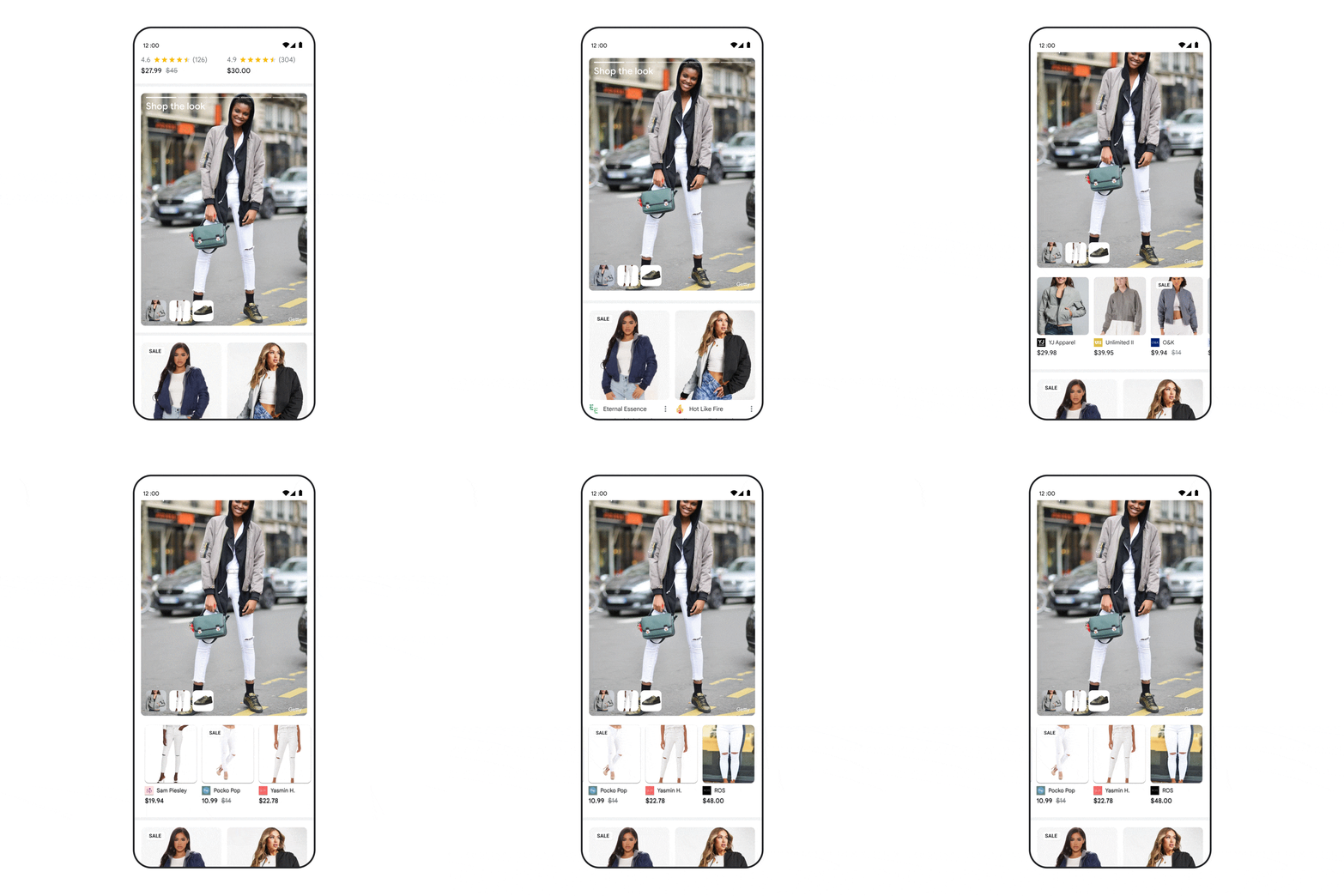
3. See what’s trending: Trending products is a new feature in Search that shows you products that are popular right now within a category — helping you discover the latest models, styles and brands. U.S. shoppers will be able to shop the look and see trending products later this fall.

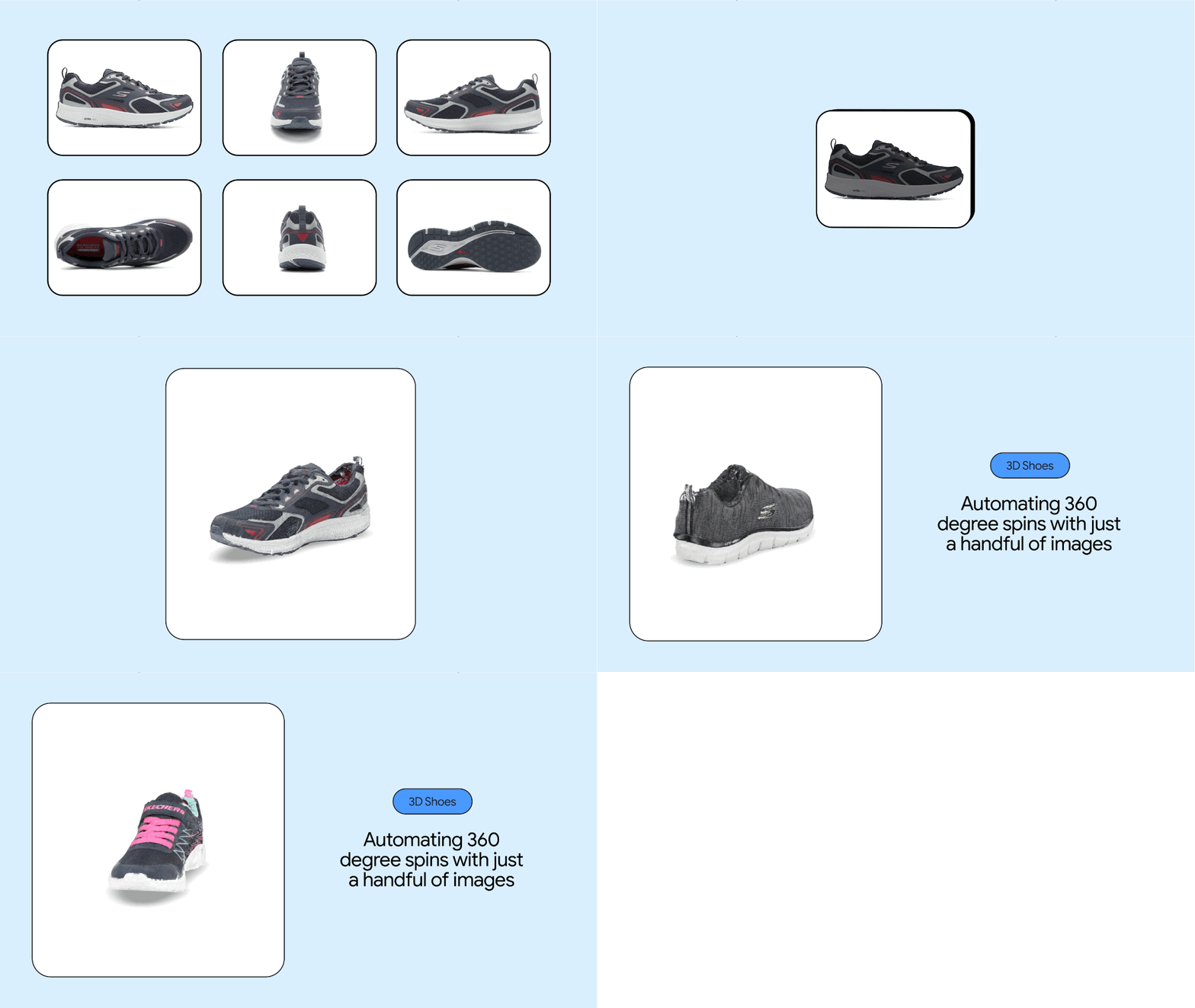
4. Shop in 3D: People engage with 3D images almost 50% more than static ones. Earlier this year, we brought 3D visuals of home goods to Search. Soon you’ll find 3D visuals of shoes, starting with sneakers, as you search on Google. While many merchants already have 3D models available, we know creating these assets can be expensive and time consuming, often requiring hundreds of product photos and costly technology. So, to make this process more efficient and cost-effective, we’re announcing a new way to build 3D visuals. Thanks to our advancements in machine learning, we can now automate 360-degree spins of sneakers using just a handful of still photos (instead of hundreds). This new technology will be available in the coming months.
Tools to shop with confidence
5. Get help with complex purchases: It can be overwhelming to make certain purchases — you consider lots of factors, read tons of articles and open countless tabs on your browser. For those trickier decisions, the new buying guide feature shares helpful insights about a category from a wide range of trusted sources, all in one place. If you’re shopping for a mountain bike, for instance, the buying guide might show you information about size, suspension, weight and materials. With this information, you can research and make quicker decisions with confidence. Buying guide recently launched in the U.S., with new insight categories coming soon.

6. See what other shoppers think: Page insights will give you even more reason to shop with confidence. This new feature in the Google app brings together helpful context about a webpage you’re on or a product you’re researching, like its pros and cons and star ratings, all in one view. And to find the best deal, you can easily opt in to get price drop updates. Page insights will launch in the U.S. in the coming months.

More personal shopping experiences
7. Get personalized results: Soon you’ll see more personalized shopping results based on your previous shopping habits. You’ll also have the option to tell us your preferences directly, plus controls to easily turn off personalized results if you’d like. Here’s how it works: When you’re shopping on Google, just make your selections once — your preferred department and brands — to see more of each in the future. So if you select the “womens” department and the brand Cuyana, next time you’re shopping for something like a messenger bag, we’ll show you women’s messenger bags from Cuyana and similar brands. And if at any point you don’t want to see personalized results or your preferences change, you can easily adjust or turn off the feature by tapping the three dots next to a Search result via the About this result panel. Shopping personalization will roll out in the U.S. later this year.

8. Shop your way with new filters: Whole page shopping filters on Search are now dynamic and adapt based on real-time Search trends. So if you’re shopping for jeans, you might see filters for “wide leg” and “bootcut” because those are the popular denim styles right now — but those may change over time, depending on what’s trending. Dynamic filters are now available in the U.S., Japan and India, and will come to more regions in the future.

9. Get inspired beyond the Search box: Using Discover in the Google app, you’ll see suggested styles based on what you’ve been shopping for, and what others have searched for too. For instance, if you’re into vintage styles, soon you’ll see suggested queries of popular vintage looks. Just tap whatever catches your eye and use Lens to see options for where to buy.

With these new features, your shopping experience on Google just got a lot easier, more intuitive and, of course, more fun. And regardless of where you end up buying, these tools can help you find what you want more quickly and maybe even discover the next thing you’ll love.

New ways to make more sustainable choices
Search interest in terms like electric vehicles, solar energy and thrift stores reached new highs globally over the past year — suggesting that people are looking for ways to practice sustainability in their daily lives. That’s a trend we love to see.
Averting climate change requires all of us to act. At Google, we aim to make our operations more sustainable (like our goal to achieve net-zero emissions across all of our operations and value chain by 2030), and also make it easier for people and businesses to make more sustainable choices. At our Search On event, we’re sharing new ways Google can help you be more sustainable.
Find more efficient cars and eco-friendly routes
If you’re in the market for a new car, you’re probably looking to lower your fuel costs and emissions. Over the next few days, we’ll start to show the annual fuel cost for cars in search results. We’ll also show emissions estimates, so you know how a particular model you have your eye on compares to similar ones.

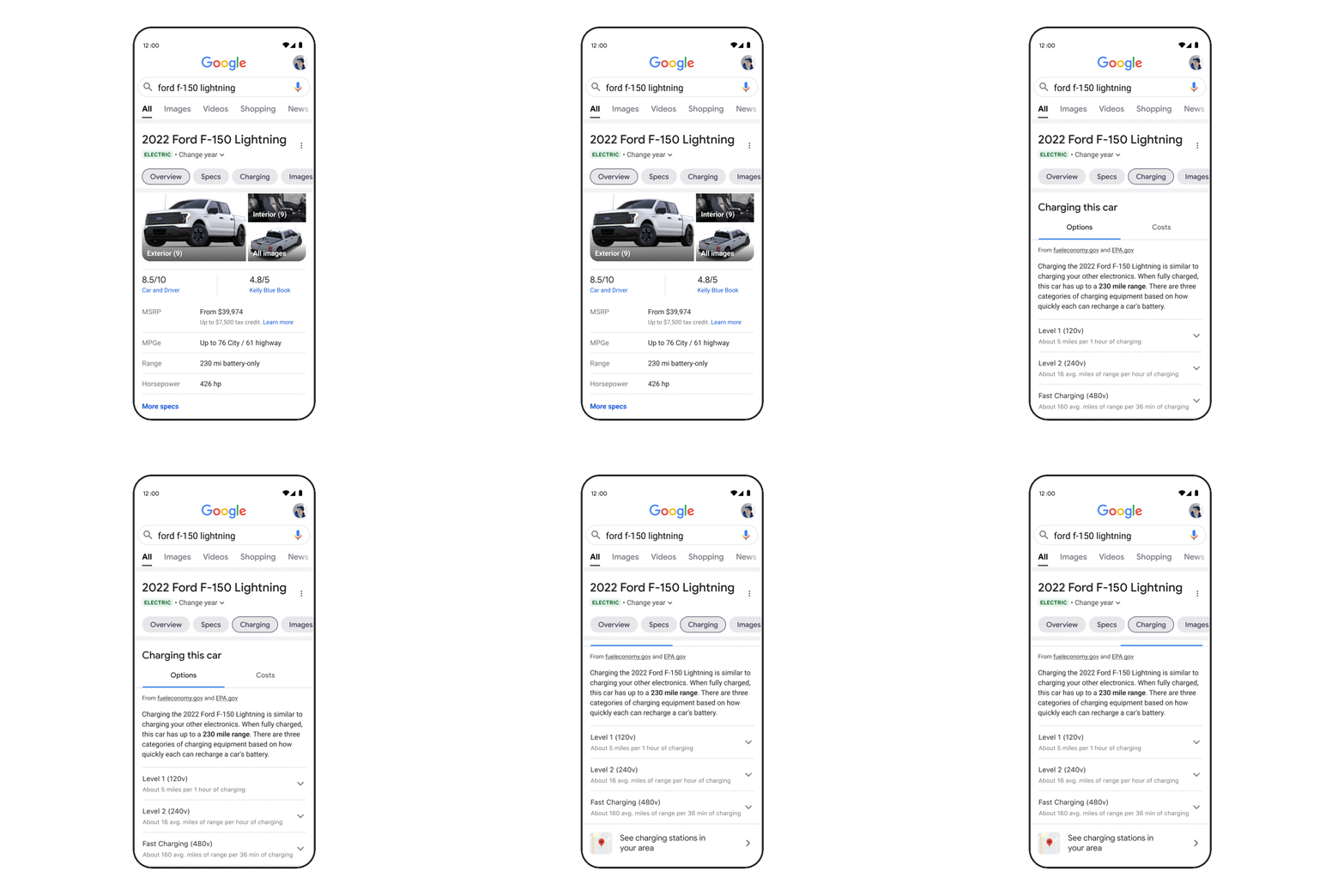
If you’re looking to buy an electric vehicle — which more than a quarter of new car buyers are — we’ll soon show estimated costs, range and charging speeds for electric vehicle models. Plus, you’ll be able to easily find public charging stations near you that are compatible with each electric vehicle. For U.S. shoppers, we’ll also show available federal tax incentives, which make the switch to electric cars even more appealing.
To help save money on gas, drivers have also been using our eco-friendly routing feature, which helps people find the most fuel-efficient routes using insights from the U.S. Department of Energy’s National Renewable Energy Laboratory and data from the European Environment Agency. We’re now making it easy for companies — like delivery or ridesharing services — to become more sustainable by using the same eco-friendly routing capability in their apps. Check out our blog post about Maps updates to learn more about this feature.
Shop pre-owned items
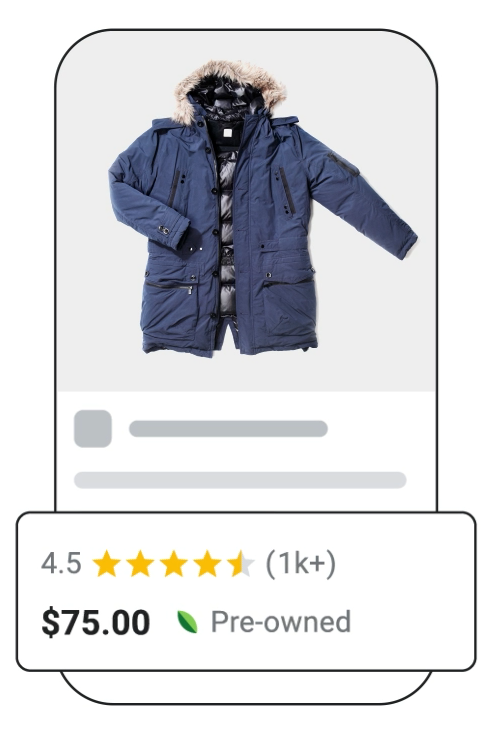
Whether it’s sprucing up your wardrobe with new items or digging up hidden gems from a few seasons ago, clothing choices have an impact on emissions and waste. After all, clothing is responsible for 10% of global carbon emissions. Buying pre-loved items is a small action you can take to live more sustainably. Later this year on Search, we’ll highlight which products are pre-owned, making it easier than ever for you to make sustainable choices when shopping and maybe even save some money!
Brussel up a healthier dinner
Some food ingredients are more sustainable than others. But it’s not always easy to find out how the environmental impact of chicken compares to fish or how eggs compare to tofu.
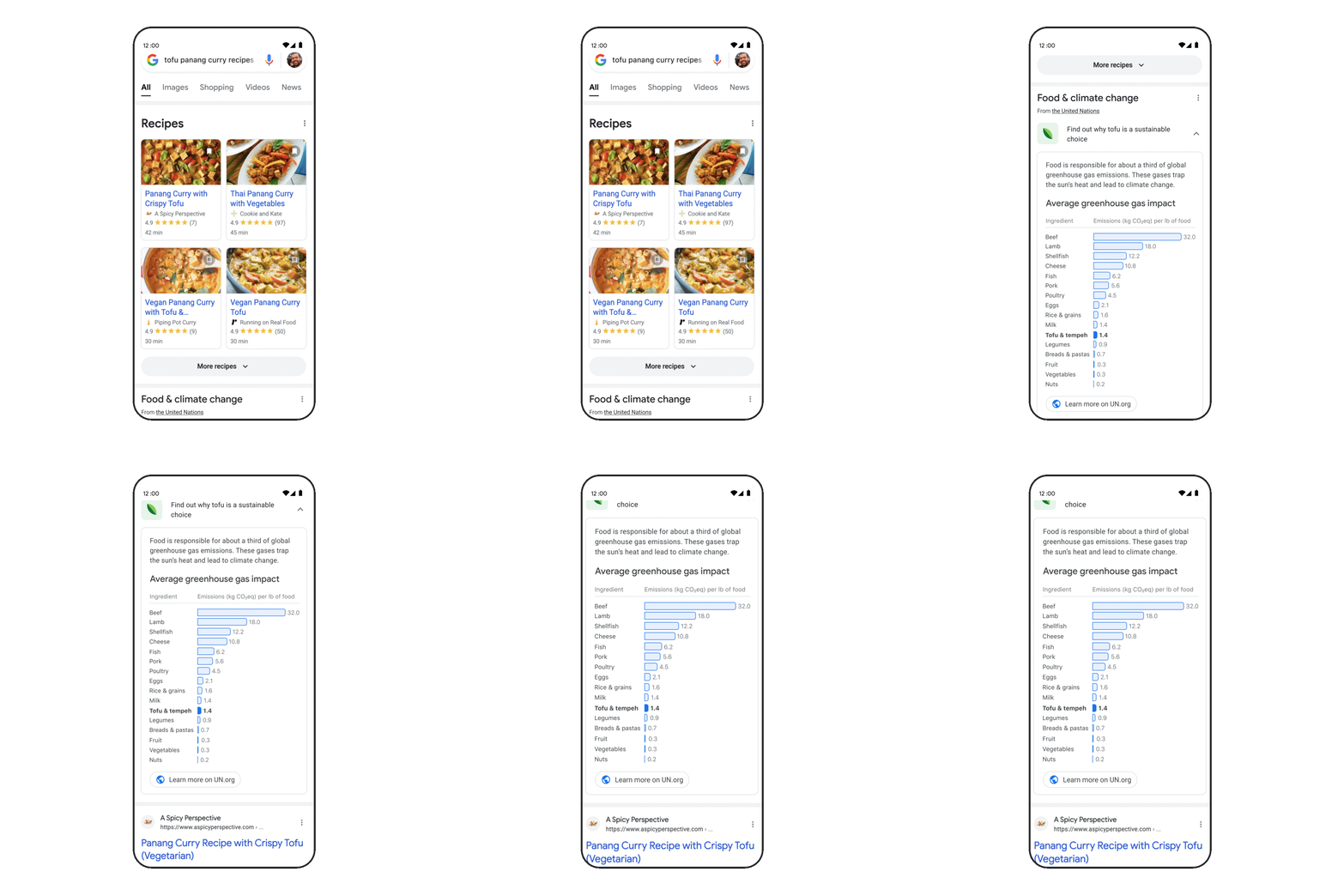
Soon, when you search for certain recipes like “bean recipes” or “broccoli chicken,” you can see how one choice compares with others thanks to ingredient-level emissions information from the United Nations. This feature will soon be available worldwide to English language users.
Whether you’re buying pre-owned products and planning your next meal or road trip, these small changes can add up to a big impact. The future of our planet — and everyone on it — deserves nothing less.

Helping you find and control personalized results in Search
Have you ever watched a great cooking show? The fun is not just in seeing the finished dish, but also in understanding the inspiration, ingredients, execution and presentation — all the factors that went into making the meal.
That’s how we feel about Search: There’s value not just in seeing your search results, but also in understanding the factors that went into our systems to determine that those results would be useful for you. That’s why we share information about how Google Search works, and build tools like About this result. Today, we’re expanding About this result to help you understand and control how Search connects you to helpful results that are tailored for you.
Search results for you
About this result already tells you about some of the most important factors that Google Search uses to connect results to your queries. These are factors like looking at whether a webpage has keywords that match your search, or if it contains related terms, or if it’s in the language that you’re searching in.
Often the words in your query give our systems all the context they need to return relevant results. But there are some situations where showing the most relevant, helpful information means tailoring results to your tastes or preferences. In these cases, personalized results can make it easier to find content you might like.
For example, at Search On today, we announced how you’ll soon be able to enjoy a more personalized shopping experience when you shop with Google — helping you quickly see results from the brands and departments you like.
Another example of how personalized results can be helpful is if you search for something like “what to watch.” You might prefer a suspenseful thriller, whereas someone else might want a rom-com. That’s why Search offers movie and TV recommendations (if you have personal results turned on). Once you select the streaming services that you use, you’ll get personalized recommendations for what’s available and quickly see where to watch your picks.
Find cooking inspiration
Starting today, in English for mobile users globally, you’ll also be able to find more inspiration for your next meal. You can search for “dinner ideas” to see personalized recommendations for recipes you might like to try. If you have a specific hankering, you can search by cuisine or dietary preferences — for example, “Thai recipes.”

Easily understand and control personal results
We’re also launching a new update to About this result so you can easily see if a result is personalized. You can quickly access controls to manage personal results, including the ability to turn them off completely, if you want. And as always, we offer easy-to-use tools to control how and whether your search history and activity are saved to your account. This update to About this result will be available in English in the U.S. to start.

This information in About this result will also help anyone understand that not all Google Search results are personalized. Our systems only personalize when doing so can provide more relevant and helpful information. Results can differ between two people for reasons other than personalization, such as location. For example, if you searched for coffee shops near you in Columbus, OH, we wouldn’t show you the same results as someone searching for coffee shops in Tucson, AZ.
The information in About this result can give you a better understanding of how Google connects you to relevant, helpful results. As always, our goal is to help you discover the information that’s most useful to you, so you can find inspiration no matter what you’re searching for.
Amazon presenta Fire TV Cube (terza gen.) e il Telecomando Vocale Alexa Pro
Find the perfect dish, no matter your craving
Let’s say you’re in charge of picking a restaurant for a family reunion dinner. You know your mom loves Italian food, but your niece and nephew are super picky about pizza. Your uncle insists on a great view, but your sister won’t go anywhere that doesn’t have good dessert. Oh, and you have to book a reservation by tomorrow. That’s a tall order — even for a foodie like you.
Sometimes finding a specific craving or determining a unique place to set a mood can take some time. When you’re searching for answers, it should come naturally and in a way that’s easy — especially when you’re catering to a family of picky eaters.
Today, we’re announcing a new set of features to help you find the perfect meal, from the first search to your first bite.
Satisfy your craving by searching for specific food dishes
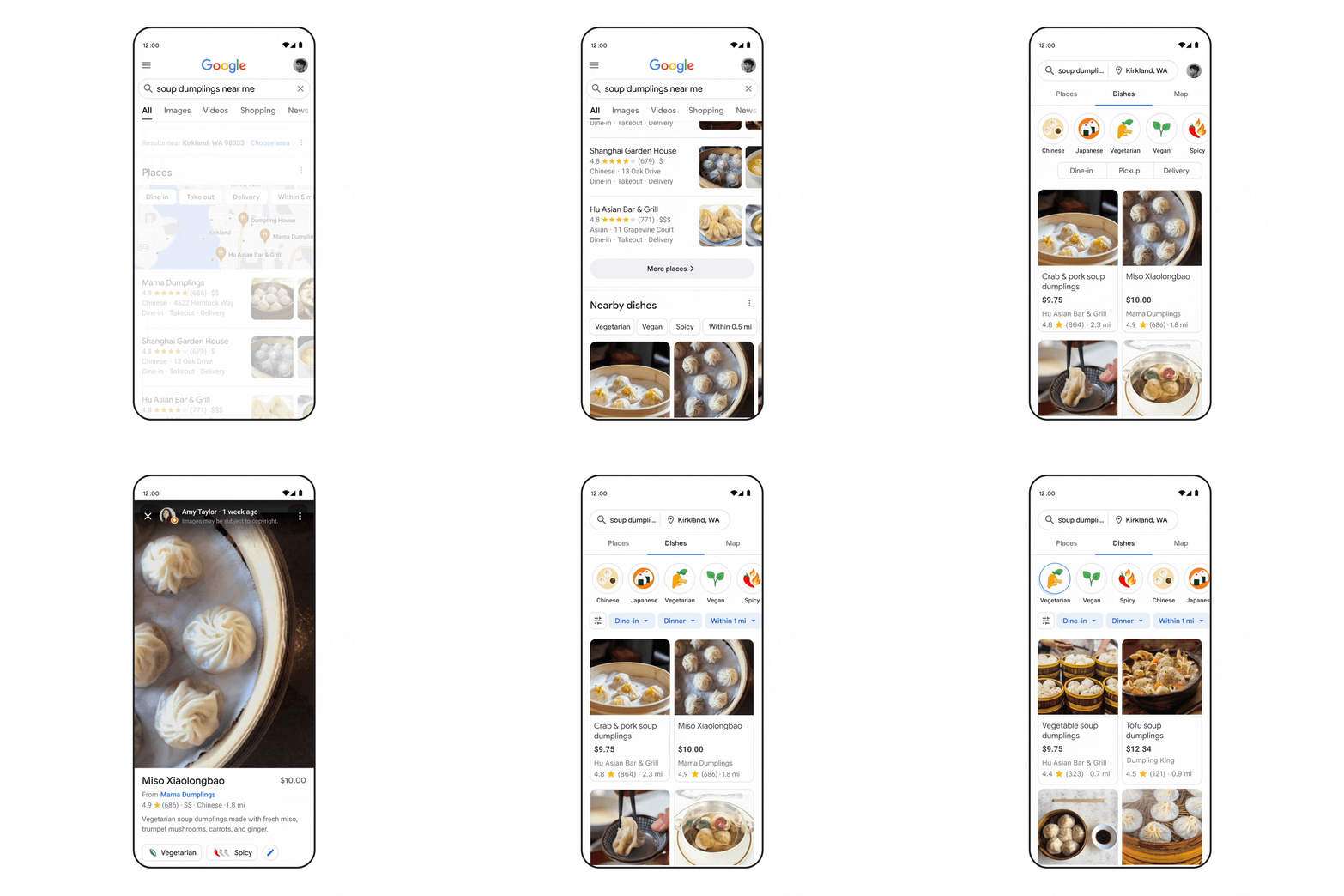
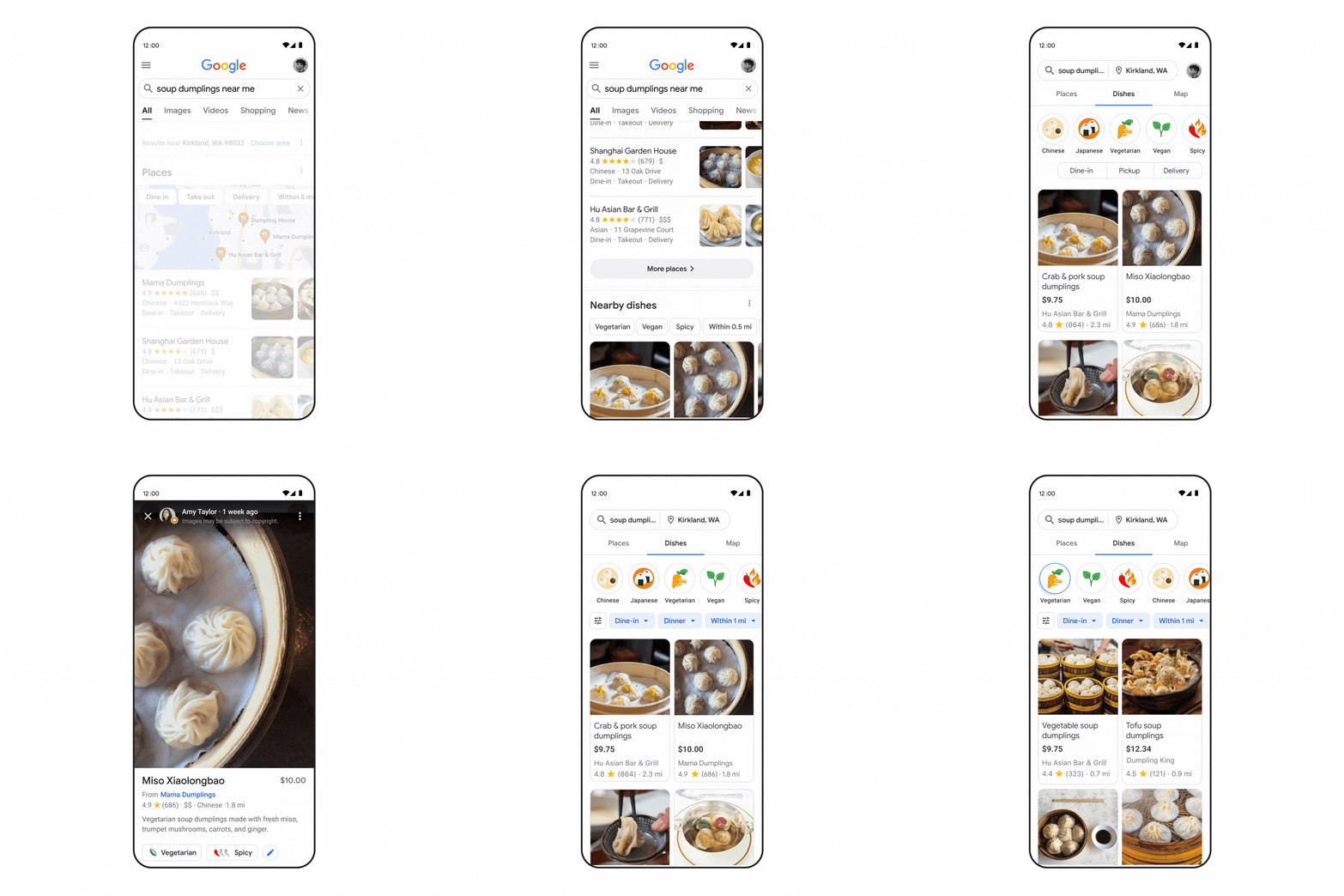
Our research shows 40% of people already have a dish in mind when they search for food. So to help people find what they’re looking for, in the coming months you’ll be able to search for any dish and see the local places that offer it.
For example, my family loves soup dumplings, and we love trying new restaurants to find the juiciest, most flavorful ones. In the past, searching for soup dumplings near me would show a list of related restaurants. With our revamped experience, we’ll now show you the exact dish results you’ve been looking for. You can even narrow your search down to spicy dishes if you want a bit of a kick. No more digging through endless menus from different places to see if they have what you’re hungry for.
Use multisearch to identify and find food near you
Earlier this year, we introduced multisearch, an innovative way to search using images and text simultaneously.
For example, what if your friend posts a photo of a delicious-looking pastry and you don’t know what it is? Instead of messaging your friend and waiting for a response, you can use the Google app. Simply search a screenshot of the post to identify that it’s a kouign amann, a French pastry made with layers of butter and dough. Starting this fall, you can add “near me” to see bakeries nearby and try it yourself. Yum!

Get a better sense of what makes a restaurant special
How would you describe what keeps you coming back to one of your favorite restaurants? Maybe it serves one of the most authentic lasagna recipes you’ve ever had. Or maybe it’s where you’ve discovered amazing local artists on Thursday nights. When you’re exploring what makes a place unique, you want it to be as easy as getting a recommendation or an insider tip from a friend.
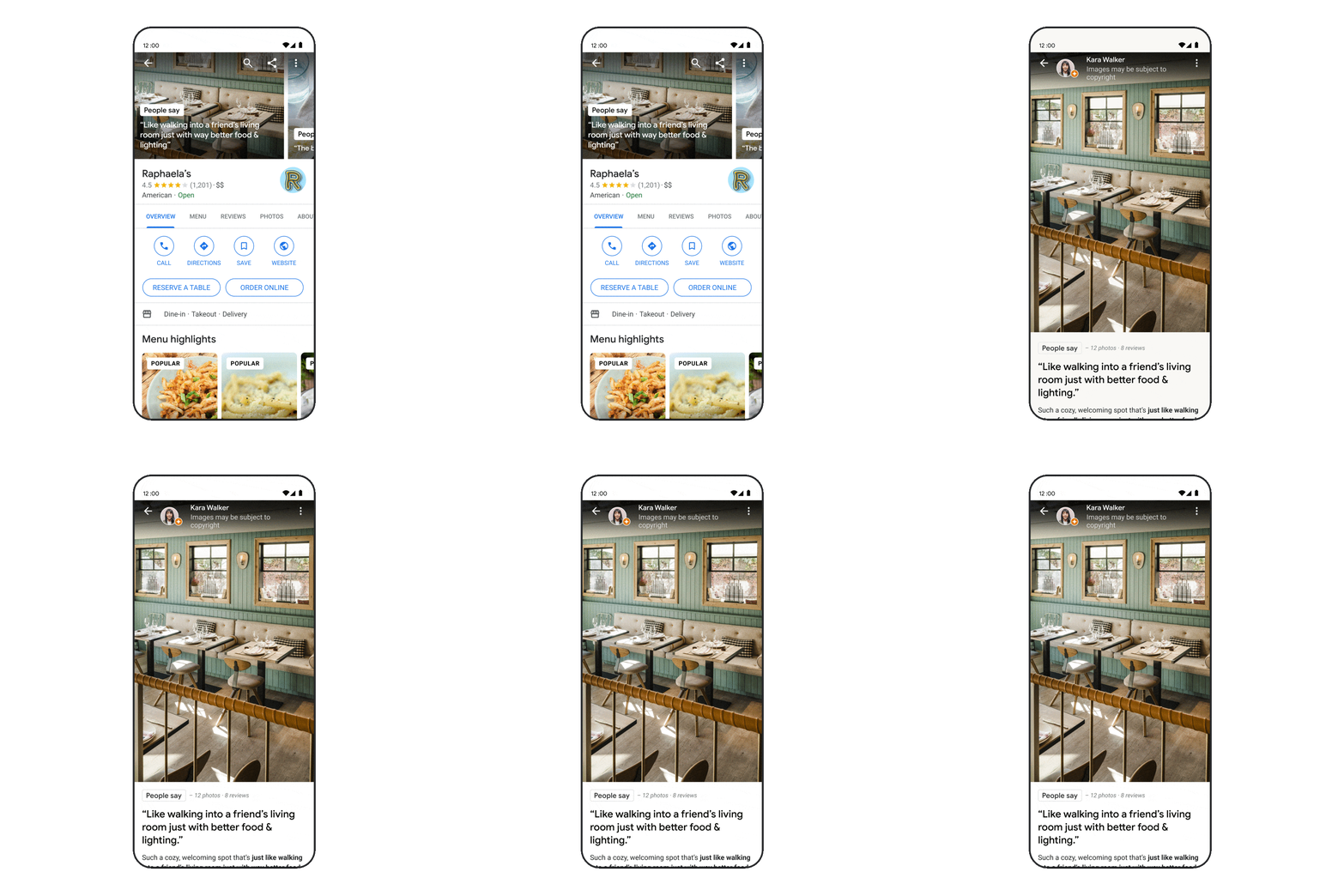
Star ratings are helpful, but they don’t tell you everything about a restaurant. In the coming months, you’ll be able to preview and evaluate restaurants to better understand what makes them special and help you make a decision. To make this possible, we use machine learning to analyze images and reviews from people (like you!) to find what makes a place distinctive.
See updated digital menus at your fingertips
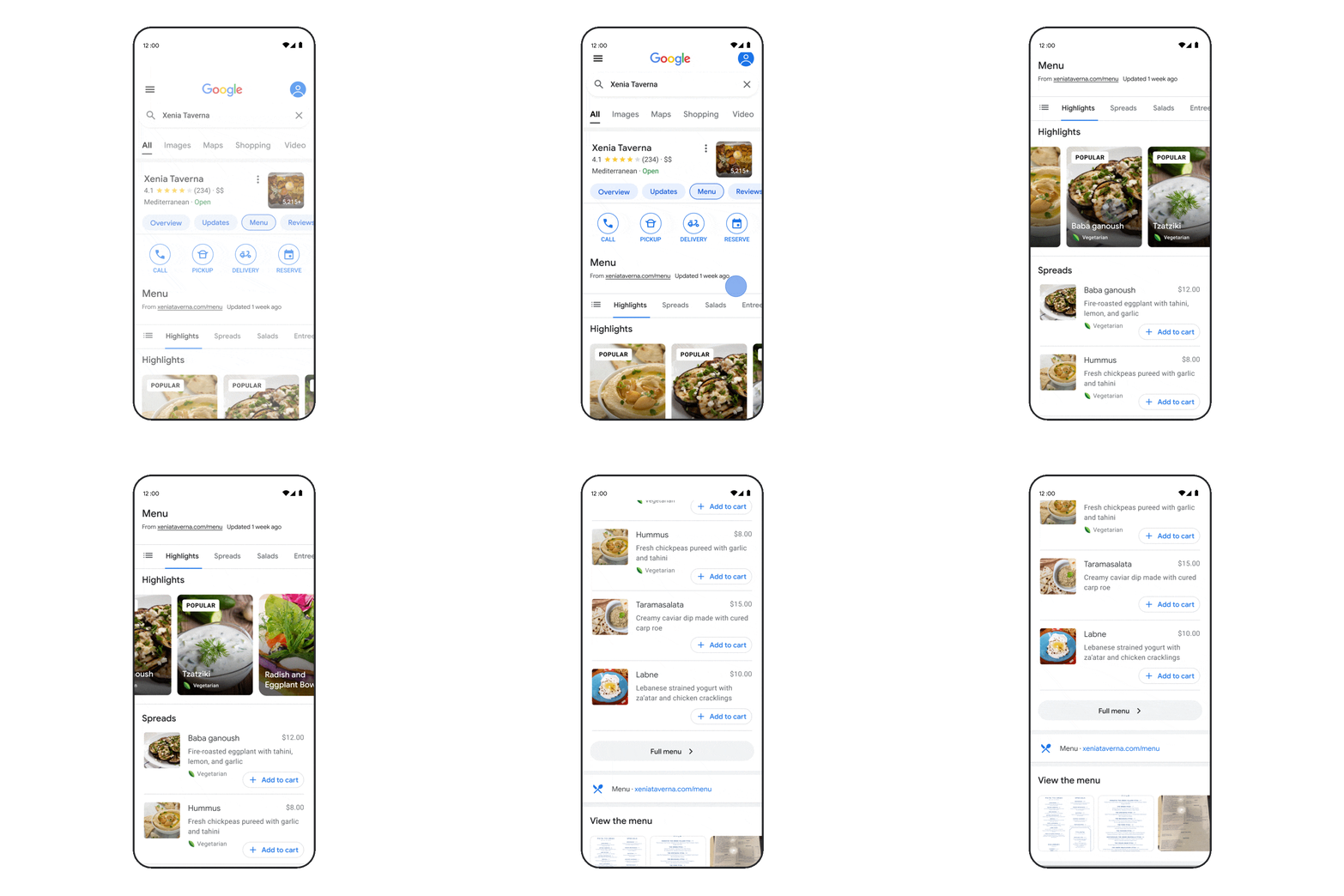
Once you’ve found a restaurant that serves the dish you’re looking for, you’ll probably want to explore the menu to see if they offer something for everyone in your group. But it can be hard to find accurate menus online.
That’s why we’re expanding our coverage of digital menus, and making them more visually rich and reliable. We combine menu information provided by people and merchants, and found on restaurant websites that use open standards for data sharing. To do this, we use state-of-the-art image and language understanding technologies, including our Multitask Unified Model.
These menus will showcase the most popular dishes and helpfully call out different dietary options, starting with vegetarian and vegan.
We want to make searching for food easier and more natural so that you spend less time figuring out what to eat and more time enjoying the meal. Whatever you’re craving next, we’re here to help you find it.
Search On 2022: Search and explore information in new ways
At Search On today, we shared how we’re getting closer to making search experiences that reflect how we as people make sense of the world, thanks to advancements in machine learning. With a deeper understanding of information in its many forms — from language, to images, to things in the real world — we’re able to unlock entirely new ways to help people gather and explore information.
We’re advancing visual search to be far more natural than ever before, and we’re helping people navigate information more intuitively. Here’s a closer look.
Helping you search outside the box
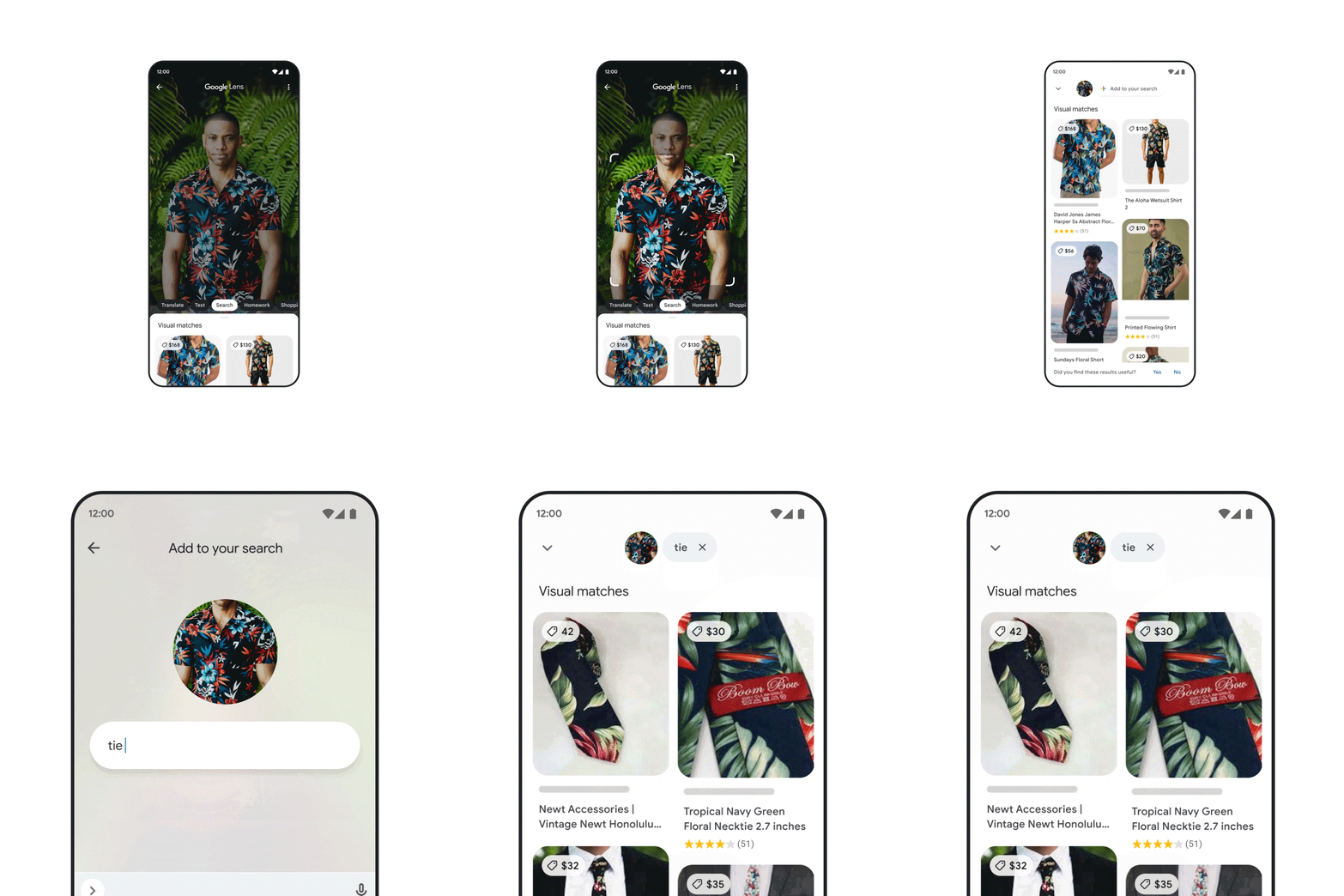
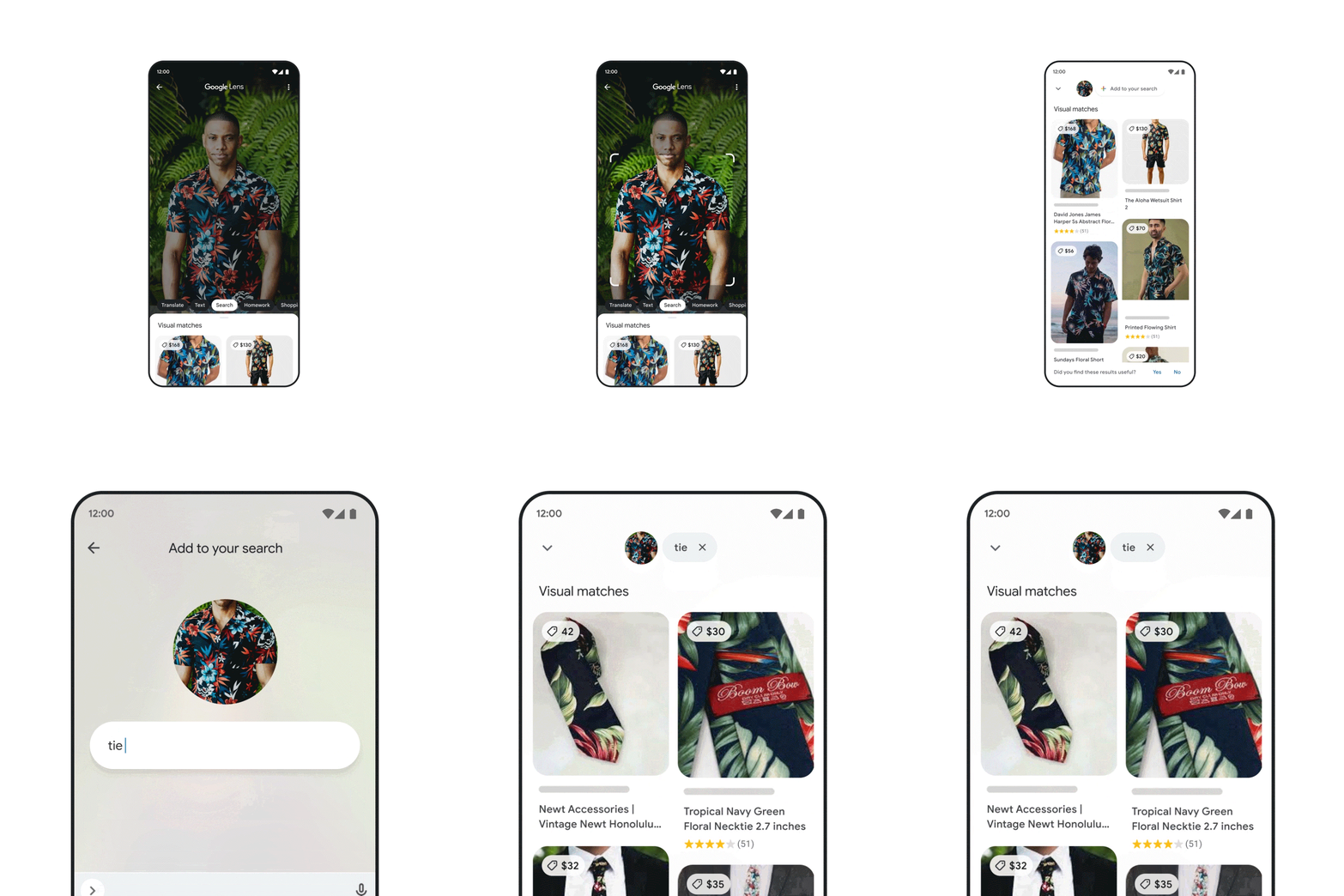
With Lens, you can search the world around you with your camera or an image. (People now use it to answer more than 8 billion questions every month!) Earlier this year, we made visual search even more natural with the introduction of multisearch, a major milestone in how you can search for information. With multisearch, you can take a picture or use a screenshot and then add text to it — similar to the way you might naturally point at something and ask a question about it. Multisearch is available in English globally, and will be coming to over 70 languages in the next few months.
At Google I/O, we previewed how we’re supercharging this capability with “multisearch near me,” enabling you to snap a picture or take a screenshot of a dish or an item, then find it nearby instantly. This new way of searching will help you find and connect with local businesses, whether you’re looking to support your neighborhood shop, or just need something right now. “Multisearch near me” will start rolling out in English in the U.S. later this fall.
One of the most powerful aspects of visual understanding is its ability to break down language barriers. With Lens, we’ve already gone beyond translating text to translating pictures. In fact, every month, people use Google to translate text in images over 1 billion times, across more than 100 languages.
With major advancements in machine learning, we’re now able to blend translated text into complex images, so it looks and feels much more natural. We’ve even optimized our machine learning models so we’re able to do all this in just 100 milliseconds — shorter than the blink of an eye. This uses generative adversarial networks (also known as GAN models), which is what helps power the technology behind Magic Eraser on Pixel. This improved experience is launching later this year.

With the new Lens translation update, you can point your camera at a poster in another language, for example, and you’ll now see translated text realistically overlaid onto the pictures underneath.
And now, we’re putting some of our most helpful tools directly at your fingertips, beginning with the Google app for iOS. Starting today, you’ll see shortcuts right under the search bar to shop your screenshots, translate text with your camera, hum to search and more.

New ways to explore information
As we redefine how people search for and interact with information, we’re working to make it so you’ll be able to ask questions with fewer words — or even none at all — and we’ll still understand exactly what you mean, or surface things you might find helpful. And you can explore information organized in a way that makes sense to you — whether that’s going deeper on a topic as it unfolds, or discovering new points of view that expand your perspective.
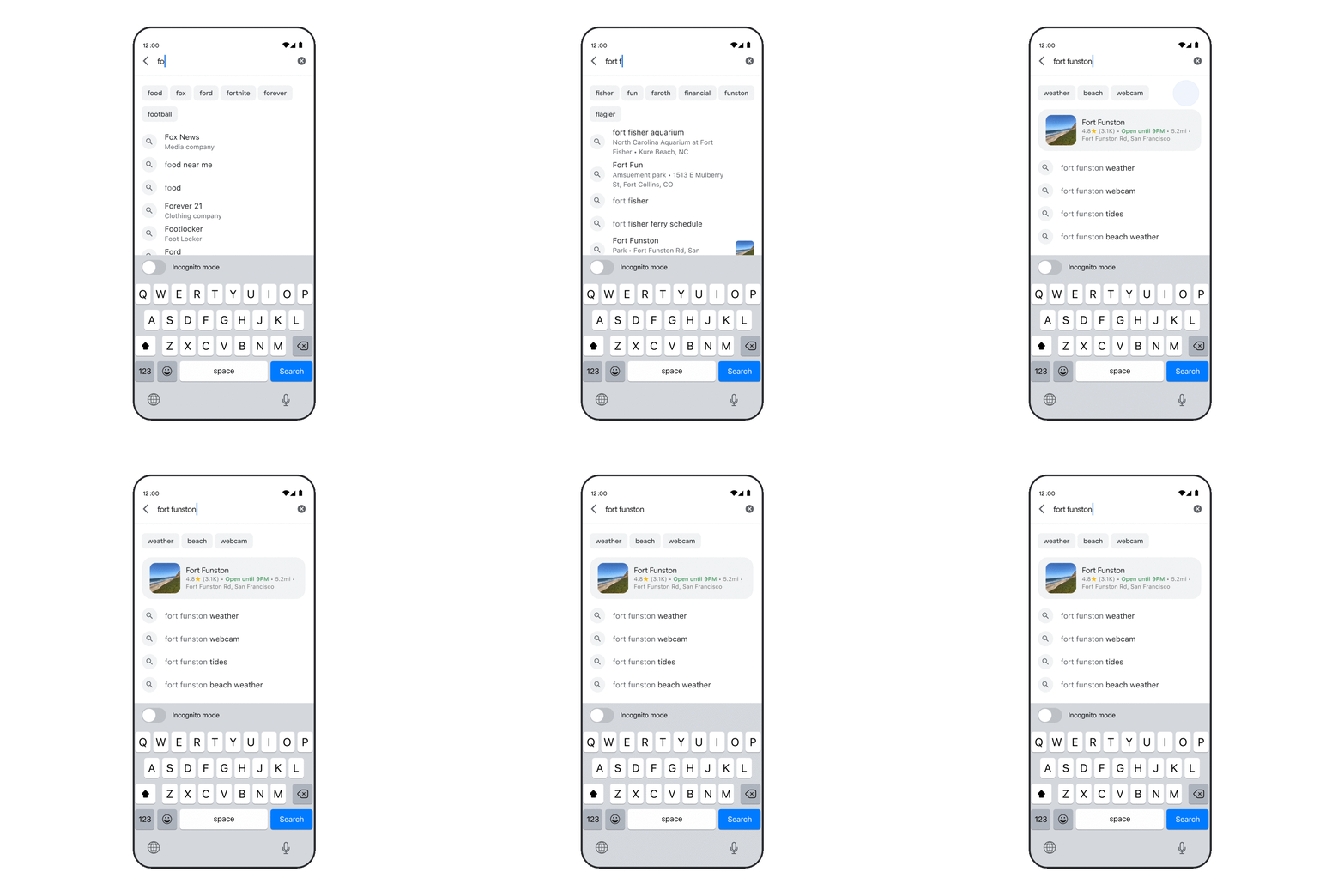
An important part of this is being able to quickly find the results you’re looking for. So in the coming months, we’re rolling out an even faster way to find what you need. When you begin to type in a question, we can provide relevant content straight away, before you’ve even finished typing.
But sometimes you don’t know what angle you want to explore until you see it. So we’re introducing new search experiences to help you more naturally explore topics you care about when you come to Google.
As you start typing in the search box, we’ll provide keyword or topic options to help you craft your question. Say you’re looking for a destination in Mexico. We’ll help you specify your question — for example, “best cities in Mexico for families” — so you can navigate to more relevant results for you.
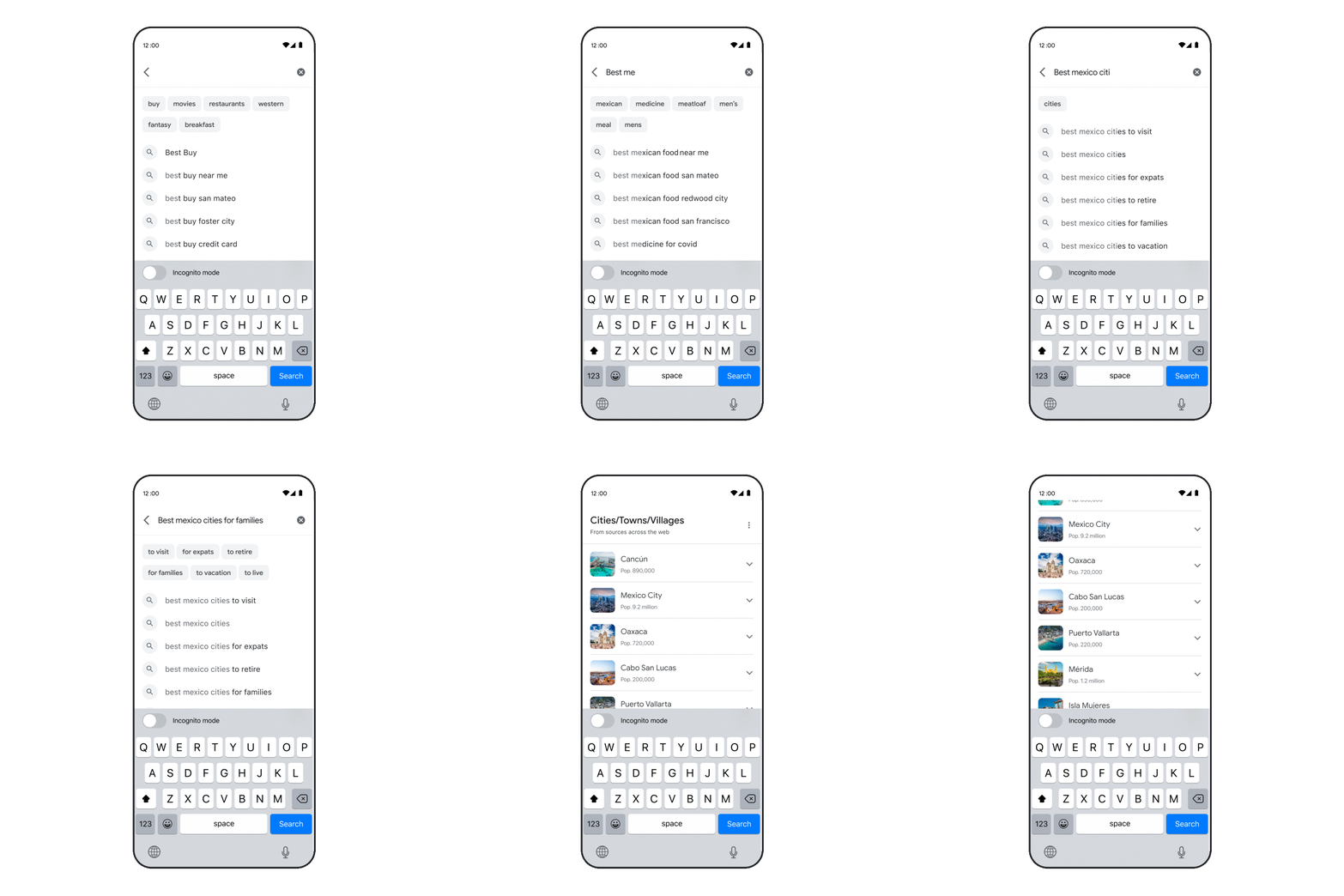
Maybe you hadn’t considered Oaxaca, but it looks like a great place to visit with the kids. And as you’re learning about a topic, like a new city, you might find yourself wondering what it will look like or what it will feel like. So we’re also making it easier to explore a subject by highlighting the most relevant and helpful information, including content from creators on the open web. For topics like cities, you may see visual stories and short videos from people who have visited, tips on how to explore the city, things to do, how to get there and other important aspects you might want to know about as you plan your travels.

Additionally, with our deep understanding of how people search, we’ll soon show you topics to help you go deeper or find a new direction on a subject. And you can add or remove topics when you want to zoom in and out. The best part is this can help you discover things that you might not have thought about. For example, you might not have known that Oaxacan beaches were one of Mexico’s best-kept secrets.
We’re also reimagining the way we display results to better reflect the ways people explore topics. You’ll see the most relevant content, from a variety of sources, no matter what format the information comes in — whether that’s text, images or video. And as you continue scrolling, you’ll see a new way to get inspired by related topics to your search. For instance, you may never have thought to visit the historic sites in Oaxaca or find live music while you’re there.

These new ways to explore information will be available in the coming months, to help wherever your curiosity takes you.
We hope you’re excited to search outside the box, and we look forward to continuing to build the future of search together.