Google at the 2022 United Nations General Assembly
This week world leaders gathered in New York City for the United Nations General Assembly (UNGA). Google participated in a range of UNGA-related engagements as part of our commitment to collaborate with international organizations to achieve collective solutions to the world’s most pressing challenges. Here are just a few of the many topics we covered:
Global governance in a digital era
The global internet was built to be a shared resource that everyone could access wherever they lived — but over the last few years this ideal has been increasingly challenged. Regulatory barriers to the free flow of information across borders are threatening to fragment the internet. New and revitalized global governance frameworks are needed for an increasingly digitized world, and international organizations will be critical to achieving them, which is why we support the UN Global Digital Compact.
Over the course of this week, we had various conversations about what needs to be done to ensure that the internet remains open, secure and reliable for everyone. Preserving the cross-border availability of secure technologies and digital services – coupled with forward-looking decisions by governments to invest in digital infrastructure and digital skilling – can protect access to information everywhere and ensure that the benefits resulting from the global internet are preserved.
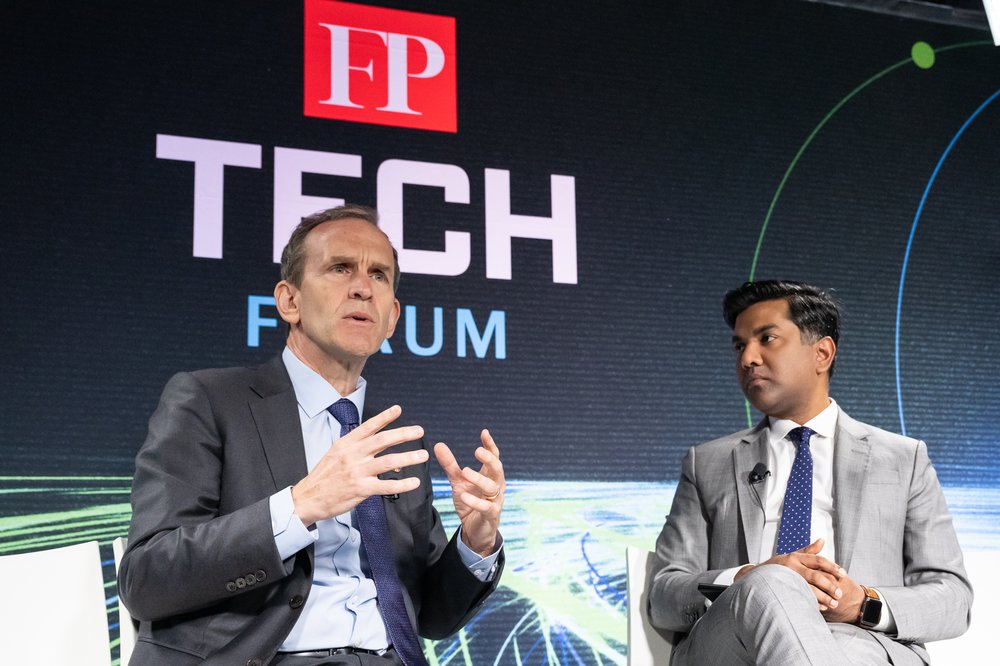
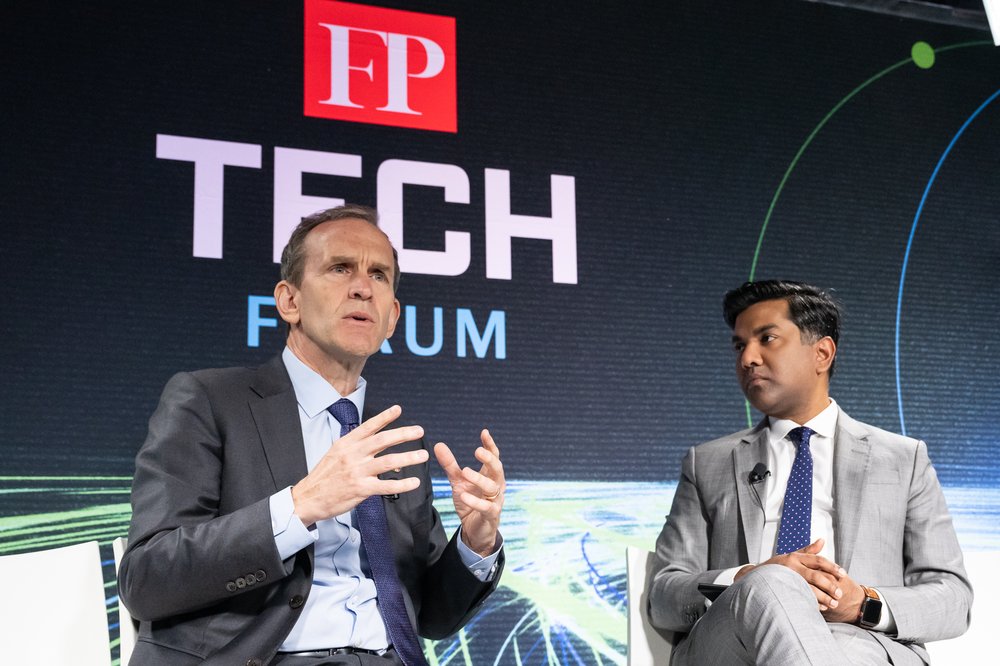
Kent Walker on stage with Foreign Policy Editor in Chief Ravi Agrawal at FP Tech Forum
Supporting the UN Sustainable Development Goals
Progress on the UN Sustainable Development Goals (SDGs) was a key topic during this week’s UNGA. The 17 UN SDGs were created “to make a better world for everyone, now and into the future.” They include goals like achieving gender equality, ensuring quality education and tackling economic inequality. At Google, we see countless ways in which technology can help accelerate progress on these goals.
While the global community has made some important progress in meeting the SDGs since they were launched in 2015, headwinds persist due to Covid-19 and global conflict and, unfortunately, not a single country is on track to meet all 17 goals by 2030. To that end, Google’s philanthropic arm, Google.org recently announced that we are expanding these efforts through a $25 million commitment to support NGOs and social enterprises using artificial intelligence (AI) to accelerate progress in achieving the SDGs.

James Manyika, Jacquelline Fuller and UN Deputy Secretary-General Amina Mohammed hosted a roundtable on using AI to accelerate the UN’s Sustainable Development Goals. (L to R: Jacquelline Fuller – President of Google.Org, Elizabeth Cousens – President of UN Foundation, Paula Ingabire – Minister of Information Communications Technology and Innovation of Rwanda, UN Deputy Secretary-General Amina J. Mohammed, James Manyika – SVP of Technology & Society and UN Tech Envoy Amandeep Singh Gill).
A number of the SDGs – ensuring sustainable cities, and access to affordable and clean energy, for example – were established with sustainability top of mind. And as our CEO has said before, solving climate change is humanity’s next big moonshot. Working together, governments, companies, and citizens can create technology-enabled, scalable solutions that deliver a prosperous, carbon-free future for all of humanity.
As a company we’ve been carbon neutral since 2007, and by 2030 we aim to achieve net zero emissions across our operations and value chain, and to run our data centers and offices entirely on carbon-free energy. As we work towards these goals, we’re collaborating with partners to share tools and resources to make clean energy achievable for all, such as the 24/7 Carbon-Free Energy Hub and Academy launched earlier this week. And we continue to partner with UN Energy, Sustainable Energy for All, and dozens of companies and cities around the world to grow the 24/7 Carbon-Free Energy Compact.
Ukraine
The war in Ukraine continues to be both a tragedy and a humanitarian disaster. Since the war broke out, our team has worked around the clock to combat disinformation, elevate authoritative content across our services, protect cybersecurity in Ukraine and globally, while also providing humanitarian assistance and supporting the region more broadly. This week, we were honored that Sundar was selected as a recipient of one of this year’s Atlantic Council Global Citizen Awards, in recognition of Google’s efforts in response to Russia’s continuing war in Ukraine, our commitment to digital resilience, and our ongoing support for refugees and displaced people throughout the world.
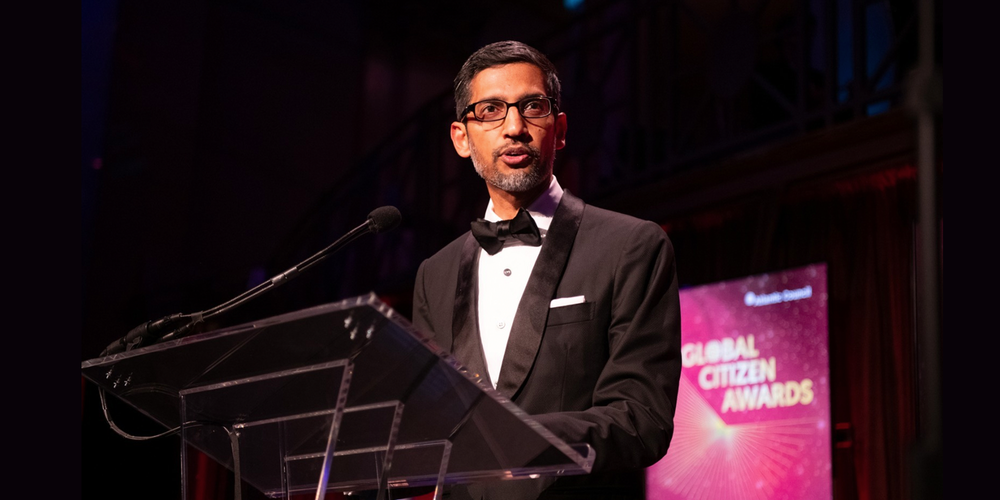
Sundar Pichai delivers an acceptance speech at the Atlantic Council’s 2022 Global Citizen Awards, highlighting the role the private sector can play in helping refugees around the world.
International organizations like the United Nations are unique in their ability to convene countries from all over the world, and we are pleased to collaborate closely with member governments to play our part.
Logitech combo Touch per iPad Pro 12.9”: solo per OGGI sconto da sogno su Amazon
Logitech Combo Touch custodia con tastiera per iPad Pro 12,9 pollici (5a gen – 2021), quasi al MINIMO STORICO su Amazon.
Leggi Logitech combo Touch per iPad Pro 12.9”: solo per OGGI sconto da sogno su Amazon
Helping publishers grow their digital business
Before joining Google, Alejandra Brambila worked at Reuters helping publishers across Latin America integrate the news agency’s reporting into their publications. Working with newsrooms across the region, she saw first-hand the challenges they faced in building a sustainable news business. Now she applies that insight as a member of Google’s Latin America news partnerships team, working closely with publishers to help them grow and scale their digital operations. We talked to her about the importance of balance and why everything starts with the audience.
What did you do before you came to Google?
I worked with a large news agency that has a subscription service publishers use to supplement their coverage. They have reporters all over the world, so it’s really helpful for publishers who might not have global correspondents. In my time there I worked closely with all kinds of publishers, from very traditional outlets to newer digital natives and startups.
What’s your role now?
I work with a team that provides solutions for a range of publishers across Latin America. We work with partners on growing their businesses and navigating change in the industry, and we also help them get the most out of Google’s advertising and monetization products.
What’s most challenging for publishers in the region?
From a business perspective, some of the biggest challenges are in technology and
digital transformation. Many of the media companies in this region weren’t built with tech at their core. So they’ve been adapting, but they don’t necessarily have technology strategy integrated into the decision-making process at the highest levels. In part, that leads to executional issues, but it’s also about shifting mindset.
What are some of those executional challenges?
There’s a real problem in the region with finding and retaining tech talent. I see it constantly with my partners in Argentina, Colombia, Mexico – that technology talent turns over really fast. So sometimes you have leadership knowing they need to make changes and being really eager to do it, but they don’t have the structure in place to make it happen.
We always encourage partners to be realistic and start with changes they know they can execute. It’s also about having that product mindset, where you’re always thinking about improvements you can make on an ongoing basis, rather than just one-off changes.
Can you explain what you mean about transformation in general requiring a mindset shift?
For a lot of these companies, they’ve been through a lot of transition. First they had to adapt to digital advertising. Now many of them are trying to focus more on digital subscriptions, but it feels very disruptive and risky.
How do you address those kinds of concerns?
It’s really about finding that balance between advertising and subscriptions. And the publishers that have been able to do that have built a strong brand in addition to having a technology vision. It’s not enough to have a large audience. You need loyal readers coming back to your site. You also have to have the right technology in place. For example, since in Latin America we don’t have the fastest devices or internet connections, content needs to be light and fast loading to maximize your ad revenue. So you need a good CMS that loads faster and indexes better.
But the businesses I see that are thriving have focused on building that audience connection, whether by having high standards for journalism or serving their community in different ways, like with events.
What other encouraging developments do you see in terms of business models?
I see more media finding different ways to reach their audiences, for example, through new verticals like education or cooking or health. There are also startups and entrepreneurs using different platforms like Substack and, of course, podcasts.
We’re also seeing more partners focused on strengthening their technology talent and their product teams. They’re working on applying that product approach and putting structures and frameworks in place to iterate and experiment. All of those things are starting to move in the right direction and that’s encouraging to see.
HUAWEI MatePad T 10s: tablet SUPER ECONOMICO a prezzo REGALO
Samsung Galaxy Tab S6 Lite: tablet ECCELLENTE a prezzo SHOCK su eBay
La tastiera super professionale da gaming Logitech G PRO K/DA è SCONTATISSIMA
Samsung Galaxy Buds2: ECCELLENTI cuffie TWS a prezzo REGALO (-34%)
Risiko BATMAN DC: il gioco da tavolo del CAVALIERE OSCURO è il FENOMENO del momento
Work Diary: a Google Assistant marketer in San Francisco
In our new Work Diary series, we show you what a day on the job is really like for Googlers with all sorts of roles and interests around the world. In this installment you’ll hear from Seonah, who works on privacy and trust marketing for Google Assistant. Follow along with her day below, and be sure to watch her video diary, too.
Name: Seonah Iverson
Location: San Francisco
Time at Google: 1 year
Job title: Google Assistant Privacy & Trust Product Marketing Lead
What that role actually does: I help make Google Assistant more trusted and safe for the people who use our products.
What’s your favorite part of a typical work day? When I get the chance to hear from real users during research calls – it always inspires me to keep pushing our product to be the best that it can be.
7:15 a.m. → “Hey Google, good morning”
Yes, you guessed it, Google Assistant wakes me up with some alternative R&B playing from my Nest Hub Max Smart Display. I think the first words out of my mouth most mornings are “Hey Google, good morning,” which I set up for my Assistant to tell me the weather forecast, what’s on my calendar and news highlights from my favorite news outlets. I really try not to pull out my phone right away in the morning and dive straight into work emails, and this seriously helps.
8 a.m. → E-bike commute with a view
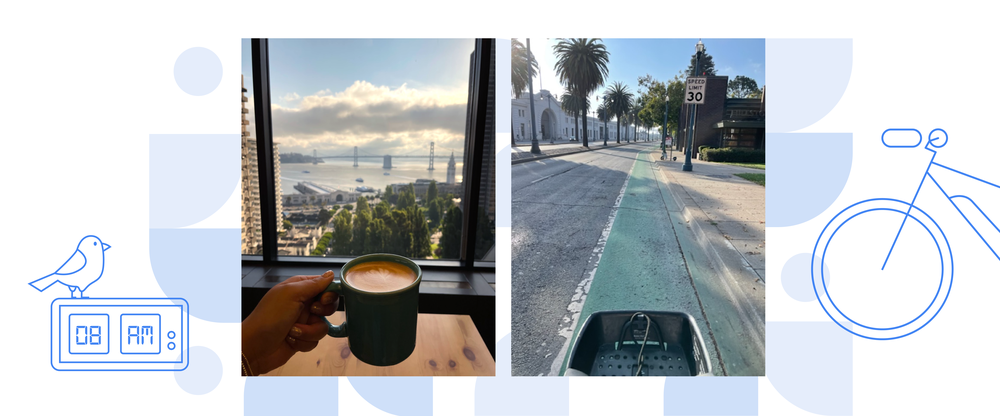
I work from home two days a week and from the office the rest, I love this flexible schedule. On the days I go into the office, I’m ready to get out of my apartment for a while and connect with my coworkers in person. Google food and coffee doesn’t hurt either. On the mornings I go in, I grab an e-bike in my neighborhood — North Beach — and take the Embarcadero cycling path to the office. The view is so nice (especially when it’s sunny!).
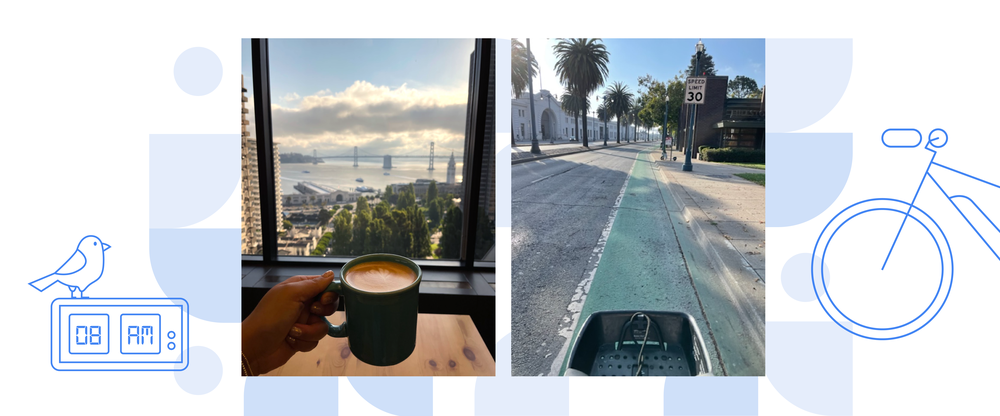
Seonah’s morning consists of an e-bike commute and coffee — both with great views.
8:30 a.m. → Prep for projects focused on protecting user privacy
When I get to the office, I grab an oat milk latte from the Flora Hub coffee bar on the 13th floor and start looking at my emails and calendar for the day. (This spot has the best views of the Bay — you can see all the way to the Bay Bridge.)
I start this part of the workday by taking inventory of my inbox and calendar and making any adjustments I need to — moving meetings or booking conference rooms, things like that. I also make sure I’ve blocked off at least one part of the day for me to go heads-down and get things done on my top projects. I think of this as my mental prep time.
This week, I’m focused on gathering key user insights from research and prepping for a product and messaging review — this helps our product team address top user concerns and explain things in a simple way that makes sense to everyone.
9 a.m. → Down to business!
My meeting blocks tend to start around 9 a.m., so I head to a conference room. For most of the morning, I’m in Google Meet calls with user focus groups to hear from real users on the privacy controls and settings they use most often or would like to better understand.
When I finish up with user research calls, I meet with Assistant product managers, engineers and other teammates located in New York, Atlanta and Mountain View. We talk about the upcoming privacy and safety settings improvements we’re planning to launch and how we can introduce the updates without disrupting our users’ experience — these meetings always spark good ideas and are key to moving projects forward.
12 p.m. → Cafe with teammates, by route of dooglers <3
Around noon I meet up with some of my fellow Assistant marketing teammates and we walk outside to get to the Maritime Social cafe. The best part is passing by the doogler area and seeing the pups playing!
I have a huge sweet tooth, so I always get dessert with lunch, whatever it is.

Seonah’s walk to lunch takes her past fellow Googlers — and a few dooglers.
1 p.m. → Boba and brainstorm
In the afternoon, I grab boba from a nearby cafe and meet up with the Google Asians in Marketing group. We get together in a conference room to talk about creating more representation and inclusion not just at Google, but also in the marketing industry in general. This is a volunteer project that I always enjoy participating in.
2 p.m. → Back into top privacy priorities and checking off tasks
I head to my desk and get back to daily tasks for the next couple of hours. Today, one thing I want to cross off my list is completing some writing and design work that explains the latest updates to Assistant privacy controls that will appear on our website and in our email newsletter to users. Part of this process includes making sure our explainer videos are up to date and translated appropriately for users worldwide.
I usually listen to music when I’m doing this — that’s how I get into a flow mindset and get the most done. I really try to balance meetings with tasks to make each day as productive as possible; I love creating Calendar tasks and crossing them off my list. Sometimes I’ll even retroactively add them and cross them off! The mix of completed tasks and meetings on my calendar is my source of truth to keep me accountable to projects I’m spending time on and if I have room to take on any other stretch projects.
4 p.m. → Ahhhh, a quick chair massage break
When I feel like I need a pick-me-up, I take a break with a chair massage on the second floor, near the gym.

Seonah finishes up her day and looks at her calendar for tomorrow.
4:30 p.m. → Time for inbox zero
Back to my laptop one last time to finish up daily work and respond to those last few emails. Personally, I subscribe to the inbox zero way of life, so I make sure to check that box before I head out for the day! Oh, and I water my desk plant if it’s looking wilty.
5 p.m. → Barre class and a walk home
Before heading home, I like to take a barre class nearby. Afterward, I’ll walk home and run some errands on the way. I’ll usually listen to my more recent playlist, a current events podcast or call my family. I’m always listening to something if I’m walking around or sitting at my desk; part of my daily attire is a pair of headphones.
7 p.m. → Dinner and a show — or a Korean language lesson
To close out the day it’s either date night, grab dinner with friends or cook at home. Afterwards, I’ll usually watch some TV — or if I want to do something more engaging, I’ll practice my Korean (I just started taking language classes) or practice piano on my keyboard.

Time to relax with some music and get ready for tomorrow.
The last to-do of the day is looking at my Nest Hub Max Smart Display and by using Look and Talk, I ask my Assistant to “set my alarm for 7:15 a.m. tomorrow.”
Samsung Galaxy con supporto 5G: questo è il modello che devi comprare subito
Basta C e C++, meglio Rust. Lo dice il CTO di Microsoft Azure
Mark Russinovich, CTO di Microsoft Azure, propone di abbandonare i linguaggi di programmazione C e C++ in favore di Rust
Leggi Basta C e C++, meglio Rust. Lo dice il CTO di Microsoft Azure
Chromecast con Google TV (HD) arriva in Italia: lo streaming a un prezzo accessibile
Antenna TV da interni e il digitale terrestre torna a VOLARE con pochi spiccioli
HUAWEI MatePad T 10s (WiFi) è il tablet da comprare subito: offerta STELLARE

9 years later, Chromecast has way more — at a lower price
Since we launched it in 2013, we’ve introduced three generations of the original Chromecast, plus Chromecast Ultra for 4K and HDR support. Most recently, in 2020, we took our biggest leap yet with Chromecast with Google TV (4K).
Chromecast with Google TV comes with your favorite Chromecast features from over the years — plus the Google TV experience, which brings together movies, shows, live TV and more from across your apps and subscriptions and organizes them just for you.
Today, we’re expanding this lineup with the new Chromecast with Google TV (HD). We built this product with affordability in mind and to help bring all our favorite features of Chromecast and Google TV to more people than ever.
We’ve come pretty far since the original Chromecast launched 9 years ago. Here’s how we’ve evolved — and what you can expect from the new Chromecast with Google TV (HD).
More affordable than our original Chromecast
Chromecast originally launched as a $35 dongle that made it easy and inexpensive to bring your online entertainment to your TV. At the time, this was a big deal: you could browse the web, watch TV shows and movies, and listen to music simply by plugging it into the back of your TV and connecting the device to Wi-Fi.
Chromecast with Google TV (HD) is just $29.99 in the US, making it even more affordable than our original Chromecast. It brings more capabilities and intelligence to the Chromecast experience that people have loved for years.
More streaming options than ever, organized for you
In the beginning, Chromecast launched with just a handful of partners: Netflix, YouTube, Google Play Movies and Google Play Music. Nine years later, there are 10,000+ apps to choose from with Google TV, from HBO Max and Disney+ to Prime Video, and we continue to add new content all the time. Google TV’s content offerings go beyond entertainment as well — you can work out with Peloton right from their app, for example.
And with more content choices than ever before, Chromecast with Google TV has helped reinvent what simple and easy content discovery on your TV looks like. It’s the home for your entertainment, bringing together movies, shows, live TV and more so you can find what to watch without jumping from app to app.

Google smarts built-in
In 2013, you could use your phone, tablet or laptop with Chromecast to browse and cast content to your TV, play and pause, control the volume and more. Chromecast brought a broad range of content to your big screen, from sharing your family photos to enjoying a video clip for your favorite news site with the press of a button.
Today, with new streaming services and apps launching all the time, there is so much content, and choosing something to watch has become harder than ever. That’s why we built Google TV.
And since launching Google TV two years ago, we’ve continued to make updates to the experience, like introducing profiles for everyone in your family to help resolve common complaints like, “Why am I getting recommendations for cartoons when I only want thrillers?” It also helps parents have a place for their kids to watch family-friendly content.
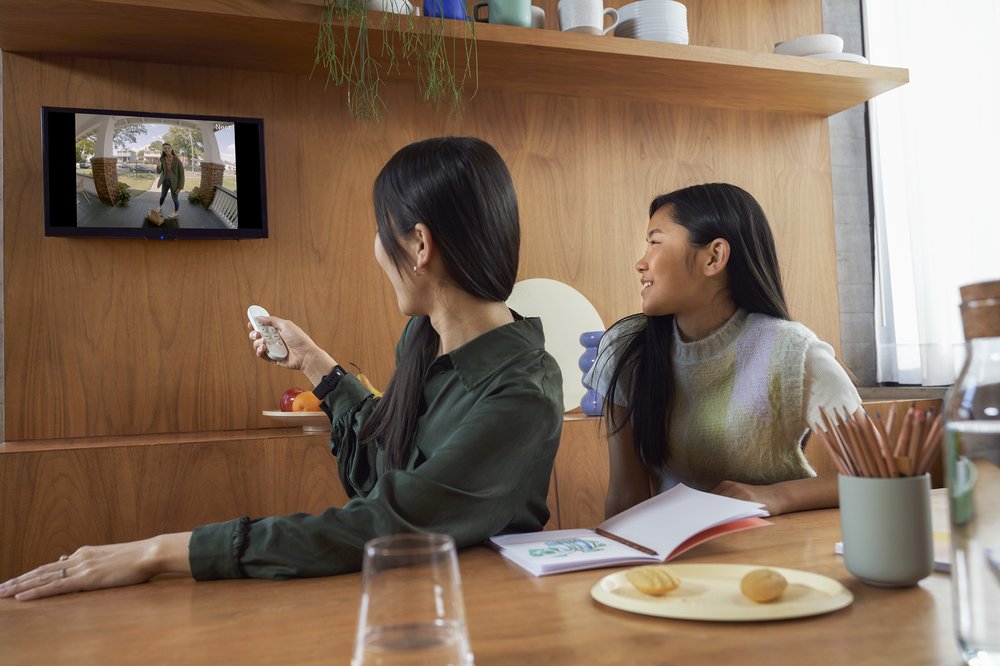
Plus, Google Assistant has a dedicated button on the included remote, so you can easily find something to watch — “Play ‘House of the Dragon’ on HBO Max” — or ask everyday questions like, “How’s the traffic to work?” Or, when it’s movie night, you can see your front door on the big screen with a Nest Doorbell to keep tabs on your pizza delivery.
Plug in and play
The original Chromecast was a small dongle for your TV that was designed to get out of the way. It introduced the foundational casting experience of using apps that people were familiar with on their smartphone: just open a supported app, press the Cast icon, and sit back and enjoy.
We’ve kept that same spirit with all of our Chromecast devices, and Chromecast with Google TV (HD) is no exception. It comes in the same compact and thin design as the Chromecast with Google TV (4K), tucks neatly behind your TV, and set-up is fast and simple.
And of course, you’ll still have access to your favorite Chromecast features like casting from your phone, sharing your Google Photos to your TV, and casting your Google Meet video calls to TV, so you can join the team meeting or lecture from the comfort of your couch.
Chromecast with Google TV (HD) streams in high definition with 1080p HDR, and we’ve made software optimizations behind the scenes to make sure you get a smooth and snappy experience no matter what TV you’re watching on.
Starting today, Chromecast with Google TV (HD) is available for $29.99 in our classic Snow color, and is available in 19 countries now, with more regions coming soon. For full details on availability, check out our Google Store help page.
And right now, people who buy Chromecast with Google TV (HD) will get 6 months of Peacock Premium, so you can watch hit movies and shows, exclusive Originals, WWE, extended live sports, and more.
From day one with Chromecast, we wanted to create an easy solution that worked for everyone, for every TV in the house. Nine years later, that mission hasn’t changed.