Kingston A400 SSD da 240 GB a meno di 30 euro su Amazon
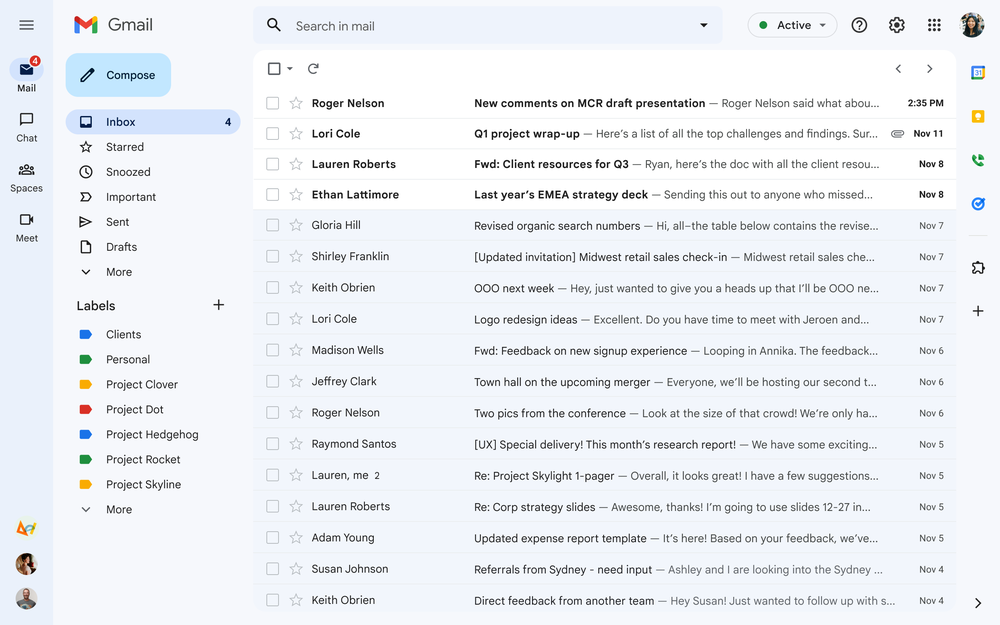
A unified Gmail, for all the ways you connect
Gmail has changed a lot over the past 18 years, and since the beginning, we’ve aspired to help billions of people around the world stay connected and get things done. Our latest changes bring helpful updates to every Gmail user, including the best of Google Workspace, combined with a fresh new look based on Google’s Material Design 3.
Evolving right along with you
Over the years, we’ve introduced new ways to stay productive, like the tabbed inbox, AI-based innovations like Smart Compose and Smart Reply and the ability to get your Gmail on the go with native apps for iOS and Android. (Fun fact: Gmail was the first app on the Google Play Store to hit one billion installs!) Often these changes are highly visual, like custom inbox themes, but some really important ones are less visible, like AI-based spam, phishing and malware protections.
Modern communication, modern design
During the pandemic, we’ve seen a further evolution as tens of millions of people around the world started to move between email, messaging, group chat and video calls as a part of managing their daily lives. To help people stay connected, we’re bringing together Gmail, Chat, Spaces and Meet in a single, unified view.
The new integrated Gmail view with Chat, Spaces and Meet
We first announced the new integrated Gmail view as a sneak-peek preview back in January, and we got tons of feedback from users who are excited about the new look and feel, along with improvement suggestions.
Starting today, the integrated view will begin to roll out for all Gmail users who have turned on Chat. You’ll see a clean, streamlined way to move between apps that you can customize based on what works best for you.
Using Quick Settings, you can select apps you’d like to toggle between on the left side of your window, whether it’s Gmail by itself or a combination of Gmail, Chat, Spaces and Meet. Label lovers will see separate sections for system labels (like Starred, Snoozed and Important) and custom labels you make yourself. And people who love to chat will see conversation bubbles with snippets of incoming messages, along with options to quick reply instead of opening the full message.
Easily select the applications you want to use in Gmail
Over the next few weeks, users can enable the integrated view, using the new visual configuration option in Settings — and anyone who wants to keep their existing Gmail layout will be able to do so. You get the Gmail that best fits your personal style, along with a clean, new look, thanks to our Material 3 design.
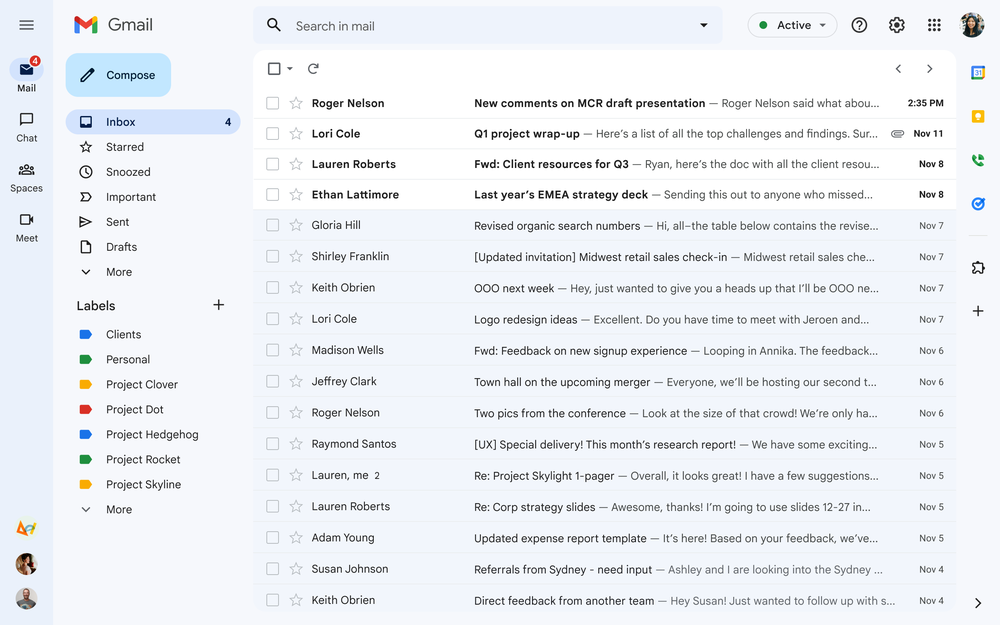
The new Gmail interface updated with Material 3 look and feel.
More than a pretty (inter)face
Beyond the user interface, we’re continuing to make Gmail more powerful and customizable. For example, we’re making it easier than ever to find the message you’re looking for by bringing search chips to your inbox and improved search results that suggest the best match for your query.
New inbox filters and improved search results
And later this year, we’re delivering an improved experience for tablet users, better emojis, new accessibility features and a whole lot more.
Looking ahead
Now you can optimize Gmail for how you like to stay connected, whether it’s as a standalone email application or a hub for easily moving between Chat, Spaces and video calls in Google Meet. After 18 years of helping people collaborate and get things done, Gmail is more helpful, customizable, and integrated than ever before.
AMD Ryzen 5 5600G a meno di 190 euro su Amazon
Switch 5 porte di Netgear a meno di 17 euro su Amazon
Questa incredibile “scatolina” è una BOMBA per lo streaming da PC/Mac/Smartphone/Tablet
Apple Alimentatore Duo MagSafe ad un prezzo mai visto prima su Amazon
Expanding testing for the Privacy Sandbox for the Web
Improving people’s privacy, while giving businesses the tools they need to succeed online, is vital to the future of the open web. That’s why we started the Privacy Sandbox initiative to collaborate with the ecosystem on developing privacy-preserving alternatives to third-party cookies and other forms of cross-site tracking. Over the past several months, we’ve released trial versions of a number of new Privacy Sandbox APIs in Chrome for developers to test.
Throughout this process, we’ve worked to refine our design proposals based on input from developers, publishers, marketers, and regulators via forums like the W3C, and earlier this year, we reached an agreement with the UK’s Competition and Markets Authority (CMA) on how we develop and release the Privacy Sandbox in Chrome worldwide.
The most consistent feedback we’ve received is the need for more time to evaluate and test the new Privacy Sandbox technologies before deprecating third-party cookies in Chrome. This feedback aligns with our commitment to the CMA to ensure that the Privacy Sandbox provides effective, privacy-preserving technologies and the industry has sufficient time to adopt these new solutions. This deliberate approach to transitioning from third-party cookies ensures that the web can continue to thrive, without relying on cross-site tracking identifiers or covert techniques like fingerprinting.
For these reasons, we are expanding the testing windows for the Privacy Sandbox APIs before we disable third-party cookies in Chrome.
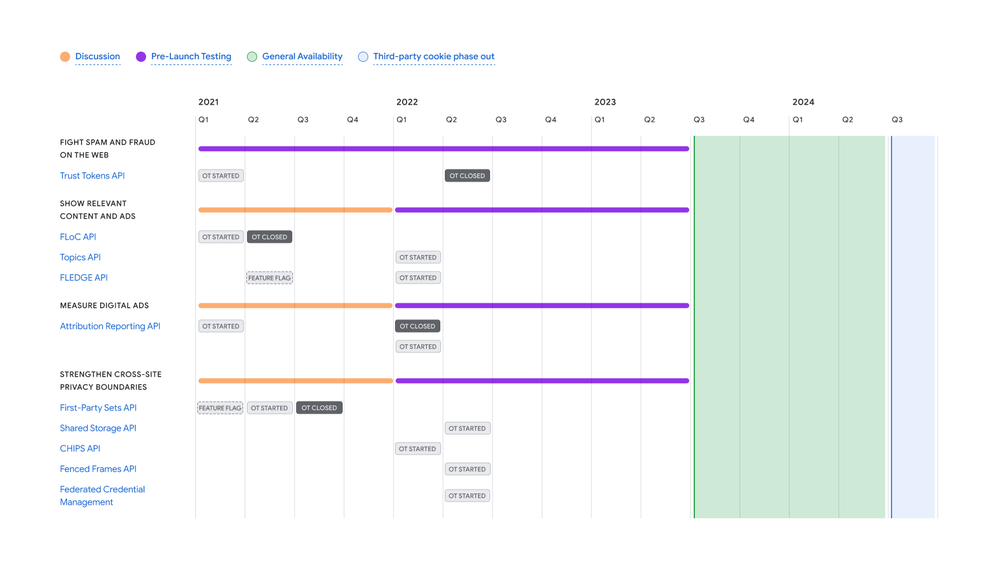
Developers can already test these APIs today, and beginning in early August, the Privacy Sandbox trials will expand to millions of users globally, and we’ll gradually increase the trial population throughout the rest of the year and into 2023. Before users are added into the trials, they will be shown a prompt giving them the option to manage their participation. As the web community tests these APIs, we’ll continue to listen and respond to feedback.
By Q3 2023, we expect the Privacy Sandbox APIs to be launched and generally available in Chrome. As developers adopt these APIs, we now intend to begin phasing out third-party cookies in Chrome in the second half of 2024. As always, you can find up-to-date timelines and milestones on the Privacy Sandbox website.
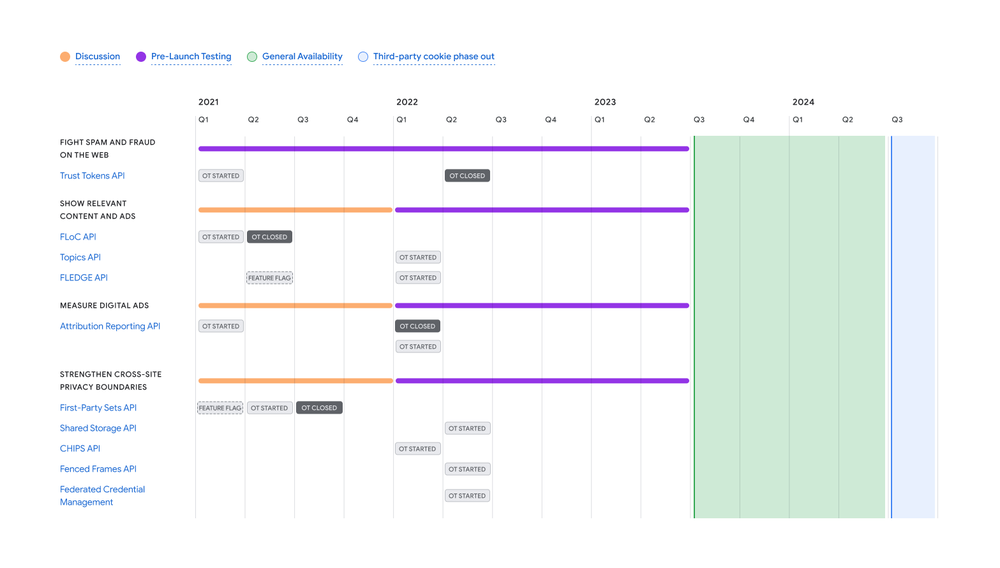
The updated timeline is available on privacysandbox.com/timeline.
We’re grateful to be working with companies across the industry who are invested in developing privacy-first experiences on the web, and will be testing Privacy Sandbox in the coming months.
The Privacy Sandbox initiative is an ambitious undertaking for the entire industry, and we look forward to continuing to engage with the web community as testing expands.
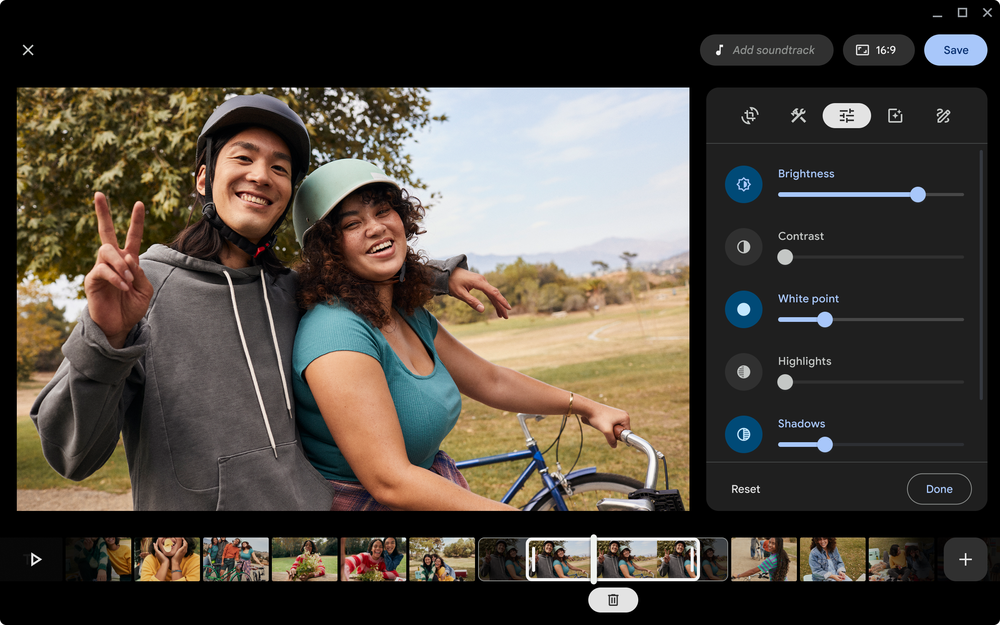
New video editing and productivity features coming to Chromebook
Today we’re announcing new features and apps for Chromebook to take your creativity and productivity to the next level. Whether you’re enjoying your favorite music or movies, creating a vacation highlight reel or powering through work, Chromebook lets you do it all with speed, security and ease — right out of the box.
Over the next few months we’ll roll out new Chromebook features, including video editing tools in the Google Photos app to help you showcase your summer adventures, enhanced app capabilities and features to help you get organized and get things done.
Get in the director’s chair with Google Photos
Share your favorite memories with friends and family and bring your creativity to life with Google Photos’ new movie editor and video editing features — available first on Chromebook this fall.
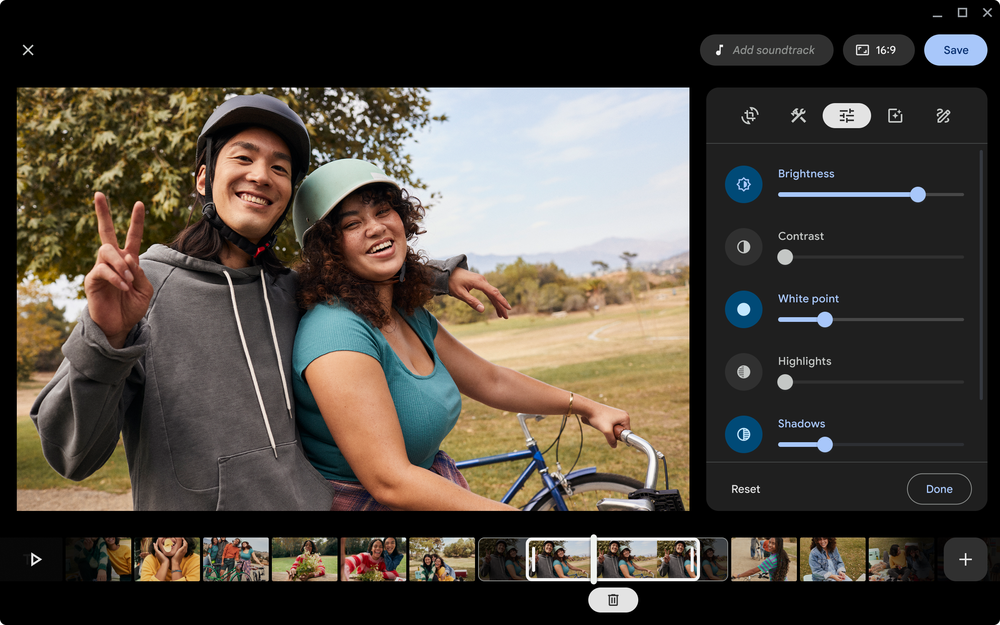
A peek at Google Photos’ new movie editor coming to Chromebook (UI subject to change)
Creating an end-to-end movie made up of multiple video clips, photos, a title card and music can come with a learning curve and take a lot of time. But Google Photos’ revamped movie creation tools help you make high-quality movies with just a few taps. You’ll be able to create beautiful movies from suggested themes, or put yourself in the director’s seat and start from scratch, right on your Chromebook.
Start by selecting a theme and the people (or pets!) you’d like to feature, and Google Photos will make a movie with both video clips and photos. It even intelligently selects the most meaningful moments from your long videos.
For those who like more creative control, you can also build your own movie from scratch with the Google Photos movie editor. Google Photos’ search capabilities make it easy to select, then arrange photos and clips in the order you’d like.
Whether you start from a theme or a blank slate, you’ll be able to trim video clips, or edit them to adjust the brightness, contrast and more. Or you can apply one of the Real Tone filters we added earlier this year – these filters were made to work well across skin tones, so you can choose from a wide assortment of looks to find one that reflects your style. You can also add finishing touches, like music and a title card, to make your movie shine.
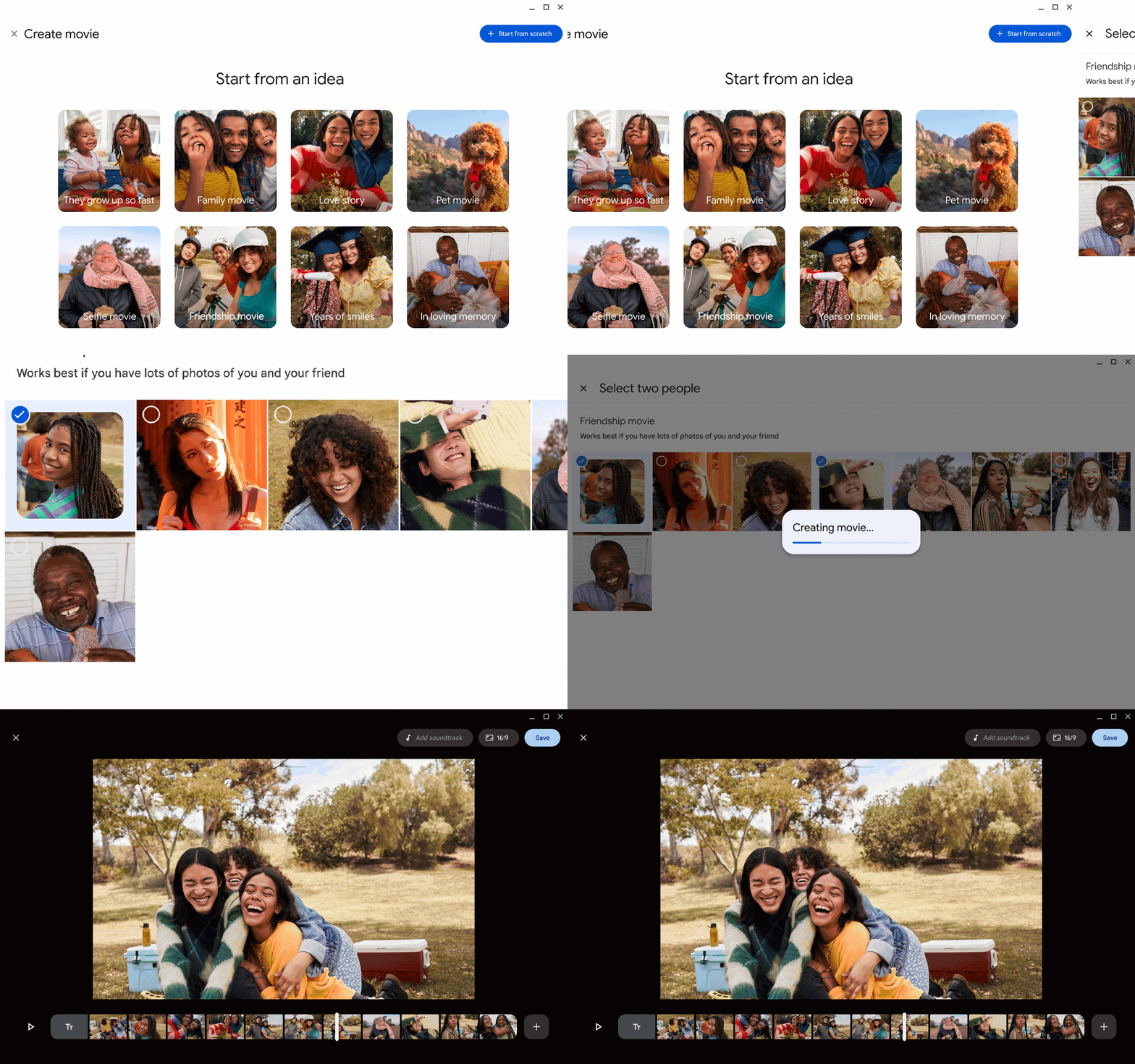
Select a theme, like “Friendship movie”, and choose who you want to include and Google Photos will create a movie with clips and photos (UI subject to change)
Google Photos integrates with Chromebook’s Gallery and Files apps, so if you open a video in the Gallery app, you can continue editing it in Google Photos with a tap. You can also use images and videos saved on your Chromebook in the movies you make on the Google Photos app.
And for professional-grade video editing, the LumaFusion app is also coming to Chromebooks. LumaFusion’s multitrack video editor lets you add graphics, visual effects, transitions and distortions, audio tracks and sound effects, narration, color grading and more.
No matter what kind of movie you want to create, from a summer highlight reel to a short film, Chromebook’s versatile and easy-to-use tools and apps have you covered.
Meet new apps, and get more out of your favorites
Whether you’re diving into forecasting at work or preparing and planning for back-to-school season, Chromebook’s preinstalled apps are ready to help. Here are a few new ones we recommend trying out:
- Gallery app. We’re introducing new PDF editing features to Gallery, Chomebook’s default media app, so you can fill out forms, highlight text, sign documents and add text annotations. No more printing and scanning just to sign a form. You’ll start to see this roll out next week.
- Screencast app. Anyone can now use Screencast to record, view and share transcribed videos and presentations, whether it’s a virtual lesson or a how-to video or demo.
- Cursive app. Capture, edit and organize handwritten notes on stylus-enabled Chromebooks. When it’s time to share, you can quickly copy and paste your notes into another app or send as a PDF.
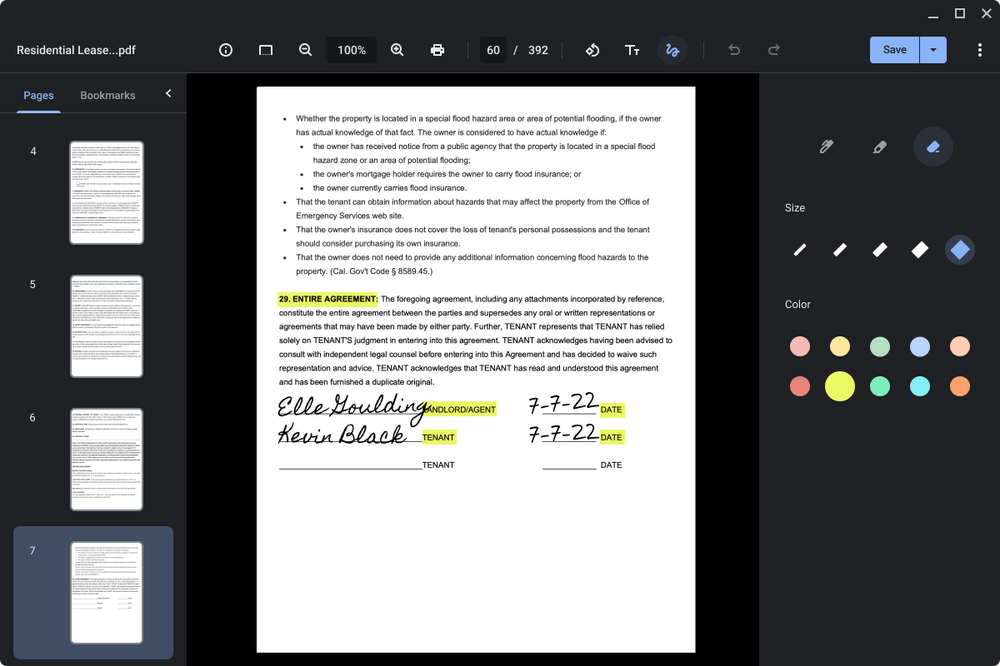
Using the Gallery app you’ll be able to annotate, highlight, edit, and sign PDFs.
And of course, when it’s time to go back to school or catch up on work after a long summer vacation, Google Workspace apps — like Docs, Calendar, Meet and Chat — are already on Chromebook. Whether you’re catching up on emails or collaborating on a group project you paused weeks ago, all of your files will be waiting on Google Drive. And when you want to kick back and relax, entertainment apps are just a tap away. Check the latest trends on YouTube, update your “Summer 2022” playlist on YouTube Music or play a game on Stadia.

For creativity, easy-to-use design tools like Canva, Figma and Adobe Express are made to work easily on Chromebook so you can create everything from beautiful presentations to professional-looking social media posts. Apps like FL Studio help you arrange, record, mix and master quality music, and add instruments like synthesizers, drum kits and more.
For a little more support in and out of class, Evernote helps you keep your life organized with great note-taking, project planning and easy ways to find what you’re looking for. Plus, get expert advice to help you succeed from Outlier.org, which provides world-class online college education from the founders of MasterClass. And you have 1000+ powerful PC games on NVIDIA GeForce NOW and Luna to help you unwind.
Check out special offers on some of these apps and others — perfect for college students heading back to school in the U.S.
Manage your life and make Chromebook your own
Recently we’ve added new ways to help you get things done easily, like the newly redesigned Launcher that lets you find what you need with the press of a button, and additions to cross-device features like Phone Hub and Nearby Share. In the next few months, we’re also rolling out some new organization and productivity features to help you manage your schedule and stay focused, with some new ways to personalize your Chromebook.
We’re keeping busy through the rest of the summer making Chromebook even more useful and powerful. We’ll be back to share more updates soon.
9 ways to make the most of your Chromecast
The year 2013: when we were all snacking on endless fro-yo, discussing season three of “Game of Thrones” with anyone who would listen and laughing out loud to the best clips on Vine. But did you know it was also the year we introduced Chromecast to the world?
Since then, Chromecast continues to be the one of the simplest options for you to see your photos on the big screen, gather round a virtual fireplace on YouTube over the holidays or catch up on your favorite show — all with one device.
So to celebrate nine years of our favorite streamer that’s only getting better with age (we’re a little biased), we’re rounding up nine features to help you to make the most of your Chromecast:
- See who’s at your door. Today we’re announcing Chromecast with Google TV is rolling out support for live video streaming from Nest Cam (outdoor or indoor, battery), Nest Cam (indoor, wired), Nest Cam with floodlight and Nest Doorbell (battery) – which means all your Nest Cams and Nest doorbells are supported. Now you can quickly see a live view of your cameras from the comfort of your couch – so you can know for sure when your pizza delivery shows up at your front door on movie night.
- Mirror your Android screen or Chrome tab to the big screen. Looking at a menu with your family before heading out to dinner? Or planning your next vacation destination with your friends? No matter what information you’re sharing, you can easily cast to a TV or other screen.
- Show off your photos on a TV with Chromecast. When you’re back from that vacation, show off your photos with the Google Photos app. Just select the photo or album you want to cast and display it on your TV. Then you can swipe between photos to change what’s displayed.
- Cast your meetings to the big screen. With the Google Meet app, you can cast your meeting to the TV while continuing to use your computer’s camera, microphone and audio. Perfect for virtual family reunions.
- The control is yours with Chromecast. Chromecast with Google TV comes with a physical remote, which has been one of our most requested features since Chromecast’s early days. But you can also use your phone, your TV remote or your voice – just say, “Hey Google, play ‘The Umbrella Academy’ on the living room TV” to your Assistant-enabled device.
- Continue casting even when you leave the room. You don’t need to worry about playback being interrupted if you need to leave the house for a bit, or if you walk outside of your Wi-Fi coverage area. So if you need to run to the store to grab more ice, the party inside can continue.
- Let your friends and family join in on the party with a shared queue. In the YouTube app, anyone connected to the same Wi-Fi as your Chromecast can tap the Cast icon on a YouTube video and add it to a shared playlist so everyone can contribute to what you’re watching or listening to.
- Move your media from room to room. Ready to move to another room but don’t want to stop listening to the latest episode of your favorite podcast? You can easily move music, podcasts or radio currently streaming from your Google Nest or Home speaker or display, or Chromecast device to another Nest speaker, speaker group, display, or Chromecast-connected device so you don’t have to worry about missing a thing. You can also move YouTube videos between Google Nest displays and Chromecast devices.
- Cast with Android, iOS or Chrome on PC and Mac. We wanted to make it easy to cast from as many devices as possible, whether you’re on Android, iOS or on your computer. It’s as simple as tapping Cast from a compatible app, selecting your Chromecast and tapping play.
Google’s efforts to identify and counter spyware
The following testimony was delivered to the U.S. House Intelligence Committeeby Shane Huntley, Senior Director of Google’s Threat Analysis Group (TAG) on July 27, 2022.
Chairman Schiff, Ranking Member Turner, and esteemed Members of the Committee:
Thank you for the opportunity to appear before the Committee to discuss Google’s efforts to protect users from commercial spyware. We appreciate the Committee’s efforts to raise awareness about the commercial spyware industry that is thriving and growing, creating risks to Americans and Internet users across the globe.
Our expert teams
Google has been tracking the activities of commercial spyware vendors for years, and we have been taking critical steps to protect our users. We take the security of our users very seriously, and we have dedicated teams in place to protect against attacks from a wide range of sources. Our Threat Analysis Group, or TAG, is dedicated to protecting users from threats posed by state-sponsored malware attacks and other advanced persistent threats. TAG actively monitors threat actors and the evolution of their tactics and techniques. For example, TAG has been closely tracking and disrupting campaigns targeting individuals and organizations in Ukraine, and frequently publishes reports on Russian threat actors.
We use our research to continuously improve the safety and security of our products and share this intelligence with our industry peers. We also publicly release information about the operations we disrupt, which is available to our government partners and the general public. TAG tracks and proactively counters serious state-sponsored and financially motivated information cyber criminal activities, such as hacking and the use of spyware. And we don’t just plug security holes – we work to eliminate entire classes of threats for consumers and businesses whose work depends on the Internet. We are joined in this effort by many other security teams at Google, including Project Zero, our team of security researchers at Google who study zero-day vulnerabilities in the hardware and software systems that are depended upon by users around the world.
Our ongoing work
Google has a long track record combating commercial surveillance tools targeting our users. In 2017, Android – which is owned by Google – was the first mobile platform to warn users about NSO Group’s Pegasus spyware. At the time, our Android team released research about a newly discovered family of spyware related to Pegasus that was used in a targeted attack on a small number of Android devices. We observed fewer than three dozen installs of this spyware. We remediated the compromises for these users and implemented controls to protect all Android users.
NSO Group continues to pose risks across the Internet ecosystem. In 2019, we confronted the risks posed by NSO Group again, relying upon NSO Groups’s marketing information suggesting that they had a 0-day exploit for Android. Google was able to identify the vulnerability in use and fix the exploit quickly. In December 2021, we released research about novel techniques used by NSO Group to compromise iMessage users. iPhone users could be compromised by receiving a malicious iMessage text, without ever needing to click a malicious link. Short of not using a device, there is no way to prevent exploitation by a zero-click exploit; it’s a weapon against which there is no defense. Based on our research and findings, we assessed this to be one of the most technically sophisticated exploits we had ever seen, further demonstrating that the capabilities NSO provides rival those previously thought to be accessible to only a handful of nation states.
Although this Committee must be concerned with the exploits of NSO Group, it is not the only entity posing risks to our users. For example, TAG discovered campaigns targeting Armenian users which utilized zero-day vulnerabilities in Chrome and Internet Explorer. We assessed that a surveillance vendor packaged and sold these technologies. Reporting by CitizenLab linked this activity to Candiru, an Israeli spyware vendor. Other reporting from Microsoft has linked this spyware to the compromise of dozens of victims, including political dissidents, human rights activists, journalists, and academics.
Most recently, we reported in May on five zero-day vulnerabilities affecting Chrome and Android which were used to compromise Android users. We assess with high confidence that commercial surveillance company Cytrox packaged these vulnerabilities, and sold the hacking software to at least eight governments. Among other targets, this spyware was used to compromise journalists and opposition politicians. Our reporting is consistent with earlier analysis produced by CitizenLab and Meta.
TAG also recently released information on a segment of attackers we call “hack-for-hire” that focuses on compromising accounts and exfiltrating data as a service. In contrast to commercial surveillance vendors, who we generally observe selling a capability for the end user to operate, hack-for-hire firms conduct attacks themselves. They target a wide range of users and opportunistically take advantage of known security flaws when undertaking their campaigns. In June, we provided examples of the hack-for-hire ecosystem from India, Russia, and the United Arab Emirates.
The growth of commercial spyware vendors and hack-for-hire groups has necessitated growth in TAG to counter these threats. Where once we only needed substreams to focus on threat actors such as China, Russia, and North Korea, TAG now has a dedicated analysis subteam dedicated to commercial vendors and operators.
Risks posed by commercial spyware are increasing
Our findings underscore the extent to which commercial surveillance vendors have proliferated capabilities historically only used by governments. These vendors operate with deep technical expertise to develop and operationalize exploits. We believe its use is growing, fueled by demand from governments.
Seven of the nine zero-day vulnerabilities our Threat Analysis Group discovered in 2021 were originally developed by commercial providers and sold to and used by state-sponsored actors. TAG is actively tracking more than 30 vendors with varying levels of sophistication and public exposure selling exploits or surveillance capabilities to state-sponsored actors.
This industry appears to be thriving. In fact, there was recently a large industry conference in Europe, sponsored by many of the commercial spyware vendors we track. This trend should be concerning to the United States and all citizens. These vendors are enabling the proliferation of dangerous hacking tools, arming nation state actors that would not otherwise be able to develop these capabilities in-house. While use of surveillance technologies may be legal under national or international laws, they are found to be used by some state actors for purposes antithetical to democratic values: targeting dissidents, journalists, human rights workers, and opposition party politicians.
We have also observed proliferation risk from nation state actors attempting to gain access to the exploits of these vendors. Last year, TAG identified an ongoing campaign targeting security researchers working on vulnerability research and development at different companies and organizations. The actors behind this campaign, which we attributed to a government-backed entity based in North Korea, have employed a number of means to target researchers.
In addition to these concerns, there are other reasons why this industry presents a risk more broadly across the Internet. While vulnerability research is an important contributor to online safety when that research is used to improve the security of products, vendors stockpiling zero-day vulnerabilities in secret can pose a severe risk to the Internet when the vendor itself gets compromised. This has happened to multiple spyware vendors over the past ten years, raising the specter that their stockpiles can be released publicly without warning.
The proliferation of commercial hacking tools is a threat to national security, making the Internet less safe and undermining the trust on which a vibrant, inclusive digital society depends. This is why when Google discovers these activities, we not only take steps to protect users, but also disclose that information publicly to raise awareness and help the entire ecosystem, in line with our historical commitment to openness and democratic values.
Google’s work to protect users
Across all Google products, we incorporate industry-leading security features and protections to keep our users safe. On Search, Google’s Safe Browsing is an industry-leading service to identify unsafe websites across the web and notify users and website owners of potential harm. Google Safe Browsing helps protect over four billion devices every day by showing warnings to users when they attempt to navigate to unsafe sites or download harmful files. Safe Browsing also notifies webmasters when their websites are compromised by malicious actors and helps them diagnose and resolve the problem so that their visitors stay safer.
On Gmail, we recommend certain Gmail security precautions to prevent spoofing, phishing, and spam. Spoofers may send forged messages using an organization’s real name or domain to subvert authentication measures. We use email authentication to protect against email spoofing, which is when email content is changed to make the message appear from someone or somewhere other than the actual source. And we offer other advanced phishing and malware protection to administrators to better protect their users. By default, Gmail displays warnings and moves untrustworthy emails to the user’s spam folder. However administrators can also use advanced security settings to enhance their users’ protection against suspicious attachments and scripts from untrusted senders.
For Android, through its entire development lifecycle, we subject the products to a rigorous security program. The Android security process begins early in the development lifecycle, and each major feature of the platform is reviewed by engineering and security resources. We ensure appropriate controls are built into the architecture of the system. During the development stage, Android-created and open source components are subject to vigorous security reviews For users, Android provides safety and control over how apps and third parties can access the data from their devices. For example, users are provided visibility into the permissions requested by each app, and they are able to control those permissions.
We have also built additional tools to prevent successful attacks on devices that run Android once those devices are in users’ hands. For example, Google Play Protect, our built-in malware protection for Android, continuously scans devices for potentially harmful applications.
Although our security precautions are robust, security issues can still occur, which is why we created a comprehensive security response process to respond to incidents. Google manages a vulnerability rewards program (VRP), rewarding researchers millions of dollars for their contributions in securing our devices and platforms. We also provide research grants to security researchers to help fund and support the research community. This is all part of a larger strategy to keep Google products and users, as well as the Internet at large more secure. Project Zero is also a critical component of this strategy, pushing transparency and more timely patching of vulnerabilities.
Finally, we also offer the leading tools to protect important civil society actors such as journalists, human rights workers, opposition party politicians, and campaign organizations – in other words, the users who are frequently targeted by surveillance tools. Google developed Project Shield, a free protection against distributed denial of service (DDoS) attacks, to protect news media and human rights organization websites. We recently expanded eligibility to protect Ukraine government organizations, and we are currently protecting over 200 Ukraine websites today. To protect high risk user accounts, we offer the Advanced Protection Program (APP), which is our highest form of account security. APP has a strong track record protecting users – since the program’s inception, there are no documented cases of an account compromise via phishing.
Whole of Society response necessary to tackle spyware
We believe it is time for government, industry and civil society to come together to change the incentive structure which has allowed these technologies to spread in secret. The first step is to understand the scope of the problem. We appreciate the Committee’s focus on this issue, and recommend the U.S. Intelligence Community prioritize identifying and analyzing threats from foreign commercial spyware providers as being on par with other major advanced threat actors. The U.S. should also consider ways to foster greater transparency in the marketplace, including setting heightened transparency requirements for the domestic surveillance industry. The U.S. could also set an example to other governments by reviewing and disclosing its own historical use of these tools.
We welcome recent steps taken by the government in applying sanctions to the NSO Group and Candiru, and we believe other governments should consider expanding these restrictions. Additionally, the U.S. government should consider a full ban on Federal procurement of commercial spyware technologies and contemplate imposing further sanctions to limit spyware vendors’ ability to operate in the U.S. and receive U.S. investment. The harms from this industry are amply evident by this point, and we believe they outweigh any benefit to continued use.
Finally, we urge the United States to lead a diplomatic effort to work with the governments of the countries who harbor problematic vendors, as well as those who employ these tools, to build support for measures that limit harms caused by this industry. Any one government’s ability to meaningfully impact this market is limited; only through a concerted international effort can this serious risk to online safety be mitigated.
Google is investing heavily as a company and as an industry to counter serious threats to our users. In the modern world, we must be able to trust the devices we use every day and ensure that foreign adversaries do not have access to sophisticated exploits. While we continue to fight these threats on a technical level, the providers of these capabilities operate openly in democratic countries. Google is committed to leading the industry in detecting and disrupting these threats.
I thank the Committee for this attention on this critical issue.
Charging Station per controller PS5 DualSense: SCONTO FOLLE del 36%
Our new office is a love letter to Atlanta
Google has been a part of Atlanta for more than 20 years. There are more than 1,000 full-time Google employees in Georgia — in two offices in Atlanta and a data center in Douglas County — helping to build and support our products, and help our partners and customers across the South and nationally.
We recently opened our doors to the newest office space in Midtown Atlanta at the 1105 West Peachtree building. This new Google office encompasses 19 floors spanning 500,000 square feet, and is a part of our broader investment in local communities across the U.S.
Atlanta has a rich civil rights history and is home to top Historically Black Colleges and Universities (HBCUs) and tech talent. Continuing our long-term investment here will help support our Black Googler community in Atlanta, in line with our racial equity commitments.
Inspired by the city’s legacy for social change, our office was designed as an homage to the people of Atlanta, with each floor an ode to Atlanta’s cultural, musical and artistic history. We worked with more than 50 local and diverse companies to design and build the new space, including artwork from more than 20 local artists.
A giant heart outlining the Google Atlanta sign greets you in the lobby. One of the staircases features a rainbow design — in support and celebration of the LGBTQ+ community — inspired by the city’s nearby rainbow crosswalks. The WERD Cafe, our Googler cafeteria, is named for the first Black-owned and programmed U.S. radio station.
Our commitment to Atlanta extends far beyond the walls of our new office. In 2021, Google products helped provide $13.21 billion of economic activity for tens of thousands of Georgia businesses, nonprofits, publishers, creators and developers.
Today, we’re announcing a $1 million commitment to the Urban League of Atlanta to support their work in training underserved communities throughout Georgia. This grant will help jobseekers get digital skills training and place them in high-growth jobs.
On top of this, to bring equitable opportunities to more Georgians, we’re partnering with local community organizations and universities. We’re working with HBCUs like Clark Atlanta University and Spelman College to attract top talent, and partnering with the Technical College System of Georgia to offer Google Career Certificates to 22 colleges across the state at no cost.
Lastly, we are partnering with Mayor Andre Dickens and the Atlanta BeltLine to launch the Atlanta BeltLine Marketplace, an effort to help local Black, Latino and women-owned small businesses reach new customers by retrofitting rail cars into office spaces. We’re providing Wi-Fi for the rail containers, a complete suite of Google Nest products, Chromebooks and free digital skills training.
We look forward to continuing to support and partner with our customers, employees and local communities in Atlanta for years to come.
Logitech G presenta la collezione Aurora: PREORDINA le nuove periferiche da gaming

Le prime foto dell’EVA di Samantha Cristoforetti. Quelle vere
Sono state pubblicate poco fa le prime fotografie scattate durante l’EVA del 21 luglio scorso. Dato che mostrano entrambi, presumo che siano state scattate dall’interno della Stazione Spaziale Internazionale. Sam indossa la tuta con le bande blu e ha sul braccio la bandiera italiana.


