
Sorpresona per il First Contact Day: nella terza stagione di Star Trek Picard torna il cast di The Next Generation
Scusate l’inflazione di notizie riguardanti Star Trek, ma oggi è una giornata speciale, lo Star Trek First Contact Day, che si celebra ogni 5 aprile per “ricordare” il primo contatto dell’umanità con una civiltà aliena che avverrà il 5 aprile 2063 nella cronologia della saga (come descritto appunto nel film Primo contatto), e per l’occasione è uscito poco fa un annuncio che farà la felicità di moltissimi appassionati dei Star Trek: nella terza stagione di Picard tornerà il cast originale di The Next Generation.
Incoming transmission from #StarTrekPicard season 3! ✨ https://t.co/c1Yma43NE3 pic.twitter.com/0onT2GdOW6
— Star Trek (@StarTrek) April 5, 2022
Ci sarebbe poi da parlare dell’uscita del restauro di Star Trek il Film e del documentario dedicato a Star Trek Voyager, ma sto rischiando l’indigestione e mi fermo qui :-)
Tenda AP5: miglior Access Point Wireless a 3 antenne ad un prezzo INCREDIBILE su Amazon
Plan your next getaway with these 8 Google Maps tips
The longer days in the U.S. have us chasing that windows-down-music-up-breeze-blowing kind of road trip feeling. Whether you’re planning a getaway to the coast to get a dose of Vitamin D or a weekend reunion to see friends and family, here are 8 Google Maps tips for your next road trip — which include some brand new features — so you can save money, coordinate with friends and family and plan your trip like a pro.
Save $ on the go
- Get the best gas deal near you: With gas prices skyrocketing, even the smallest difference per gallon helps! When you need to make a pit stop, use Google Maps to search for nearby gas stations and see their prices to get the best deal.
- Increase your fuel efficiency: Google Maps can help you keep your tank full a little longer by recommending the most fuel-efficient route. To turn on fuel efficient routes, tap the three dots on the directions screen, then tap ‘Route options’ and turn ‘Prefer fuel-efficient routes’ on.
- Avoid tolls: Avoid high-priced toll roads and highways when navigating to your destination. To steer clear of tolls completely, simply tap on the three dots at the top right corner of your directions in Google Maps to see your route options and select ‘Avoid tolls.’ And soon, we’ll start showing you the estimated toll price before you start navigating to help you compare and select the best route for you.
Use your vacation time wisely
- Figure out the best time to leave: Traffic to popular destinations, like the beach on a perfect summer day, can be unpredictable. To make sure you don’t get stuck in traffic for most of your drive, set the time you’d like to depart or arrive by to see how long it’ll take you to get to your destination.
- Find helpful information and save precious time: Once you arrive at your vacation destination, use the Popular Times and Live Busyness information to see when restaurants are most crowded so you can know which places are likely to seat you immediately. You can also use the popular dishes feature to quickly find out what the must-try items and local favorites on the menu are.
- Get directions quicker with new widgets: Our new pinned trip widget lets you access frequent trips that are pinned in your Go Tab directly from your iOS home screen — so you can see your estimated arrival time at the destination, next departures for transit trips, and a suggested route for driving trips. To add a widget, first make sure you have the latest Google Maps app. Then, touch and hold a widget or an empty area on your home screen until your apps jiggle, then tap ‘Add button’ in the upper-left corner. Once you find the Google Maps app, tap it, swipe to select a widget, then tap ‘Add widget.’
Plan like a pro
- Plan activities as a group: With group lists in Google Maps, planning with friends or family is simple and efficient, giving you the ability to create a vacation activity itinerary together by adding places to go and things to do as a group. Bonus tip: You can also share your real-time location with your group to make it easier to meet up or find one another if you get separated.
- Access directions offline: No service? No problem. You can still find your way even if you have spotty reception or an expensive data plan. Download a map of an area in advance so you can still access directions and turn-by-turn navigation even if you can’t get online. To do this, tap on your profile picture in Maps, tap Offline maps, then Select your own map. From here, adjust the map to cover the area you’d like to download and that will be available for you to reference on your adventures.

Unreal Engine 5: le nuove funzionalità
Putting Android Enterprise security to the test
Today’s employees are just as likely to work from home as they are from the office. As a result, maintaining security on mobile devices has never been more challenging — and failing to do so has never been riskier.
Businesses of all sizes rely on Android Enterprise as their front line of defense to help keep enterprise data secure and employee data private. Through a hardened operating system, strict hardware requirements, security services and comprehensive enterprise mobility management (EMM) policy controls, Android Enterprise provides businesses and organizations with the multi-layered security and tools they need to secure their workforce.
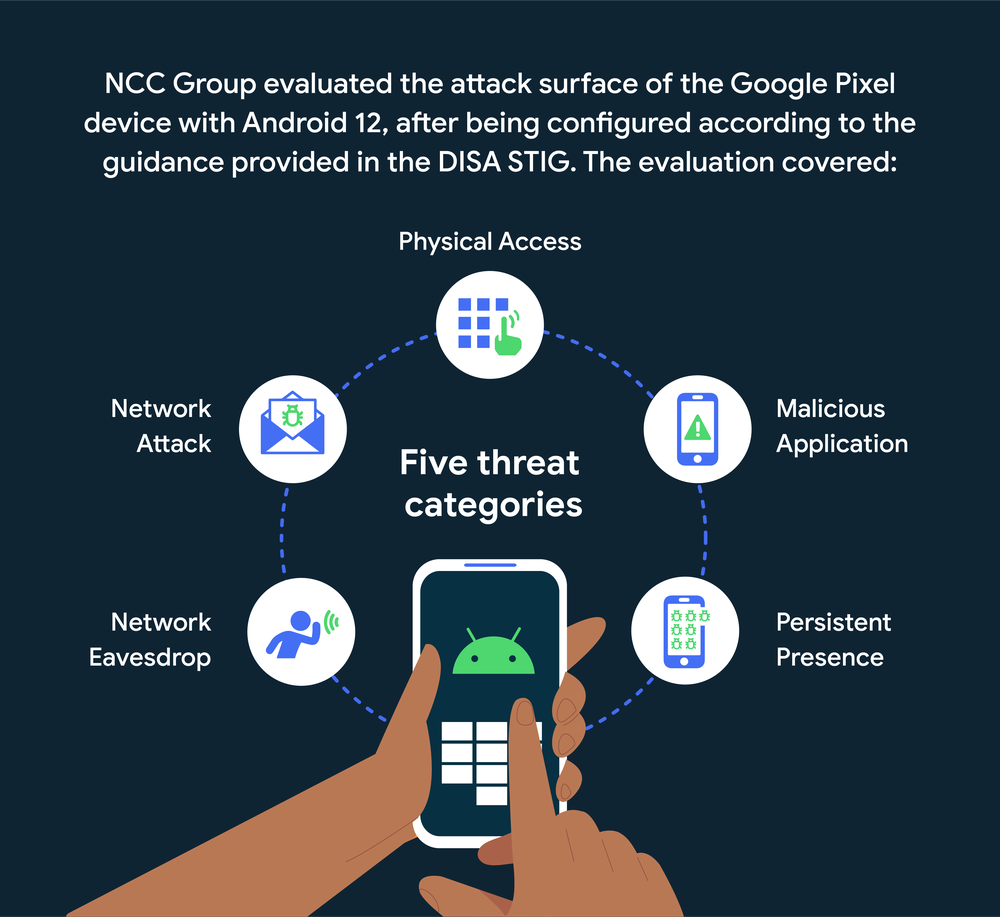
Even still, we wanted to put Android Enterprise to the test. So Google engaged NCC Group, an IT security assessment firm, to evaluate how well Android Enterprise performed based on the U.S. Department of Defense’s (DoD) own security configuration requirements.
NCC Group tested a Google Pixel device with Android 12 against the DoD’s Defense Information Systems Agency (DISA) Security Technical Implementation Guides (STIG), which provides standardized guidance for information technology systems across the U.S. federal government. After thorough testing, NCC Group found no “CAT I” issues, which indicate the most serious security concerns — like the ability to gain complete and immediate control over a device. They identified two “CAT II” risks, which imply a relatively low threat to the device and have since been resolved. Finally, NCC Group found only three “CAT III” risks, which are purely informational and pose no immediate threat to the device.
Read the full report.
In short, Android Enterprise held up exceedingly well under testing. That’s good news for all Android Enterprise customers, especially since both public and private sector organizations use the DISA STIG as a baseline configuration when deploying Android smartphones and tablets.
Visit the Android Enterprise security page to learn more about our security features, like built-in anti-malware through Google Play Protect and personal and work data separation through the Android work profile.

Fastweb Mobile 5G 150 GB, chiamate gratis e 100 SMS a 7,95€ al mese

Impara Google Ads da zero con Domestika
Mars Stealer: il nuovo cypro-malware
The Works: attacco ransomware porta alla chiusura dei negozi

Vodafone Special: winback immortale a 7€ con 50GB

Lampada smart con comandi vocali OFFERTONA Amazon 36€

Ufficiale: la Serie 30 di TCL è arrivata in Italia