Amazon Prime Prova Prima, Paga Poi: 7 giorni per provare gratis gli abiti. Ecco come funziona

TikTok, rimossi 81 milioni di video: violano le politiche del social

Serially, in Italia la nuova piattaforma di streaming serie TV gratis
Sondaggio Bitdefender: un utente su due usa la stessa password ovunque
Bitdefender ha effettuato un sondaggio sulle pratiche di base di sicurezza informatica in 11 paesi, e i risultati sono piuttosto deludenti: c’è ancora tanta strada da fare. Per esempio, il 50% degli intervistati ha ammesso disinvoltamente di usare la stessa password per tutti gli account. Un altro 32% ha detto di usare solo poche password che riutilizza.
Il sondaggio (PDF scaricabile, in inglese; comunicato stampa riassuntivo in italiano) si basa su un campione di 10.124 intervistati in Australia, Stati Uniti, Regno Unito, Francia, Germania, Italia, Spagna, Paesi Bassi, Romania, Svezia e Danimarca, di età fra 18 e 65 anni.
Sempre a proposito di password, più di una persona su quattro usa password banali (tipo 1234) come PIN di blocco del cellulare, e più di una persona su dieci non usa nessun PIN. Gli uomini tendono a usare password semplici più delle donne (31% contro 23%). Poi chiediamoci come mai i furti di account sono così frequenti.
Per quanto riguarda gli antivirus, più di uno su tre (35%) non ne usa sul proprio smartphone e il 30% ritiene che i telefonini non ne abbiano bisogno. Eppure il 66% dice di aver avuto almeno una minaccia informatica su quello stesso cellulare negli ultimi 12 mesi.
Il sondaggio copre anche l’uso degli smartphone e degli altri dispositivi digitali connessi da parte dei bambini (36% è senza supervisione) e molti altri aspetti della vita digitale.
Nel comunicato stampa sono disponibili anche i dati riferiti all’Italia. Qualche esempio: le piattaforme maggiormente utilizzate sono WhatsApp e Facebook (nessuna sorpresa); fra i 18 e 24 anni spadroneggiano Instagram e TikTok, nella fascia 25-34 si usano maggiormente Instagram e Netflix, e dai 45 ai 65 anni prevalgono Gmail e Facebook. Gli smartphone più diffusi sono gli Android. Un quarto degli utenti non usa un antivirus sul proprio dispositivo mobile; un quinto abbondante (23%) usa una password semplice per gli account online mentre il 22% usa una password semplice o non ha affatto una password.

Il sito che sa che cosa hai scaricato
C’è un sito, I Know What You Download (letteralmente “so cosa scarichi”), che dice di essere in grado di rivelare che cosa è stato scaricato tramite Bittorrent da chi lo visita.
La cosa è piuttosto inquietante, ma i suoi risultati basati sugli indirizzi IP non vanno presi per oro colato: infatti se da un lato è vero che uno scaricamento fatto con il protocollo Bittorrent è facilmente monitorabile e quindi non va considerato privato, va ricordato che gli indirizzi IP vengono assegnati agli utenti quasi sempre in modo temporaneo, per cui l’indirizzo IP che avete adesso può essere stato assegnato a qualcun altro ieri e I Know What You Download vi potrebbe mostrare cosa ha scaricato quel qualcun altro anziché voi.
La schermata qui sopra, per esempio, è tratta da un mio computer e mi dice che io avrei scaricato The Matrix Reloaded e The Matrix Revolutions il 4 ottobre scorso. Decisamente non l’ho fatto, visto che uso rarissimamente il protocollo Torrent e quei due film li ho già.
Il sito offre un altro servizio interessante: la creazione di un link breve che permette di scoprire cosa ha scaricato qualcun altro (perlomeno secondo quanto risulta al sito). Per provarlo, scegliete un sito innocuo (un post sui social network, una pagina di Wikipedia) e immettete il suo link nella sezione apposita di I Know What You Download:otterrete in risposta un link breve da mandare all’utente che volete sorvegliare. Il link è del tipo https://ikwyd.com/r/4Do1.
Quando l’utente-bersaglio cliccherà sul link che gli avete inviato, vedrà il sito innocuo che gli avete scelto, ma IKWYD saprà qual è il suo indirizzo IP ed elencherà a voi eventuali scaricamenti Torrent effettuati da quell’indirizzo IP. Anche qui i risultati vanno letti con un pizzico di cautela.
Come uscire dai social network e salvare i propri dati
Si parla molto, ultimamente, di lasciare i social network: troppo ficcanaso e troppo tossici nel loro favorire l’odio, la lite e l’aggressività. Se per caso state meditando di chiudere un account social ma non volete perdere tutte le foto e i contatti che vi avete accumulato, Intego ha pubblicato un articolo molto dettagliato che spiega come fare per Facebook, Instagram, Twitter, YouTube, WhatsApp, TikTok e molti altri. Questa è una sua sintesi con i link essenziali.
Facebook. Si può disattivare temporaneamente l’account oppure eliminarlo definitivamente e si può scaricare una copia di tutti i propri dati. Per riattivare un account disattivato basta rientrare nell’account. Se si elimina un account, ci sono 30 giorni di tempo per ripristinarlo.
YouTube. YouTube fa parte di Google, per cui l’account YouTube è legato all’account Google. Per eliminare il proprio account YouTube occorre quindi eliminare il proprio account Google, ma attenzione, perché eliminare un account Google significa perdere anche Gmail, Google Drive e molti altri servizi. Però si può eliminare un canale YouTube lasciando intatto tutto il resto. Non c’è modo di fare una disattivazione temporanea; si può scaricare una copia dei propri dati andando a takeout.google.com.
WhatsApp. Si può eliminare l’account ma non è prevista la disattivazione temporanea. I dati possono essere scaricati tramite un backup.
Instagram. Qui è permessa la disattivazione temporanea e si può scaricare una copia dei propri dati prima di eliminare l’account (cosa che non si può fare nei menu dell’app).
TikTok. La disattivazione temporanea non è prevista; si può eliminare l’account scegliendo la gestione account dal menu che compare cliccando sulle tre barrette orizzontali in alto a destra. Per scaricare i propri dati può essere necessario aspettare fino a 30 giorni.
SnapChat. Eliminare definitivamente un account SnapChat è facile; per disattivarlo temporaneamente (per 30 giorni) basta chiederne l’eliminazione e poi rientrare nell’account prima che siano trascorsi 30 giorni. Non sembra esserci un modo per scaricare i propri dati.
Twitter. Si può chiedere la disattivazione per un periodo di 30 giorni; se non si accede all’account per tutto questo periodo, l’account viene eliminato. Si può scaricare una copia dei propri dati.
LinkedIn. Scaricare una copia dei dati è semplice; disattivare temporaneamente non è previsto, ma si può eliminare il proprio account, con 14 giorni di tempo per eventuali ripensamenti.
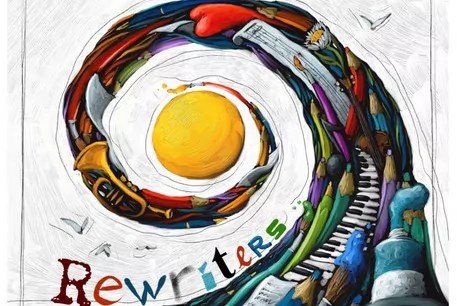
Rewriters. Il valore della diversità di genere
Rewriters, di Greta V. Galimberti – Trendiest Media A Roma, fino al 17 ottobre, si tiene il REWRITERS FEST, il primo grande appuntamento del progetto culturale Rewriters, organizzato da Eugenia…
L’articolo Rewriters. Il valore della diversità di genere scritto da Greta Valentina Galimberti proviene da Assodigitale.

The best of Google available on Samsung Galaxy foldables
From split-screen multitasking with the power of Google Workspace apps to hands-free Duo calls in Flex mode, Google and Samsung continue to work together to create more helpful experiences on Android foldables. When we combine the helpfulness of Google’s apps and services with Samsung’s Galaxy Z Fold3 5G and Galaxy Z Flip3 5G devices, a world of new possibilities unfolds.
Here are six great ways to experience the best of Google on Samsung’s latest Galaxy Z devices.
1. Enjoy entertainment with a bigger, better and bolder YouTube experience

Check out Chromebook’s new accessibility features
With accessibility features on Chromebooks, we want everyone to have a good experience on their computer – so people can get things done, families can play together, students and teachers can learn together, and employees can work productively and efficiently, wherever they are. October is National Disability Employment Awareness Month, so we wanted to share a few recent and new Chromebook features that help people access information in a way that works for them.
New enhanced voices for Select-to-speak
People spend a lot of time reading on their laptop, doing things like reading news articles or reviewing school textbooks. Reading on a screen can be less than ideal for many, including people with dyslexia (an estimated 10-20% of the population), low vision, those learning a new language or people who have a hard time focusing on busy text.
With a few clicks, Select-to-speak on Chromebooks allows you to hear selected text on your screen spoken out loud. Earlier this year we added new features like controls to speed up, slow down or pause the reading voice, and to easily jump to different parts of text. Plus, you can choose to highlight the words being spoken while shading background text to help focus your attention.
Why we should rethink accessibility as customization
As a Technical Writer for Google Cloud who’s worked in this industry for more than 20 years, technology has had a big impact on my life. It led me to a job that I love, and it keeps me connected to co-workers, friends and family scattered around the world.
But it also helps me to accomplish everyday tasks in ways many people might not realize. I have aniridia, a rare eye condition where the eyes are underdeveloped. Among other things, I’m light sensitive, have about 20/200 vision that isn’t correctable with lenses or surgery, and my eyes move around involuntarily.
Most people don’t realize the extent of my disability because I’m largely independent. The challenges I face on a regular basis are little things that most people take for granted — for example, I don’t experience eye contact, which means I often miss non-verbal cues. And for me, crossing the street is like a real world game of Frogger. Reading menus and shopping can be difficult. Navigating airports or locating my rideshare car can be stressful.
But I’ve used tech to create my own set of “life hacks.” I adjust the magnification of my view of a Google Doc during a meeting, which doesn’t change anyone else’s view of it. I zoom in on instructors during virtual dance classes. I regularly use keyboard shortcuts and predefined text snippets to work more productively. I do lots of planning before trips and save key navigational info in Google Maps. I take photos of menus and labels so I can read them more closely on my phone.
The technologies that help to mitigate the kinds of challenges I face don’t just benefit me, though — they benefit everyone. Features like Dark mode, Assistant, Live Caption — these benefit everyone and make their individual experiences using certain products better. And they can also support people with permanent, situational, or temporary disabilities.
The positive effect of disability-friendly design on a wider population is known as the curb-cut effect. A curb cut is a ramp built into a sidewalk that slopes down to a street. Their primary purpose is to provide access for wheelchairs, but curb cuts actually help many others, including people riding bikes, skateboards or scooters, people pushing strollers or pulling wheeled luggage, and people walking with canes or crutches. So while they were made to help people with disabilities, they actually help so many others.
There’s an important lesson to learn from the curb-cut effect, one that I think about when we are creating new technologies here at Google: If you are involved in designing, creating, selling, or supporting products and services, I challenge you to reframe accessibility as customization. Many people typically view accessibility as an extra feature of a product that is specifically for someone with a disability. But features like Dark mode or captions are really a way to customize your user experience, and these customizations are beneficial to everyone. We all find ourselves in different contexts where we need to adjust how we interact with our devices and the people around us. Design that provides a range of ways to interact with people and our world results in products and services that are more usable — by everyone.
Continuous scrolling comes to Search on mobile
At Google, we’re always exploring new ways to help people find what they’re looking for quickly and easily. Earlier this year, we launched a redesign of the Search results page on mobile for a more modern experience that’s easier to scan and navigate. Today, we’re making browsing search results more seamless and intuitive with the introduction of continuous scrolling on mobile devices. Now, when you reach the bottom of a search results page on your phone, the next set of results will automatically load with relevant information.
While you can often find what you’re looking for in the first few results, sometimes you want to keep looking. In fact, most people who want additional information tend to browse up to four pages of search results. With this update, people can now seamlessly do this, browsing through many different results, before needing to click the “See more” button.
For example, for broader, more open-ended questions like “What can I do with pumpkins?” you may want to consider more results and inspiration before deciding how to move forward. Scrolling through a wider range of results may show you tons of options you hadn’t considered, like no-carve pumpkin decor ideas for Halloween, pumpkin seed recipes that make your pumpkin worth carving and more ideas for how to make the most out of your gourd.
So for everyone with a little extra curiosity, this new Search experience is starting to gradually roll out today for most English searches on mobile in the U.S.

Le migliori Smart TV in offerta su Amazon (fino a 800 euro di sconto!)

Controllo Green Pass: rilasciato l’SDK per Android dal Ministero della Salute
Countering threats from Iran
Google’s Threat Analysis Group tracks actors involved in disinformation campaigns, government backed hacking, and financially motivated abuse. We have a long-standing policy to send you a warning if we detect that your account is a target of government-backed phishing or malware attempts. So far in 2021, we’ve sent over 50,000 warnings, a nearly 33% increase from this time in 2020. This spike is largely due to blocking an unusually large campaign from a Russian actor known as APT28 or Fancy Bear.
We intentionally send these warnings in batches to all users who may be at risk, rather than at the moment we detect the threat itself, so that attackers cannot track our defense strategies. On any given day, TAG is tracking more than 270 targeted or government-backed attacker groups from more than 50 countries. This means that there is typically more than one threat actor behind the warnings.
In this blog, we explore some of the most notable campaigns we’ve disrupted this year from a different government-backed attacker: APT35, an Iranian group, which regularly conducts phishing campaigns targeting high risk users. This is the one of the groups we disrupted during the 2020 US election cycle for its targeting of campaign staffers. For years, this group has hijacked accounts, deployed malware, and used novel techniques to conduct espionage aligned with the interests of the Iranian government.
Hijacked websites used for credential phishing attacks
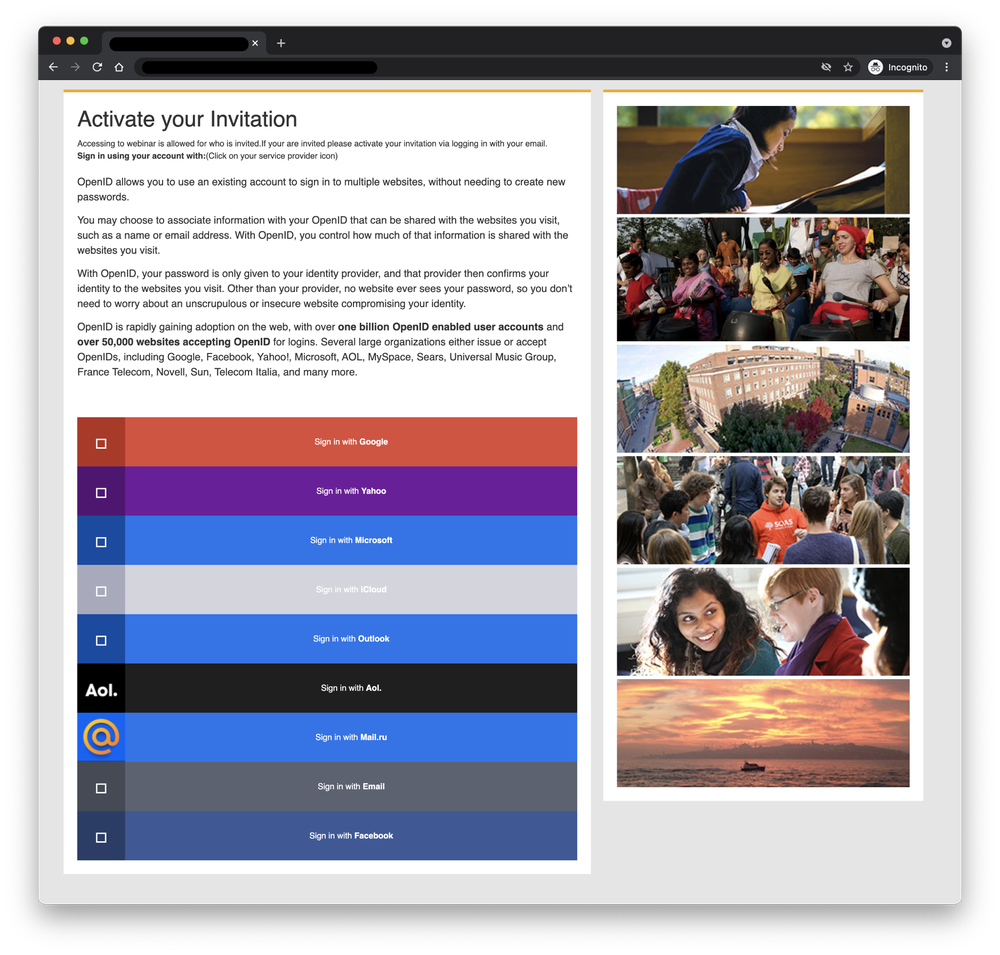
In early 2021, APT35 compromised a website affiliated with a UK university to host a phishing kit. Attackers sent email messages with links to this website to harvest credentials for platforms such as Gmail, Hotmail, and Yahoo. Users were instructed to activate an invitation to a (fake) webinar by logging in. The phishing kit will also ask for second-factor authentication codes sent to devices.
APT35 has relied on this technique since 2017 — targeting high-value accounts in government, academia, journalism, NGOs, foreign policy, and national security. Credential phishing through a compromised website demonstrates these attackers will go to great lengths to appear legitimate – as they know it’s difficult for users to detect this kind of attack.